
Blog · Guide
Your first plugin, end to end: a translation tool for DeepSeek Harness
August 27, 2026 · dshbase · hands-on guide
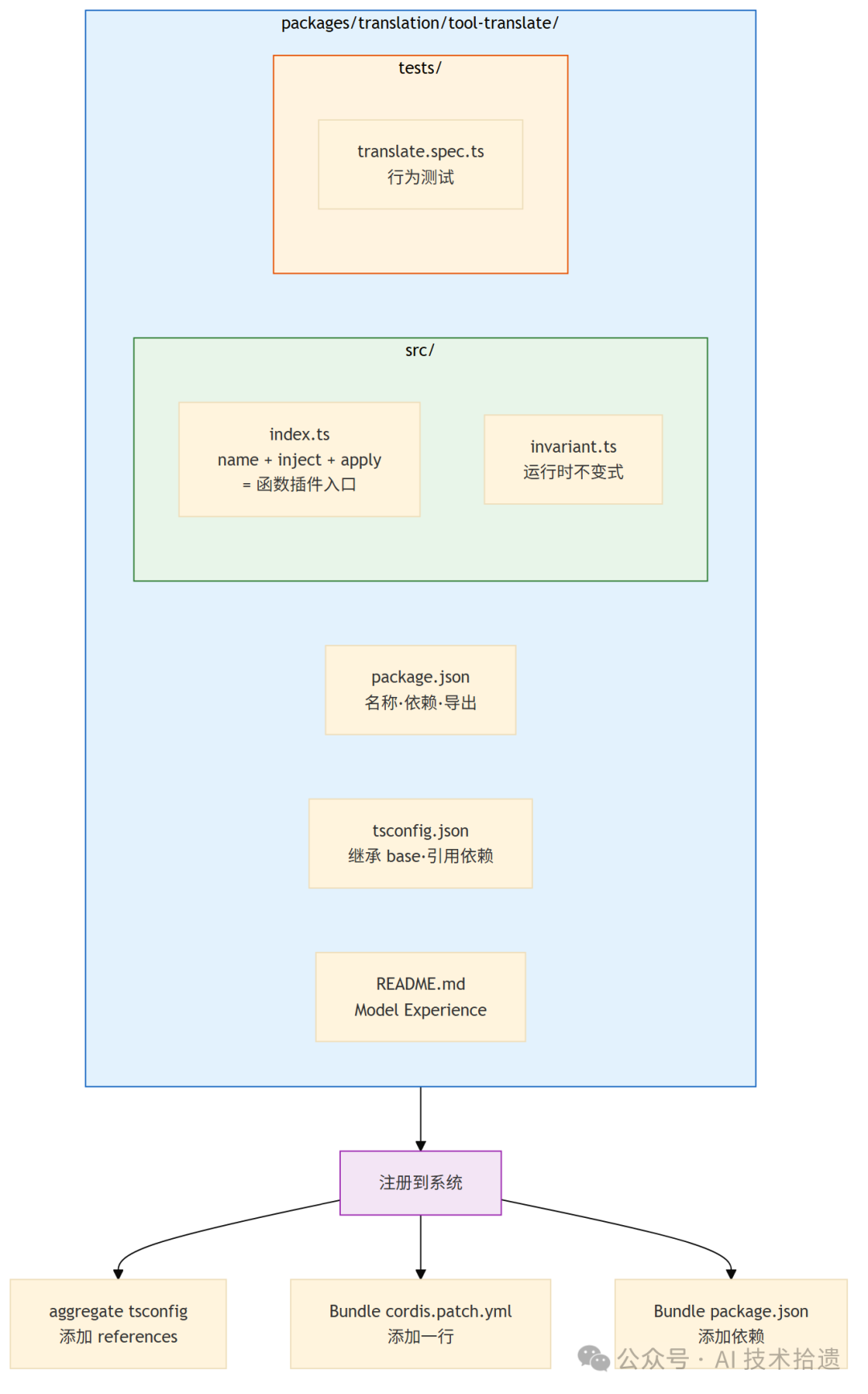
If "everything is a plugin" has stayed abstract, this closes the loop: we build a complete dsh plugin package from scratch — a translation tool that lets the agent translate text into a target language. Along the way we cover the package skeleton, defineTool, calling the LLM through the capability seam, registration/lifecycle, and a behavioural test. The steps below mirror the official cookbook (adding-a-package.md, adding-a-tool.md).
1. The package skeleton
A tool lives in its own package inside the mono-repo. The essentials of package.json:
{
  "name": "@deepseek-ai/dsh-tool-translate",
  "version": "0.0.0",
  "private": true,
  "type": "module",
  "exports": { ".": "./src/index.ts", "./invariant": "./src/invariant.ts", "./package.json": "./package.json" },
  "peerDependencies": { "@deepseek-ai/cordis": "workspace:*" }
}
Three things to internalise: private: true means the package stays in the repo rather than being published to npm; type: module makes it ESM-only; and @deepseek-ai/cordis is both a peer and a dev dependency. The tool package depends on service definitions (dsh-tools, dsh-llm) rather than on any concrete provider — that indirection is what keeps tools provider-agnostic.
2. Implement the plugin
import type { Context } from '@deepseek-ai/cordis'
import { defineTool } from '@deepseek-ai/dsh-tools'

export const name = 'tool-translate'
export const inject = ['tools', 'llm'] as const

export function apply(ctx: Context) {
  ctx.tools.register(defineTool({
    name: 'translate',
    description: 'Translate text to a specified language.',
    parameters: {
      text: { type: 'string', description: 'The text to translate', required: true },
      targetLanguage: { type: 'string', description: 'Target language', required: true }
    }
    // the tool implementation calls the llm through ctx.llm (capability seam)
  }))
}
The pattern is three exports: name, inject, and apply(ctx). The inject list is the declaration of intent — the runtime guarantees the tools and llm service definitions are available before apply runs, and that's the capability seam: your tool requests capabilities and gets the interfaces, without ever importing a specific model provider.
3. Registration and the capability seam
Because the tool declares only service definitions, it stays portable — the same tool can call DeepSeek's adapter or another provider simply by swapping which service implementation is loaded. apply() registers the tool with the tools service at load time; lifecycle (load/unload) is managed by Cordis, so pulling the plugin cleanly unmounts its registrations rather than leaving dangling state.
4. Test it
Two companion pieces make it robust. A behavioural test (translate.spec.ts) asserts what the tool does with representative inputs, matching the "行为测试" expectation in the diagram above. A runtime-invariant module (invariant.ts, exported under ./invariant) holds the assertions that must hold while the plugin runs — the invariant, not just the happy path, is what keeps a heavily-composed system from decaying.
5. Wire it into the system
Finally the package is registered in the monorepo: add its path to the aggregate tsconfig references, add one line to the cordis.patch.yml bundle so the runtime knows to load it, and add the dependency in the aggregate package.json.
The takeaway for installers
A tool plugin is a small, repeatable shape: a package skeleton, a defineTool, a declared inject list, a test, and a registration line or two. Once you've seen one, ship new tools by copying the shape — and because tools depend on service definitions instead of providers, the same plugin runs unchanged no matter which model you slot in. That's the "everything is a plugin" promise made concrete: your own capability is just another module the harness can load, inspect and cleanly unload.