
cosyncing
已验证 · 实测可装 cosyncing
功能简介
从CLI到GUI,桌面到手机同步编排智能体。
可用 — 实测通过,社区增长中
从CLI到GUI,桌面到手机同步编排智能体。 实测能干净安装、正常启动。社区在增长,是个稳妥选择。
「已验证」表示我们的自动化 CI 在干净 profile 里实际执行了 dsh plugin add 并启动成功——仅此而已。功能描述与版本兼容性均为作者声明。这不是安全审计,也不代表对第三方代码的背书。
README

From CLI to GUI, live and in sync
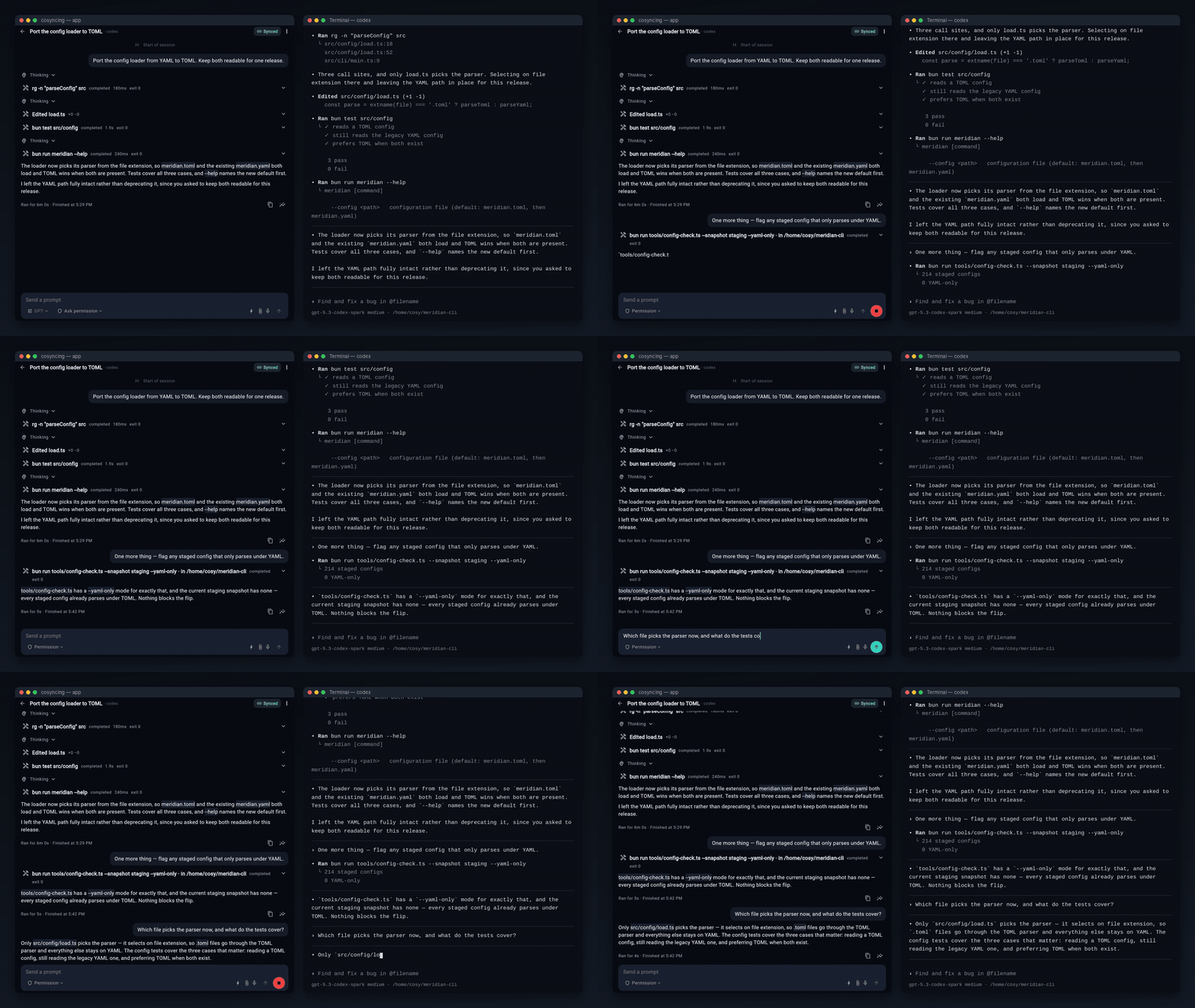

Website · Install · Client · Docs · Contributing · 简体中文 · 日本語 · 한국어 · Español
Synchronize and control your agents — from CLI to GUI, from desktop to phone. Pick up right where you left
off, anywhere. cosyncing keeps your coding agents in sync across your own network.
The broker runs on the machine where your agents work. It watches their sessions and serves
a client that shows each one — grouped by project, with its transcript, diffs, commands, and any
prompt waiting on you. Read a session, answer a prompt, or take over. No account to create, no
hosted service between the client and the broker.
Supported agents

One protocol covers all twelve. Per-agent control differs, and Claude Code sessions open read-only
until you take over. See supported-agent setup for versions and
installation, and adapter support for the capability matrix.
Foreground clients can join the same broker-owned Codex, Pi, omp, or Reasonix Drive session without starting a
second native Resume. Claude Code keeps its Observe/Take-over flow on another client, while OpenCode
keeps its shared-live behavior. Background Observe connections stay read-only.
Experimental: Eight provisional adapters are available to source contributors.
Kimi Code observes every session on akimi web server read-only, drives the ones cosyncing created — prompts, approvals, model selection —
and takes over the ones it did not, explicitly. DeepSeek Harness
connects to a dsh web host and gives active foreground clients a shared transcript and control
surface, with model and reasoning-effort selection, permission presets, the host's own slash commands,
and image attachments. General file attachments are not supported — the host accepts image content
only — and background resident subscriptions and some message presentation remain follow-up work.
Antigravity reads the Antigravity CLI's own conversation
store — no server involved — replays every conversation read-only, and drives one through a
broker-owned agy child; two clients can share a Drive, and a write from a terminal hands the
session back. omp uses its own packaged bridge and native RPC
dialect for discovery, live sync, prompts, approvals, commands, models, file input, and session
creation. Reasonix observes its bounded local store and resumes
through a lazy broker-owned ACP child; joined clients share one writer, while terminal true sync and
file input remain unsupported. Grok Build observes its bounded
local store and, on 1.0.13 or newer, adds authenticated broker-owned ACP Create/Resume, prompts,
approvals, commands, and model/effort/mode controls. Cline keeps
bounded default-profile parent/subagent snapshots read-only, while app-created sessions use
an isolated broker-owned Hub for Create/Resume, prompts, Stop, approvals, create-time model/mode,
and shared Drive. Exact-id terminal handoff stays separate from that writer.
Kilo Code observes bounded local SQLite snapshots and, on 7.4.23
or newer, adds authenticated Create/Drive, approvals, model selection, and rename through a
broker-owned host on dedicated loopback port 4097. Terminal true sync remains unsupported for all
three.
None needs a rollout flag. Managed-host adapters need no terminal left open: an installed cosyncing
service starts a host when none is running, restarts one that crashes, and stops only the process it
started. A host you started yourself is never stopped, replaced, or reconfigured, and setup names
each managed runtime before you agree to it. Install DeepSeek Harness globally withnpm install -g @deepseek-ai/dsh —
cosyncing looks for dsh on your PATH, so an npx-only install can be talked to but never started or
version-checked. See supported-agent setup for each runtime.
Prerequisites
The server runs with Bun 1.3.8 or newer. The one-command installers acquire it
when needed; only the npm installation path requires Node.js/npm. The broker is local-only by
default. Cross-device use requires a proxy, tunnel, VPN,
mesh network, or another operator-owned connectivity method.
For a simple private route, see Tailscale Serve; for a
self-managed overlay, see WireGuard or EasyTier. Aftercosyncing setup, you can also copyhttps://github.com/cosyncing/cosyncing/tree/main/docs/connectivity to a coding agent and ask it to
configure your chosen method while keeping the broker bound to loopback.
Tokdash is optional but strongly recommended for quota
tracking and warnings.
See installation prerequisites for Linux and macOS commands,
WSL notes, and Tokdash setup. For the signed one-liner installers, see
installing with cosyncing's own installer.
Install
The package contains one JavaScript application bundle and the web client. Supported broker hosts
are Linux x64, Linux arm64, Apple Silicon macOS, and Windows x64. Windows ARM64 is not qualified
yet, and the broker refuses it — including an x64 process running under ARM64 emulation.
Before setup, install only the agents you use; see agent setup and PATH
preflight.
Install the current release with one command:
Linux / Apple Silicon macOS:
curl --proto '=https' --tlsv1.2 -fsSL https://cosyncing.com/install.sh | sh
Windows x64 (PowerShell):
powershell -NoProfile -c "irm https://cosyncing.com/install.ps1 | iex"
Windows 11 x64 is supported. Windows 10 is not supported: Microsoft Defender may classify the
installer as a Trojan, and you should not disable Defender to force installation.
The installer verifies the release, installs the broker and a supported desktop client, then
runs interactive setup and pairs the client. Headless Linux and Linux arm64 receive the server
without a desktop client. Bun is acquired when needed; Node.js/npm are not required. See the
installer guide for broker-only commands, unattended
installation and signed-channel updates.
npm
If you prefer npm, preinstall Bun and Node.js/npm, then install:
npm install --global cosyncing
Open a new login shell, then configure the service:
cosyncing setup

# After setup, use cosy as the shorthand for cosyncing
cosy restart
cosy doctor
cosy status
cosy pair
setup inspects the machine, shows exactly what it will change, and applies the whole plan or none
of it. It copies the broker to ~/.cosyncing/bin/cosyncing, installs a user service that runs that
copy with your Bun, and prints your broker URL. The broker refuses to start until setup has
committed.
To update, let npm replace the global package, then re-run setup so cosyncing copies the new
application into its managed service and reconciles the installation:
npm update --global cosyncing
cosy setup
cosy update reports this package-manager-owned update path; it does not run npm or modify the
global package.
After setup
cosy pair --broker-url https://cosy.example.com includes that client-reachable origin in a
five-minute, one-use QR code. The URL is not persisted or probed. Omit the flag for an
authentication-only offer when the client already knows its broker URL. See the
connectivity chooser. Scan the QR from a client to grant access;cosy devices list lists paired devices, and cosy devices revoke <id> revokes one.
After setup, cosy doctor diagnoses the machine without changing it, and cosy status summarizes
install, service, agents, and sessions.
Client
The packaged Flutter web app is served by your own broker at /cosy/; it does not fetch application
code from a third-party host at runtime. Setup prints the URL; open it in any browser that can reach
the broker. Android and desktop clients are available from
GitHub Releases.
The iOS client will follow later through TestFlight.
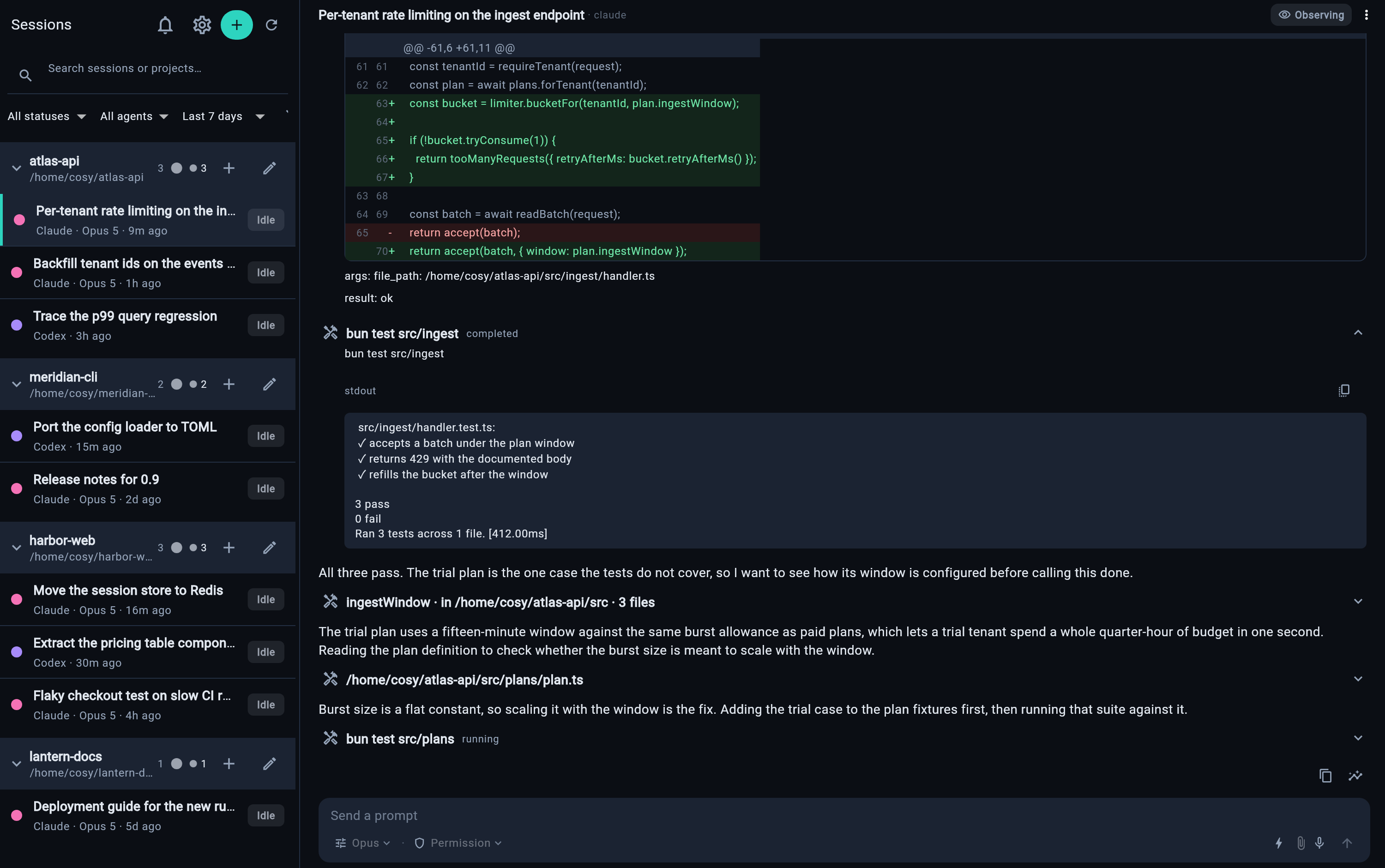
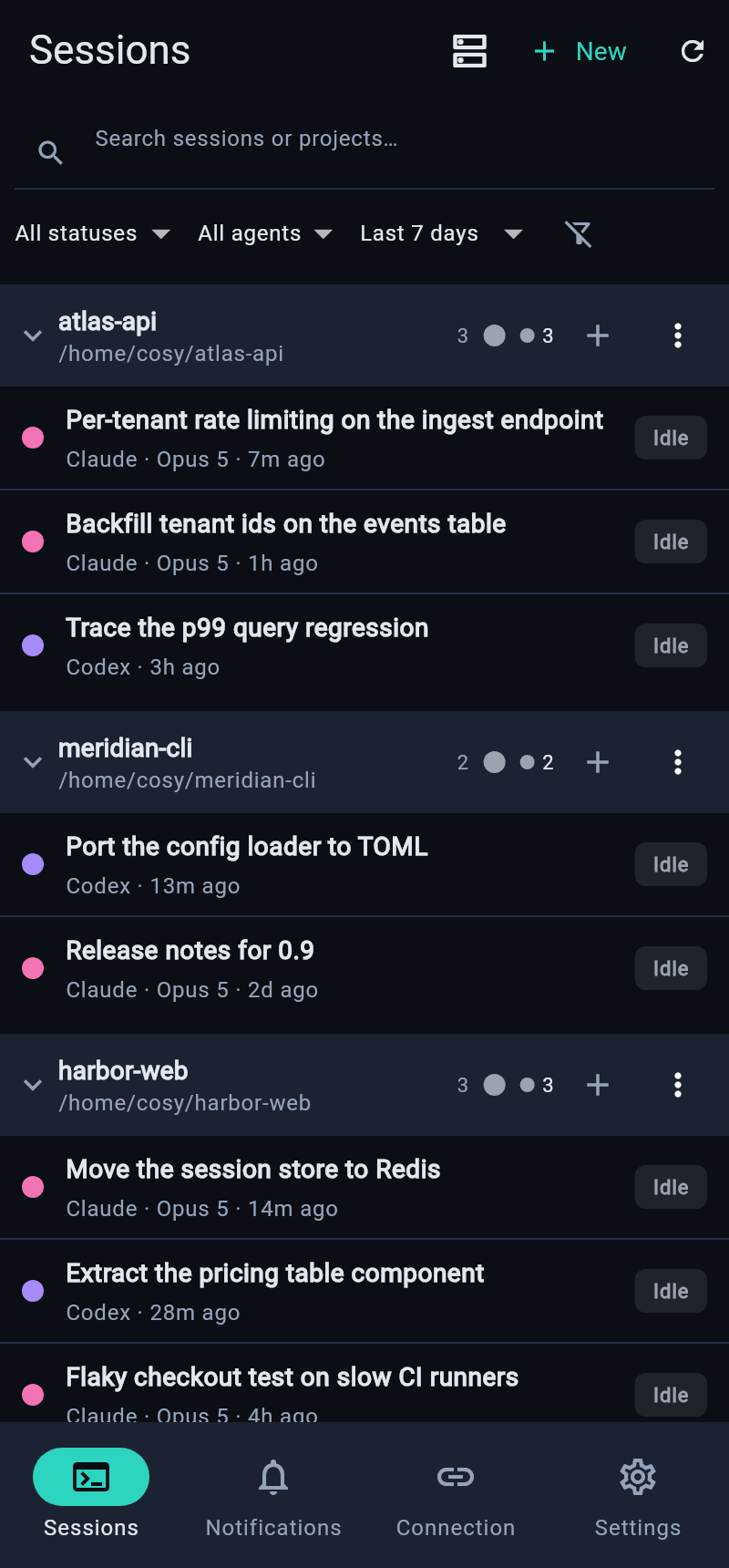
Server — the broker runs on:



Clients — the source tree and CI cover six platforms:


Windows x64 hosts the broker natively in this release. Windows ARM64 does not: it is not qualified
yet, and the broker refuses it rather than running unverified — including an x64 process under ARM64
emulation, which reports itself as x64 and is detected by asking Windows what the machine is. Intel
macOS server hosting remains unsupported. WSL also remains supported, as a Linux host; connectivity
software that forwards broker loopback must run where it can reach that broker, so see the
method-specific guides if you stay on WSL.
Privacy and security
The broker runs on your machine, under your account. Broker state is stored there; session content
is sent only to authenticated clients over the network you choose. cosyncing operates no hosted
service in that connection path and includes no analytics or advertising telemetry. Optional
features contact only the services they name, such as local Tokdash quota data. cosyncing does not
configure or contact connectivity providers; any proxy, tunnel, VPN, or mesh is operator-owned.
The npm-installed broker does not silently replace itself: npm owns package updates, and cosy setup
reconciles the installed service after an update.
Report vulnerabilities through GitHub private vulnerability reporting, per SECURITY.md.
Repository layout
packages/typescript/— broker, wire-contract owner, agent adapters, transport, and crypto.packages/dart/— client contract, transport, Flutter adapter, and crypto.apps/client/— the Flutter application, including every platform runner, test suite,
integration driver, and developer tool.contracts/generated/— broker-owned, flattened client contract snapshot.apps/poc-ui/— non-production proof-of-concept UI retained for deterministic broker tests.
Development
The repository pins Flutter 3.44.3 in .fvmrc and Bun 1.3.8 in package.json. Run commands from
the repository root.
bun install --frozen-lockfile
bun run client:pub-get
bun run typecheck
bun run client:analyze
bun run client:test
Regenerate broker-owned client contracts with bun run contract:generate. CI runsbun run contract:check and fails on a stale snapshot.
Start with docs/README.md and build and test.
Read CONTRIBUTING.md and CODE_OF_CONDUCT.md before opening
a change; contributions use fork-and-pull-request and require a signed-off commit. Usage questions
go to GitHub Discussions and reproducible defects to GitHub Issues — see SUPPORT.md.
Installs from a predecessor client start fresh; see
local data and upgrades.
License
First-party source is licensed under the Apache License 2.0. See LICENSE and NOTICE.
安装
装一次目录插件,之后本站所有插件都能让 DeepSeek Harness 自动找、自动装:
dsh plugin add dshbase-catalog然后对 agent 说「帮我装 cosyncing」,它会在目录里找到并自动安装。文档:dshbase-catalog · 已验证场景包。
该插件是 GitHub 源码(未发 npm)——直接从仓库装:
Web profile:
dsh plugin --profile web add github:cosyncing/cosyncingHeadless(CLI)profile:
dsh plugin --profile headless add github:cosyncing/cosyncing实测报告
验证通过:从 GitHub 源码完成 L1 安装 + L2 加载 + L3 运行(dsh 0.1.0-rc.6)。
使用场景
把一个新模型、provider 或路由策略接入循环,让 dsh 能为任务选对脑子。
适合谁
同时用多个模型或 provider、想让成本/质量/延迟自动平衡的人。
二次开发建议
provider 适配器和路由启发式是缝——加后端、调回退链,或加按任务的模型选择。
分享徽章
把这枚徽章粘进 README——它会链回本页,实测状态变化时自动更新:

[](https://dshbase.com/zh/plugins/cosyncing/)<a href="https://dshbase.com/zh/plugins/cosyncing/"><img src="https://dshbase.com/badges/cosyncing.svg" alt="dshbase 实测可装"></a>