
插件目录 / Network / deepseek-harness-mobile
deepseek-harness-mobile
已验证 · 实测可装 sorsama
功能简介
Android 伴侣:聊天、目标、审批、通知
推荐 — 实测可用且热门
Android 伴侣:聊天、目标、审批、通知 实测能干净安装、正常启动。100+ stars,社区认可度高,是低风险选择。
「已验证」表示我们的自动化 CI 在干净 profile 里实际执行了 dsh plugin add 并启动成功——仅此而已。功能描述与版本兼容性均为作者声明。这不是安全审计,也不代表对第三方代码的背书。
README

DSH Mobile — DeepSeek Harness Remote
An open-source Android companion that puts your DeepSeek Harness in your pocket.
Drive sessions, review plans and goals, answer approvals and questions, and get notified
when the harness finishes — from your phone, over your network or a relay.




English · 中文 · हिन्दी · Español · Français · ไทย
DSH Mobile is an unofficial companion app for the
DeepSeek Harness (MIT). It mirrors the web GUI
feature for feature and uses the harness's own visual language. Android only, Kotlin + Jetpack
Compose.
Its companion on the other end is
dsh-relay, a harness plugin that adds the
authentication layer the harness says it lacks, so this app can reach a harness with a real
credential and a pinned key instead of an open port. See
Relay.
dshm.zyphite.com is the project site: what the app is, what it looks
like, and how to get it running, on one page.
The wiki is the user-facing guide:
getting started,
connecting,
troubleshooting,
a feature tour and an
FAQ.
Screenshots
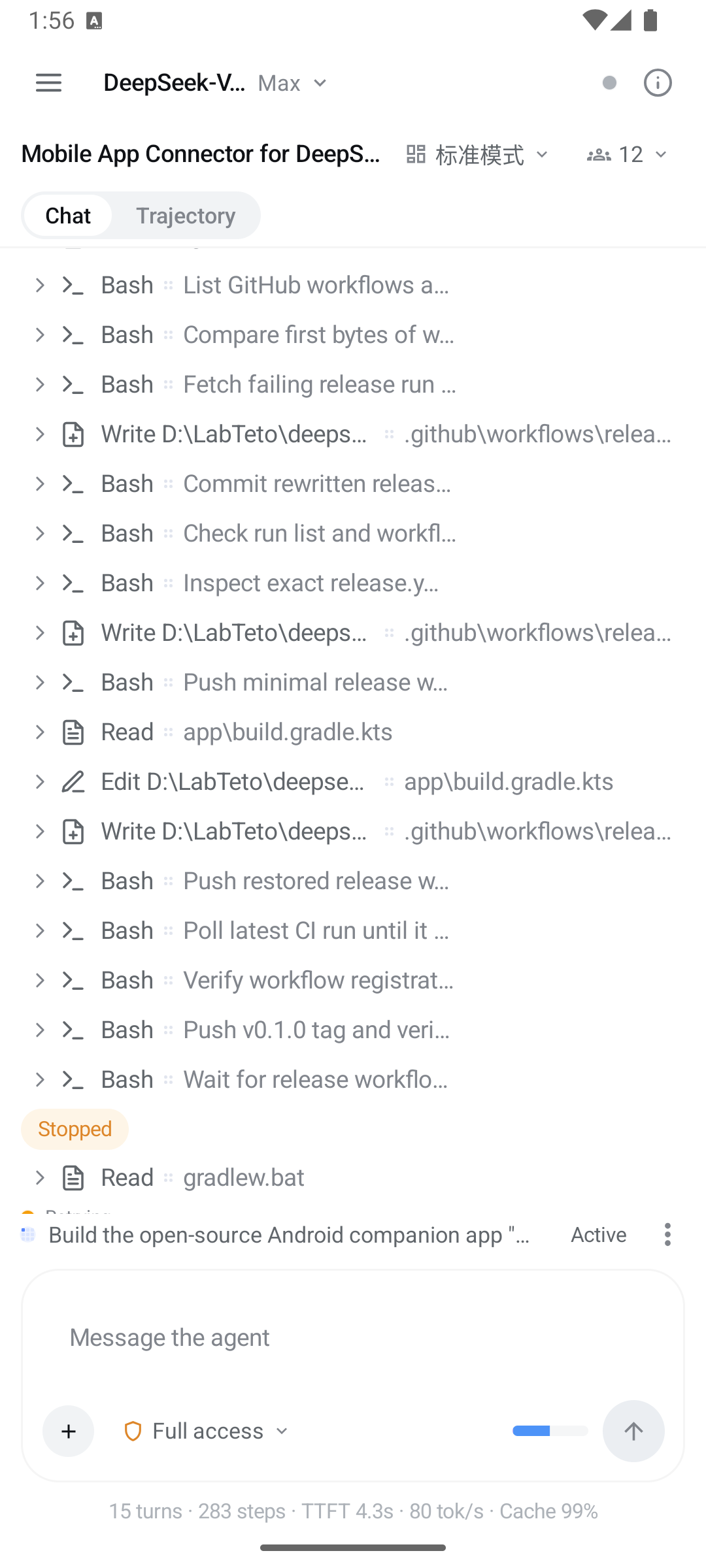
| Connect | Chat | Trajectory |
|---|---|---|
 |
 |
 |
Recent harnesses with live reachability, LAN discovery, manual host:port, auto-connect. |
Streamed turns, a glyph per tool, expandable tool cards, permission picker. | The same session as a per-turn ledger with usage totals. |
| Session details | Subagents |
|---|---|
 |
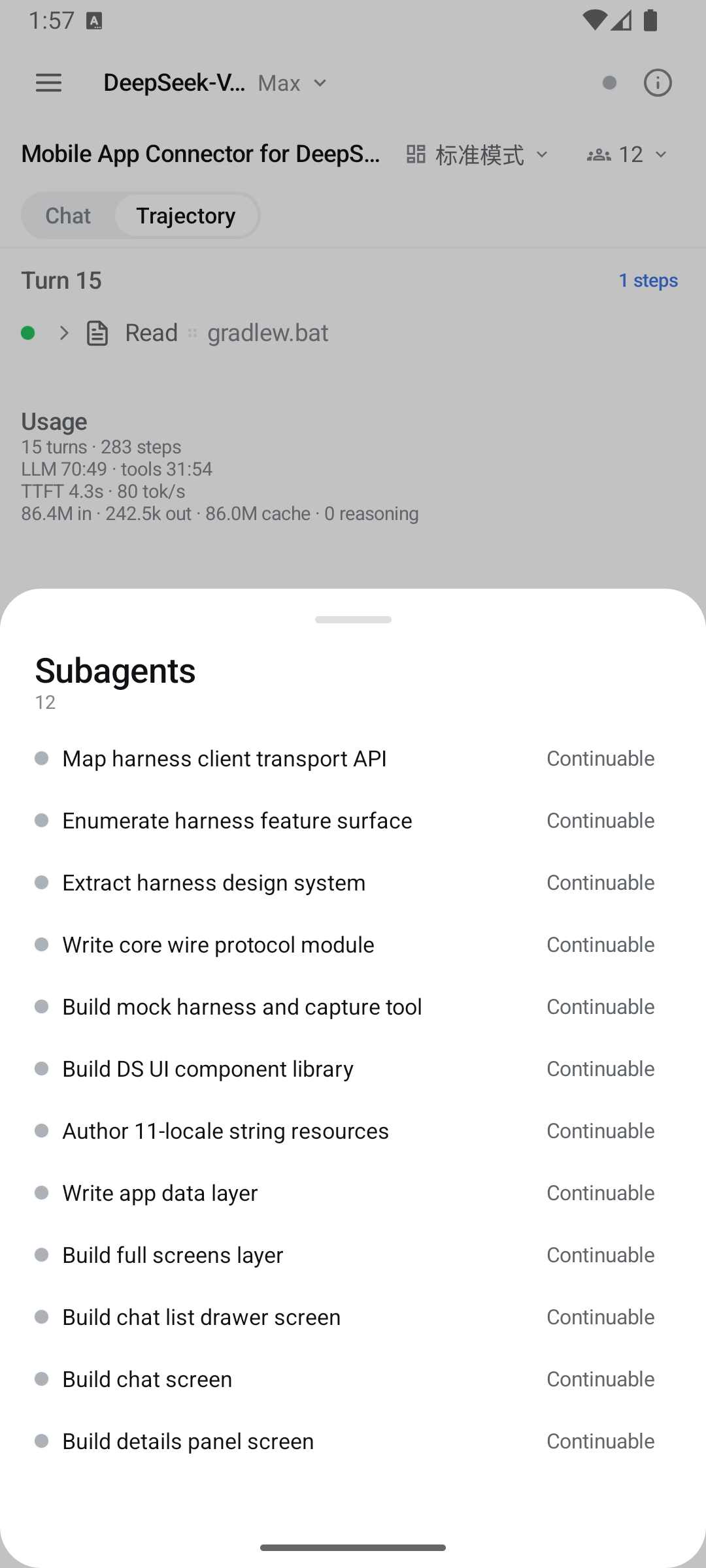 |
| Context breakdown, goal, plan mode, background jobs, queued turns, host info, session-log export. | The subagent catalog — open a child's transcript, follow up, or interrupt it. |
Features
- Connecting — finds a harness on your Wi-Fi with an active subnet scan and a readiness
handshake, remembers hosts and probes them for liveness on the way in, takes a manualhost:port, handles loopback for same-device setups, and auto-connects when you tell it to
(last used, LAN, or same device). - Navigation — the drawers work like Discord's: swipe right from the left edge for the
workspace-grouped chat list, swipe left to close it, swipe left from the right edge for the
session details panel. - Chat — streamed turns with reasoning disclosure, markdown, terminal/diff/read/search/web tool
cards, a queue dock where you can edit, remove or steer a queued turn, history paging, and
multi-photo and file attachments. Drafts are kept per host and session. - Workspace panels — tabbed text, Markdown, image, PDF and isolated HTML previews; native
terminal controls with a bundled xterm renderer; archived-session restore in Settings. - Message feedback — confirmed ratings and retraction, with version-conflict handling.
- Slash commands and skills — the composer checks a
/line against the session's own command
catalog and runs it through the harness's command gateway. Anything the catalog does not claim
is sent as a prompt, which is how skills get invoked. - Everything the GUI does — goals (phases, rounds, pause/resume/edit), plan mode and plan review,
permission approvals, user questions, todo dock, subagents (catalog, follow-ups, interrupt),
background jobs, workflow runs, skills, model selection, agent presets, session search,
trajectory ledger, session export, message feedback. - Notifications — turn complete, goal complete or blocked, review or question waiting for you.
A foreground service keeps the connection alive in the background. - Harness look — the exact DeepSeek Harness design tokens (colors, type, radii, disclosure rows,
shimmer, ink buttons), with light, dark and system themes. - 11 languages — English, 中文, हिन्दी, Español, Français, العربية, বাংলা, Português, Русский,
اردو, ไทย (RTL aware).
Requirements
- Android 8.0+ (minSdk 26).
- A running DeepSeek Harness
at0.1.7-rc.2for DSH Mobile0.12.0;0.1.6-alpha.xstill works.
See compatibility and validation results.
Quick start
Install the latest APK from
Releases.Open the app and choose how to connect. Relay and local network are two different setups, not
two settings of one, so pick the one that matches what you installed on the computer. The last
two entries below are ways of running local-network mode.Relay — encrypted, authenticated, and works from outside your Wi-Fi.
Installdsh-relayinto
the harness web profile:dsh plugin --profile web add dsh-relay dsh webOpen the printed URL on that computer, set a password, then open
/relay/pair. In the app: Relay → Pair a relay, scan the QR. Once every
client you use has paired, turn off the relay'scompat.addressGrants;
nothing here needs it.Local network — apply the one-file LAN patch in
harness/README.md, restartdsh web, then tap
Scan network. The harness signs each device in once: paste the link it
prints at startup when the app asks. That link authenticates the phone, but
it does not encrypt the connection and it does not stop anyone already on the
network from reaching the port, so use it only on networks you trust.Behind your own HTTPS reverse proxy — paste the
https://address into
local-network mode. The proxy can forward to loopback, so the harness needs
no patch, but it encrypts the link without authenticating anyone. Seeharness/README.md.USB / emulator —
dsh web, thenadb reverse tcp:3080 tcp:3080, and
connect to127.0.0.1:3080in local-network mode. No patch needed; the app
still asks for the startup link once.Pick a session, chat, and get notified when the harness is done.
If a connect attempt fails, the app names the cause, and the wiki's
Troubleshooting page is
keyed on that exact sentence.
Compatibility & security
- See docs/COMPATIBILITY.md for the harness version matrix and what
0.1.3 and 0.1.2 changed. - Read docs/SECURITY.md first. From harness 0.1.2 the harness authenticates
its whole API, and a signed-in device reaches all of it; there is no longer a reduced tier for
a caller that is not on the machine itself. Signing in grants the same power as a shell on that
computer, because the agent runs commands there. Local-network mode authenticates but does not
encrypt; relay mode adds a pinned certificate on top.
Building
./gradlew :app:assembleDebug      # debug APK
./gradlew :app:assembleRelease    # release APK (signed when keystore env is set)
The shipped version comes from the git tag: the release workflow exports DSH_VERSION_NAME from
the tag name and derives versionCode from it. A local build falls back to the literal inapp/build.gradle.kts.
See CONTRIBUTING.md for the development loop against a real harness, the module
layout, and the release workflow.
Repository
| Path | What |
|---|---|
core/ |
Pure-JVM protocol core: wire DTOs, RPC client, WebSocket downlinks, reconnect loop, session folding, notification classifier |
app/ |
Android UI: screens, discovery/connection, foreground service, notifications, i18n |
mock-harness/ |
Ktor mock of the harness /api server for tests |
tools/capture/ |
Records real harness traffic into conformance fixtures |
harness/ |
Companion patch + guide for LAN mode |
| — | The relay itself lives in sorsama/deepseek-harness-relay |
docs/ |
Architecture, protocol notes, compatibility, security |
License
MIT. Bundled third-party material is listed in
THIRD_PARTY_NOTICES.md. The DeepSeek Harness and its brand are property
of their respective owners; this project is an independent, community-built remote.
安装
装一次目录插件,之后本站所有插件都能让 DeepSeek Harness 自动找、自动装:
dsh plugin add dshbase-catalog然后对 agent 说「帮我装 deepseek-harness-mobile」,它会在目录里找到并自动安装。文档:dshbase-catalog · 已验证场景包。
该插件是 GitHub 源码(未发 npm)——直接从仓库装:
Web profile:
dsh plugin --profile web add github:sorsama/deepseek-harness-mobileHeadless(CLI)profile:
dsh plugin --profile headless add github:sorsama/deepseek-harness-mobile实测报告
验证通过:从 GitHub 源码完成 L1 安装 + L2 加载 + L3 运行(dsh 0.1.0-rc.6)。
使用场景
给 agent 网络能力——请求、API、代理或协议——让它能触达外部系统。
适合谁
任务涉及网络的人——调 API、抓资源或与远端服务通信。
二次开发建议
适配器和请求整形是缝——加协议、鉴权处理器、重试和端点抽象。
分享徽章
把这枚徽章粘进 README——它会链回本页,实测状态变化时自动更新:

[](https://dshbase.com/zh/plugins/deepseek-harness-mobile/)<a href="https://dshbase.com/zh/plugins/deepseek-harness-mobile/"><img src="https://dshbase.com/badges/deepseek-harness-mobile.svg" alt="dshbase 实测可装"></a>