
插件目录 / Developer / deepseek-harness-openai-codex
deepseek-harness-openai-codex
已验证 · 实测可装 syncended
功能简介
Developer 类别的 DeepSeek Harness 插件。
可用 — 实测通过,早期项目
Developer 类别的 DeepSeek Harness 插件。 实测能干净安装、正常启动。早期项目,但功能可用。
「已验证」表示我们的自动化 CI 在干净 profile 里实际执行了 dsh plugin add 并启动成功——仅此而已。功能描述与版本兼容性均为作者声明。这不是安全审计,也不代表对第三方代码的背书。
README
DeepSeek Harness — OpenAI Codex Plugin
Use a ChatGPT Plus or Pro subscription as an LLM provider in DeepSeek Harness.
The plugin adds device-code OAuth login through the Web settings UI and an interactive Harness /codex slash command. It does not run a browser callback server or localhost listener. After login, Codex models appear with other providers, tokens refresh automatically, and Web shows 5-hour and weekly limits in a Codex limits popup.
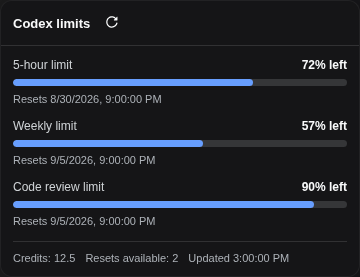
Rendered by the real plugin UI with sanitized demonstration balances.
The limits view uses OpenAI's undocumented Codex usage endpoint. Its availability and response shape may change without notice.
Requirements
- A ChatGPT Plus or Pro subscription with Codex access.
- DeepSeek Harness
0.1.0-rc.6or a compatible release. - Node.js 18 or newer.
- pnpm available to the
dsh plugincommand. - Outbound HTTPS access to
auth.openai.comandchatgpt.com.
Install
DSH reconciles plugins per profile. Install the package in every profile where the provider or /codex command is needed; web is shown here:
dsh plugin --profile web add -w @syncended/dsh-codex
For local development, install a checkout instead:
dsh plugin --profile web add -w /absolute/path/to/deepseek-harness-openai-codex
The package declares a DSH bundle. It registers the openai-codex route and maps its credential automatically, so no dsh settings set command is needed. Restart the selected profile after installing or upgrading.
To remove it:
dsh plugin --profile web remove @syncended/dsh-codex
Connect a ChatGPT account
Web GUI
- Open Settings → OpenAI Codex.
- Click Sign in. The plugin opens OpenAI's device-login page in another tab.
- Return to DSH, copy the one-time code displayed there, and paste it into the OpenAI page.
- Approve access and return to DSH. The settings page updates to Connected automatically.
- Choose an
openai-codex/...model from the standard model selector and send a test prompt. - Use Codex limits above Settings to inspect the normalized 5-hour and weekly balances.
Like other DSH credential settings, Web login is restricted to a loopback/same-origin Host session. For a remote Host, use an authenticated SSH/local tunnel to its loopback Web UI rather than exposing credential operations publicly.
Interactive Harness command
/codex is a Harness slash command, not a shell executable. Run it inside an interactive profile that has this plugin installed:
| Command | Description |
|---|---|
/codex login |
Start the device-code flow and print the verification URL and code. |
/codex status |
Show token status and expiry. |
/codex logout |
Delete the stored token file and unpublish the live credential. |
How it works
- The plugin stores
{ access, refresh, expires }in$DSH_HOME/openai-codex.jsonby default. - It publishes only the live access token to the DSH credential service as
OPENAI_CODEX_TOKEN. - The bundled
llm-pi-airoute uses theopenai-codex-responsesAPI and the installed pi-ai Codex model catalog. - The refresh loop renews credentials shortly before expiry without requiring a Host restart.
- The Web limits API calls OpenAI from the Host and returns only normalized percentages, reset times, and optional credit balances; OAuth tokens never cross into browser JavaScript.
Protect $DSH_HOME: the token file is sensitive local credential state. /codex logout removes it and clears the published credential.
Configuration
The defaults normally need no changes. To override them, edit the existing openai-codex row in $DSH_HOME/profiles/<profile>/cordis.patch.yml and restart that profile:
- id: openai-codex
  config:
    # clientId: app_EMoamEEZ…hrann
    credentialRef: OPENAI_CODEX_TOKEN
    deviceCodeTimeoutSeconds: 900
    refreshWindowMs: 300000
    # dshHome: /absolute/path/to/dsh-home
    # tokenFile: /absolute/private/path/openai-codex.json
| Key | Default | Description |
|---|---|---|
clientId |
built in | OpenAI OAuth client ID used by the device flow. |
credentialRef |
OPENAI_CODEX_TOKEN |
DSH credential ref receiving the live access token. |
deviceCodeTimeoutSeconds |
900 |
Maximum time to approve a device login. |
refreshWindowMs |
300000 |
Refresh-loop scheduling window; the implementation still refreshes only near expiry. |
dshHome |
normal DSH home | Alternate base directory used to derive the default token path. |
tokenFile |
$DSH_HOME/openai-codex.json |
Absolute token persistence path; takes precedence over dshHome. |
Token-path precedence is tokenFile, then dshHome, then DSH_HOME, then ~/.dsh.
If credentialRef is changed, update the matching provider mapping in the existing llm-pi-ai row as well; otherwise the route continues reading OPENAI_CODEX_TOKEN:
- id: llm-pi-ai
  config:
    providers:
      openai-codex:
        displayName: OpenAI Codex
        apiKeyEnv: MY_CODEX_TOKEN_REF
Troubleshooting
- No Codex models: confirm the plugin is installed in the active profile, restart that profile, and verify
/codex statusreports a credential. - Login never completes: confirm outbound access to OpenAI endpoints, repeat
/codex login, and approve before the 15-minute timeout. - Remote Web login is rejected: connect through loopback using an authenticated tunnel; credential mutation is intentionally restricted.
- Limits fail but models work: the undocumented usage endpoint may have changed or be unavailable; model requests use a separate API path.
- Repeated sign-in after configuration changes: verify the token path is writable and
credentialRefmatches thellm-pi-aiprovider mapping.
Development
npm test
npm pack --dry-run
Tag-driven publication is documented in RELEASING.md.
License
MIT — see LICENSE.
安装
装一次目录插件,之后本站所有插件都能让 DeepSeek Harness 自动找、自动装:
dsh plugin add dshbase-catalog然后对 agent 说「帮我装 deepseek-harness-openai-codex」,它会在目录里找到并自动安装。文档:dshbase-catalog · 已验证场景包。
该插件是 GitHub 源码(未发 npm)——直接从仓库装:
Web profile:
dsh plugin --profile web add github:syncended/deepseek-harness-openai-codexHeadless(CLI)profile:
dsh plugin --profile headless add github:syncended/deepseek-harness-openai-codex实测报告
验证通过:从 GitHub 源码完成 L1 安装 + L2 加载 + L3 运行(dsh 0.1.0-rc.6)。
分享徽章
把这枚徽章粘进 README——它会链回本页,实测状态变化时自动更新:

[](https://dshbase.com/zh/plugins/deepseek-harness-openai-codex/)<a href="https://dshbase.com/zh/plugins/deepseek-harness-openai-codex/"><img src="https://dshbase.com/badges/deepseek-harness-openai-codex.svg" alt="dshbase 实测可装"></a>