
插件目录 / Knowledge / dsh-chat-import
dsh-chat-import
已验证 · 实测可装 Nwflower
功能简介
从 Claude Code、Codex、Reasonix 等 Agent 工具导入历史消息,并在 DSH 中继续对话。
推荐 — 实测可用且热门
从 Claude Code、Codex、Reasonix 等 Agent 工具导入历史消息,并在 DSH 中继续对话。 实测能干净安装、正常启动。202+ stars,社区认可度高,是低风险选择。
「已验证」表示我们的自动化 CI 在干净 profile 里实际执行了 dsh plugin add 并启动成功——仅此而已。功能描述与版本兼容性均为作者声明。这不是安全审计,也不代表对第三方代码的背书。
README

DSH Chat Import
A session import plugin built on DeepSeek Harness: import conversation history from external agents with one click and continue chatting in DeepSeek Harness.
All sessions, continued in DSH.








Supported Data Sources


Install
Requires dsh ≥ 0.1.5-rc.1
- Install via terminal
dsh plugin --profile web add dsh-chat-import # npm package
- Install via Plugin Marketplace
Usage
- Import conversations via GUI
Open the import window from the "Import sessions" button at the bottom of the left sidebar, select the conversations you want to import, and import with one click.
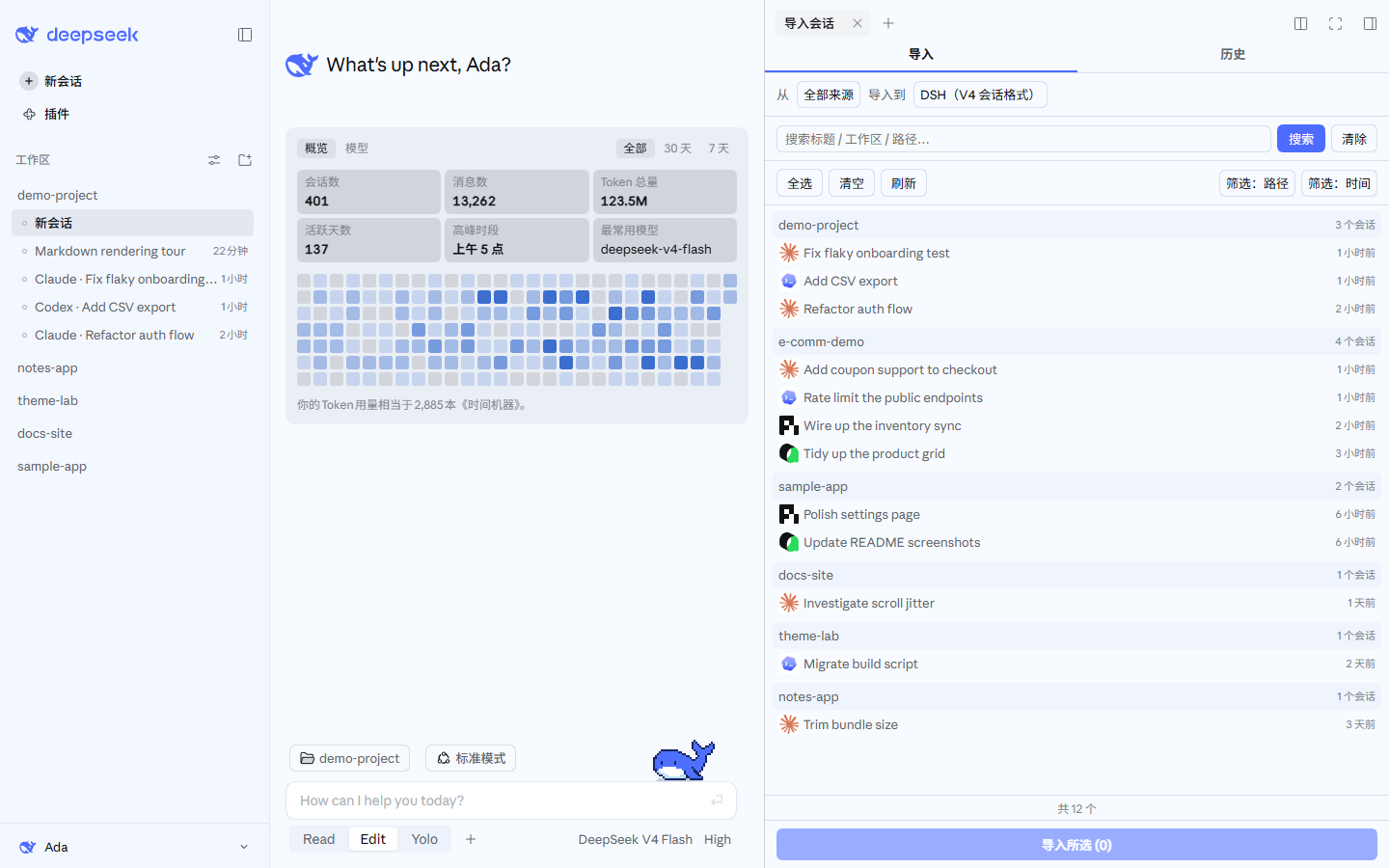 |
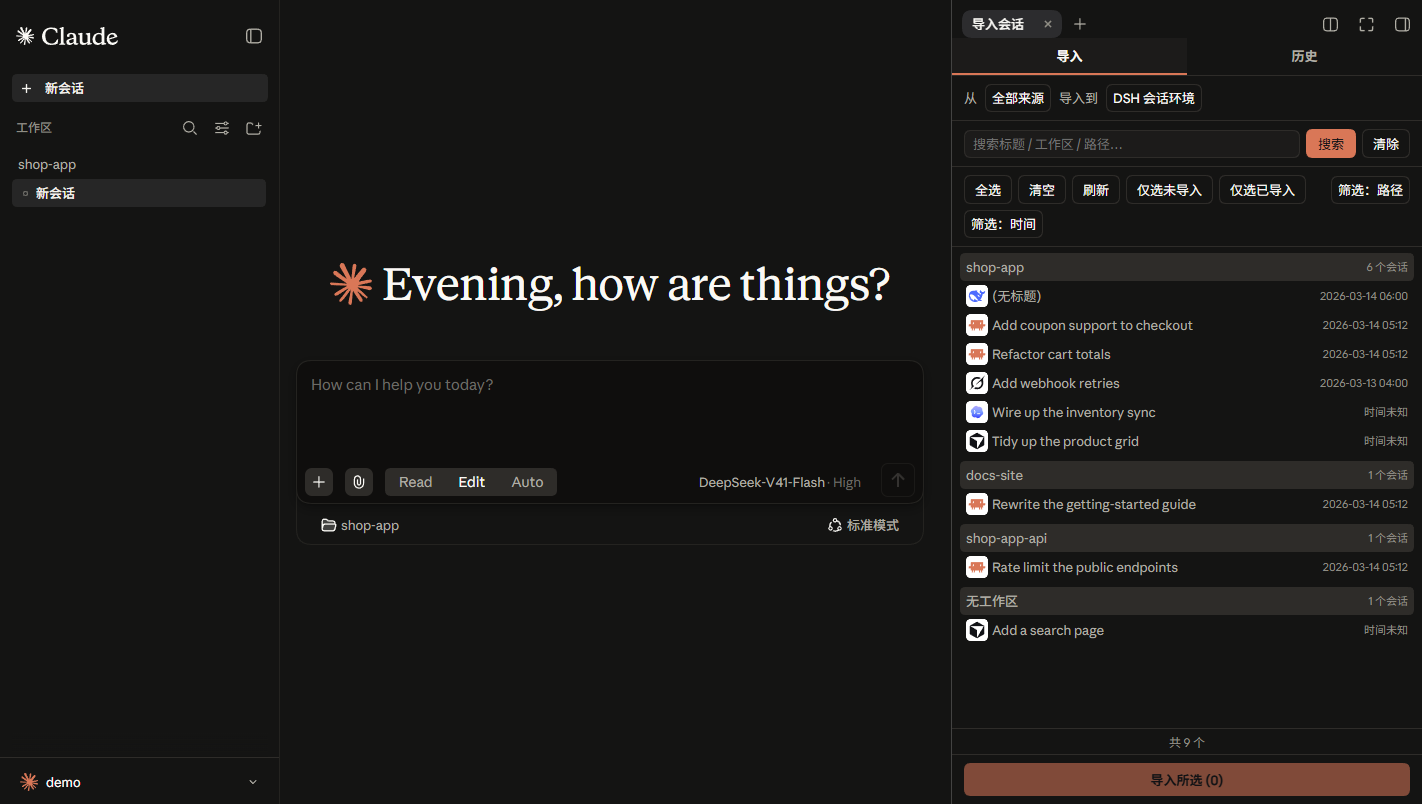 |
These screenshots also use the author's other theme plugin, DSH Claude Style: it recreates the look and feel of Claude Code Desktop inside DSH. If the default theme is not quite your taste, give it a try.
- Import via Agent tool calls
# Example call formats
import_chat({ format: "claude", path: "~/.claude/projects" })
import_chat({ format: "chatgpt", path: "~/Downloads/chatgpt-export/conversations.json" })
import_chat({ format: "local-jsonl", path: "D:\downloads\session.jsonl" })
Configuration
For TUI compatibility, plugin-provided tools are injected into context by default. You can configure the import tools in Settings to not inject into context or inject partially, which saves a significant amount of tokens.
For full tool / command usage, see docs/USAGE.md.
Features
| Capability | Entry Point | Description |
|---|---|---|
| Import | Sidebar panel "Import" tab | Import conversations from other agents, preserving reasoning, tool call results, and system prompts (optional) |
| Retract Import | Sidebar panel "History" tab | View import history and delete sessions created by this plugin with one click |
| Export | Context tool | Serialize DSH sessions back to external agents |
| Sync | Sidebar panel "Sync" tab | Bidirectional incremental sync between external agents and DSH, off by default |
| Ignore | Automatic + /ignores commands |
Archive / delete / workspace-removal auto-registers the source so rescans and sync skip it; /ignore, /unignore manage the table |
Docs
| Document | Description |
|---|---|
| Usage Reference | Full parameters, examples, and edge cases for every tool / command |
| Interchange Protocol | Interchange v1 protocol and bundle format |
| Settings Migration | DSH 0.1.5 → 0.1.7 plugin settings-page migration (measured errors, compatibility recipe) |
| Changelog | Version history |
| Roadmap | Shipped / planned |
| Contributing | Development setup, commit rules, security & privacy |
Related Links
Only need to migrate configuration (skills, hooks, global settings, etc.) rather than conversation history? Recommended: dsh-movein
Star History
安装
装一次目录插件,之后本站所有插件都能让 DeepSeek Harness 自动找、自动装:
dsh plugin add dshbase-catalog然后对 agent 说「帮我装 dsh-chat-import」,它会在目录里找到并自动安装。文档:dshbase-catalog · 已验证场景包。
Web profile:
dsh plugin --profile web add dsh-chat-importHeadless(CLI)profile:
dsh plugin --profile headless add dsh-chat-import包信息
npm:dsh-chat-import · 版本 0.2.0 · 实测环境 dsh 0.1.0-rc.6
实测报告
端到端验证通过:dsh 0.1.0-rc.6 上 L1 安装 + L2 加载 + L3 运行问答。
使用场景
给 agent 一套记忆、知识库或检索层,让它不再跨会话丢上下文。
适合谁
跑长项目、想让 agent 记住决策、文档和偏好而不用每次重讲的人。
二次开发建议
记忆/检索后端是缝——插新存储、调蒸馏策略,或加引用与审计轨迹。
分享徽章
把这枚徽章粘进 README——它会链回本页,实测状态变化时自动更新:

[](https://dshbase.com/zh/plugins/dsh-chat-import/)<a href="https://dshbase.com/zh/plugins/dsh-chat-import/"><img src="https://dshbase.com/badges/dsh-chat-import.svg" alt="dshbase 实测可装"></a>