
插件目录 / UI & Skins / dsh-client-ui-quote
dsh-client-ui-quote
已验证 · 实测可装 skyhancloud
功能简介
A selection-quoting plugin for the DeepSeek Harness web GUI: select text inside an AI reply and attach it to your next message as a quote banner.
可用 — 实测通过,早期项目
A selection-quoting plugin for the DeepSeek Harness web GUI: select text inside an AI reply and attach it to your next message as a quote banner. 实测能干净安装、正常启动。早期项目,但功能可用。
「已验证」表示我们的自动化 CI 在干净 profile 里实际执行了 dsh plugin add 并启动成功——仅此而已。功能描述与版本兼容性均为作者声明。这不是安全审计,也不代表对第三方代码的背书。
README

dsh-client-ui-quote
English | 中文
A selection-quoting plugin for the DeepSeek Harness web GUI: select text inside an AI reply and attach it to your next message as a quote banner.






Table of Contents
Features
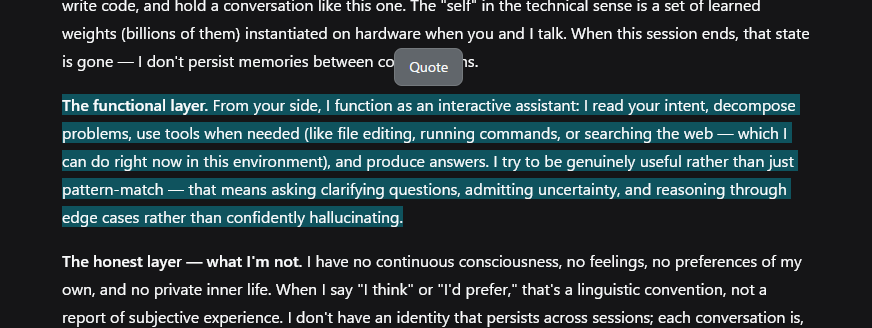
- Selection toolbar — one 引用 (Quote) button appears above the selection after a 50ms debounce, so it never flashes mid-drag. It hides on Escape, scroll-away, or when the selection collapses.
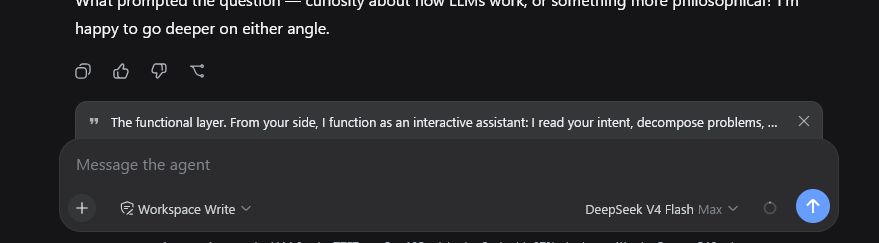
- Quote banner — a removable strip above the composer with a quote glyph, the quoted text, and a × button. The quote is consumed by the next send: the banner clears when the message goes out. Escape while the composer is focused clears it too.
- Clean draft — the quote is a pending-send attachment, not text in your input. Focus returns to the composer so typing follows.
- Localized — toolbar labels and the quote attribution follow the UI language (中文 / English).
- Fallback for older harnesses — on versions without the input-machine quote attachment, the button inserts the quote block at the end of the draft instead.
Preview
Installation
Prerequisites
- DeepSeek Harness with the web GUI (
dsh web) - Full banner behavior needs
@deepseek-ai/dsh-client-ui-conversationwith the input-machine quote attachment (InputActions.setQuote). Older versions fall back to inserting the quote into the draft.
Install
dsh plugin --profile web add https://github.com/skyhancloud/dsh-client-ui-quote
Then restart dsh web and refresh the browser.
Usage
- Select any text inside an AI reply.
- Click 引用 (Quote) above the selection — the quote appears as a banner above the composer.
- Type your message and send — the quote is prepended to the outgoing message:
> 引用 AI 回复:
> <selected lines>

<your message>
- Click × on the banner when you no longer need the quote.
Development
pnpm install
pnpm run bundle   # emits lib/index.js and lib/client.js
Pull requests are welcome.
License
MIT — see LICENSE.
安装
装一次目录插件,之后本站所有插件都能让 DeepSeek Harness 自动找、自动装:
dsh plugin add dshbase-catalog然后对 agent 说「帮我装 dsh-client-ui-quote」,它会在目录里找到并自动安装。文档:dshbase-catalog · 已验证场景包。
该插件是 GitHub 源码(未发 npm)——直接从仓库装:
Web profile:
dsh plugin --profile web add github:skyhancloud/dsh-client-ui-quoteHeadless(CLI)profile:
dsh plugin --profile headless add github:skyhancloud/dsh-client-ui-quote实测报告
验证通过:从 GitHub 源码完成 L1 安装 + L2 加载 + L3 运行(dsh 0.1.0-rc.6)。
分享徽章
把这枚徽章粘进 README——它会链回本页,实测状态变化时自动更新:

[](https://dshbase.com/zh/plugins/dsh-client-ui-quote/)<a href="https://dshbase.com/zh/plugins/dsh-client-ui-quote/"><img src="https://dshbase.com/badges/dsh-client-ui-quote.svg" alt="dshbase 实测可装"></a>