
插件目录 / UI & Skins / dsh-codex-experience
dsh-codex-experience
已验证 · 实测可装 lamost423
功能简介
Codex 风格回答注解、多注解暂存、链接引用与临时 Side Chat。
可用 — 实测通过,早期项目
Codex 风格回答注解、多注解暂存、链接引用与临时 Side Chat。 实测能干净安装、正常启动。早期项目,但功能可用。
「已验证」表示我们的自动化 CI 在干净 profile 里实际执行了 dsh plugin add 并启动成功——仅此而已。功能描述与版本兼容性均为作者声明。这不是安全审计,也不代表对第三方代码的背书。
README
DSH Codex Experience|DSH Codex 体验增强插件
English | 中文
Codex-style annotations, multi-comment composition, and ephemeral side chat for DeepSeek Harness.
为 DeepSeek Harness 增加 Codex 风格的回答注释、多条批注合并提交与临时侧边对话。
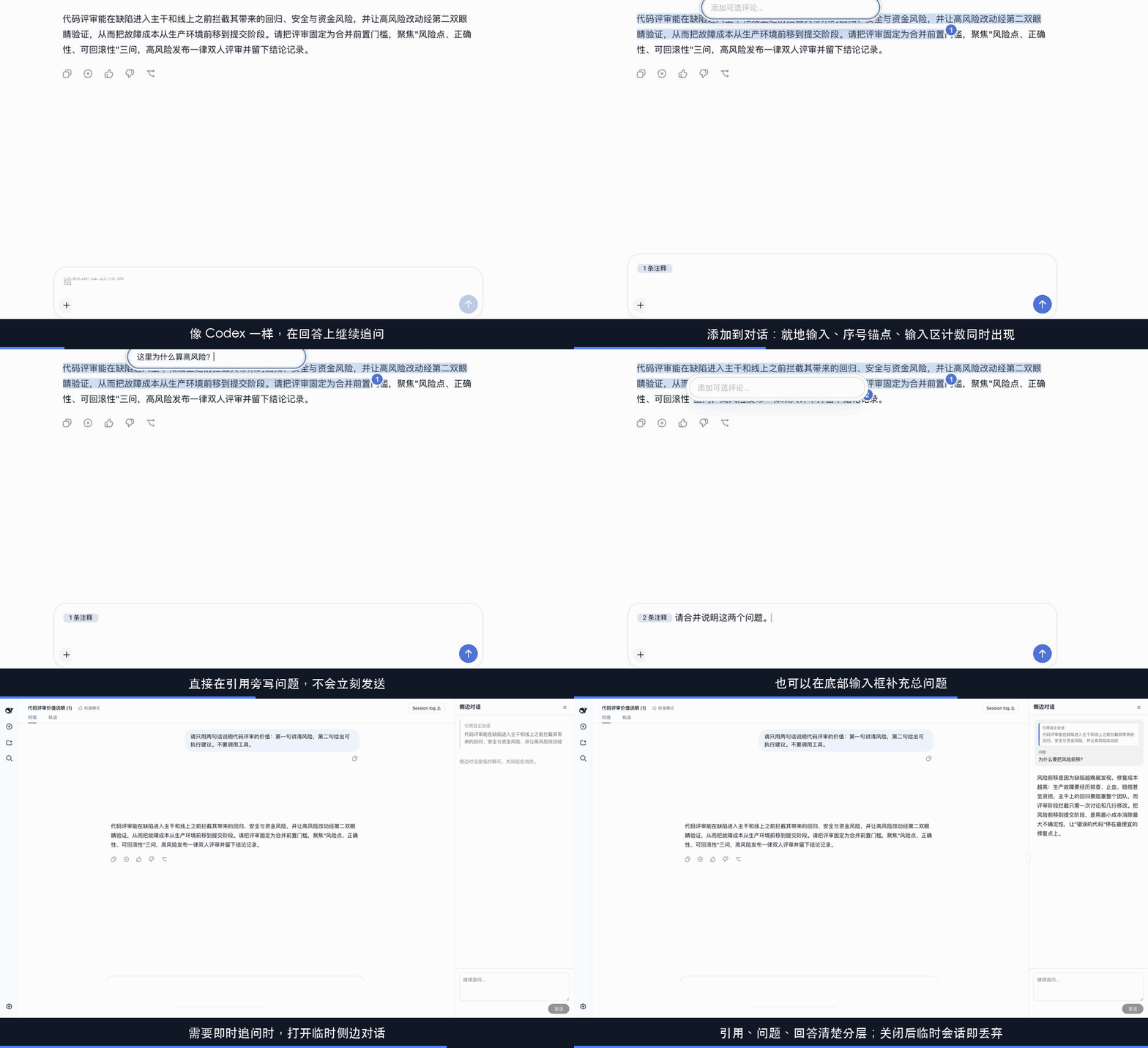
This is the unofficial DSH Codex Experience community fork. It adds Codex-style answer annotations and ephemeral side chat plus a todo freshness Guard. The conversation feature depends on Client and Session extension points carried by this fork, so it is not installable on the official npm build as a standalone plugin.
Run
Run from source
Run the community fork from source:
git clone https://github.com/lamost423/dsh-codex-experience.git
cd dsh-codex-experience
corepack enable
pnpm install --frozen-lockfile
pnpm run build
pnpm dsh web
DeepSeek Harness (dsh) is an open-source agent harness developed by DeepSeek AI.
It uses an architecture where everything is a plugin, and is powered by Cordis, whose design is described in A Programming Paradigm for Spatiotemporal Composability.
Developer preview
DeepSeek Harness is currently in developer preview and is iterating rapidly. THERE WILL BE COMPATIBILITY-BREAKING CHANGES.
The command starts this fork's Web UI at http://127.0.0.1:3080 by default. The official @deepseek-ai/dsh npm package does not contain the fork's Side Chat extension points. See the Web UI guide for the shared upstream behavior.
Community and support
- Report fork-specific defects and feature requests through this fork's GitHub Issues.
- Use the upstream GitHub Discussions for official DeepSeek Harness topics.
- Add the
dsh-plugintopic to your plugin repository for discoverability. - Join DeepSeek Harness Discord community.
Contributing
See CONTRIBUTING.md.
Development
Start with the development guide and architecture documentation.
For agents, follow AGENTS.md.
License
Third-party dependencies and their licenses are disclosed in THIRD_PARTY_NOTICES.md.
安装
装一次目录插件,之后本站所有插件都能让 DeepSeek Harness 自动找、自动装:
dsh plugin add dshbase-catalog然后对 agent 说「帮我装 dsh-codex-experience」,它会在目录里找到并自动安装。文档:dshbase-catalog · 已验证场景包。
该插件是 GitHub 源码(未发 npm)——直接从仓库装:
Web profile:
dsh plugin --profile web add github:lamost423/dsh-codex-experienceHeadless(CLI)profile:
dsh plugin --profile headless add github:lamost423/dsh-codex-experience实测报告
验证通过:从 GitHub 源码完成 L1 安装 + L2 加载 + L3 运行(dsh 0.1.0-rc.6)。
使用场景
改变 dsh 的外观或交互方式——一套主题、皮肤或新面板,重塑工作区。
适合谁
在 web UI 里一待几小时、想让它按自己的习惯好看又好用的人。
二次开发建议
皮肤、面板和主题 token 是扩展点——写新皮肤、加面板,或与上游配色同步 token。
分享徽章
把这枚徽章粘进 README——它会链回本页,实测状态变化时自动更新:

[](https://dshbase.com/zh/plugins/dsh-codex-experience/)<a href="https://dshbase.com/zh/plugins/dsh-codex-experience/"><img src="https://dshbase.com/badges/dsh-codex-experience.svg" alt="dshbase 实测可装"></a>