
插件目录 / Developer / dsh-cot-profile
dsh-cot-profile
已验证 · 实测可装 Chloride233
功能简介
Real-time chain-of-thought trajectory profiling for DeepSeek Harness: live wording indicators, profile-family judgment, per-session measurement records
可用 — 实测通过,早期项目
Real-time chain-of-thought trajectory profiling for DeepSeek Harness: live wording indicators, profile-family judgment, per-session measurement records 实测能干净安装、正常启动。早期项目,但功能可用。
「已验证」表示我们的自动化 CI 在干净 profile 里实际执行了 dsh plugin add 并启动成功——仅此而已。功能描述与版本兼容性均为作者声明。这不是安全审计,也不代表对第三方代码的背书。
README
dsh-cot-profile
Real-time chain-of-thought trajectory profiling for DeepSeek Harness: watch the reasoning stream as it happens, tally signature wording indicators (let me / we / let's / I), classify the current session's trajectory family against built-in baselines, and optionally record per-session measurement aggregates.
Read this first: honest framing
Wording fingerprints describe the (model × assembly) combination — system prompt, tool schema, reasoning effort — not model identity. The underlying research (xiaobright/modeltest) shows the same wording pattern across different models when the interface changes (the V4 Flash counterexample: identical we-heavy, let me-free reasoning under the minimal assembly, at a different ability level).
yjh051108/dsh-router-standard maps the same lexicon onto a fault line: along the persona axis, V4 Pro behavior collapses into three bands — spec (collective We, let me ≈ 0), a transition band (mixed: We/The/Let mixing, unstable), and react (first-person The/Let, we ≈ 0). Neither side is universally "stronger" (maintenance tasks favor the spec side; greenfield builds favor the react side). The author's own correction note rejects any reading of the wording as model identity or capability proof.
This plugin tells you which trajectory side the current session behaves like (minimal-like / standard-like / ambiguous), flags the transition band explicitly as "不确定" instead of forcing a label, and shows you the raw indicators side by side, so you draw your own conclusions. It does not assert "this is model X".
Where the family names come from: minimal-like / standard-like / ambiguous are the labels of the lexicon classifier in xiaobright/modeltest (evaluator/trigger_probe/src/classifier.mjs, MIT) — trajectories are named after the DSH preset they appear under (the minimal preset's collective We voice vs the standard preset's first-person Let me voice), with ambiguous for unclassifiable runs. yjh051108/dsh-router-standard later mapped the same lexicon onto the spec/mixed/react bands. This plugin keeps the classifier labels as profile ids and the bands as the professional-level vocabulary.
Features
- Live UI: session-header badge + collapsible floating panel, updated by session-projection push frames — no polling, no custom RPC.
- Indicators:
let me/we/let's/Icounts, first-line patterns (We need…/The user wants…/Let me…/I…), block-length median, interim visible replies. - Judgment: weighted-distance match against built-in profile baselines with confidence; verdicts only after N blocks (default 10, configurable). Trajectories that cannot be reliably assigned — low confidence, or both
weandlet meelevated (the router-standard transition band) — are reported as "过渡带 / 不确定" instead of a possibly-wrong hard label. - Extensible: user-editable profile families and per-dimension weights (Web settings or cordis config).
- Record mode: per-turn cumulative JSON records (event and/or JSONL; sessions rarely dispose, so snapshots land at every turn/end) — the measurement instrument that calibrates the baselines with real data.
- Privacy: only aggregates ever leave the host computation; raw reasoning text is never recorded or transmitted.
Screenshots
| minimal-like verdict | standard-like verdict |
|---|---|
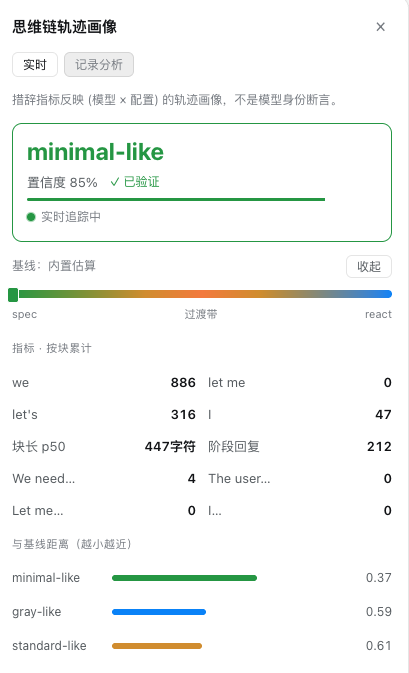 |
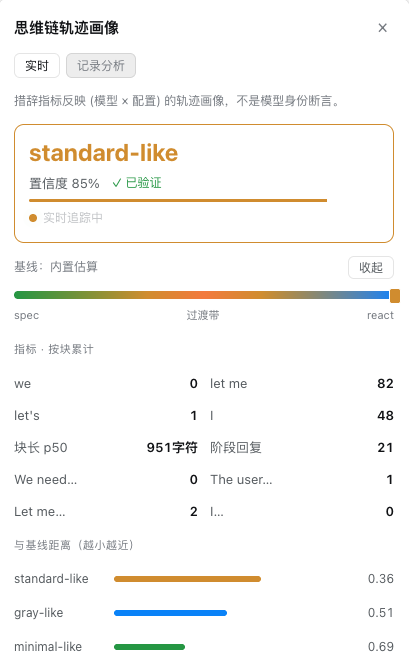 |
| GUI calibration (scan → groups → one-click baseline) |
|---|
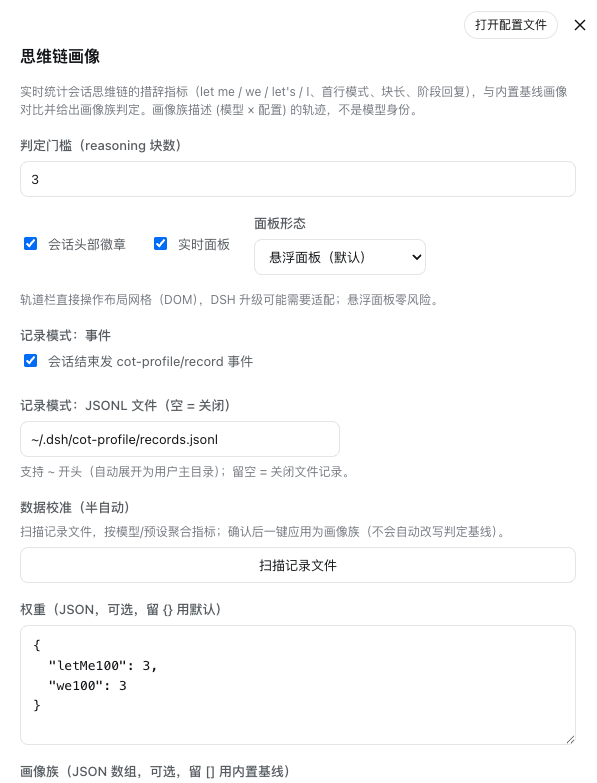 |
Install
dsh plugin --profile web add github:Chloride233/dsh-cot-profile
The core plugin (badge, panel, records) works immediately. The Web settings section additionally needs a temporary one-time patch to DeepSeek Harness 0.1.0-rc.6 (see Optional: Web settings); without it, configure via cordis config below.
Configure
Configuration lives in the cot-profile plugin row (cordis.patch.yml of this repo, or your profile's cordis.yml). Defaults:
- id: cot-profile
  config:
    minBlocksForJudgment: 3    # verdict after N reasoning blocks (3 default; confidence+transition guard short tasks)
    badge: true                # session-header badge
    panel: true                # real-time panel
    panelMode: overlay         # 'overlay' (default, zero risk) | 'track' (experimental right column)
    weights: {}                # per-dimension weights; {} = built-in defaults
    profiles: []               # custom profile families; [] = built-in baselines
    record:
      emit: true               # emit cot-profile/record per turn (and at session end)
      file: ''                 # optional JSONL path (leading ~ expands to $HOME)
Panel modes:
overlay(default): floating panel pinned to the right edge of the conversation — an official additive slot, zero risk.track(experimental): a real right column appended to the shell's three-column grid via direct DOM manipulation (MutationObserver overgrid-template-columns). It does not cover content and does not replace any shipped UI, but it operates outside the official slot system — a DSH upgrade that changes the frame structure may require adapting this mode. Off by default.
Weights (defaults, let me/we dominate per research separation):
{ "letMe100": 3, "we100": 3, "lets100": 2, "i100": 1.5,
  "firstLineWeNeed": 1.5, "firstLineUserWants": 1, "firstLineLetMe": 1.5,
  "firstLineI": 1, "firstLineOther": 0.5, "p50BlockChars": 1, "visibleReplies": 1.5 }
A custom profile is { "id", "name", "description", "vector" } with any of the vector dims; add one per model/version you want to track and judge against.
Optional: Web settings section
DeepSeek Harness 0.1.0-rc.6 exposes only a hard-coded allowlist of settings namespaces to the browser (WEB_SETTINGS_NAMESPACES in dsh-host-apiproxy; its source comment calls moving that decision to settings.register() deferred work). Until upstream lands plugin-declared settings exposure, run:
sh scripts/install-patch.sh
This copies the installed dsh-host-apiproxy into the web profile and adds cot-profile to the allowlist. It is idempotent and optional — the plugin is fully functional without it. Caveats:
- A
pnpm installin the profile directory removes the copied package; re-run the script afterwards. - A dsh upgrade may change the allowlist layout; the patch script fails loudly (never silently) when it cannot find the block.
FAQ
- Local-path install fails to load?
dsh plugin add <local-dir>installs via pnpm'slink:protocol, which resolves the linked package's imports from its own directory — so the checkout needs a resolvablenode_modules. Runpnpm installin the checkout (or symlink it to the running harness's node_modules). Installing from the GitHub URL (github:...) does not have this issue — pnpm resolves dependencies from its store natively.
Events & data
| Surface | Shape |
|---|---|
| Projection key | cot-profile — read it in any session-scoped slot via useProjection('cot-profile') (typed as CotProfileView in lib/index.d.ts) |
cot-profile/update |
{ sessionId, blocks, counts, firstLines, p50BlockChars, visibleReplies, vector, judgment, ui, revision, seq } (throttled 500ms) |
cot-profile/record |
one cumulative snapshot per turn/end, plus a final record at session end (only when the session had ≥1 reasoning block) |
Record schema (v1)
{
  "v": 1,
  "sessionId": "...",
  "startedAt": 1720000000000,
  "endedAt": 1720000100000,
  "preset": "anchored-standard",        // when known (agent-preset/selected)
  "provider": "deepseek",               // when known (agent/request capture)
  "model": "deepseek-v4-pro",           // when known
  "reasoningBlocks": 193,
  "turn": 4,                          // snapshot turn (null on the final record)
  "final": false,                     // false = per-turn snapshot, true = session end
  "indicators": { "letMe": 1, "we": 179, "lets": 88, "i": 17,
                  "p50BlockChars": 111, "visibleReplies": 1,
                  "firstLines": { "we-need": 120, "other": 73 } },
  "vector": { /* normalized indicator vector */ },
  "judgment": { "family": "minimal-like", "confidence": 0.87, "distances": {},
                "mixed": false, "mixedReason": "" }
}
Privacy boundary (hard requirement): records contain only aggregates — never raw reasoning text. File recording is off by default and opt-in.
GUI calibration (semi-automatic)
The settings section (Settings → 思维链画像 → 数据校准) scans the configured record file, groups records by (provider, model, preset), aggregates indicator-vector means per group, and offers a one-click "应用为画像族" — writing the measured group as a new profile-family into the profiles config. Aggregation is automatic; applying is always a human decision, and the built-in baselines are never rewritten automatically.
The scan reads GET /cot-profile/records — a route the plugin registers on the web server. It reads only the configured record.file path and returns aggregates (never raw reasoning text); without a configured file it returns an empty result. If the settings section shows a scan error, confirm the JSONL path is set and a few sessions have ended.
Development
npm test # node --test test/*.test.js (zero dependencies)
lib/analyzer.js— pure analysis (tokenize, counts, first-line classes, vector, distance, judgment)lib/profiles.js— built-in baselines (marked estimates — calibrate with record-mode data)lib/index.js— host: session projection, events, record sinklib/client.js— badge, panel, settings section
How the judgment is verified
Three layers, in increasing strength:
- Unit tests (
test/analyzer.test.js,test/projection.test.js) — the pure logic: tokenization, counts, vectors, weighted distance, transition-band detection. Deterministic, fast. - Golden verification against real model data (
test/golden-verify.test.js+test/golden/probes.csv) — 119 real DeepSeek V4 Pro / V4 Flash single-request probe runs fromyjh051108/dsh-router-standard(MIT, seetest/golden/NOTICE), each with a ground-truth lexicon classification and the same wording metrics this plugin consumes. Current results: spec-side runs 83/83 judged spec-side (100%), zero direction errors, react-side runs never misjudged spec-side, ambiguous runs flagged as the transition band ≥55%. This validates discrimination against real model behavior, not just self-consistency. - End-to-end replay verification (
scripts/replay-verify.mjs) — replays a real DSH session log (session.jsonl.zstd) through the projection fold and cross-checks every statistic against an independent ground-truth tally over the raw reasoning texts. Verified on the session logs in this repo's history: all reasoning blocks, counts, first-line patterns, and block-length medians match exactly. This validates the monitoring chain (event stream → fold → stats) that unit tests cannot cover. - Record-mode calibration (see above) — the plugin's own session records accumulate per-model aggregates you can inspect in the settings UI and apply as measured baselines.
The honest limit: wording is a fault-line fingerprint, so "verified" here means consistent with real model trajectories under known assemblies — it cannot prove which model is running (no single-assembly wording can).
Controlled probes (your environment, your assembly)
The golden data validates the judgment against someone else's probes; for your model, your harness, your task, run controlled probes:
- Pick a known assembly. A spec-side trajectory comes from the minimal/RL-reduced assembly (
Wevoice, let me ≈ 0); a react-side from a Standard/PTC-style assembly (The/Letvoice); a mixed-side from an intermediate persona. Thedsh-router-standardpreset family is a ready source of both persona sides. - Run one micro-task session per probe — e.g. "inspect the repository, then locate and read the README" (the router probes' micro-task), one short task per session, reasoning visible.
- Export and verify:
The script replays each log through the plugin's fold, reports the verdict per session, and fails on direction errors (a spec-expect session judged react-side, or vice versa). A transition-band verdict under a spec/react expectation is conservative (data-insufficient), not an error — consistent with the golden criteria.node scripts/probe-verify.mjs --expect spec ~/.dsh/sessions/<ws>/<session>/session.jsonl.zstd node scripts/probe-verify.mjs --expect react --dir ~/.dsh/sessions/probe-react
On-machine verification results (this project's own probes)
Controlled probes were run on this machine (DeepSeek V4 Pro, identical task and workspace, only the assembly varied) — see docs/experiments/:
| assembly | n | verdicts | reading |
|---|---|---|---|
| standard | 3 | react, react, mixed(3-blocks) | react side (let me / I voice) |
| minimal | 3 | spec, spec, mixed(genuine we+letMe) | spec side (we / let's voice) |
- The assembly → trajectory-side mapping reproduces on this machine, consistent with router-standard / modeltest.
- The probes surfaced and fixed a real judgment flaw: a tool-heavy session with a runaway
let mecount (letMe100 ≈ 1700) was mislabelled "uncertain" because the soft-distance saturates when the observation is far above every baseline. The strong-signal override now judges such trajectories confidently (≥85%). - Record-mode calibration on this machine showed measured intensities well above the built-in estimates (minimal we100 ≈ 469 vs baseline 126; standard letMe100 ≈ 1706 vs 208) — the estimates are from other environments/tasks, so apply measured baselines with that context in mind.
Methodological note: a session's actual assembly must be read from the agent-preset/selected event plus the tool-call surface (session-header agentPreset is just a creation-time default and is unreliable).
Upstream wishlist
Both are temporary gaps in DeepSeek Harness 0.1.0-rc.6 this plugin works around:
- Plugin-declared settings exposure — move the settings namespace allowlist from
dsh-host-apiproxyintosettings.register()so plugins can expose their own configuration without patching a bundle. - Additive right-column slot — a
conversation.details.panel-style list seat so a floating panel can become a native right column.
Credits
This project stands on community work. Acknowledgements by contribution type:
Methodology & data
xiaobright/modeltest— the trajectory indicator baselines and evaluation data (V4.1b, frozen) behind the built-in profiles.xiaobright/dsh-anchored-standard— the anchoring mechanism that motivated this plugin's original requirement.yjh051108/dsh-router-standard— the three-band / fault-line framing adopted for profile semantics, and the golden verification data (119 real probe runs, seetest/golden/NOTICE).
Design reference
zhu1090093659/dsh-web-ui— the layout-track idea behind the experimentaltrackpanel mode (re-implemented from measured behavior, not copied code).
Ecosystem
yjh051108/dsh-routing-suite— the injector + routing preset suite this project's direction intersects with.
License
MIT. See LICENSE.
安装
装一次目录插件,之后本站所有插件都能让 DeepSeek Harness 自动找、自动装:
dsh plugin add dshbase-catalog然后对 agent 说「帮我装 dsh-cot-profile」,它会在目录里找到并自动安装。文档:dshbase-catalog · 已验证场景包。
该插件是 GitHub 源码(未发 npm)——直接从仓库装:
Web profile:
dsh plugin --profile web add github:Chloride233/dsh-cot-profileHeadless(CLI)profile:
dsh plugin --profile headless add github:Chloride233/dsh-cot-profile实测报告
验证通过:从 GitHub 源码完成 L1 安装 + L2 加载 + L3 运行(dsh 0.1.0-rc.6)。
分享徽章
把这枚徽章粘进 README——它会链回本页,实测状态变化时自动更新:

[](https://dshbase.com/zh/plugins/dsh-cot-profile/)<a href="https://dshbase.com/zh/plugins/dsh-cot-profile/"><img src="https://dshbase.com/badges/dsh-cot-profile.svg" alt="dshbase 实测可装"></a>