
dsh-desktop
已验证 · 实测可装 yxccai
功能简介
DeepSeek Harness非官方Win/macOS应用,内置运行时,自动复用DSH环境
可用 — 实测通过,早期项目
DeepSeek Harness非官方Win/macOS应用,内置运行时,自动复用DSH环境 实测能干净安装、正常启动。早期项目,但功能可用。
「已验证」表示我们的自动化 CI 在干净 profile 里实际执行了 dsh plugin add 并启动成功——仅此而已。功能描述与版本兼容性均为作者声明。这不是安全审计,也不代表对第三方代码的背书。
README
DSH Desktop

English | 简体中文
An unofficial open-source desktop app for DeepSeek Harness, designed to provide a simpler and more convenient desktop experience.
Highlights
A desktop shell around the official DSH Web — inherited features, secure, and easy to keep current
DSH Desktop does not reimplement any functionality; it wraps the official DSH Web in a native desktop window:
- One-click launch: No browser tab, no URL, no command line — double-click the desktop icon to enter the same runtime environment as the official Web.
- Feature inheritance: The official DSH Web serves as the host runtime, loading its full UI and plugin system while sessions, workspace data, and the plugin ecosystem are fully preserved; the Web plugin market component among the built-in plugins manages plugins for both the desktop and the Web version from a single place.
- Safe isolation: The renderer never receives direct Node.js, filesystem, or arbitrary command access; the Electron sandbox, contextIsolation, loopback-only navigation, and a whitelisted IPC layer form the isolation boundary.
- Simple upgrades: When the official DSH ships a new version, the desktop updates with a version bump and a rebuilt bundle. Existing
DSH_HOME, sessions, Agent Presets, and persistent plugins carry over unchanged.
Foundation stays lean — only a few practical desktop enhancements
The base build does not pile on features; it keeps the official Web experience and adds only the enhancements most useful in a desktop context:
- Project panel: Beside the chat, it lists the files actually modified or produced by each reply. Multi-tab previews cover Markdown, HTML, source code, diff, CSV, PDF, images, and text, with split editing and conflict-aware atomic saves. Git workspaces show real status and per-file discard; non-Git directories use content snapshots (no
git init, nothing written into the project). Each reply records a recoverable snapshot, and restoring always saves the current state as a recovery point first. - Built-in plugins (optional install): Built-ins are offered as a selectable catalog rather than pre-installed. Available now: multiple color themes (Deep Ocean Blue, Aurora Green-Purple, Rose Sunset Pink, Warm Sand Amber, each with light and dark modes), a custom image background (native file picker, adjustable opacity, instant disable), and a lightweight writing assistant (drafting, rewriting, summarizing, translating). All support install, disable, and uninstall on demand.
- Windows system notifications (optional): Get a native notification when the agent awaits approval, finishes a task, or stops with an error — no need to watch the page constantly. Toggle it anytime under Settings → Plugins → Built-in Plugins; off by default.
Extensible and creative — a complete plugin ecosystem on a lean base
The base stays light; extension capabilities are directly available:
- Built-in plugins keep growing: Official curated plugins ship through a trusted channel with integrity verification, and can be installed, disabled, or uninstalled without touching user content.
- Community plugin market: A fixed, verified copy of the community market component is included. Once enabled, Settings → Plugins → Plugin Market browses awesome-dsh-plugin.com — install, update, and uninstall community plugins centrally, with a bundled
pnpmso nothing needs to be installed globally. Installs go into the sharedDSH_HOMEand work in both the desktop and the browser version. - Scale on demand: Add capabilities from the built-in and community catalogs when needed; keep the base experience lean when not.
Download
Two ways to use
| Way | For whom | What you get |
|---|---|---|
| One-click installer | Most users | Double-click to install and run; no environment needed. Your own data is used (DSH_HOME, sessions, plugins), but DSH is started by the desktop's bundled runtime |
| Connect mode | Users with Node.js who want the full official DSH | Not just your data — the DSH Web itself is also started by you with the system Node (npx pulls the latest release); the desktop only connects as a shell and never uses the bundled runtime |
Both ways share the same data (DSH_HOME, sessions, plugins) and can be switched freely. Developers can also run from source; npm start uses auto mode and prefers the system environment.
One-click installer
Download from GitHub Releases:
macOS (test build)
Apple Silicon (M-series):
The Intel (x64) build appears on the Releases page once the runner finishes.
On first launch, Control-click the app in Finder and choose Open. If macOS still blocks it, go to System Settings → Privacy & Security → Open Anyway. Signing and notarization are planned for a future release.
Screenshots
Conversation-aware project panel
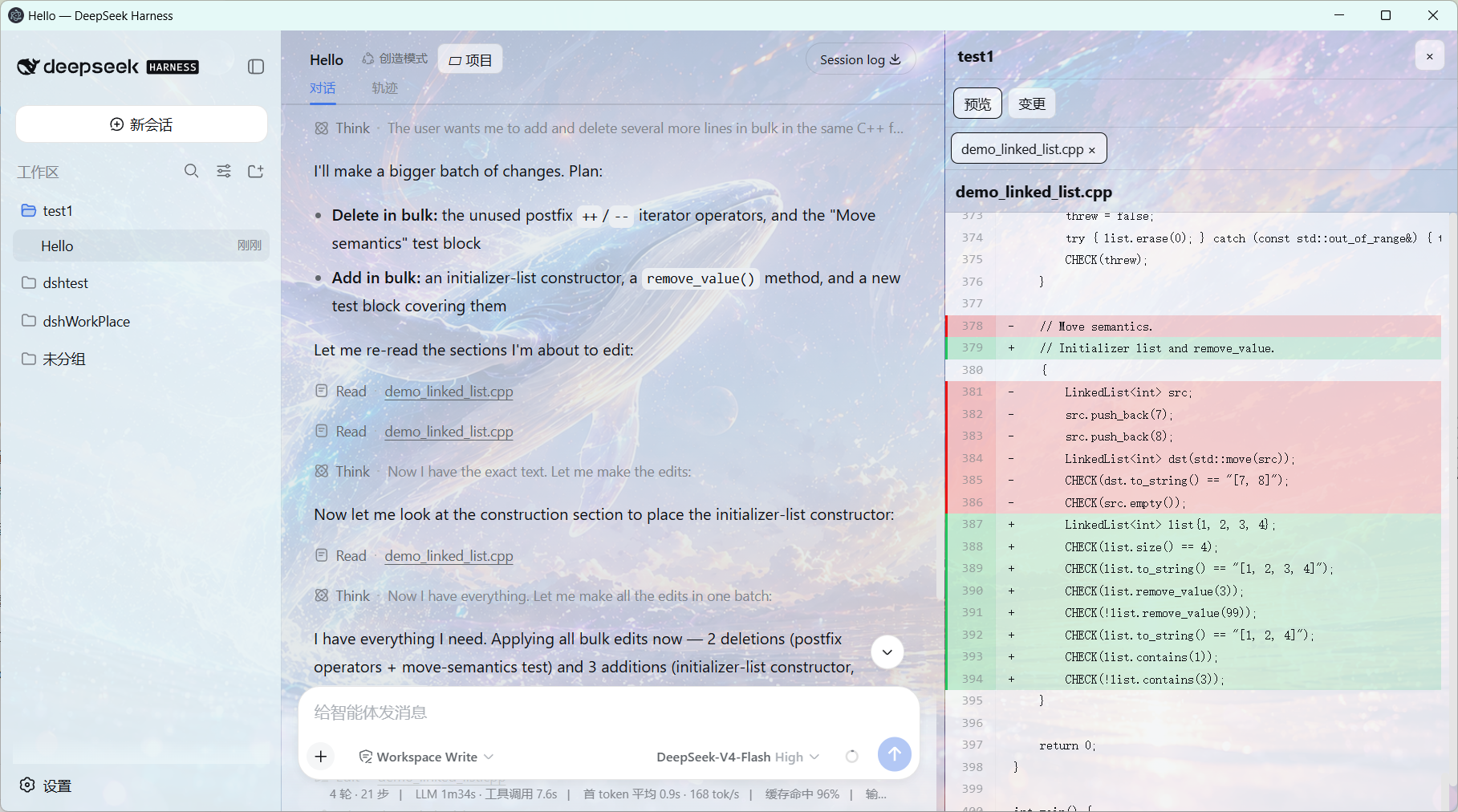
Conversation snapshots and per-file rollback

Managed Plugin Center
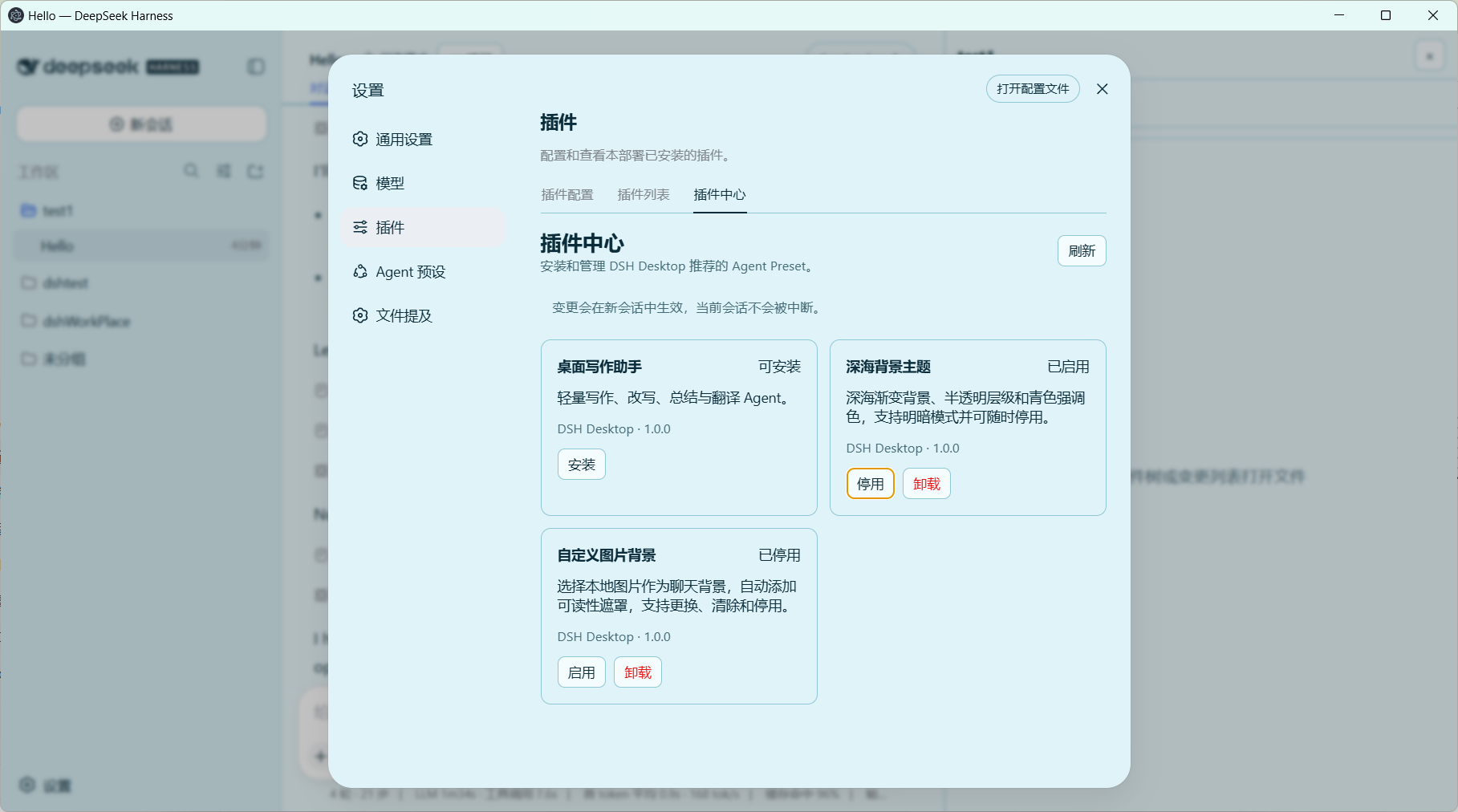
Community plugin market
After the bundled community market component is mounted into the shared DSH_HOME, it manages plugins already installed on both the desktop and the Web side, and lets you browse and install newly added community plugins at any time:


How it works
DSH Desktop automatically selects an available runtime:
- Connect to an existing DSH service.
- Reuse a global
dshinstallation. - Reuse the system
npx/npmenvironment. - Fall back to the bundled DSH runtime.
Existing users can usually keep their original DSH_HOME, sessions, Agent Presets, and persistent plugins. New users do not need to install DSH or Node.js first.
Project panel
Files actually modified or produced by a conversation appear below the relevant response. Clicking one opens it in a right-side multi-tab preview with a filename and close button; the chat layout shrinks instead of being covered. Previews support Markdown, HTML, source code, diff, CSV, PDF, images, and text, plus split editing with conflict-aware atomic saves. Git workspaces expose real status/diff/discard controls; ordinary non-Git directories use DSH Desktop content-blob snapshots instead, without running git init or writing metadata into the project. Both modes retain turn changes, full-context diffs, per-file undo, and recoverable snapshots; restoring a snapshot first records the current state as a recovery point.
Office files currently open through their system application; native DOCX/XLSX/PPTX rendering remains planned.
Web plugin market (optional)
DSH Desktop bundles the community plugin market @sanqi-normal/dsh-webui-market-plugin (MIT, vendored at resources/market-plugin) and mounts it into the shared DSH_HOME on demand, so the DSH Web GUI gains a Settings → Plugins → Plugin Market tab that browses awesome-dsh-plugin.com and installs/uninstalls community plugins into the web profile.
- Manage it from two places: the desktop Plugin Center window (Web 插件市场 tab) and the Web settings bridge (内置插件 tab card in the GUI). Install, enable, disable, and uninstall are exclusive, transactional operations on
$DSH_HOME/cordis.patch.ymlplus$DSH_HOME/node_modules/@sanqi-normal/dsh-webui-market-plugin;$DSH_HOME/profiles/webis never modified. - Works without a global pnpm: the app bundles pnpm and provisions a PATH shim (
src/pnpm-runtime.js) that every DSH process inherits, so in-web installs succeed on Windows even when pnpm was never installed globally (npx/global/bundled launches). DSH services started manually from a terminal also fall back to the bundled pnpm under$DSH_HOME/bin. If pnpm is genuinely unavailable, the market reports a clear message instead of raw console garbage. - Common install problems are handled automatically: git-hosted build scripts are allowed (
dangerously-allow-all-builds); migrated profiles reuse their recorded pnpm store (npm_config_store_dir); lockfiles missing tarball integrity (bare GitHub archive URLs written by older pnpm) are rewritten togithub:syntax and the op is retried once. - Third-party warning: market plugins are written by community authors and run inside the DSH process with host privileges (files, network, commands). Only install sources you trust. The desktop app ships a fixed, digest-verified copy and refuses to operate on foreign or tampered content, but takes no responsibility for third-party plugin behavior.
- Restart required: changes take effect after the DSH web service restarts; running conversations are not interrupted.
- Provenance and reproduction:
resources/market-plugin/VENDORED.md— the Host half is upstream plus two DSH Desktop portability patches (bundled-pnpm PATH shim and human-readable pnpm errors), the Client half is an original redesigned UI under MIT.
Plugin compatibility
Plugins built on official DSH/Cordis services, Host tools, UI slots, themes, and persistent Presets generally offer the best compatibility. Plugins that depend on fixed DOM structures, browser extensions, or development HMR require separate testing.
Connect mode (use the full official DSH Web, not just your data)
The one-click installer keeps your data (DSH_HOME, sessions, plugins), but the DSH process is started by the desktop's bundled fixed version (rc.6) as Electron-as-Node. Connect mode goes further: the DSH Web itself is also started by you with your own system Node (npx pulls the latest official release), and the desktop only connects as a shell — data, process, and version are all under your control.
DSH Desktop is only a shell — by default it picks a runtime in auto order (connect to an existing service → global dsh → system npx → bundled runtime). If you want DSH Web started by your own system Node, use connect mode:
Full steps
Install Node.js (a prerequisite for connect mode): download the LTS version from nodejs.org and install it.
Install the desktop (either):
- Download the one-click installer and install it;
- or run from source (developers).
Start DSH Web with the system Node (in a terminal; keep the window open):
npx @deepseek-ai/dsh web --host 127.0.0.1 --port 3080
- Configure the desktop to only connect, never start a service:
{
  "launchMode": "connect",
  "url": "http://127.0.0.1:3080"
}
The config lives at <userData>\config.json (Windows default: C:\Users\<username>\AppData\Roaming\dsh-desktop-shell\config.json; or wherever DSH_DESKTOP_HOME points if set).
- Launch the desktop — it detects the DSH service on port 3080 and connects directly, skipping the bundled runtime.
Your DSH then runs in real Node (process.execPath is node.exe), so the desktop only supplies the window, project panel, built-in plugins, and system notifications — no Electron-as-Node bundled runtime, and you get upstream updates as soon as they are released.
Note: in connect mode, the DSH Web is started and managed by your terminal — closing the terminal stops the service; the desktop will not launch it for you.
Run from source
git clone https://github.com/yxccai/dsh-desktop.git
cd dsh-desktop
npm ci
npm run check
npm test
npm start
npm start uses auto mode by default: it prefers your system dsh or npx, so it does not force the bundled runtime either.
Platform support
- Windows x64: Setup build is available and tested.
- macOS Intel / Apple Silicon: Unsigned test builds are published as prereleases. On first launch, Control-click the app in Finder and choose Open; if macOS still blocks it, use System Settings → Privacy & Security → Open Anyway. Signing and notarization are planned.
- Additional platforms may be considered in future versions.
Development
npm ci
npm run check
npm test
npm start
More information:
License
This project is licensed under the MIT License. DeepSeek Harness, Electron, and other dependencies remain under their respective licenses.
安装
装一次目录插件,之后本站所有插件都能让 DeepSeek Harness 自动找、自动装:
dsh plugin add dshbase-catalog然后对 agent 说「帮我装 dsh-desktop」,它会在目录里找到并自动安装。文档:dshbase-catalog · 已验证场景包。
该插件是 GitHub 源码(未发 npm)——直接从仓库装:
Web profile:
dsh plugin --profile web add github:yxccai/dsh-desktopHeadless(CLI)profile:
dsh plugin --profile headless add github:yxccai/dsh-desktop实测报告
验证通过:从 GitHub 源码完成 L1 安装 + L2 加载 + L3 运行(dsh 0.1.0-rc.6)。
使用场景
把 dsh 跑成原生桌面应用——独立窗口、托盘图标、快捷键——而不是浏览器标签。
适合谁
想要已安装应用的感觉和系统集成(托盘、全局热键、开机自启)的人。
二次开发建议
原生壳是缝——加全局快捷键、通知、单实例锁或按 OS 定制的行为。
分享徽章
把这枚徽章粘进 README——它会链回本页,实测状态变化时自动更新:

[](https://dshbase.com/zh/plugins/dsh-desktop-4/)<a href="https://dshbase.com/zh/plugins/dsh-desktop-4/"><img src="https://dshbase.com/badges/dsh-desktop-4.svg" alt="dshbase 实测可装"></a>