
插件目录 / UI & Skins / dsh-diagram
dsh-diagram
已验证 · 实测可装 hanzhangzzz
功能简介
Turn DeepSeek Harness articles into editable Excalidraw canvases — live diagrams, not disposable Mermaid output.
可用 — 实测通过,早期项目
Turn DeepSeek Harness articles into editable Excalidraw canvases — live diagrams, not disposable Mermaid output. 实测能干净安装、正常启动。早期项目,但功能可用。
「已验证」表示我们的自动化 CI 在干净 profile 里实际执行了 dsh plugin add 并启动成功——仅此而已。功能描述与版本兼容性均为作者声明。这不是安全审计,也不代表对第三方代码的背书。
README
dsh-diagram
English | 简体中文



Turn an article you have read in DSH into a diagram you can keep editing, saving, and exporting.
A canvas plugin for DeepSeek Harness (DSH) Desktop and Web. The Agent drafts the structure; you refine text and layout in Excalidraw inside the same session, without rebuilding the result in another app.
In DeepSeek Harness Desktop (recommended): open Plugins → Add plugin, enter the package below, click Install, then Enable now.
[email protected]
Using DSH Web from a terminal instead? Run npx -y @deepseek-ai/[email protected] plugin --profile web add [email protected]. Details: Quick install.
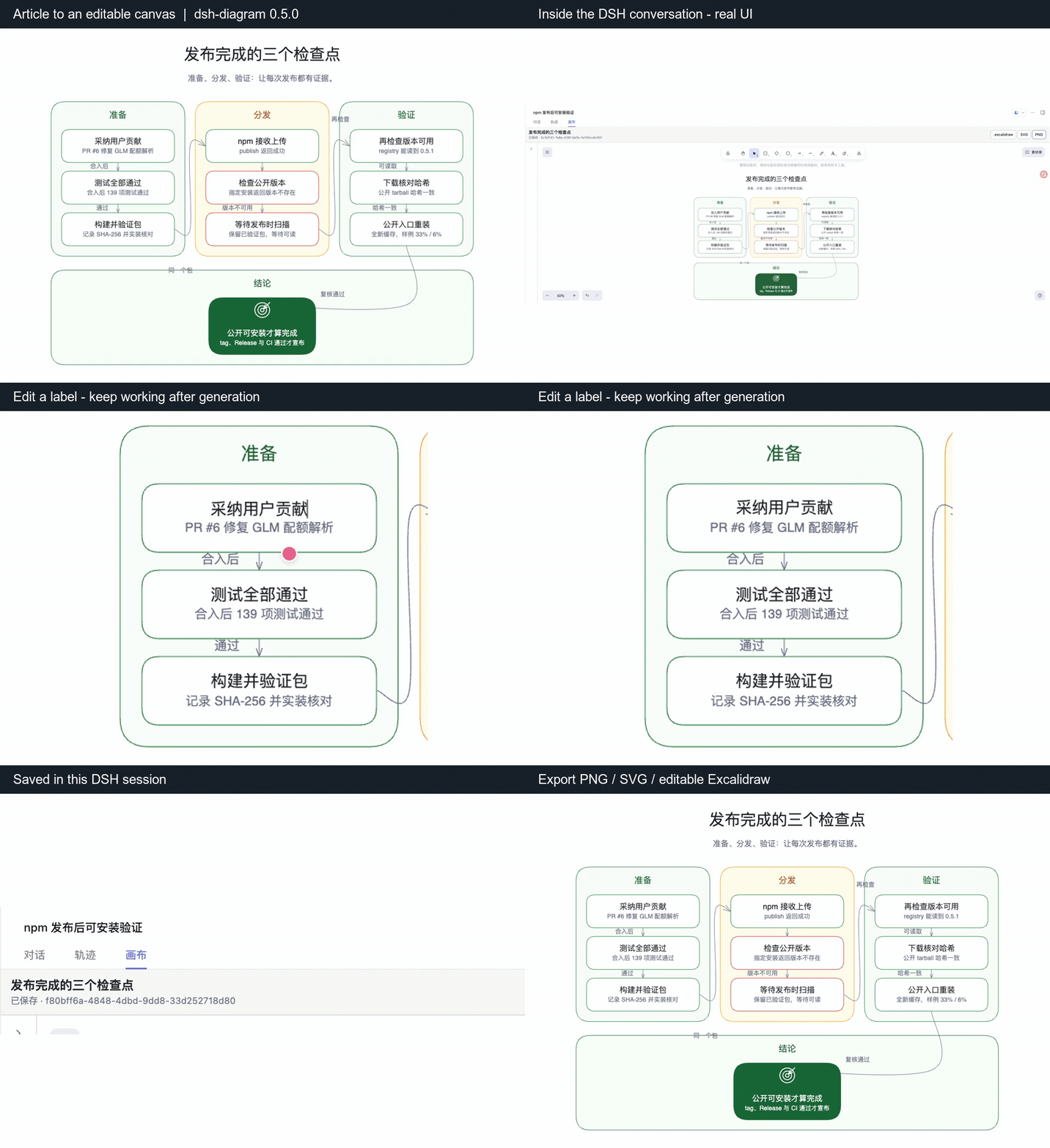
dsh-diagram 0.5.0 · real DSH recording (Chinese UI). Cropped close-ups of editing, saving, and an actual export; model-generation waiting is not shown.
The whole loop in 30 seconds (0.6.1, with sound): draft from the conversation → fix labels by hand → the Agent reads your edited version → export PNG/SVG/.excalidraw. Product frames are real recordings and exports; the animation around them is illustration.
https://github.com/user-attachments/assets/e0930087-f841-48af-84ea-fa39267f85b0
Try one complete workflow
After Enable now in Desktop (or restarting DSH Web), put an article in a session, type / and select canvas-diagram, then send:
Turn the article above into a diagram with just three main steps and short labels.
Use the Canvas so I can edit and export the result.
Open Canvas, change a label, wait for Saved, and click PNG to export. Missing the entry point? See Quick install and Troubleshooting. New to DSH? Set up the host and model using the DSH instructions first, then install this plugin.
New in 0.6.0: see the whole classification, then read every entry
Large classification trees can use an editable overview + complete detail index. The overview shows one mark per terminal entry; the detail panel preserves every label and description. Use Classification overview or Read details in the canvas to navigate without shrinking all text into one screen (Chinese UI: 分类总览 / 阅读明细).
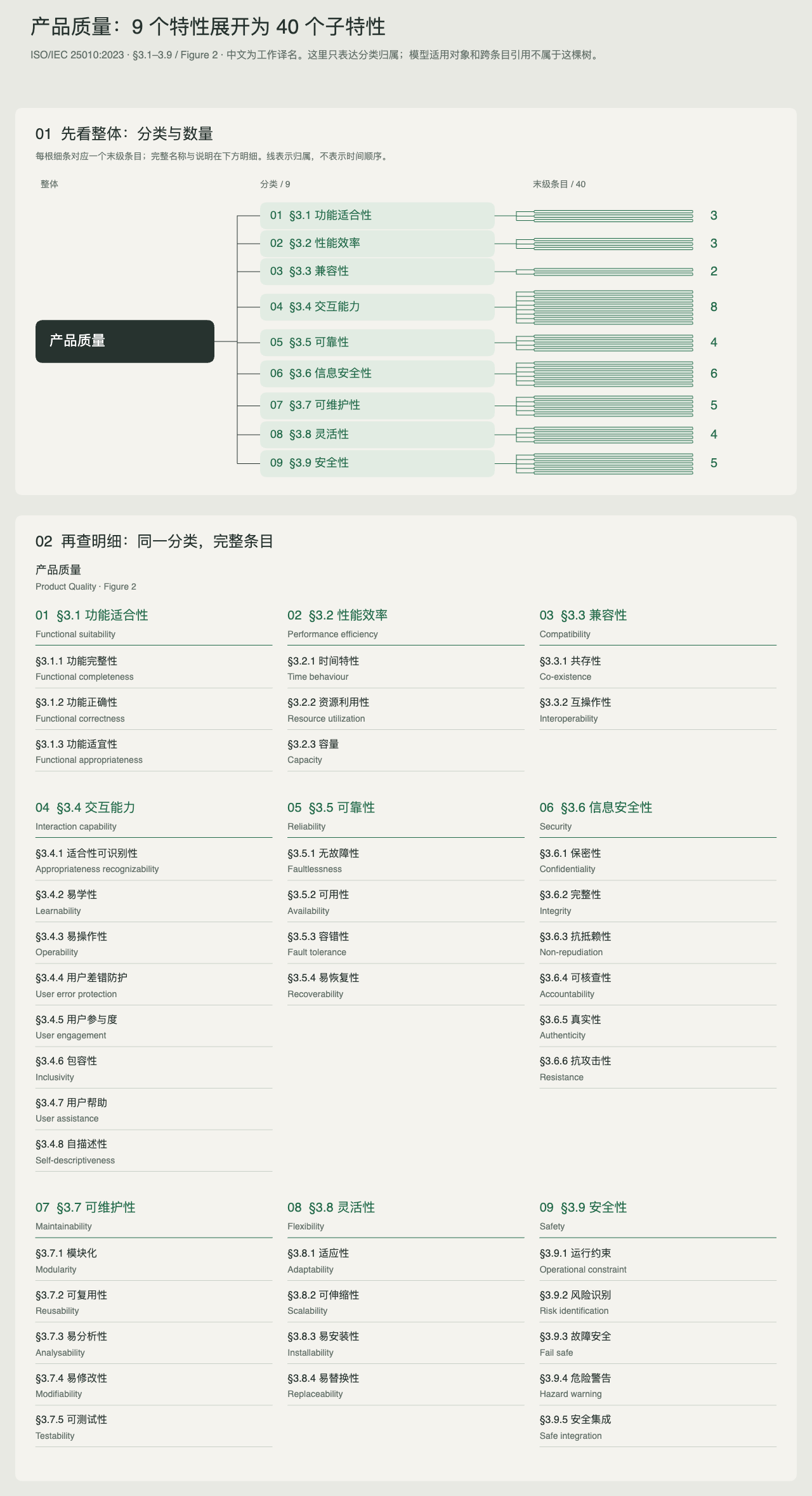
This is a native canvas export from a frozen ISO/IEC 25010:2023 Figure 2 classification: 50 nodes and 49 relations. It demonstrates deterministic rendering, not a claim that the whole PDF was automatically converted. Chinese labels are working translations.
After selecting /canvas-diagram, try:
Create an editable classification overview and complete detail index from the content above.
Use diagram_create with kind: hierarchy and composition: atlas only if the source has
one root, categories and terminal entries. Preserve all labels, descriptions and relations.
If the structure has cross-links or more levels, choose another diagram type without dropping them.
Scope: clean, ungrouped, three-level classification trees. Cycles, multiple parents, deeper paths and categories without entries are rejected. Manual edits to duplicated labels/counts do not synchronize automatically; connectors are editable but do not automatically re-layout. Existing saved canvases retain their content.
Why keep the diagram in DSH?
- Reuse the article context. Ask the Agent to organize content already in the conversation. The plugin itself does not fetch webpages.
- Keep editing after generation. Change labels, nodes, and layout in Excalidraw, with autosave in the current session.
- Take the result with you. Export PNG/SVG for sharing or
.excalidrawfor further editing. Ask the Agent to read the canvas when you want it to incorporate your manual changes.
An actual exported result
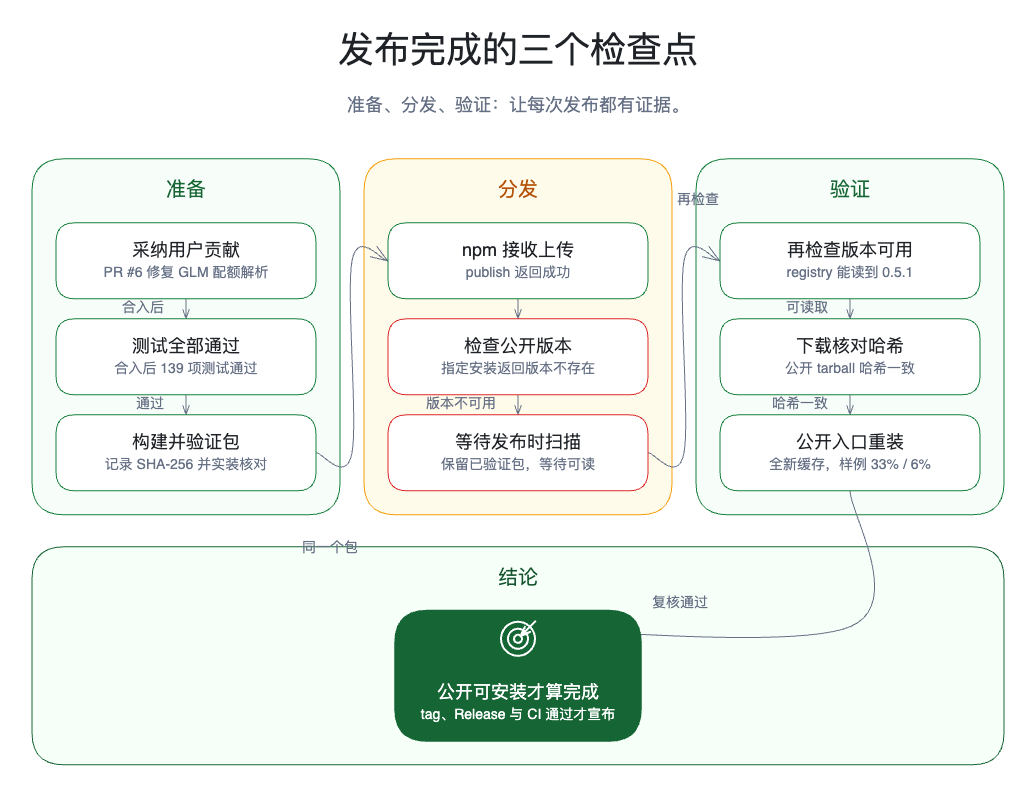
This report board comes from a real release retrospective. Generated with published 0.5.0, manually refined in the canvas, then exported; this is not a UI mockup. Click to view at full size.
Quick install
DeepSeek Harness Desktop (recommended)
Requirements:
- The official DeepSeek Harness Desktop app, version
0.1.7-rc.2. Verified on macOS Apple Silicon; Windows x64 has not been tested yet. Desktop0.1.7-rc.1rejects this plugin, so accept the in-app update to0.1.7-rc.2first. - Nothing else: Desktop bundles its own Node.js and package manager.
The official app is signed by Hangzhou DeepSeek Artificial Intelligence Co., Ltd. See the official DeepSeek Harness repository. Community "DSH desktop" wrappers are different applications and have not been tested with this plugin.
- In the sidebar, open Plugins, then click Add plugin.
- Enter
[email protected]and click Install. Keep the version in the name: DSH's package manager skips releases published less than 24 hours ago, so a baredsh-diagramcan pick an older release that fails with "[email protected] is incompatible with DSH 0.1.7-rc.2". - Click Enable now. The plugin appears under Installed as version
0.6.1. - Open a session and look for the Canvas tab.
Desktop keeps its plugins in its own profile. Manage them on the Plugins page; the terminal commands in this README apply to DSH Web only.
DSH Web (terminal)
Requirements:
- DeepSeek Harness
0.1.7-rc.2(latest); also verified on0.1.5-rc.1and0.1.5-rc.2.0.1.2-rc.1remains in the supported range, but a fresh install of that DSH release currently fails to startdsh webeven without plugins, so it could not be re-verified. DSH0.1.1-rc.2and older need dsh-diagram0.4.0 - Node.js
^22.19.0or>=24.0.0 - pnpm
>=10onPATH(the DSH plugin command delegates package management to pnpm) - DSH Web bound to
127.0.0.1
DeepSeek Harness does not install a global dsh command by default; the official way to launch it is through npx. The commands below work on any machine that meets the requirements:
npx -y @deepseek-ai/[email protected] plugin --profile web add [email protected]
npx -y @deepseek-ai/[email protected] --profile web --dump-config
npx -y @deepseek-ai/[email protected] web
The config dump should contain this block:
# == dsh-diagram
- id: diagram
  name: dsh-diagram
If DSH Web was already running, restart it after adding or updating the plugin. Then open an existing session and look for the Canvas tab.
Other launch methods: source checkout or global dsh command
Running DSH from source
Run the same commands from a DeepSeek Harness checkout that matches a supported release, using pnpm dsh as the prefix:
pnpm dsh plugin --profile web add [email protected]
pnpm dsh --profile web --dump-config
pnpm dsh web
If dsh is on your PATH
If you installed the CLI globally or created a shell alias, the short form works the same way:
dsh plugin --profile web add [email protected]
dsh --profile web --dump-config
dsh web
Later sections use this short dsh form; substitute the npx -y @deepseek-ai/[email protected] or pnpm dsh prefix that matches how you run DSH.
Create your first diagram
Open a DSH session that already contains the article, or let the Agent read it with DSH's existing file or Web tools.
Type
/in the composer and pick canvas-diagram — the plugin registers this skill so you never have to remember a tool name. Plain requests such as "把这篇文章画成架构图" route through the same skill automatically. An explicit prompt also works:Create one clear diagram for this article. Choose the most suitable diagram type, call diagram_create, and keep the title and node labels concise.For the optional editorial hand-drawn treatment, say so explicitly:
Turn this article into an editable sketchnote diagram. Use semantic icons only for the key concepts.After the tool finishes, select Canvas at the top of the conversation.
Edit the diagram directly. Saved means the Host has completed a durable write.
Export the result, or ask the Agent to call
diagram_readbefore continuing from your manual changes.
Supported layouts include reports, flowcharts, architecture diagrams, timelines, hierarchies, comparisons, and relationship diagrams. Ask for sketchnote for the optional hand-drawn style, or keep the default clean style.
What it adds
| Surface | Behavior |
|---|---|
diagram_create |
Creates a diagram for the current Agent Session from a compact semantic specification. visualStyle: "sketchnote" selects the optional hand-drawn compiler; controlled icon values compile to editable native primitives rather than images. |
diagram_read |
Reads a bounded summary of the current editable scene into the conversation transcript. |
canvas-diagram skill |
Built-in bilingual routing entry: selectable from the composer's / menu and matched by generic diagram requests, so the Agent reaches diagram_create without exact tool-name prompts. |
| Inline chat preview | After diagram_create, a preview card appears in the conversation flow and always renders the diagram's current content — including later canvas edits — as a static SVG. |
| Canvas tab | Opens the Excalidraw editor only when selected, keeping it out of the normal chat startup path. |
| Diagram list | Switches between diagrams; collapses on desktop and becomes a selector on narrow screens. |
| Autosave | Debounced durable writes with revision conflict protection and tab-local pending-draft recovery. |
| Export | Downloads .excalidraw, SVG, or PNG files. |
The plugin does not fetch articles and does not inject UI into arbitrary websites. Article acquisition stays with the DSH conversation, file tools, or Web tools.
Compatibility
| Item | Supported in 0.6.1 |
|---|---|
| DeepSeek Harness Desktop | 0.1.7-rc.2 (macOS Apple Silicon verified; Windows x64 not yet tested) |
| DeepSeek Harness Web | 0.1.7-rc.2, 0.1.5-rc.1, 0.1.5-rc.2, 0.1.2-rc.1 (older DSH: use [email protected]) |
| Profile | desktop (managed on the Plugins page) or web |
| Web bind address | 127.0.0.1 only (Desktop's own Host already uses loopback) |
| Node.js | ^22.19.0 or >=24.0.0 |
| Editor | Excalidraw 0.18.1 |
| Storage | Plugin-owned DSH storage-domain sidecar |
| Install artifact | Prebuilt npm package or GitHub Release tarball with SHA-256 checksum |
The npm package has no install lifecycle scripts. Installation adds a bundle to the selected DSH profile; it does not compile code or modify the DeepSeek Harness source tree.
Manage the installation
In Desktop, use the Plugins page. The commands below are for DSH Web.
Update
npx -y @deepseek-ai/[email protected] plugin --profile web update [email protected]
Restart DSH Web after the update.
Install the exact latest public GitHub Release artifact
The release page publishes the same prebuilt tarball with a SHA-256 checksum:
dsh plugin --profile web add \
  https://github.com/hanzhangzzz/dsh-diagram/releases/download/v0.6.1/dsh-diagram-0.6.1.tgz
See v0.6.1 for the checksum and release notes.
Remove
dsh plugin --profile web remove dsh-diagram
Removing the bundle does not delete saved diagram sidecar data. Reinstalling the plugin can make that data available again to the same Session identity.
Data, security, and limits
- The Excalidraw scene is the current document. The original semantic specification is retained only as its creation source.
- A diagram is bound to its Session id and
{createdAt, cwd}lifecycle fingerprint. A reused Session id cannot read older data. - Session fork and Session export do not copy or include diagram sidecar data.
- Editor assets and fonts are self-hosted by the bundle; the canvas does not depend on an external CDN.
- Static paths, RPC bodies, request origin, Session ownership, and scene contents are validated by the Host before persistence.
- Images, iframes, embeddables, external links, and non-empty binary files are rejected in this release.
- Defaults limit each scene to 1 MiB and all stored diagram records to 64 MiB. Element, text, diagram-count, and byte limits are explicit in
cordis.patch.yml. - The plugin intentionally refuses to load when DSH Web binds to
0.0.0.0; this release does not expose the canvas RPC to a LAN.
Troubleshooting
Desktop says "[email protected] is incompatible with DSH 0.1.7-rc.2"
The package manager picked an older release. Add the plugin again as [email protected], with the version. If your Desktop is 0.1.7-rc.1, update the app to 0.1.7-rc.2 first.
A newly published version was not installed
pnpm 11's default minimumReleaseAge excludes versions less than 24 hours old. Pin an exact version on release day rather than relying on @latest; the trial command above already pins 0.6.1.
The Canvas tab is missing
In Desktop, confirm that the plugin shows version 0.6.1 under Installed and that you clicked Enable now. In DSH Web, confirm that you installed the plugin into the web profile, that --dump-config contains the dsh-diagram block shown above, and that DSH Web was restarted after installation.
The Agent wrote an SVG or Mermaid file instead of using the Canvas
The model chooses freely among all tools and workspace skills in the session. The plugin registers its own canvas-diagram skill so generic diagram requests normally route to the canvas; if a workspace skill with a stronger matching description still wins, pick canvas-diagram from the / menu or mention the Canvas explicitly — for example, "call diagram_create so I can edit the result in the Canvas tab".
The Agent does not know about my manual edits
Manual edits are not silently injected into model context. Ask the Agent to call diagram_read; its result is then recorded in the normal conversation transcript.
Can the plugin fetch an article from a URL?
No. First let DSH obtain the content through the conversation, a file tool, or a Web tool. Then ask for a diagram.
Why does startup fail with 0.0.0.0?
The canvas RPC is not designed for LAN exposure in this release. The plugin fails closed unless DSH Web is physically bound to 127.0.0.1.
What should I do after a revision conflict?
The editor keeps the local draft. Export it before choosing Reload server version if you need to preserve both versions.
Why can SVG export log a font fallback warning?
Under the strict content security policy, Excalidraw may fall back from glyph subsetting to embedding the full self-hosted font. The exported SVG remains self-contained; the plugin does not enable unsafe-eval to suppress the warning.
Source preview: structured diagrams
The source version adds numbered, editable supporting notes, decision diamonds, explicit parallel architecture regions (composition: regions), and aligned comparison criteria. Main-graph reading and whole-document overview are separate viewport actions; all exports retain the complete current scene. These changes are not included in the public 0.6.1 package above. Build this source to try the prerelease.
Keep decision-changing conditions in the main node. Supporting notes are not automatically synchronized with manual edits to their referenced labels. Shared comparison labels must represent the same criterion; the renderer aligns matching labels, not their meaning.
Build from source
git clone https://github.com/hanzhangzzz/dsh-diagram.git
cd dsh-diagram
pnpm install --frozen-lockfile
pnpm run bundle
pnpm pack
Install the generated tarball from a DeepSeek Harness checkout:
cd /path/to/deepseek-harness
pnpm dsh plugin --profile web add /absolute/path/to/dsh-diagram-VERSION.tgz
pnpm dsh --profile web --dump-config
pnpm dsh web
Developer checks:
pnpm run typecheck
pnpm run test
pnpm run bundle
pnpm pack --json
pnpm run smoke:dsh-install
Every installable development commit must use a new prerelease version; never
repack changed code under an existing version. Before a public release, pack
once and exercise the same DSH profile update path from the previous public
version to that exact tarball:
pnpm run smoke:dsh-install -- \
  --tarball /absolute/path/to/dsh-diagram-VERSION.tgz \
  --upgrade-from PREVIOUS_PUBLIC_VERSION
This verifies the client-side update mechanics and both pre/post-update Web
boots without publishing the candidate. Registry discovery through @latest
is verified separately after the version is publicly released.
See DESIGN.md for the product and implementation decisions.
Contributing
Bug reports and focused pull requests are welcome in GitHub Issues. If the plugin improves your article-to-diagram workflow, a GitHub star helps other DSH users discover it.
License
The plugin's own code is licensed under MIT. Licenses for bundled JavaScript and self-hosted fonts are listed in THIRD_PARTY_NOTICES.md and third_party_licenses/.
For contributors, pnpm review:atlas opens the deterministic comparison harness; use /tests/visual/atlas.html or add ?case=release for the second subject.
安装
装一次目录插件,之后本站所有插件都能让 DeepSeek Harness 自动找、自动装:
dsh plugin add dshbase-catalog然后对 agent 说「帮我装 dsh-diagram」,它会在目录里找到并自动安装。文档:dshbase-catalog · 已验证场景包。
该插件是 GitHub 源码(未发 npm)——直接从仓库装:
Web profile:
dsh plugin --profile web add github:hanzhangzzz/dsh-diagramHeadless(CLI)profile:
dsh plugin --profile headless add github:hanzhangzzz/dsh-diagram实测报告
验证通过:从 GitHub 源码完成 L1 安装 + L2 加载 + L3 运行(dsh 0.1.0-rc.6)。
分享徽章
把这枚徽章粘进 README——它会链回本页,实测状态变化时自动更新:

[](https://dshbase.com/zh/plugins/dsh-diagram/)<a href="https://dshbase.com/zh/plugins/dsh-diagram/"><img src="https://dshbase.com/badges/dsh-diagram.svg" alt="dshbase 实测可装"></a>