
插件目录 / Developer / dsh-edit-approval
dsh-edit-approval
已验证 · 实测可装 SiriLee
功能简介
DeepSeek Harness plugin: per-edit approval with red/green line diff before write/edit/str_replace_editor (approve / reject / always allow)
可用 — 实测通过,早期项目
DeepSeek Harness plugin: per-edit approval with red/green line diff before write/edit/str_replace_editor (approve / reject / always allow) 实测能干净安装、正常启动。早期项目,但功能可用。
「已验证」表示我们的自动化 CI 在干净 profile 里实际执行了 dsh plugin add 并启动成功——仅此而已。功能描述与版本兼容性均为作者声明。这不是安全审计,也不代表对第三方代码的背书。
README
dsh-edit-approval
Ask-before-act approval for DeepSeek Harness: every write / edit / str_replace_editor call asks before the file is touched — a red/green line-level diff, approve once or reject — and every bash command asks before it runs, each with its own master switch in Settings → General.


English | 中文
A deliberately focused plugin with two mirror-symmetric approval gates — edits and commands — so the agent can never modify files or run commands without your say-so.
| Gate | Intercepts | Default | Panel |
|---|---|---|---|
| Edit approval | write / edit / str_replace_editor |
On | Red/green line-level diff — approve once or reject |
| Bash approval | bash |
Off | Description headline + native command row |
Both gates ride the harness's own serviceAsk seam: the plugin returns { kind: 'ask', reason } from tools/pre-execute, the harness routes it into the web approval panel — zero UI changes in the host — allowed-once proceeds, rejected denies the call, and under the never policy the plugin delegates so full-access sessions keep working.
Preview
After installing, Settings → General gains two rows — 编辑审批 / 命令审批 (Edit approval / Bash approval). Every write-family call shows the red/green diff panel; after you enable Bash approval, every command shows a panel whose white headline is the agent's description and whose grey row is the raw command text.
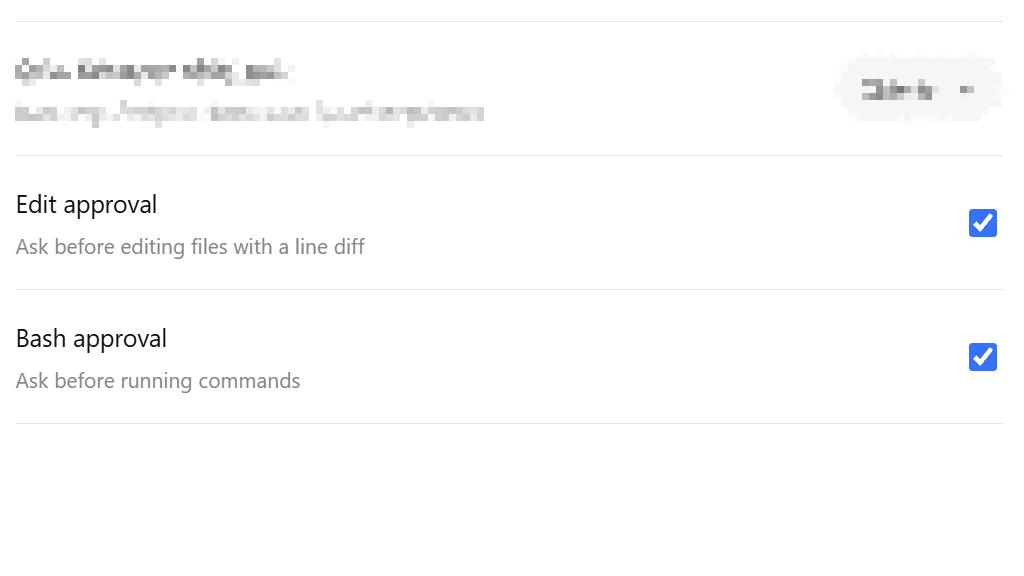 Master switches in Settings → General |
 Edit approval panel — red/green line diff |
 Bash approval panel — description + command |
 /approval-edit and /approval-bash commands |
Install
dsh plugin --profile web add dsh-edit-approval
Restart dsh web (--profile web) after installing.
For contributors: install from a local checkout or a pinned commit — dsh plugin --profile web add /path/to/dsh-edit-approval or dsh plugin --profile web add github:SiriLee/dsh-edit-approval#<sha> — or from an offline tarball (npm pack then dsh plugin --profile web add ./dsh-edit-approval-<version>.tgz). A git install fails on first run until you add an allowBuilds key to the profile's pnpm-workspace.yaml (pnpm blocks git dependencies from running build scripts); after that it runs the plugin's prepare and installs it. npm pack also runs prepare, so a tarball always carries a prebuilt lib/ (with .d.ts) and the LICENSE.
Usage
- Edit approval is on by default. Any
write/edit/str_replace_editorcall asks before the file is touched. The panel shows only the changed lines — removals red, additions green — with a right-alignedNN|line-number gutter and a…ellipsis marking skipped context and hunk gaps. - Approve once or reject.
allowed-oncelets the call proceed;rejecteddenies it and reports back to the model. - Bash approval is off by default — enable it in Settings → General or with the command below. The panel's white headline is the description (e.g.
bash · push to remote); the grey row below is the raw command text, rendered natively by the harness. - Command-line entry:
/approval-edit on|off|statusand/approval-bash on|off|status— the same source as the settings rows. - Allow-list (config file): in the
bash-approvalsettings namespace,allowholds command prefixes that always pass. Matching is whitespace-normalized (git pushhitsgit push) so a bypass via extra spaces fails. There is deliberately no UI for it yet.
How it works
The plugin listens on the tools/pre-execute waterfall (the seam the harness runs before a tool executes) and dispatches to one of two gates by tool name — edits win on overlap.
1. Edit approval
For each intercepted write-family call it:
- Resolves the target through
ctx.fs, applying the same session-cwd rule the fs tools use (a relative..path canonicalizes the cwd). - Reads the current content and reconstructs the proposed content from the tool's arguments, mirroring each tool's semantics:
write— full text;edit— single unique replace (orreplace_all);str_replace_editor—str_replaceunique replace,insertline insertion,createusesfile_text. - Computes a line-level diff with jsdiff's
structuredPatch(Myers) — the same reference implementation and the same 3-line context window the harness's write/edit result cards use — so the approval preview and the post-approval result card derive from the same algorithm, and a one-line edit in a large file stays a one-line diff. - Returns
{ kind: 'ask', reason }with a header line (tool · file (op): N insertions, M deletions) plus the diff text. The harness'sserviceAskroutes it throughctx.approvalinto the web approval panel.
2. Bash approval
A pure decision, no fs involved — it never reads or writes anything:
- Passes when the gate is disabled, the tool is not in
tools, the command is blank, or the call is a sandbox escalation (sandbox_permissions+justification— those carry their own approval and must not double-prompt). - Allow-list first: a whitespace-normalized prefix match passes without asking.
- Otherwise returns
{ kind: 'ask', reason }with a single-line headline —bash · <description>(or justbashwhen the description is blank). The command text is not embedded in the reason: the harness renders it natively in the panel's command row, so nothing is duplicated.
3. Shared policy handling
The session approval policy (ask / never) keeps applying. Under never (e.g. danger-full-access), every ask this plugin emits would be deterministically rejected by the approval service, silently breaking every edit and command in a full-access session — so both gates delegate via next() and let the sandbox enforce. The plugin never expands access or changes the sandbox mode.
4. The approval panel
The browser half (dsh.client) enhances panels as they appear (a per-animation-frame MutationObserver, all side effects inside a single ctx.effect torn down on unload / HMR):
- Edit panels are rebuilt from the plain-text headline into only the changed rows — removals red, additions green, right-aligned
NN|gutter — plus awhite-space: pre-wrapcompensation and a collapse button on multi-line diffs. - Bash panels are left harness-native: a
dsh-ea-kind-commandmarker only, no restyling, no rebuild — the white description headline and grey command row are exactly what the harness renders.
Configuration
Runtime configuration lives in two settings namespaces — edit-approval and bash-approval — layered as schema defaults < cordis row config < user settings page (persisted). The cordis row ships without config on purpose; a profile patch overrides deployment defaults by restating only the keys it changes:
# profile's cordis.patch.yml
- id: dsh-edit-approval
  name: dsh-edit-approval
  config:
    minDiffLines: 2
    includeCreate: false
| Namespace | Key | Default | Description |
|---|---|---|---|
edit-approval |
enabled |
true |
Master switch for edit approval |
edit-approval |
tools |
['write','edit','str_replace_editor'] |
Whitelist of intercepted registered tool names |
edit-approval |
minDiffLines |
0 |
Ask only when the change touches at least this many lines; smaller changes pass silently |
edit-approval |
includeCreate |
true |
Whether creating a new file asks for approval |
edit-approval |
includeDelete |
true |
Whether clearing/emptying a file asks for approval |
bash-approval |
enabled |
false |
Master switch for bash approval |
bash-approval |
tools |
['bash'] |
Whitelist of intercepted registered tool names |
bash-approval |
allow |
[] |
Command prefixes that always pass (whitespace-normalized) |
The config surface is forward-compatible by contract: new keys are only ever added with defaults, never removed or reinterpreted — an older plugin version silently ignores unknown keys, so a newer config file stays safe on an older release.
What it deliberately does NOT do
- Escape or expand sandboxing — it never changes the sandbox mode or grants access; escalation calls pass through to the sandbox's own approval.
- Intercept inside commands — file edits performed inside a
bashcommand are not edit-gated (they are covered by Bash approval, when enabled). - Partial application — the diff is a read-only preview (
+/-line markers); "apply only some lines" is not supported. - Ask about calls the tool itself would fail on — e.g.
str_replace_editor createagainst an existing file, a non-unique or missingold_str/old_string; they pass through for the tool to report. An emptyold_stringeditpreview deviates from the tool (treated as not-found) — safe, it never falsely blocks. - Keyboard shortcuts (Enter to approve / Esc to reject) — split into the dedicated dsh-approval-hotkeys plugin.
- Post-edit review / rollback — covered by the community dsh-change-review.
- Permission-tier extensions — covered by the community dsh-auto-approval-plugin.
Compatibility
- Node.js
^22.19.0 || >=24.0.0. - DeepSeek Harness web profile (
dsh --profile web); peer@deepseek-ai/*packages are resolved by the harness at runtime. - The registered tool name is
str_replace_editor(underscores), distinct from the npm package name@deepseek-ai/dsh-tool-str-replace-editor.
[!WARNING]
This project and DSH are both in developer preview. Pin exact versions in
reproducible environments and review the behavior notes above.
Security
The plugin reads the target file only to compute the edit preview (at the tools/pre-execute interception point); the bash gate touches no files at all. It never writes files itself — the tool body performs the write only after you approve. It makes no network requests and accesses no credentials.
Development
npm install            # devDeps from the npm registry
npm run typecheck      # tsc on both compilation surfaces (host + client)
npm test               # vitest: diff / guard / command-guard / display-parity / integration / client suites
npm run build          # full build: tsc → lib/ (with .d.ts) + lib/client.js bundle
npm run build:portable # optional lightweight esbuild build, no typecheck
node scripts/verify-host.mjs   # verify the BUILT host artifact end-to-end (both namespaces, all slash commands)
prepare runs the full build, so git installs and npm pack / npm publish always produce a complete lib/ (with .d.ts) and the LICENSE.
Release
Releases go out through GitHub Actions Trusted Publishing (OIDC, no stored NPM_TOKEN). See docs/npm-trusted-publishing-guide.md.
npm version patch && git push origin main --tags # triggers .github/workflows/publish.yml
The workflow verifies the tag matches package.json, runs typecheck + tests + a full build + artifact verification, publishes with Sigstore provenance, and creates a GitHub Release. CI (.github/workflows/ci.yml) runs the same checks on every push / PR. The publish step is idempotent — a version already on npm is skipped.
License
安装
装一次目录插件,之后本站所有插件都能让 DeepSeek Harness 自动找、自动装:
dsh plugin add dshbase-catalog然后对 agent 说「帮我装 dsh-edit-approval」,它会在目录里找到并自动安装。文档:dshbase-catalog · 已验证场景包。
该插件是 GitHub 源码(未发 npm)——直接从仓库装:
Web profile:
dsh plugin --profile web add github:SiriLee/dsh-edit-approvalHeadless(CLI)profile:
dsh plugin --profile headless add github:SiriLee/dsh-edit-approval实测报告
验证通过:从 GitHub 源码完成 L1 安装 + L2 加载 + L3 运行(dsh 0.1.0-rc.6)。
分享徽章
把这枚徽章粘进 README——它会链回本页,实测状态变化时自动更新:

[](https://dshbase.com/zh/plugins/dsh-edit-approval/)<a href="https://dshbase.com/zh/plugins/dsh-edit-approval/"><img src="https://dshbase.com/badges/dsh-edit-approval.svg" alt="dshbase 实测可装"></a>