
插件目录 / Developer / dsh-find-plugin
dsh-find-plugin
已验证 · 实测可装 awesome-dsh-plugin
功能简介
在 Agent 内搜索发现 DSH 插件:实时 GitHub dsh-plugin 话题搜索,按 star 排行。
推荐 — 实测可用且热门
在 Agent 内搜索发现 DSH 插件:实时 GitHub dsh-plugin 话题搜索,按 star 排行。 实测能干净安装、正常启动。149+ stars,社区认可度高,是低风险选择。
「已验证」表示我们的自动化 CI 在干净 profile 里实际执行了 dsh plugin add 并启动成功——仅此而已。功能描述与版本兼容性均为作者声明。这不是安全审计,也不代表对第三方代码的背书。
README
dsh-find-plugin 
English | 中文
A plugin that finds plugins — think /find-skills from skills.sh, for DSH.
Tell your agent what you want ("notify me on WeChat when a task finishes"),
and it searches the DSH plugin ecosystem on GitHub for you — top results by
stars, each with a one-line description and an install command.
Install
# from npm (prebuilt, recommended)
dsh plugin --profile web add dsh-find-plugin

# or from GitHub
dsh plugin --profile web add github:awesome-dsh-plugin/dsh-find-plugin
Usage
Restart dsh web after installing, then just talk to the agent — it callsfind_dsh_plugin on its own whenever plugin discovery helps:
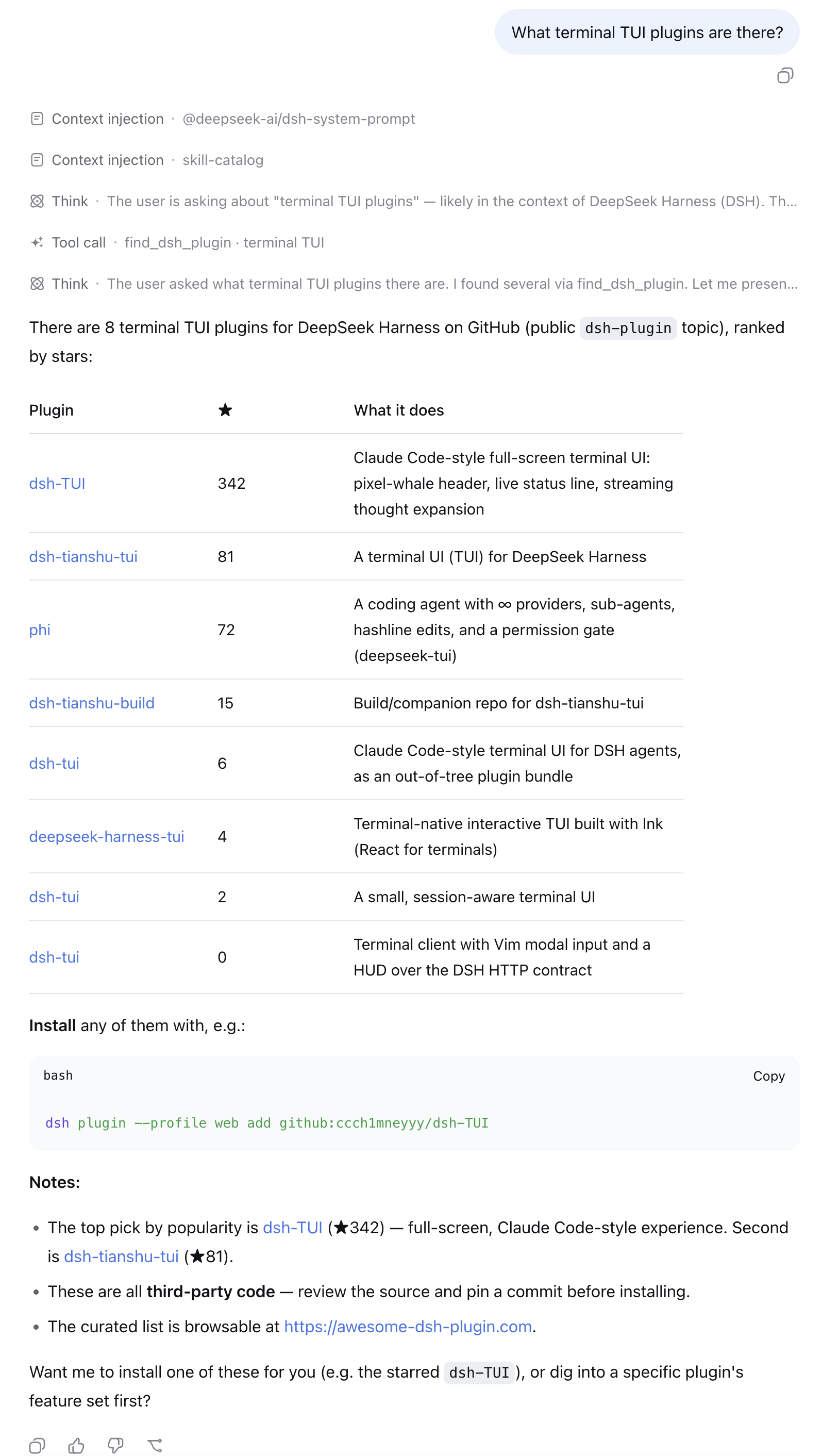
- "What terminal TUI plugins are there?"
- "I want to get a WeChat notification when a task finishes — any plugin for that?"
- "Find me something for reviewing git diffs inside DSH."
Each result comes back with stars, a description, the repo link, and a
ready-to-run dsh plugin add command — ask the agent to install one and
it can run the command for you.
How it works
- Live GitHub repository search scoped to the official
dsh-plugintopic,
re-ranked by stars (5-minute per-query cache). - When a result is also listed on
awesome-dsh-plugin, its hand-written
bilingual description fromplugins.jsonreplaces the GitHub one (thelangparameter picks the language) — ranking is untouched. - Every result comes with a ready-to-run
dsh plugin addcommand. Plugins
are third-party code — review the source and pin a commit.
Rate limits and offline fallback
GitHub's search API allows only 10 requests/minute per public IP when
unauthenticated, and that quota is shared by every host behind the same egress
IP (carrier CGNAT, corporate NAT, …), so a search can fail with HTTP 403 for
reasons outside your control. The plugin therefore:
- uses the
GITHUB_TOKENDSH credential when one is configured (30
req/min, account-scoped, immune to shared-IP exhaustion). Optional — without
it the tool still works, just closer to the anonymous limit; - retries a rate-limited (403/429) or failed request once, then degrades
instead of failing: it falls back to keyword matches from the curated
list and says so in the result note; - caches the curated list on disk (
$DSH_HOME/cache/dsh-find-plugin/) and
revalidates it withIf-None-Match/If-Modified-Since, so restarts and
offline runs use the full ~3400-entry list instead of the small bundled
snapshot. - says why a request failed. Node reports every transport failure as a bare
fetch failedand hides the useful part incause, so the plugin surfaces
the chain (fetch failed ← certificate has expired (CERT_HAS_EXPIRED)) and
names the one trap that otherwise looks like a plugin bug: a system proxy or
VPN accelerator, which Node'sfetchignores unless DSH itself was started
withNODE_USE_ENV_PROXY=1(or--use-env-proxy). A browser has no such
rule — which is why GitHub opens fine and this still fails.
Compatibility
DSH plugin APIs are prerelease-versioned, and node-semver only lets a
prerelease satisfy a range that carries a prerelease on the same
major.minor.patch — so a peer range pinned to one host line silently stops
matching the next one. The declared @deepseek-ai/dsh-tools range therefore
names every shipped line through 0.1.7, and npm run check:peers (run in CI)
resolves the current latest/next host lines from the registry and fails the
day a new one is not covered.
Development
npm run typecheck                     # tsc --noEmit
npm test                              # offline tests (mocked fetch)
FINDP_LIVE=1 npm run test:live        # opt-in real-network cases
License
MIT © awesome-dsh-plugin
安装
装一次目录插件,之后本站所有插件都能让 DeepSeek Harness 自动找、自动装:
dsh plugin add dshbase-catalog然后对 agent 说「帮我装 dsh-find-plugin」,它会在目录里找到并自动安装。文档:dshbase-catalog · 已验证场景包。
Web profile:
dsh plugin --profile web add dsh-find-pluginHeadless(CLI)profile:
dsh plugin --profile headless add dsh-find-plugin包信息
npm:dsh-find-plugin · 版本 0.3.4 · 实测环境 dsh 0.1.0-rc.6
实测报告
端到端验证通过:dsh 0.1.0-rc.6 上 L1 安装 + L2 加载 + L3 运行问答。
使用场景
扩展 agent 的编码能力面——给它一个新工具、工作流或集成,让它接手以前做不了的开发任务。
适合谁
想让 dsh 在真实代码库上像队友一样干活的开发者——能改、能跑、能验证,而不只是回答问题。
二次开发建议
工具/命令面就是缝:暴露更多 SDK 能力、加更聪明的上下文接线,或收紧改代码与验证之间的循环。
分享徽章
把这枚徽章粘进 README——它会链回本页,实测状态变化时自动更新:

[](https://dshbase.com/zh/plugins/dsh-find-plugin/)<a href="https://dshbase.com/zh/plugins/dsh-find-plugin/"><img src="https://dshbase.com/badges/dsh-find-plugin.svg" alt="dshbase 实测可装"></a>