
插件目录 / Developer / dsh-git-graph
dsh-git-graph
已收录 · 尚未实测 WhitePlusMS
功能简介
DSH Web 原生右侧栏只读 Git Graph:提交历史、分支/标签、文件 Diff、未提交改动、两提交比较与历史文件原文。
尚无短证据报告
这里还没有可核对的逐级实测记录。Star 数、目录 test 字段、web-only 标记,以及插件是否需要外部账号或服务,都不会在这里被写成通过或失败。目录徽章仍按 catalog 原样显示。
「已收录」表示该条目依据 npm/GitHub 元数据收录,我们的自动化 CI 尚未安装过该插件。功能描述与版本兼容性均为作者声明。这不是安全审计,也不代表对第三方代码的背书。
README

Version 0.6.1 · DSH 0.2.1-rc.5 · MIT
中文说明 · Static title

dsh-git-graph
dsh-git-graph by WhitePlusMS is a read-only Git visualization plugin for the native right sidebar of DeepSeek Harness (DSH) Web. Browse your workspace's commit history, branches, and file changes without an API key or conversation message.
Quick facts
| Item | Value |
|---|---|
| Plugin name | dsh-git-graph (repository and DSH bundle row id) |
| Repository | https://github.com/WhitePlusMS/dsh-git-graph |
| Install source | GitHub Release archive (dsh-git-graph-0.6.1.tgz), not npm |
| Requires | DSH 0.2.1-rc.5, dsh CLI, pnpm, Git on the DSH Host |
| Operations | Read-only — no stage, commit, push, pull, fetch, merge, or tag |
| Languages and license | Chinese / English UI · MIT |
Install · Usage · Keyboard controls · FAQ · Scope · Uninstall · Documentation
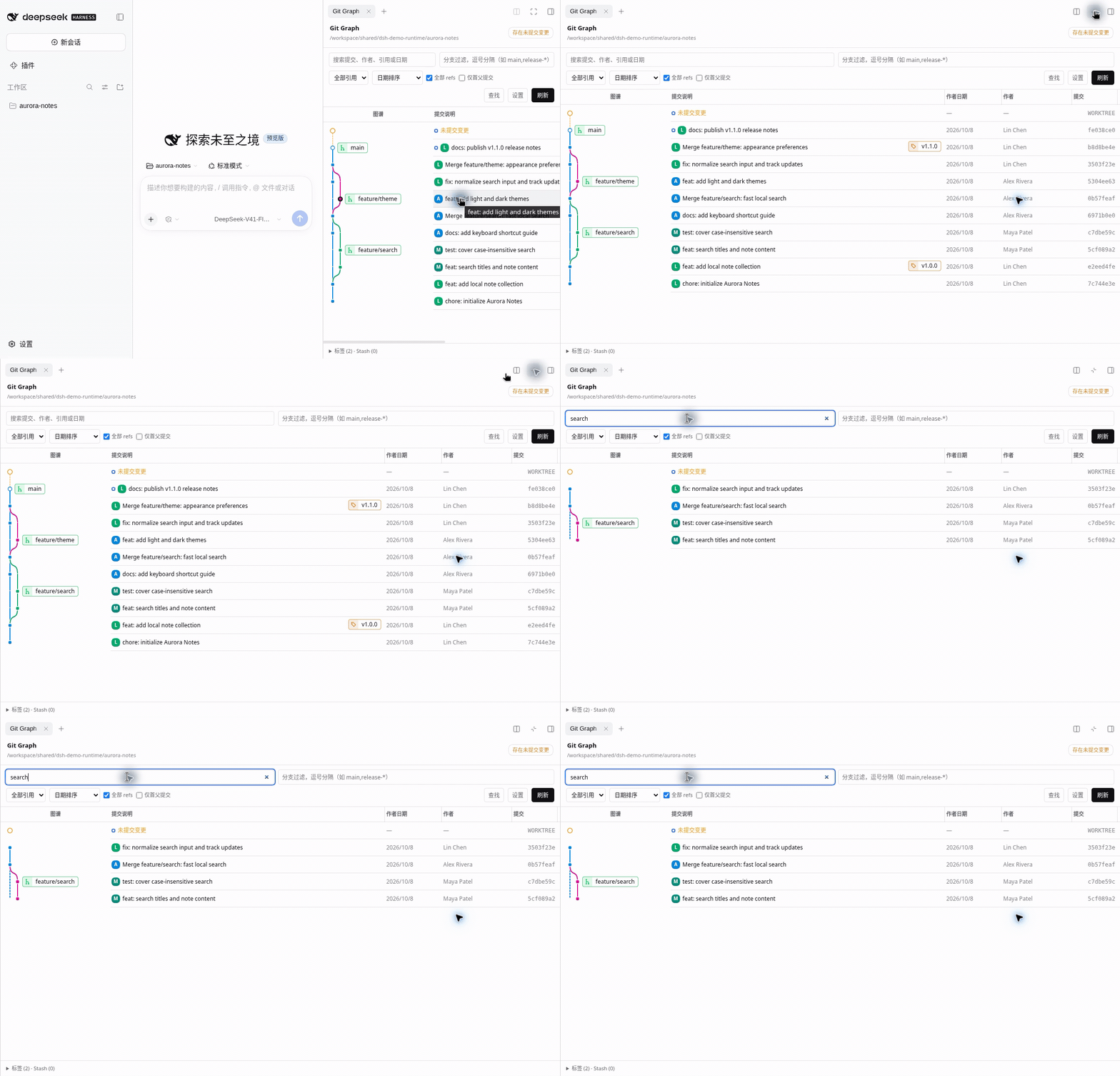
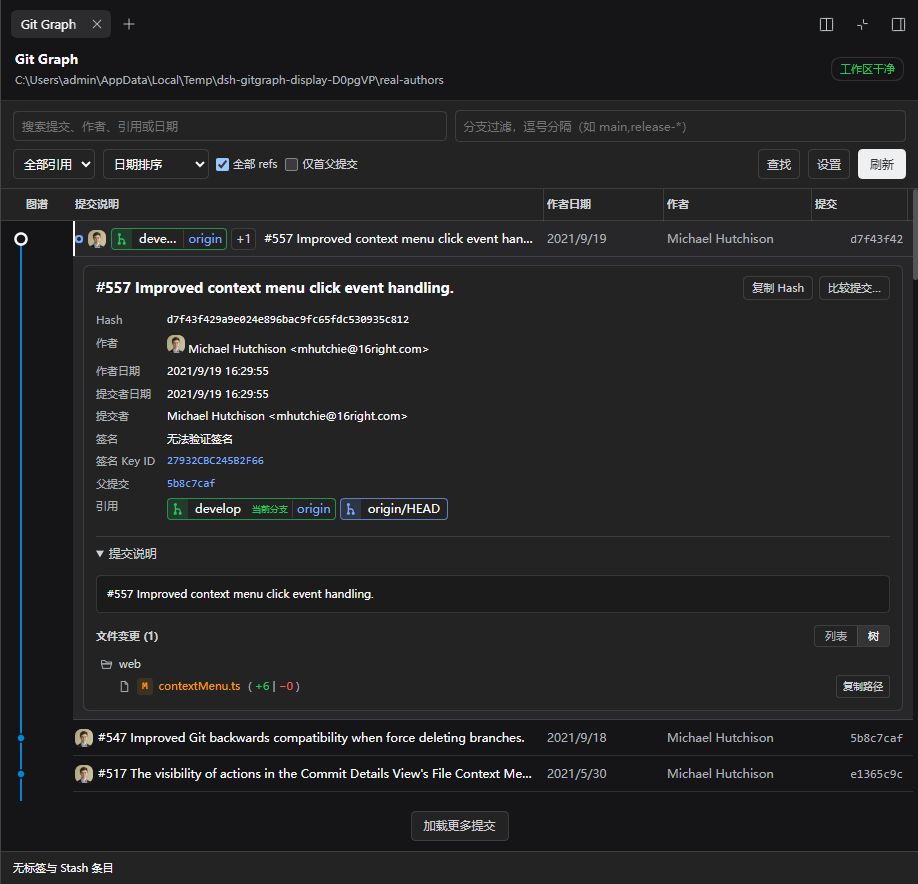
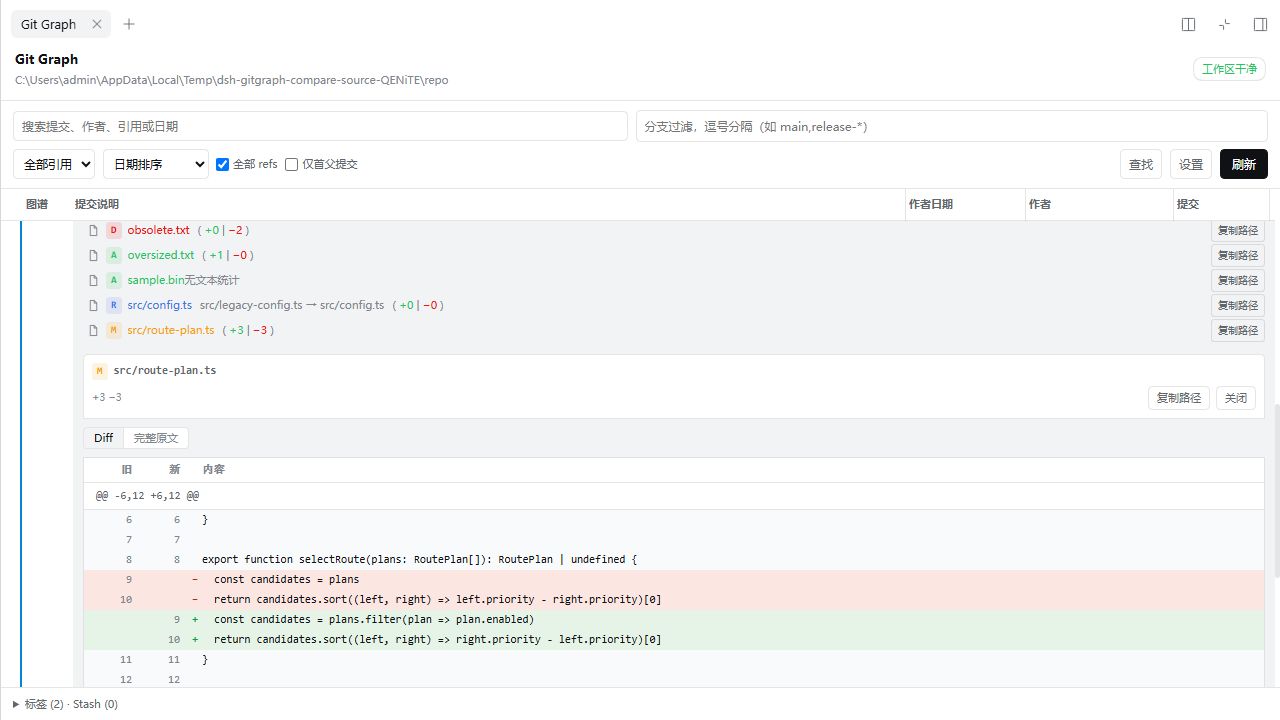
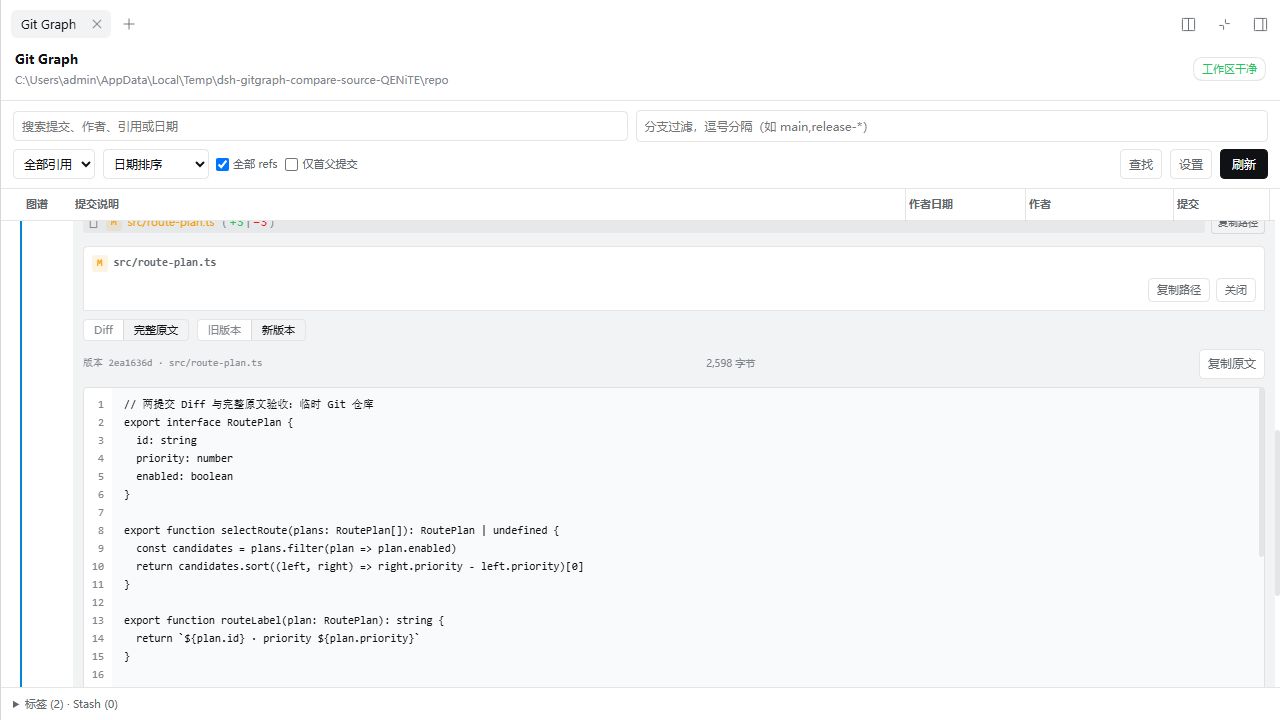
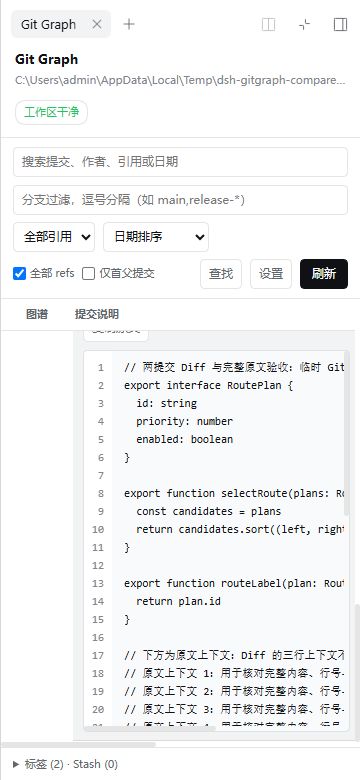
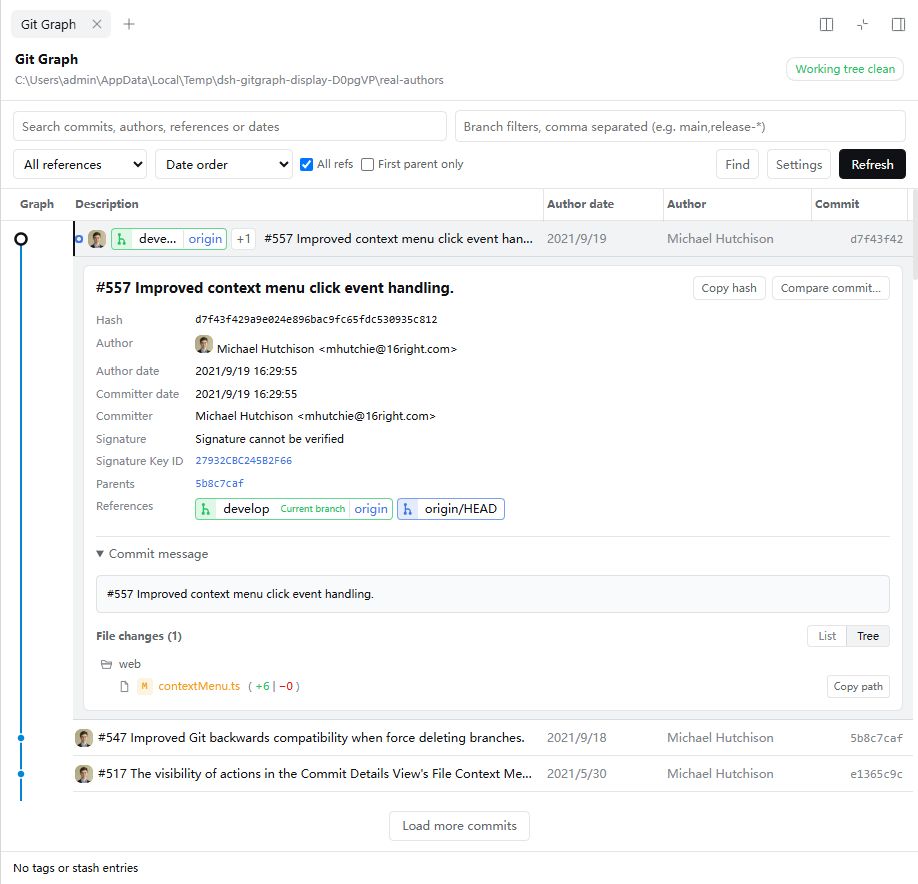
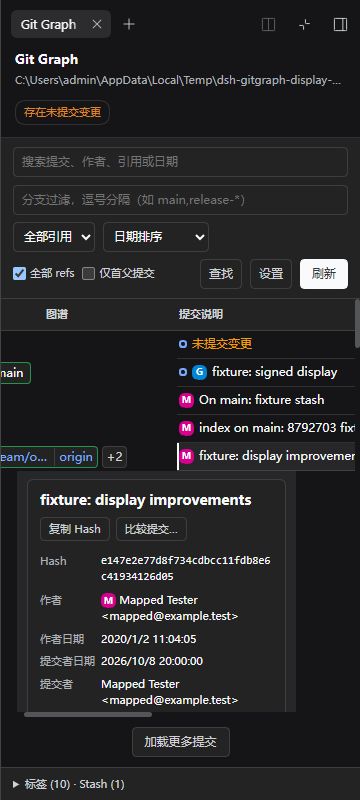
The GIFs were recorded with 0.4.0; the comparison and full-source screenshots below are from 0.5.0. They show earlier versions. The new branch navigation, dropdown controls, and dynamic graph alignment in 0.6.0 were checked in real DSH; see the fix and validation record.
More screenshots: commit comparison, full source, English, and narrow screens
What's new in 0.6.1
- Update the DSH runtime and peer dependencies to 0.2.1-rc.5 and Cordis to 4.0.5. This release targets that runtime. Restart DSH after updating.
What's new in 0.6.0
- Select a local or remote branch to focus its history and locate its tip, without checking it out. Branches, filters, and settings open from the top bar as dropdowns.
- Keep graph nodes aligned while commit details, file diffs, and uncommitted changes expand or collapse. Cancel obsolete reads when switching or closing views; load tag/stash metadata only when opened.
- Show when search stops at its 2,000-commit budget, preserve comma-containing references, use native Git branch patterns, and include file type changes. Root and subdirectory sessions share repository settings.
See the 0.6.0 release notes for fixes and upgrade details.
Features
- History — Commit topology, branches, tags, HEAD, search, and history filters.
- Branch navigation — Search local/remote branches in the branch dropdown, focus one branch, and locate its latest commit without changing the working tree.
- Commit details — Inline details with author/committer dates, parents, references, signature status, and copying.
- References — Every reference on a commit is shown; matching local/remote labels combine, chips wrap onto another line, and the row height follows. Two alternative layouts remain.
- File changes — File tree/list views, per-file diffs, and uncommitted changes; select two commits and open each changed file's diff.
- Historical source — Read and copy the complete text of an old or new file version, with its path, commit hash, line numbers, and size.
- Messages & authors — Commit messages with links, bold, italic, and inline code; real author avatars from GitHub, Gravatar, and the repository's own Git service (Gitea/Gogs).
- Display settings — Resizable columns, date display options, compact rows, line styles, and colour presets, saved per repository.
- Interface — Chinese/English, light/dark themes, pane fullscreen, and narrow-screen support.
Commit details and file diffs
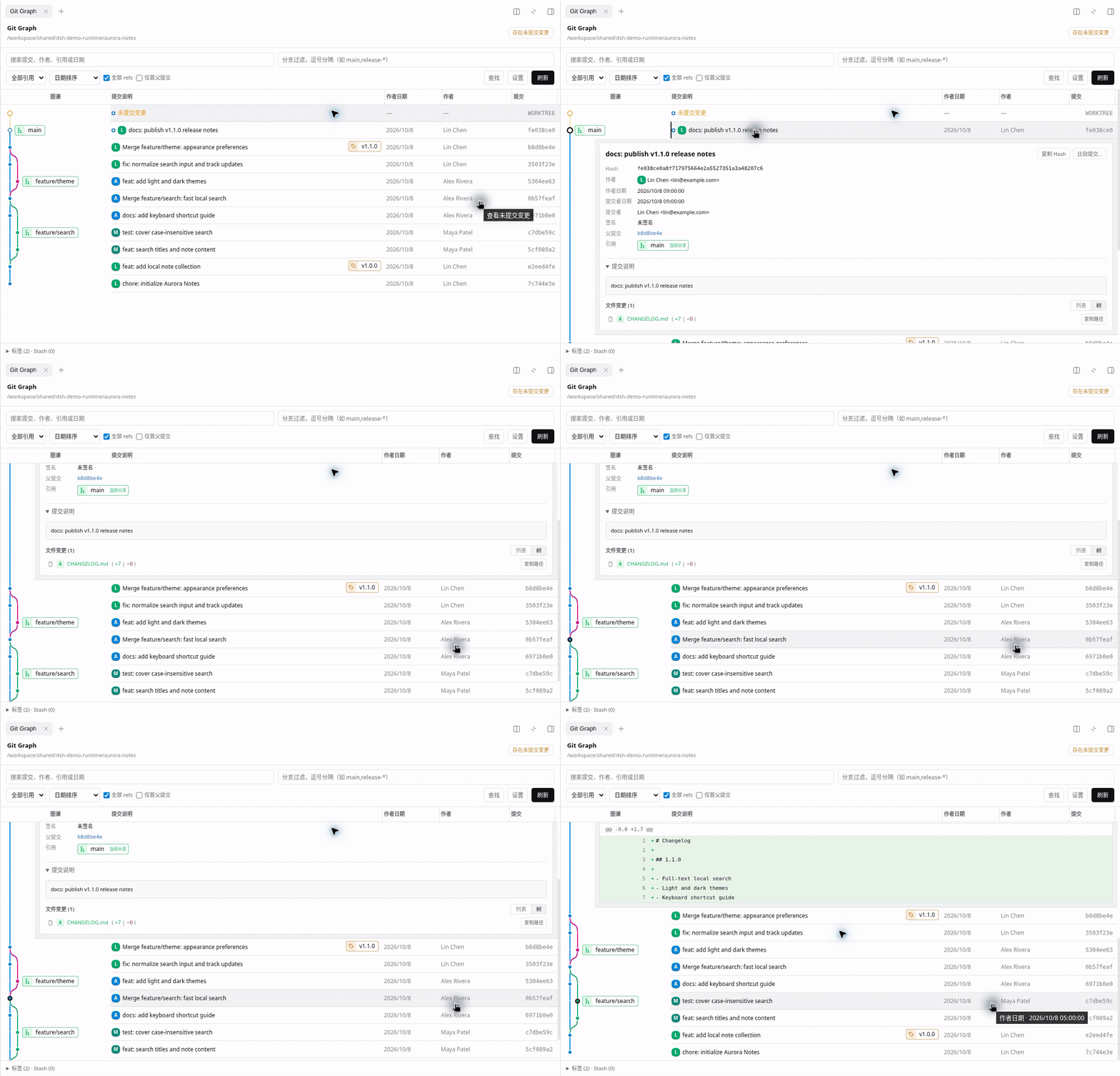
Commit comparison and uncommitted changes
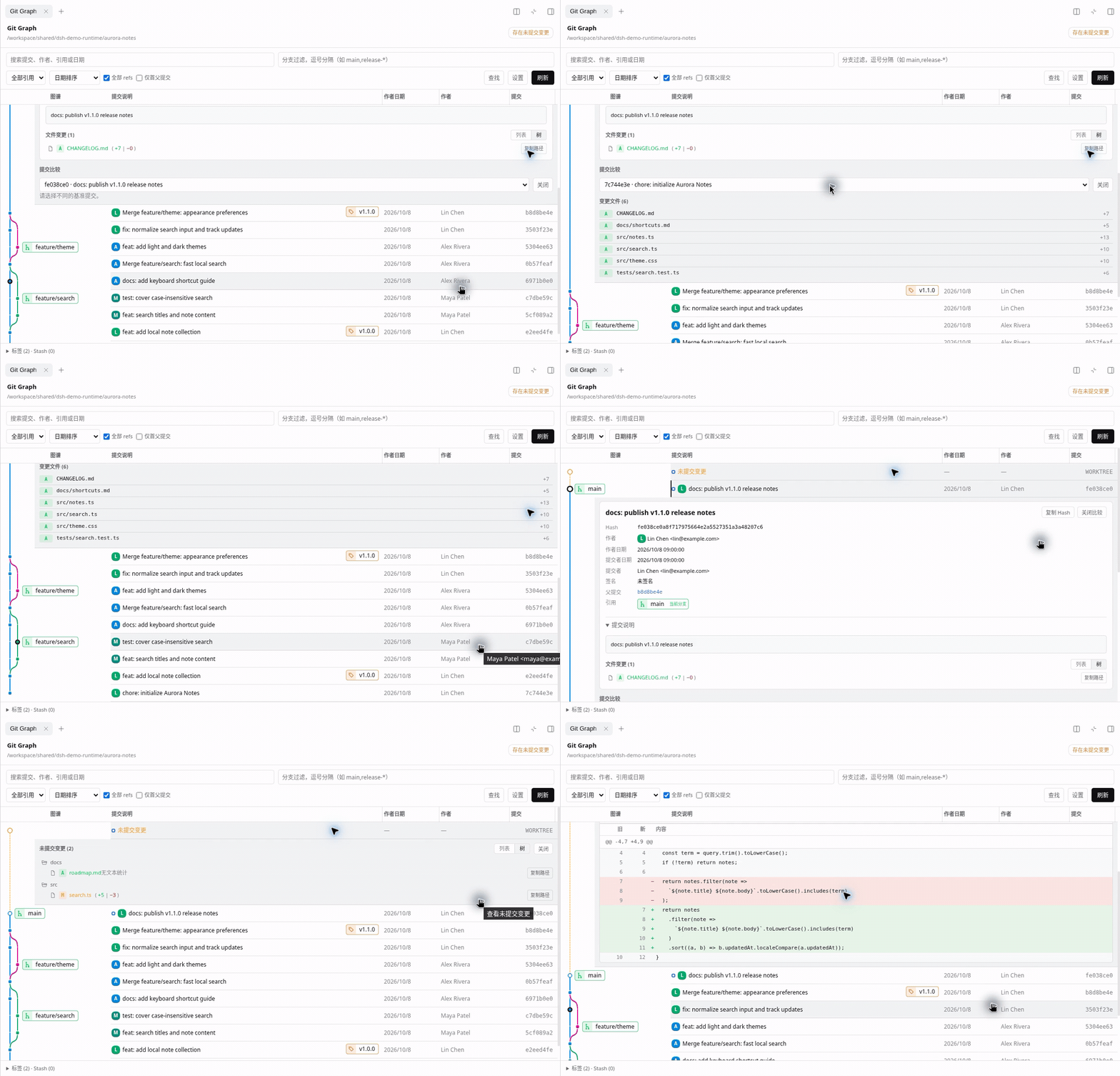
Install or update
Requires DSH 0.2.1-rc.5, the dsh CLI, pnpm for plugin installation, and Git installed on the DSH Host.
Install the prebuilt v0.6.1 Release package through either DSH's plugin page or the CLI. Both accept the same package source. See the official plugin manager guide and packaging guide.
In DSH, open Plugins → Add plugin, paste this URL, install it, and choose Enable now:
https://github.com/WhitePlusMS/dsh-git-graph/releases/download/v0.6.1/dsh-git-graph-0.6.1.tgz
Or install from the terminal:
dsh plugin --profile web add https://github.com/WhitePlusMS/dsh-git-graph/releases/download/v0.6.1/dsh-git-graph-0.6.1.tgz
The archive includes the built lib/ entry points. You do not need to clone this repository, build it locally, or keep a development folder at a fixed path.
This .tgz is built with pnpm pack and uploaded as a GitHub Release asset; it is separate from GitHub's automatically generated source archives. DSH supports installing this package URL in both the UI and CLI. Publishing a release does not automatically list the plugin in a marketplace; installing by package name alone requires an npm publication.
Name note. The npm package named
dsh-git-graphis a different, unrelated plugin (authorenoughpower, version 0.1.x, with staging and commit features). This project is installed from the Release archive above;dsh-git-graphis used here only as the DSH bundle row id and the package name inside this repository.
Check that dsh-git-graph is installed at version 0.6.1:
dsh plugin --profile web list dsh-git-graph
Start DSH Web with dsh web, or restart your existing instance to load the plugin. For updates, run add with the desired release tag, then restart that instance. Use the same profile name for installation, startup, and removal.
For 0.6.0, restart after updating so the Host and Client use the same strict data contract. Settings previously saved separately for a subdirectory are not migrated to the worktree-root settings.
For a custom profile, local .tgz installation, or source builds, see the development guide.
Usage
- Select a workspace in DSH Web and open the right sidebar.
- Select dsh-git-graph from the sidebar's start page.
- Select a commit for inline details, or a file for its diff. Select Uncommitted Changes to inspect working-tree changes.
- Choose Compare commit… and a base commit, then select a changed file. In a historical file viewer, switch between Diff and Full source, and choose the old or new version.
Use Settings to adjust the display. Settings are saved separately for each repository.
Real avatars are enabled by default and access external avatar services: GitHub repositories search public commits by author email; other repositories ask their own Git service first (Gitea/Gogs /avatar endpoint) and then Gravatar; GitHub noreply addresses resolve directly. You can disable them in Settings; missing images or failed requests retain initials.
Uninstall
dsh plugin --profile web remove dsh-git-graph
Use the profile you installed into, and restart it after removal.
Keyboard controls
| Control | Action |
|---|---|
Ctrl/Cmd+F |
Find within loaded results |
Ctrl/Cmd+Shift+F |
Toggle display settings |
Esc |
Close the branch, filter, or settings dropdown first, then Find |
↑ / ↓ |
Select a commit when Find is closed and cleared |
H |
Locate HEAD, or show an out-of-range hint |
Enter / Space on a row or node |
Select that commit |
Drag a column divider / ← / → |
Resize a column; arrow keys work when the divider is focused |
| Double-click a divider | Restore its default width |
Shortcuts apply while focus is inside Git Graph. Normal navigation keys do not intercept typing in inputs or scrolling in a file viewer.
FAQ
How do I view commits and file diffs in DeepSeek Harness Web?
Install the plugin for DSH 0.2.1-rc.5, then open dsh-git-graph from the native right sidebar. See Usage for two-commit comparisons and full historical source.
Why does DSH report cannot resolve profile bundle "dsh-git-graph"?
A previous local-directory installation may still link to a folder that was moved or deleted. Reinstall the Release package in the same profile; removing it first also lets DSH register the bundle again if the old installation was no longer enabled:
dsh plugin --profile web remove dsh-git-graph
dsh plugin --profile web add https://github.com/WhitePlusMS/dsh-git-graph/releases/download/v0.6.1/dsh-git-graph-0.6.1.tgz
Restart that DSH Web instance afterward. Running dsh plugin --profile web install alone reuses the saved package source and cannot repair a link to a missing folder.
Is dsh-git-graph on npm?
No. The npm package with this name belongs to a different project by another author. Install this plugin from the Release archive URL shown above; dsh plugin --profile web add dsh-git-graph (a bare package name) would resolve to that other project.
Is this the same as other DSH Git plugins?
No. Plugins such as kp-z/dsh-dev-git-graph, lengmoXXL/dsh-git, EasyTZ/dsh-git, and LeonZ666/dsh-gitworktree-gui are independent projects. This one is a read-only Git Graph for the native right sidebar, installed only from this repository's Releases.
Do I need an API key or a conversation message?
No. Git Graph reads the current workspace's local Git data directly.
Can Git Graph commit, merge, push, pull, or fetch?
No. The plugin is read-only; refreshing the graph does not fetch remote changes or modify the repository.
Scope
- Initially loads 100 commits, with manual loading up to 500. Search scans up to 2,000 commits and shows a warning when earlier history remains unscanned; Find searches loaded results. Reference-type filters show commits directly carrying the selected kind of label.
- Historical file viewers provide unified diffs and full text up to 1 MiB per file. Binary and oversized files show their status; text is not truncated and presented as complete. Renamed, added, and deleted files use the available version and corresponding path.
- Side-by-side diffs, syntax highlighting, tag signature verification, and stash diffs are not available. Tag/stash entries provide summaries and copying.
Documentation
llms.txt — compact machine-readable summary for AI assistants and indexes
Inspired by vscode-git-graph. Thanks to its authors and contributors.
Licensed under MIT.
安装
装一次目录插件,之后本站所有插件都能让 DeepSeek Harness 自动找、自动装:
dsh plugin add dshbase-catalog然后对 agent 说「帮我装 dsh-git-graph」,它会在目录里找到并自动安装。文档:dshbase-catalog · 已验证场景包。
该插件是 GitHub 源码(未发 npm)——直接从仓库装:
Web profile:
dsh plugin --profile web add github:WhitePlusMS/dsh-git-graphHeadless(CLI)profile:
dsh plugin --profile headless add github:WhitePlusMS/dsh-git-graph实测报告
尚无短证据报告
这里还没有可核对的逐级实测记录。Star 数、目录 test 字段、web-only 标记,以及插件是否需要外部账号或服务,都不会在这里被写成通过或失败。目录徽章仍按 catalog 原样显示。
使用场景
改变 dsh 的外观或交互方式——一套主题、皮肤或新面板,重塑工作区。
适合谁
在 web UI 里一待几小时、想让它按自己的习惯好看又好用的人。
二次开发建议
皮肤、面板和主题 token 是扩展点——写新皮肤、加面板,或与上游配色同步 token。
分享徽章
把这枚徽章粘进 README——它会链回本页,实测状态变化时自动更新:

[](https://dshbase.com/zh/plugins/dsh-git-graph-3/)<a href="https://dshbase.com/zh/plugins/dsh-git-graph-3/"><img src="https://dshbase.com/badges/dsh-git-graph-3.svg" alt="dshbase 已收录"></a>