
插件目录 / Content / dsh-image2-draw
dsh-image2-draw
已验证 · 实测可装 JuneLearn
功能简介
DeepSeek Harness Image2 生图插件,通过第三方 OpenAI Images 兼容接口调用 gpt-image-2,只需配置 baseURL 和 API Key。 | Image2 generation plugin for DeepSeek Harness via third-party OpenAI Images-compatible APIs.
可用 — 实测通过,早期项目
DeepSeek Harness Image2 生图插件,通过第三方 OpenAI Images 兼容接口调用 gpt-image-2,只需配置 baseURL 和 API Key。 | Image2 generation plugin for DeepSeek Harness via third-party OpenAI Images-compatible APIs. 实测能干净安装、正常启动。早期项目,但功能可用。
「已验证」表示我们的自动化 CI 在干净 profile 里实际执行了 dsh plugin add 并启动成功——仅此而已。功能描述与版本兼容性均为作者声明。这不是安全审计,也不代表对第三方代码的背书。
README
DSH Image2 Draw
Unable to generate images directly in DeepSeek Harness? This plugin adds Image2
generation through a third-party relay that exposes an OpenAI Images-compatible
API. Configure only a baseURL and an API Key, then use gpt-image-2 for
text-to-image and image-to-image tasks in chat.
Third-party service recommendation (referral link)
If you are looking for an OpenAI-compatible API relay, you can take a look at
WPIronman API. This is my
referral link, and I may receive a referral benefit if you register through
it; any promotion or benefit is subject to the provider's current terms. This
plugin is independent of that service and does not require any particular
relay. Evaluate pricing, reliability, and privacy terms before choosing a
provider.New users can redeem the gift quota with code
99F509ABC6C38F77.
Related project
Need independent reasoning-effort controls for third-party models in DeepSeek
Harness? See my other plugin:
DSH Reasoning Settings.
It configures reasoning levels, provider defaults, and API wire values for
custom providers and models.
Features
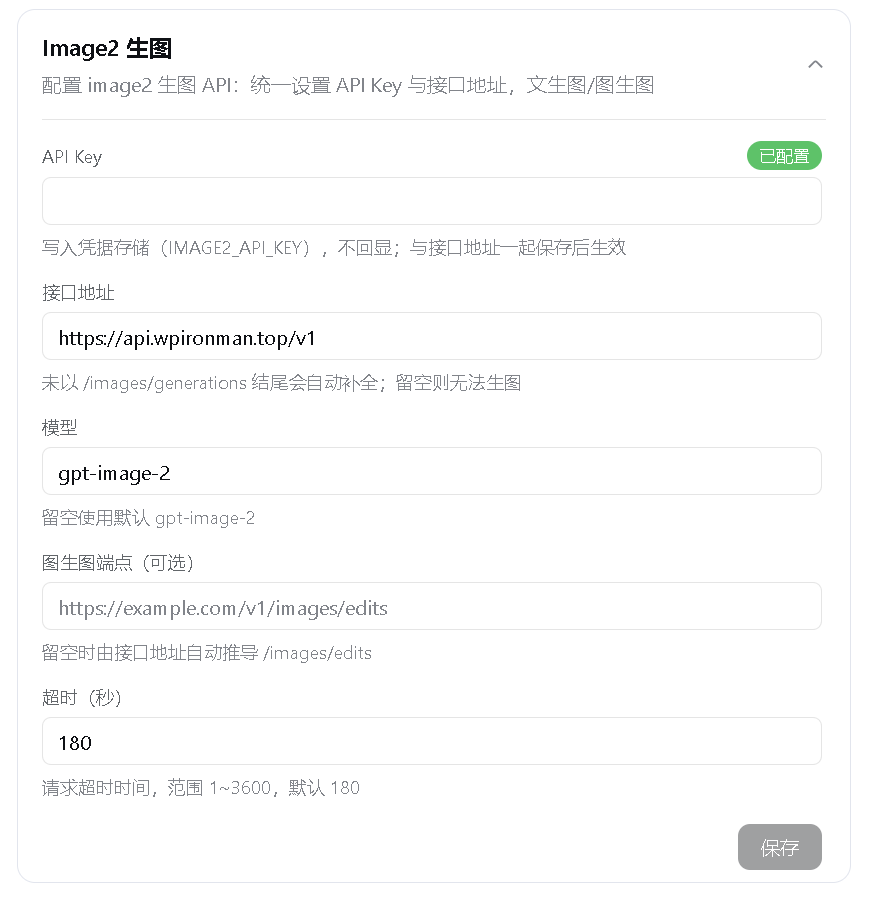
- Adds an Image2 Draw card under Settings > Plugins > Configurable plugins.
- Requires only a
baseURLand anAPI Key; the default model isgpt-image-2. - Accepts a short base URL such as
https://example.com/v1and appends/images/generationsautomatically. - Derives the image-edit endpoint as
/images/edits, with an optional expliciteditURLoverride. - Provides
image2-generatefor 1-8 sequential text-to-image generations. - Provides
image2-editwith 1-8 PNG, JPEG, or WebP reference images. - Supports adaptive portrait, landscape, and square sizes as well as validated
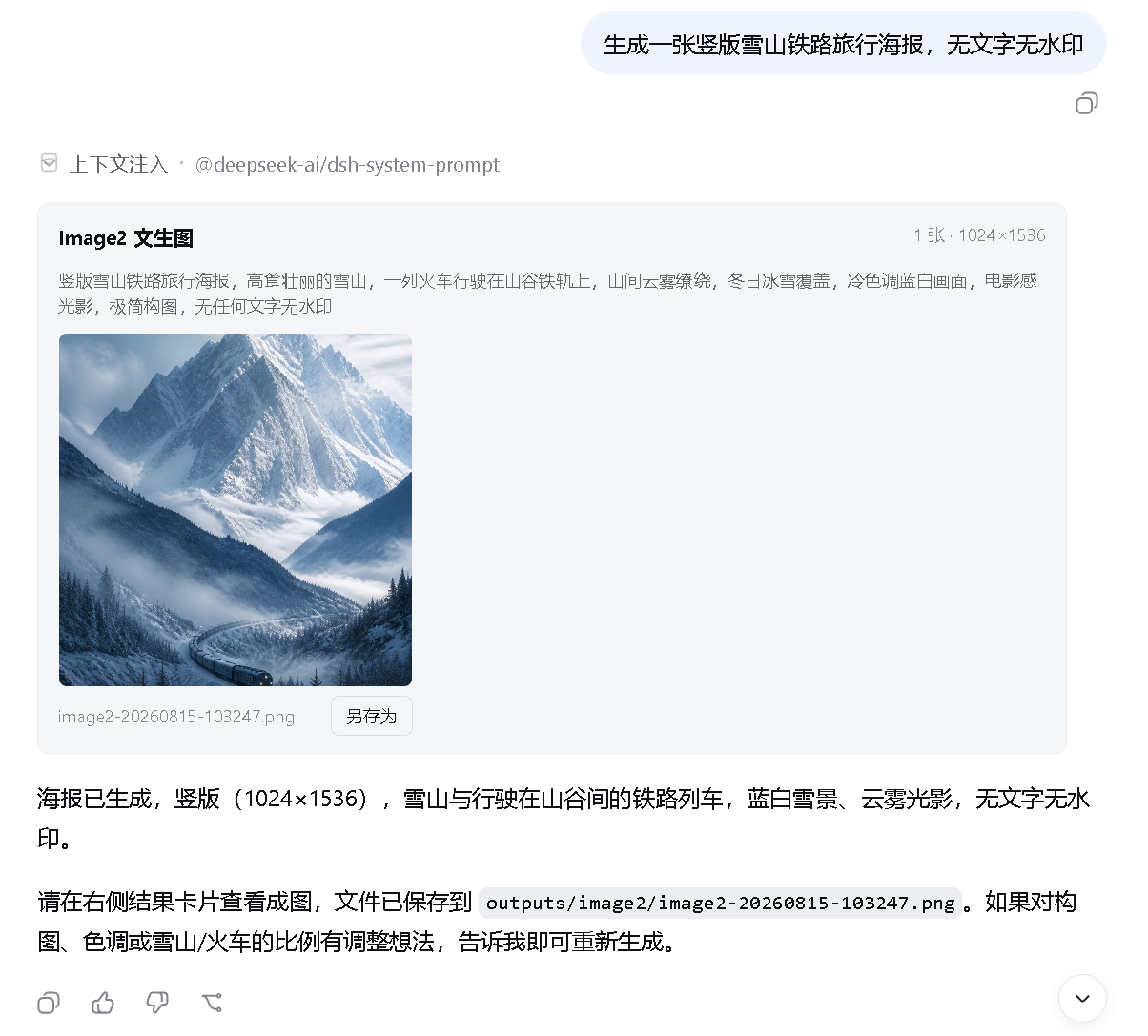
custom dimensions. - Displays generated images directly in the conversation with a dedicated tool
card for thumbnails, zoom, and Save As actions. - Resolves image attachments in the client card without injecting image content
into DeepSeek model context that does not support vision input. - Also saves images under
outputs/image2/in the current session working
directory and numbers duplicate names instead of overwriting files. - Stores API keys only in DSH credentials. Keys never enter the regular settings
document and are never returned by the plugin state endpoint. - Validates settings writes, response sizes, timeouts, and input images. HTTP 524
and timeout failures are not retried automatically, preventing duplicate
charges when the upstream service has already generated an image.
Live demo
In-conversation result
Plugin settings
Installation
Prerequisites
- Install Node.js. DSH currently supports Node.js 22.19.x
or version 24 and newer; Node.js 24 LTS is recommended. Node.js includesnpm
andnpx. - Install Git so the plugin can be fetched from GitHub.
- Install pnpm. Both methods require pnpm because
dsh plugininvokes it in the
profile directory to install or remove plugins. - Your network must reach
registry.npmjs.organdgithub.com. Configure a
working network proxy if npm or GitHub is unavailable or unstable. - Method 1 does not require a DeepSeek Harness source checkout. Method 2
additionally requires that checkout.
Check the basic environment first:
node --version
npx --version
git --version
corepack enable
pnpm --version
If corepack enable fails with a permission error, run it once from an
Administrator PowerShell. Alternatively, use another option from the
pnpm installation guide.
If downloads remain on a spinner or fail with ECONNRESET, ETIMEDOUT, or a
GitHub connection error, set a proxy for the current PowerShell window. Port7890 is only an example; replace it with your proxy's actual port:
$proxy = "http://127.0.0.1:7890"
$env:HTTP_PROXY = $proxy
$env:HTTPS_PROXY = $proxy
$env:npm_config_proxy = $proxy
$env:npm_config_https_proxy = $proxy
These variables only affect the current PowerShell window and disappear when it
is closed.
Method 1: npx (recommended for regular users)
This method does not require a DeepSeek Harness source checkout or a globaldsh installation, but Git and pnpm must already be available. On its first
run, npx downloads @deepseek-ai/dsh and its dependencies, which can take
several minutes:
npx --yes -p @deepseek-ai/dsh dsh plugin --profile web add github:JuneLearn/dsh-image2-draw
Start Web through the same package runner after installation:
npx --yes -p @deepseek-ai/dsh dsh web
Method 2: pnpm with the Harness source tree (recommended for developers)
Use this method if you already cloned deepseek-harness and want to run its
source directly. First confirm pnpm is available:
pnpm --version
Enter the DeepSeek Harness source root. Install its dependencies once, then
install the plugin:
cd D:\deepseek-harness
pnpm install
pnpm dsh plugin --profile web add github:JuneLearn/dsh-image2-draw
Start Web from that source directory afterward:
cd D:\deepseek-harness
pnpm dsh web
The package's dsh.bundle declaration adds the plugin to the Web profile
automatically. Neither method requires editing cordis.patch.yml. Web listens
on http://127.0.0.1:3080 by default; it uses another port only when the default
is occupied or you explicitly select one.
Upgrade
Run the corresponding install command again to upgrade. No uninstall or
profile-patch maintenance is required.
npx method:
npx --yes -p @deepseek-ai/dsh dsh plugin --profile web add github:JuneLearn/dsh-image2-draw
pnpm source method:
cd D:\deepseek-harness
pnpm dsh plugin --profile web add github:JuneLearn/dsh-image2-draw
Uninstall
npx method:
npx --yes -p @deepseek-ai/dsh dsh plugin --profile web remove dsh-image2-draw
pnpm source method:
cd D:\deepseek-harness
pnpm dsh plugin --profile web remove dsh-image2-draw
DSH removes both the dependency and its bundle layer. Restart dsh web; the
Image2 Draw card and image-generation tools are removed.
Usage
- Open Settings > Plugins > Configurable plugins > Image2 Draw.
- Enter the API key supplied by your relay.
- Enter the relay endpoint, for example
https://example.com/v1. - Adjust the model, edit endpoint, or timeout if needed; the defaults normally
work without changes. - Click Save and wait for the Saved status.
- Start a new session and ask the model to call
image2-generate, or provide
reference image paths and useimage2-edit.
Example prompts:
Call image2-generate to create a portrait cinematic poster of a future city at high quality.
Call image2-edit with D:\images\room.png and restyle the room with light Japanese wood while preserving the layout.
Support for gpt-image-2, image editing, custom dimensions, and quality levels
depends on the relay implementation. If the API returns HTTP 400 or 404, check
the provider's model name and Images endpoint documentation.
Image and request limits
- Text-to-image accepts a count from 1 to 8 and sends one upstream request at a
time. - Image editing accepts 1-8 reference images, up to 4MB each and 32MB total.
- Reference images must be PNG, JPEG, or WebP. Their format is detected from
magic bytes rather than trusted filename extensions. - Relative reference paths resolve from the current session working directory.
- The default timeout is 180 seconds and the configurable range is 1-3600
seconds. - Generated results must be PNG, JPEG, or WebP. Remote image downloads are
limited to 32MB.
Development
npm install
npm test
Compatibility
Built against the public dual-end plugin, settings namespace, credentials, tool
registration, client slot, and WebServer lifecycle interfaces of DeepSeek
Harness 0.1.0-rc.6. Harness is still in Developer Preview; if the plugin stops
loading after an upgrade, check these interfaces and the dsh.client.inject
declaration.
Acknowledgements
Parts of the in-conversation attachment and dedicated tool-card implementation
were adapted from the MIT-licensed
dsh-multimodal. See
THIRD_PARTY_NOTICES.md for the complete third-party
copyright and license notice.
License
安装
装一次目录插件,之后本站所有插件都能让 DeepSeek Harness 自动找、自动装:
dsh plugin add dshbase-catalog然后对 agent 说「帮我装 dsh-image2-draw」,它会在目录里找到并自动安装。文档:dshbase-catalog · 已验证场景包。
该插件是 GitHub 源码(未发 npm)——直接从仓库装:
Web profile:
dsh plugin --profile web add github:JuneLearn/dsh-image2-drawHeadless(CLI)profile:
dsh plugin --profile headless add github:JuneLearn/dsh-image2-draw实测报告
验证通过:从 GitHub 源码完成 L1 安装 + L2 加载 + L3 运行(dsh 0.1.0-rc.6)。
使用场景
把 agent 变成写手——生成、编辑或本地化文本与媒体——用于内容密集任务。
适合谁
产出文档、帖子或营销文案、想让 agent 在同一循环里起草和修改的人。
二次开发建议
内容流水线和格式输出是缝——加模板、风格规则或导出目标。
分享徽章
把这枚徽章粘进 README——它会链回本页,实测状态变化时自动更新:

[](https://dshbase.com/zh/plugins/dsh-image2-draw/)<a href="https://dshbase.com/zh/plugins/dsh-image2-draw/"><img src="https://dshbase.com/badges/dsh-image2-draw.svg" alt="dshbase 实测可装"></a>