
插件目录 / UI & Skins / dsh-memoryhub
dsh-memoryhub
已验证 · 实测可装 solknight48
功能简介
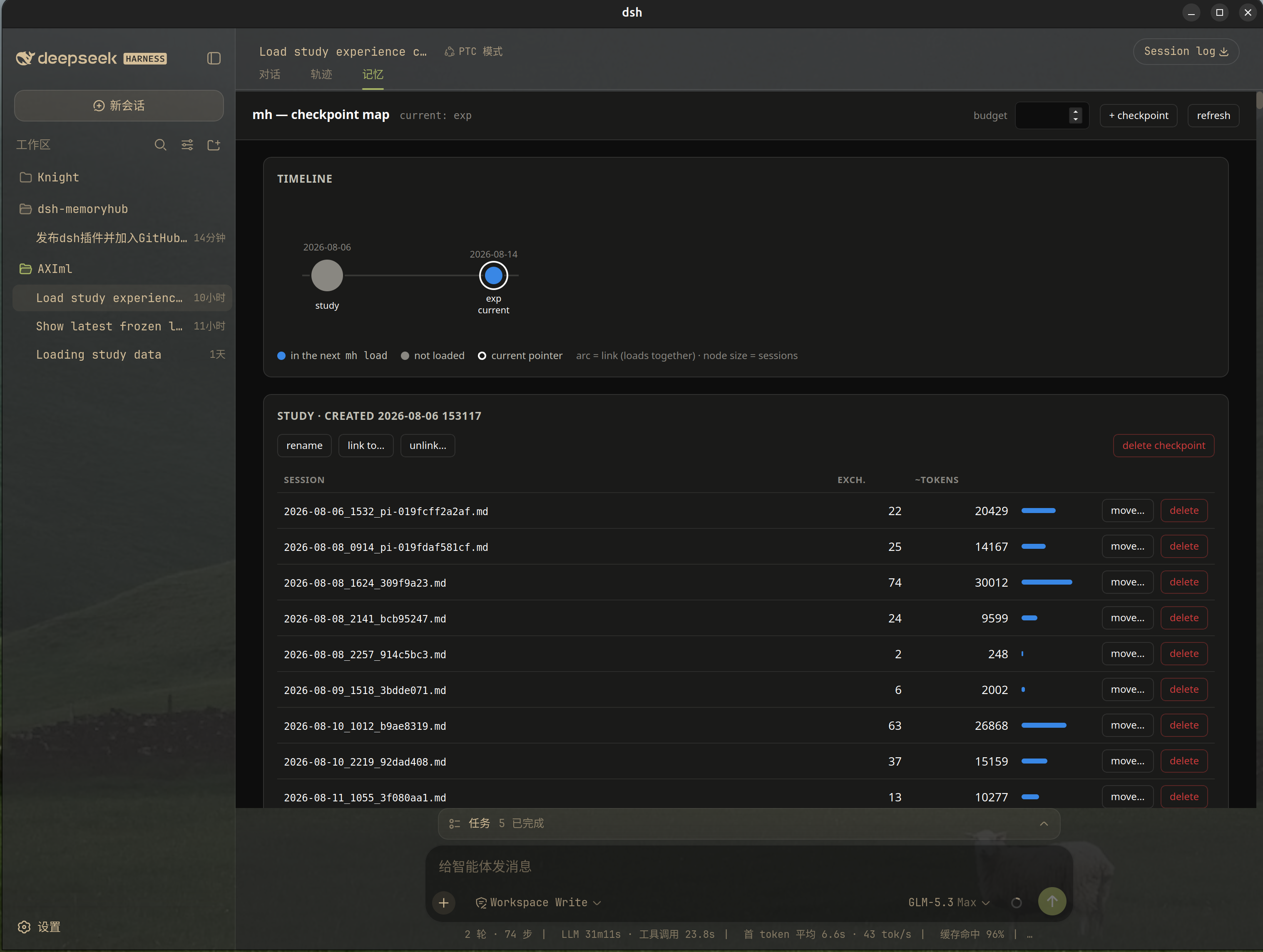
MemoryHub插件:会话启动自动加载检查点记忆,添加mh_*工具与技能,Web UI记忆标签。
可用 — 实测通过,早期项目
MemoryHub插件:会话启动自动加载检查点记忆,添加mh_*工具与技能,Web UI记忆标签。 实测能干净安装、正常启动。早期项目,但功能可用。
「已验证」表示我们的自动化 CI 在干净 profile 里实际执行了 dsh plugin add 并启动成功——仅此而已。功能描述与版本兼容性均为作者声明。这不是安全审计,也不代表对第三方代码的背书。
README
dsh-memoryhub
English | 简体中文
MemoryHub (mh) integration for
DeepSeek Harness (dsh).
MemoryHub keeps project memory as purified sessions in git-versioned
checkpoints under .memoryhub/. This plugin wires that into dsh:
- Auto-load on session start — runs
mh loadin the session workspace and
injects the checkpoint memory as durable plugin context. No prompt, no tool
call; the model simply starts with its memory back. mh_savebridges dsh sessions to mh — dsh session files are not among
the transcript formats mh discovers (Claude Code / pi / Codex), so the
plugin renders the live session's durable event log as a pi-format JSONL
transcript (in the temp dir) and saves through mh's existing--transcriptpath. Purified saves and agent-written compact saves both
work, under a stable per-session identity: re-saving replaces, never
duplicates.- Six tools —
mh_load,mh_save,mh_status,mh_list,mh_search,mh_checkpointwrap the CLI; the model never has to shell out for the
common operations. Rarer operations (mh link,mh back,mh import,mh ui) stay in the shell, as the skill explains. - A "Memory" tab in the web UI — beside chat and trajectory: the
mh ui
checkpoint map of the session's workspace, embedded live (see
The Memory tab). - The
mhworkflow skill — registered at runtime, it teaches the model
when to load, when and how to save (including writing compact summaries),
and the hub rules (no HANDOFF.md files,git -C .memoryhubfor anythingmhdoes not cover).
Prerequisites
mh installed and on PATH (uv tool install git+https://github.com/solknight48/memoryhub;
needs git ≥ 2.32, Python ≥ 3.12). The plugin shells out to it — the hub
format, git commits, and error wording stay owned by mh.
Install
dsh plugin --profile web add github:solknight48/dsh-memoryhub
The package declares dsh.bundle, so the install appends its patch layer to
the profile. For a checkout instead: dsh plugin --profile web add ./dsh-memoryhub.
Git installs fetch sources, and pnpm ≥ 10 asks before running this package'sprepare build the first time; allowlist dsh-memoryhub in the profile'spnpm-workspace.yaml as dsh instructs, then re-run the add.
Configure
Every field is optional; these are the defaults:
# $DSH_HOME/profiles/<name>/cordis.patch.yml — restates the whole row.
- insert:
    - id: memoryhub
      name: dsh-memoryhub
      config:
        mhBin: mh            # mh executable (PATH-resolved)
        autoLoad: true       # mh load + inject on every session start
        # loadBudget: 6000   # token budget for auto-load; omit for mh's default
        timeoutMs: 20000     # kill any mh invocation after this
        registerTools: true  # the six mh_* tools
        registerSkill: true  # the mh workflow skill
        noHubHint: false     # inject a one-line hint when no hub is found
        uiTab: true          # serve the mh-ui URL route the web Memory tab fetches
        uiReadOnly: false    # spawn mh ui --read-only for the Memory tab
        uiBudget: none       # the Memory tab map's initial budget ('none' = no over-budget badges)
        contextWindowTokens: 128000  # fallback window for the context-% estimate
With noHubHint: false, a workspace without .memoryhub/ stays completely
silent: no injection, no log spam. mh itself decides what "the project" is by
walking up from the session's recorded cwd — the same rule as in a shell.
Loading: no budget by default, with a context-% receipt
mh_load loads every session in the selected checkpoints — the
over-budget filtering of stock mh load is off by deployment choice. Pass
the tool's budget argument when you do want only the newest sessions that
fit. (Auto-load, if you re-enable it, keeps its budgeted semantics vialoadBudget: it injects into every session silently, so it stays opt-in per
token.)
Every successful mh_load ends with a receipt line, e.g.:
[memoryhub] memory ≈ 31,240 tokens ≈ 12.2% of the 256,000-token context window (adapter-reported); session total after load ≈ 18.6%
The window comes from the model adapter's own report (the session's newestrequest/context event) when available, otherwise fromcontextWindowTokens. The "session total" adds the last request's measured
input size, so it reads as "where this load leaves the conversation". Token
counting uses mh's own ~4 chars/token heuristic, so the number agrees with
the Memory tab's sizes.
The Memory tab (web UI)
The package is a dual-face dsh plugin: the same memoryhub row that loads
the host half also puts the browser half (dsh.client in package.json)
into the web boot graph. The browser half registers one entry into theconversation.view slot ring — a Memory tab next to chat and trajectory.
What the tab shows is not a reimplementation: it is mh ui itself, the
checkpoint map (timeline, token budget, per-turn editing), embedded in an
iframe so every mh feature and fix shows up unchanged. The wiring:
- The tab asks the host half for the map URL of its session:
GET /plugins/memoryhub/mh-ui?session=<id>. - The host half resolves the session's workspace (
session.header.cwd) and
lazily spawnsmh ui --no-browser --port 0there — one server per
workspace, pooled, killed when the plugin unloads. mh keeps its own hub
discovery (walk up for.memoryhub/,MH_HUBoverride). - The token-bearing URL (
http://127.0.0.1:<port>/?t=…) is parsed from the
child's stdout and returned to the tab, which iframes it. mh's own
security model (loopback bind, one-shot token, Host check) applies
unchanged;uiReadOnly: trueserves the map without editing.
A workspace without a hub renders an empty state with a retry button instead
of a server. The route is registered only when a web server exists, so
headless compositions never notice the feature.
The map is spawned with mh ui --budget <uiBudget> (default none, which
needs mh from the memoryhub repo with mh ui --budget support — 2026-08-14
or later): the map's budget box starts empty, so its over-budget preview
badges stay off, matching mh_load's load-everything default. Set uiBudget
to a number to restore the budgeted preview.
How saving works
mh save identifies a session through its transcript. mh knows Claude Code,
pi, and Codex transcript formats; dsh is not one of them (yet). So onmh_save, the plugin:
- Walks the session's durable event log and keeps exactly what mh's own
purifier keeps: genuine user input (source.kind === 'user') and
assistant text. Plugin-injected context (including this plugin's own
auto-load snapshot), tool calls/results, and reasoning stay out.
Assistant text that follows an mh load is dropped too, until the next
genuine user message: that reply is the load receipt plus a digest of the
memory that was just loaded — content that already lives in the
checkpoints. Saving it would re-embed old memory into every new session
and snowball. The load is detected whether it went through themh_load
tool directly or through arun_codeblock (the web GUI's path); the
user's own request line stays. Detection is two-key: the call must
have a load's shape (a directmh_loadcall,tools.mh_load(…)in code,
ormh loadas a shell command — text that merely mentions mh load in a
grep or edit payload does not count) AND the call's result must carry
mh's own load receipt (<!-- mh | loaded:and friends); a failed load
arms nothing. - Writes it as a pi-format transcript at
$TMPDIR/dsh-memoryhub/dsh_<session-id>.jsonl. - Runs
mh save --transcript <that file>(ormh save --compact --file <summary.md> --transcript <that file>with the
summary the model wrote into the tool call).
Consequences worth knowing:
- The checkpoint filename key follows mh's pi rule (
pi-<id12>) even though
the session came from dsh. Cosmetic only; identity is stable per session. - The bridge is rebuilt at every save, so a later save sees the whole session
up to that point and replaces the earlier representation (mh keeps one
representation per session). - Steering messages and file attachments are not bridged (v1); a compact
save's summary can still carry anything important. mh importbackfills Claude Code / pi / Codex history only — dsh history
enters checkpoints by being saved through this plugin.
Verify
npm install
npm run build
npm test        # e2e against the real mh CLI in a temp HOME
The test suite exercises the exact paths the plugin uses: bridge JSONL →mh save --transcript → mh load, compact-replaces-purified,
save-twice-replaces, and the mh-ui pool against a real mh ui server
(spawn, token URL, page 200, guard 403, no-hub mapping). Plugin
registration (six tools + mh(runtime) skill + the Memory tab's client
bundle in the boot graph and the /plugins/memoryhub/mh-ui route branches)
was verified by booting a real dsh web profile with the bundle installed.
The agent/session-start → mh load → agent.inject path uses the same
extension points as dsh's own hook bridges; it has not been exercised
against a live model session yet (needs an API key), and neither has the
Memory tab's in-browser render.
Layout
src/index.ts   plugin: config schema, session-start auto-load, tools, skill,
               mh-ui route (webServer soft dependency)
src/bridge.ts  dsh session events -> pi-format JSONL transcript
src/mh.ts      execFile runner for the mh CLI (non-zero exits are data)
src/mh-ui.ts   mh ui process pool (one map server per workspace)
src/estimate.ts context-share estimate for mh_load (adapter window, mh's heuristic)
src/skill.ts   the mh workflow skill, adapted for dsh
src/client/    browser half: the Memory conversation-view tab (iframe of mh ui)
tests/         e2e against the real mh binary
License
MIT
安装
装一次目录插件,之后本站所有插件都能让 DeepSeek Harness 自动找、自动装:
dsh plugin add dshbase-catalog然后对 agent 说「帮我装 dsh-memoryhub」,它会在目录里找到并自动安装。文档:dshbase-catalog · 已验证场景包。
该插件是 GitHub 源码(未发 npm)——直接从仓库装:
Web profile:
dsh plugin --profile web add github:solknight48/dsh-memoryhubHeadless(CLI)profile:
dsh plugin --profile headless add github:solknight48/dsh-memoryhub实测报告
验证通过:从 GitHub 源码完成 L1 安装 + L2 加载 + L3 运行(dsh 0.1.0-rc.6)。
使用场景
改变 dsh 的外观或交互方式——一套主题、皮肤或新面板,重塑工作区。
适合谁
在 web UI 里一待几小时、想让它按自己的习惯好看又好用的人。
二次开发建议
皮肤、面板和主题 token 是扩展点——写新皮肤、加面板,或与上游配色同步 token。
分享徽章
把这枚徽章粘进 README——它会链回本页,实测状态变化时自动更新:

[](https://dshbase.com/zh/plugins/dsh-memoryhub/)<a href="https://dshbase.com/zh/plugins/dsh-memoryhub/"><img src="https://dshbase.com/badges/dsh-memoryhub.svg" alt="dshbase 实测可装"></a>