
插件目录 / Security / dsh-plugin-browser-use
dsh-plugin-browser-use
已验证 · 实测可装 coderdailyone
功能简介
Security-first browser automation plugin for DeepSeek Harness (dsh) — 15 tools, policy re-checked on every action, no model-controlled paths
可用 — 实测通过,早期项目
Security-first browser automation plugin for DeepSeek Harness (dsh) — 15 tools, policy re-checked on every action, no model-controlled paths 实测能干净安装、正常启动。早期项目,但功能可用。
「已验证」表示我们的自动化 CI 在干净 profile 里实际执行了 dsh plugin add 并启动成功——仅此而已。功能描述与版本兼容性均为作者声明。这不是安全审计,也不代表对第三方代码的背书。
README


Install · Tools · Security model · Configuration · 中文文档
A DeepSeek Harness plugin that gives the model a real browser — navigate, click, fill, read, screenshot, tabs, downloads — backed by Chromium through playwright-core.
Its differentiator is a security-first design: every URL is re-checked against a host-label allowlist and a private-network block on every action and again after every navigation — including redirects, link clicks, popups, background loads, and downloads. And no tool ever accepts a filesystem path from the model: every file the plugin writes lands in a constrained directory under a name the plugin picked itself.
Install
dsh plugin --profile web add dsh-plugin-browser-use
dsh --profile web --dump-config   # should show the "# == dsh-plugin-browser-use" layer
A Chromium is required. The plugin resolves one in this order:
executablePathconfig$DSH_BROWSER_EXECUTABLE- Well-known OS locations (Chrome / Chromium / Edge / Brave)
- Playwright's own browser resolution (
npx playwright install chromium)
Configuration
| key | type | default | meaning |
|---|---|---|---|
allowedHosts |
string[] |
[] |
Host-label allowlist. example.com matches example.com and *.example.com; matching is on host labels, never substrings. Empty = any public host. |
allowPrivateNetwork |
boolean |
false |
Permit loopback / private / link-local targets. Off by default. |
headless |
boolean |
true |
Run without a window. |
executablePath |
string |
— | Explicit Chromium binary. Falls back to $DSH_BROWSER_EXECUTABLE, OS locations, then Playwright. |
userAgent |
string |
dsh-plugin-browser-use/<version> |
User-Agent for the browser context. |
proxyServer |
string |
— | Proxy for browser traffic (e.g. http://127.0.0.1:7890, socks5://…). Chromium ignores $http_proxy-style env, so set this (or $DSH_BROWSER_PROXY) on machines that need a proxy. |
proxyBypass |
string |
— | Comma-separated hosts that bypass the proxy. |
navigationTimeoutMs |
int ≥ 1 |
30000 |
Page-load budget per navigation. |
actionTimeoutMs |
int ≥ 1 |
15000 |
Budget per click / fill / read / screenshot. |
maxTextChars |
int ≥ 1 |
20000 |
Hard bound on extracted page text and snapshots. |
artifactsDir |
string |
private temp dir | Where screenshots / PDFs / downloads land. The plugin names every file itself. |
storageStatePath |
string |
— | Persist cookies/localStorage here on close, load at launch. The file holds live credentials — protect it. Last close wins across agents. |
uploadsDir |
string |
— (uploads disabled) | Only files directly inside this directory can be uploaded, by bare filename. |
The tools
| tool | model-facing result |
|---|---|
browser_navigate |
{ url, title, statusCode, text, truncated } of the landed page |
browser_navigate_background |
{ jobId, index, url } — loads in a new unfocused tab as a background job |
browser_click |
{ url, title, text, truncated } after the click's navigation settles |
browser_fill |
{ url, title } after filling a field |
browser_read_text |
{ url, title, text, truncated } re-read of the current page |
browser_read_snapshot |
{ url, title, snapshot, truncated } — aria role/name outline, selector-stable |
browser_screenshot |
{ path, url, title } — PNG under artifactsDir, plugin-named |
browser_pdf |
{ path, url, title } — PDF under artifactsDir (headless only) |
browser_downloads |
{ downloads: [{ index, url, suggestedFilename, state, path?, error? }] } |
browser_upload |
{ url, title } — attach a file from uploadsDir to an <input type=file> |
browser_tab_new |
{ index, url, title, statusCode? } — new active tab, policy-checked before creation |
browser_tab_list |
{ tabs: [{ index, active, url, allowed, title? }] } |
browser_tab_select |
{ index, url, title } — off-policy tabs cannot be focused |
browser_tab_close |
{ closed: true, remaining } |
browser_close |
{ closed: true } — closes the whole browser, idempotent |
Each agent session owns an isolated browser with an ordered tab list; calls from one owner are serialized in submission order (browser_navigate_background is the deliberate exception — its load runs outside the queue). All failures surface as ordinary isError tool results with a BROWSER_* code (never a thrown exception), e.g. BROWSER_HOST_NOT_ALLOWED, BROWSER_PRIVATE_NETWORK, BROWSER_NO_PAGE, BROWSER_NO_SUCH_TAB, BROWSER_UPLOAD_NOT_ALLOWED, BROWSER_JOBS_UNAVAILABLE, BROWSER_NAVIGATION_FAILED, BROWSER_ACTION_FAILED, BROWSER_LAUNCH_FAILED, BROWSER_CLOSED, BROWSER_ABORTED, BROWSER_UNSUPPORTED_SCHEME, BROWSER_INVALID_URL.
Background loads need the jobs registry (@deepseek-ai/dsh-jobs + @deepseek-ai/dsh-tool-jobs) in the profile; without it the tool fails closed with BROWSER_JOBS_UNAVAILABLE. Jobs register under kind browser.
Security model
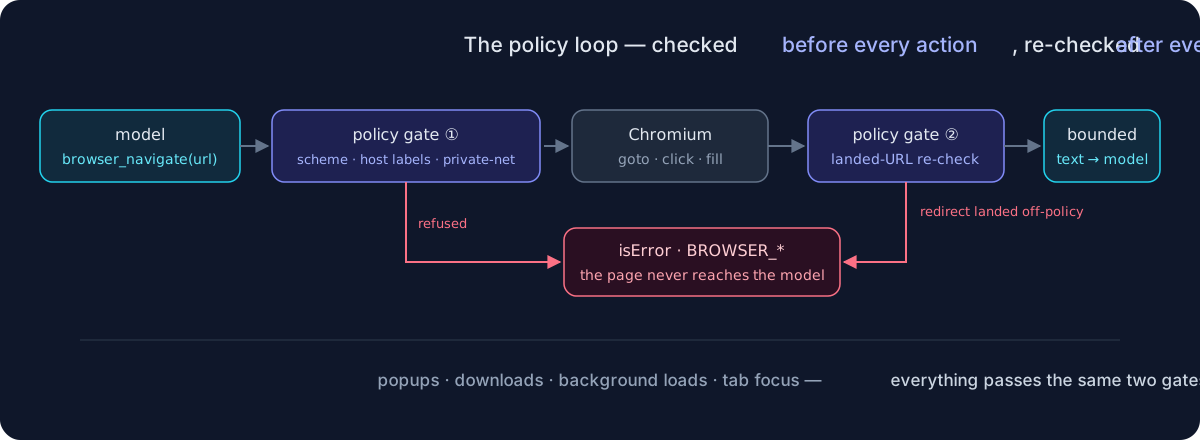
- Continuous re-check. The policy runs before every action, and again after every navigation —
browser_navigatechecks the landed URL, so a redirect (or a link click) that crosses into a disallowed host is refused even when the requested URL was allowed. Background loads get the same pre-flight and post-landing checks. - Host-label matching, never substrings.
allowedHosts: ["example.com"]matchesexample.comandsub.example.combut notevil-example.comorevil.example.com.attacker.test. - Private networks blocked by default. Loopback, private, link-local, unique-local, and IPv4-mapped spellings (
127.0.0.1,10.0.0.5,::1,::ffff:127.0.0.1,fc00::/7hex forms, …) are refused unlessallowPrivateNetworkis explicitly enabled — and when an allowlist is set, private hosts must be on it too. - Canonical host comparison. Case, trailing dots, and IPv6 brackets are normalized before comparison; anything unparseable fails closed.
- Scheme restriction. Only
http:andhttps:navigate;file:,data:,javascript:, and other schemes are refused outright. - No model-controlled paths, ever. Screenshots, PDFs, and downloads are written only into
artifactsDirunder names the plugin builds (download filenames are sanitized to one safe path segment). Uploads accept only a bare filename directly inside the operator-configureduploadsDir— separators and..are refused, and without that config the tool is disabled. - Popups can't smuggle. Pages the browser opens on its own join the tab list but never take focus; an off-policy popup can be listed and closed, never focused, read, or captured — its title is not even fetched.
- Downloads are policy-checked too. A download from a refused URL is recorded as
refusedand never written to disk. - A contained browser process. Each launch gets a private
HOME/XDG tree under the OS temp dir (removed on close), so profile, crashpad, and caches never touch the operator's real home. - Honest residual: DNS rebinding is not defended. A hostname that resolves from public to private IPs between the check and the connection can still reach internal services. Likewise, a redirect into a refused host is blocked from the model, but the request that discovered the redirect has already been sent by the browser. If either matters in your environment, run the harness in a network-isolated sandbox; do not rely on this plugin alone.
Model Experience
What the model sees: fifteen browser_* tool names; navigation and reads return the landed URL, title, HTTP status (navigation only), and bounded visible text or an aria outline. Screenshots/PDFs return paths, not image payloads — pair with an attachment-capable setup to show them to a vision model.
Token effect: each navigate / read / snapshot returns up to maxTextChars (default 20,000) characters; shrink it for cheaper sessions, grow it for dense pages. Click returns a fresh reading; fill, tab, and artifact tools return only small fixed shapes.
KV cache effect: none — results are ordinary tool results appended to the conversation; nothing rewrites the prompt prefix.
Known limitations and deferred work
- DNS rebinding not defended; refused redirects still cost one outbound request (see Security model).
- Screenshots/PDFs are saved as files, not returned as image content — wiring them into
ctx.attachmentsfor vision models is future work. - Cookie persistence is a single storage-state file: last close wins across concurrent agents.
- Playwright's
gotocannot be interrupted mid-flight: cancelling a background job marks it and the navigation timeout bounds settlement. playwright-coreneeds a browser binary present (see Install).- dsh is a developer preview; expect lockstep peer-version bumps.
Development
npm install
npm run build    # tsc → lib/
npm test         # vitest run (96 tests; live smoke self-skips)
The live smoke suite runs a real Chromium when DSH_BROWSER_LIVE=1 and a browser resolves (set DSH_BROWSER_EXECUTABLE to pin one):
DSH_BROWSER_LIVE=1 npm test
Layout: src/policy.ts (pure URL policy) → src/session.ts (browser session: tabs, artifacts, downloads, per-action re-checks) → src/tool.ts (dsh tool definitions, owner registry) → src/index.ts (plugin entry). CI runs typecheck + the keyless suite on Node 22/24.
License
MIT
Non-affiliation
This project is not affiliated with the browser-use project or company. Under the hood it drives Chromium directly through playwright-core; no browser-use code is involved.
安装
装一次目录插件,之后本站所有插件都能让 DeepSeek Harness 自动找、自动装:
dsh plugin add dshbase-catalog然后对 agent 说「帮我装 dsh-plugin-browser-use」,它会在目录里找到并自动安装。文档:dshbase-catalog · 已验证场景包。
该插件是 GitHub 源码(未发 npm)——直接从仓库装:
Web profile:
dsh plugin --profile web add github:coderdailyone/dsh-plugin-browser-useHeadless(CLI)profile:
dsh plugin --profile headless add github:coderdailyone/dsh-plugin-browser-use实测报告
验证通过:从 GitHub 源码完成 L1 安装 + L2 加载 + L3 运行(dsh 0.1.0-rc.6)。
分享徽章
把这枚徽章粘进 README——它会链回本页,实测状态变化时自动更新:

[](https://dshbase.com/zh/plugins/dsh-plugin-browser-use/)<a href="https://dshbase.com/zh/plugins/dsh-plugin-browser-use/"><img src="https://dshbase.com/badges/dsh-plugin-browser-use.svg" alt="dshbase 实测可装"></a>