
插件目录 / Knowledge / dsh-plugin-coaligne
dsh-plugin-coaligne
已验证 · 实测可装 dataelement
功能简介
CoAligne for DeepSeek Harness: shared team project context over MCP, plus the coaligne-workflow skill
可用 — 实测通过,早期项目
CoAligne for DeepSeek Harness: shared team project context over MCP, plus the coaligne-workflow skill 实测能干净安装、正常启动。早期项目,但功能可用。
「已验证」表示我们的自动化 CI 在干净 profile 里实际执行了 dsh plugin add 并启动成功——仅此而已。功能描述与版本兼容性均为作者声明。这不是安全审计,也不代表对第三方代码的背书。
README
dsh-plugin-coaligne
Bring your team's shared https://www.coaligne.com project context into DeepSeek Harness.
CoAligne is a collaboration platform where teammates and their Agents share project context. CoAligne Desktop syncs local project files and Agent conversations into a cloud project, and connects your local agents — including DSH — to that cloud context.
What you get
- The
coaligne-workflowskill, installed into your agents home at plugin activation (skills/under$DSH_AGENTS_HOME, default.agentsin your home directory): teaches the agent when and how to use the CoAligne tools — collaboration queries, long-content search strategy, comment replies, sharing flows, and a single-project AI usage report. - CoAligne MCP tools, once CoAligne Desktop is connected (see Setup below; tools appear as
mcp__coaligne__<tool>):list_projects,me,get_project_activity— project discovery and recent activitysearch— sandboxed read-only shell (grep,cat,find, …) over synced files and Agent session logsdownload_file,list_file_comments,reply_file_comment— file downloads and comment threadscreate_file_link,resolve_file_link,resolve_session_link— privateapp.coaligne.com/f/{code}andapp.coaligne.com/s/{code}locator linkslist_project_reviewers,create_review_request— send a file or Agent session to a teammate
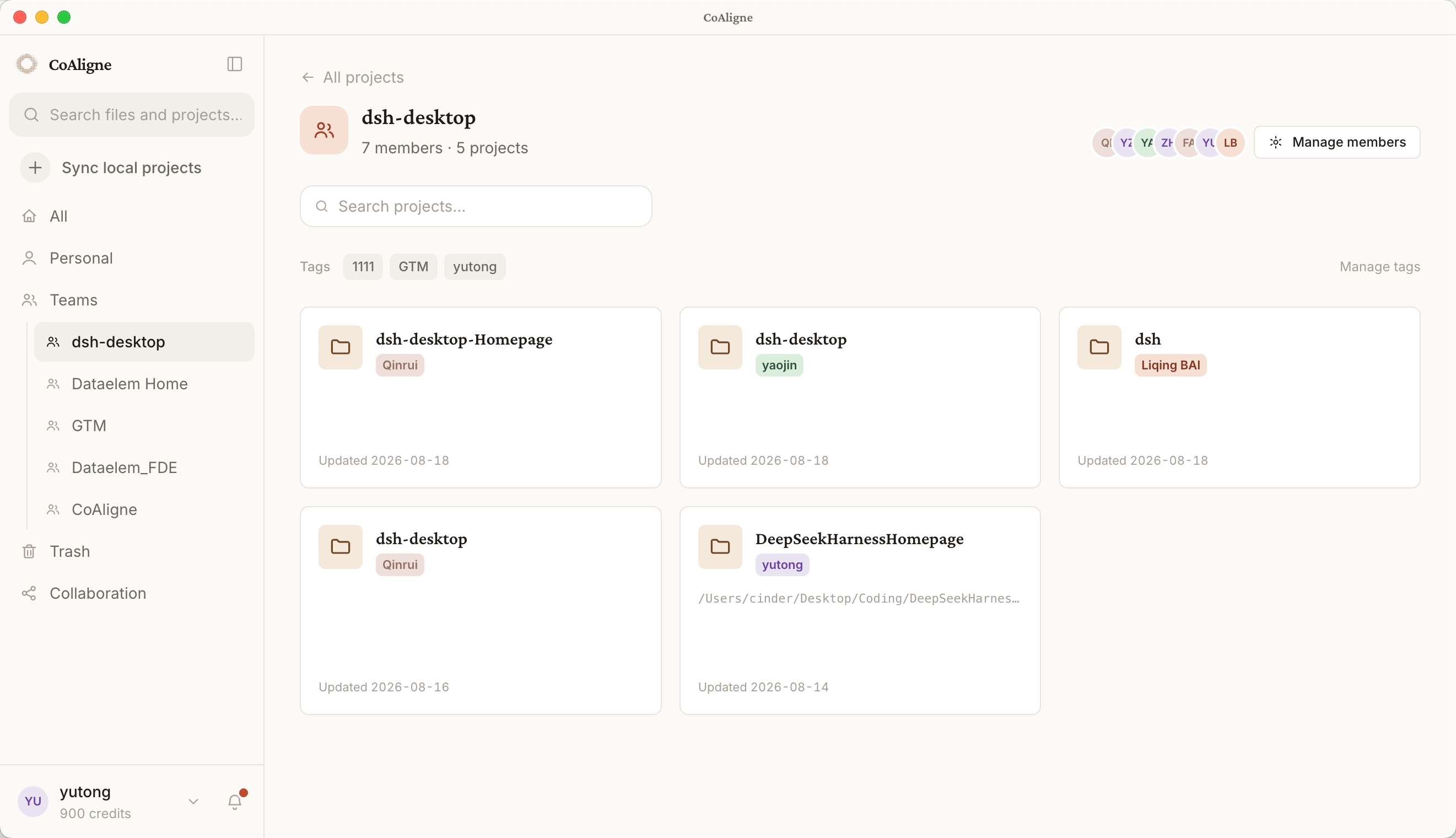
Setup
Install this plugin (or one-click install from dsh-market):
npm install dsh-plugin-coaligneSign up at https://www.coaligne.com.
Install CoAligne Desktop (macOS and Windows) from https://www.coaligne.com, sign in, and import your local project. Desktop then does two things for you:
- Sync: keeps your project files and Agent sessions flowing into the cloud project your team shares.
- Connect: automatically configures the CoAligne MCP connection for DSH (a
@deepseek-ai/dsh-mcp-clientrow with serverNamecoaligneand your account credentials). No manual token handling.
That's it — restart your DSH session and the mcp__coaligne__* tools are available, with the skill guiding when to use them.
Without CoAligne Desktop this plugin is not usable: it only installs the workflow skill, and the skill's tools all come from the Desktop-provisioned MCP connection. The plugin logs an explicit warning at activation when no Desktop connection is found.
What the bundle patch adds
The bundle patch (cordis.patch.yml) composes two rows into your profile:
| Row | Package | Purpose |
|---|---|---|
coaligne-skill |
dsh-plugin-coaligne |
Installs the bundled coaligne-workflow skill into $DSH_AGENTS_HOME (default: .agents in your home directory) |
coaligne-skill-invariant |
dsh-plugin-coaligne/invariant |
Package-owned invariant companion |
The MCP connection is deliberately not declared here — CoAligne Desktop provisions and maintains it, so this package never sees or stores credentials.
Configuration
The coaligne-skill row accepts:
| Option | Default | Description |
|---|---|---|
installSkill |
true |
Install/refresh the bundled skill at activation |
agentsHome |
'' |
Override the agents home; empty resolves $DSH_AGENTS_HOME, then .agents in the home directory |
How it works
- The skill install is an idempotent copy at plugin activation; disable it with
installSkill: falseif you manage skills yourself. - The MCP connection is owned by CoAligne Desktop: it signs in with your account, writes the connection for DSH, and keeps it valid. This plugin contains no credentials and makes no network calls.
Development
pnpm install
pnpm typecheck
pnpm test
pnpm build
License
BSD-3-Clause. Scaffolded from https://github.com/omdsh-dev/plugin-template.
安装
装一次目录插件,之后本站所有插件都能让 DeepSeek Harness 自动找、自动装:
dsh plugin add dshbase-catalog然后对 agent 说「帮我装 dsh-plugin-coaligne」,它会在目录里找到并自动安装。文档:dshbase-catalog · 已验证场景包。
该插件是 GitHub 源码(未发 npm)——直接从仓库装:
Web profile:
dsh plugin --profile web add github:dataelement/dsh-plugin-coaligneHeadless(CLI)profile:
dsh plugin --profile headless add github:dataelement/dsh-plugin-coaligne实测报告
验证通过:从 GitHub 源码完成 L1 安装 + L2 加载 + L3 运行(dsh 0.1.0-rc.6)。
分享徽章
把这枚徽章粘进 README——它会链回本页,实测状态变化时自动更新:

[](https://dshbase.com/zh/plugins/dsh-plugin-coaligne/)<a href="https://dshbase.com/zh/plugins/dsh-plugin-coaligne/"><img src="https://dshbase.com/badges/dsh-plugin-coaligne.svg" alt="dshbase 实测可装"></a>