
插件目录 / UI & Skins / dsh-plugin-uisfx
dsh-plugin-uisfx
已验证 · 实测可装 XanthanL
功能简介
DSH plugin: semantic UI sound effects powered by uisfx dsh 语义化音效插件:任务开始/成功/失败、按钮反馈,设置页即时试听,12 种音色包,支持其他插件调用。
可用 — 实测通过,早期项目
DSH plugin: semantic UI sound effects powered by uisfx dsh 语义化音效插件:任务开始/成功/失败、按钮反馈,设置页即时试听,12 种音色包,支持其他插件调用。 实测能干净安装、正常启动。早期项目,但功能可用。
「已验证」表示我们的自动化 CI 在干净 profile 里实际执行了 dsh plugin add 并启动成功——仅此而已。功能描述与版本兼容性均为作者声明。这不是安全审计,也不代表对第三方代码的背书。
README
🔊 dsh-plugin-uisfx
🌐 English | 中文
A dsh plugin that brings uisfx semantic UI sound effects to DeepSeek Harness.
Task start / success / failure and button clicks can each be assigned a sound cue from the settings page, with instant preview.






What it solves
dsh has almost no audio feedback by default. Did the task finish? Did it fail? Did the button register? You can only tell by watching the screen.
dsh-plugin-uisfx adds a semantic sound system:
- Task sounds — start, success, failure, pending attention
- Button sounds — different sounds for different button kinds
- Global sound packs — 12 uisfx packs, switch the whole personality in one click
- Per-scenario cues — every scenario maps to an independent cue, with preview buttons
- Persistent settings — stored in
settings.yaml, survives restarts
Preview
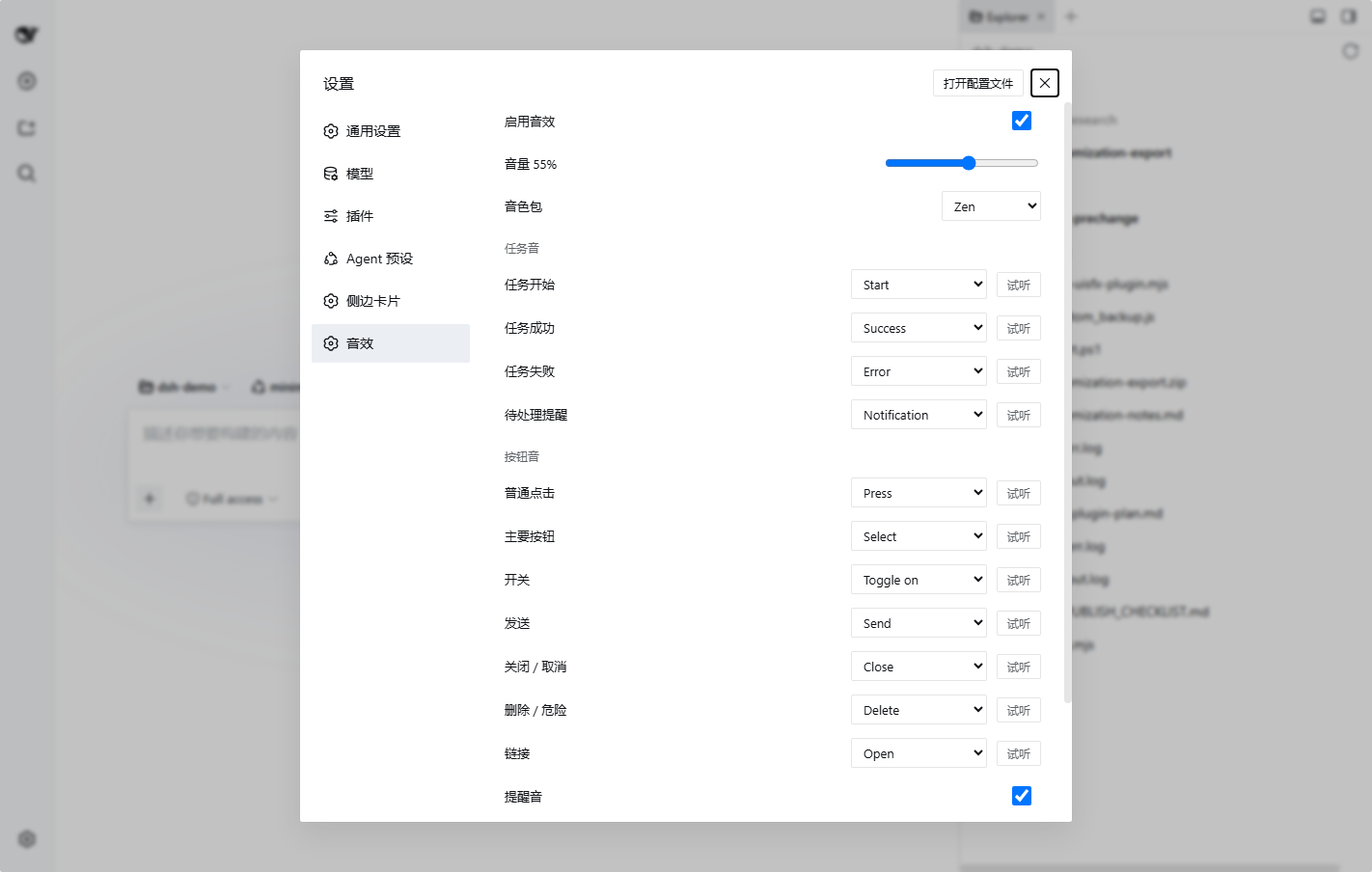
Quick start
Published on npm: dsh-plugin-uisfx
dsh plugin --profile web add dsh-plugin-uisfx
# restart dsh web
Pin a version:
dsh plugin --profile web add [email protected]
Then open Settings → Sound Effects.
Requires dsh
0.1.0-rc.6. Verified alongsidedsh-better-sidebarand@dsh-external/dsh-navbar.
Features
| Feature | Description |
|---|---|
| 🎚 Global sound pack | 12 uisfx packs (zen / studio / scifi / soft ...) |
| 🎯 Scenario mapping | 11 scenarios, each mapped to a cue with sensible defaults |
| ▶ Instant preview | Preview buttons next to every scenario in settings |
| 🔔 Task feedback | Start / success / failure / pending for the current session |
| 🖱 Button feedback | Auto-detects send / delete / toggle / link / primary / normal |
| 💾 Persistence | Host settings.yaml namespace dsh-plugin-uisfx |
| 🔌 Service API | ctx.uisfx for third-party plugins |
Default scenario mapping
| Scenario | Cue | When |
|---|---|---|
task.start |
start |
agent starts running |
task.success |
success |
task finishes successfully |
task.failure |
error |
task fails |
task.pending |
notification |
pending interaction appears |
click.normal |
press |
normal button |
click.primary |
select |
primary / accent button |
click.toggle |
toggle-on |
toggle / checkbox |
click.send |
send |
send / submit |
click.close |
close |
close / cancel |
click.danger |
delete |
delete / destructive action |
click.link |
open |
link |
Default sound pack: zen — paper, wood and quiet chimes for long working sessions.
Sound packs
| Pack | Character | Good fit |
|---|---|---|
minimal |
Dry, precise | Productivity |
soft |
Rounded, warm | Mobile, friendly SaaS |
glass |
Bright, crystalline | Media, finance |
arcade |
Chunky pixels | Games |
mechanical |
Switches, relays | Devtools |
organic |
Wood, water | Education, kids |
dreamy |
Airy, slow | Creative tools |
scifi |
Holographic | AI tools |
rubber |
Elastic, playful | Casual apps |
cinematic |
Deep impacts | Media, games |
studio |
Tactile, restrained | AI creative tools |
zen |
Paper, wood, chime | Focus, reading (default) |
Preview every pack: https://uisfx.com
Settings
| Setting | Default | Description |
|---|---|---|
enabled |
true |
Master switch |
volume |
0.55 |
Volume 0-1 |
pack |
zen |
Global sound pack |
taskSounds |
true |
Task sounds |
clickSounds |
true |
Button sounds |
attentionSounds |
true |
Pending attention sounds |
mapping.* |
table above | Per-scenario cue |
All settings are written to Host settings.yaml:
dsh-plugin-uisfx:
  enabled: true
  volume: 0.55
  pack: zen
Service API
Other dsh plugins can trigger sounds:
// play by scenario
ctx.uisfx.play('task.success')
ctx.uisfx.play('click.send')
ctx.uisfx.play('task.start')

// play a raw cue
ctx.uisfx.playCue('achievement')
ctx.uisfx.playCue('reward')

// preview from settings
ctx.uisfx.preview('success')

// read / update settings
ctx.uisfx.getPrefs()
ctx.uisfx.setPack('studio')
ctx.uisfx.setVolume(0.5)
There are 78 cues from uisfx:hover / press / select / toggle-on / send / success / error / complete / achievement / ...
Architecture
- No audio files — embeds the uisfx 0.4.0 Web Audio synthesis runtime
- Lazy player — created on the first user gesture, respecting autoplay policies
- Task watcher — subscribes to
ctx.sessions.binding(current).session(running/pending/lastAgentError) - Click classifier — global pointerdown classifier maps semantics to scenarios
- Persistence — dedicated
/uisfx/api/settingsAPI backed by Host settings
FAQ
No sound?
- Settings → Sound Effects → enable sounds
- The browser may block autoplay: click anywhere on the page once
- Check the system volume and the dsh volume slider
No success / failure sound after a task?
- Only the current session plays task sounds
- Make sure
taskSoundsis enabled - Failure detection uses
lastAgentErrororturn-errornodes
Development
git clone https://github.com/<your-name>/dsh-plugin-uisfx.git
cd dsh-plugin-uisfx
pnpm install
pnpm build      # generates lib/client.js / lib/index.js
pnpm check      # syntax checks
Use a separate dev profile so restarts never interrupt your daily web:
dsh plugin --profile dev add ./dsh-plugin-uisfx
dsh --profile dev web --port 3090
Browser debug helpers:
window.__dshUISFX()          // uisfx player
window.__dshUISFXDebug()     // current prefs
Roadmap
- Task sounds + button sounds + settings UI + persistence
- All 12 packs and 78 cues selectable
- Background-session completion notifications
- Hover / drag / split sounds
- Per-scenario sound pack
- Custom audio uploads
License
- This plugin: MIT
- Embedded uisfx runtime: MIT, copyright Yuki Capital — see
NOTICEandvendor/uisfx-0.4.0.js
Related projects
- uisfx — the open-source sound system this plugin uses
- DSH-better-sidebar — a powerful dsh sidebar plugin
- dsh-navbar — conversation message navigation dots
If you find this plugin useful, give it a ⭐ and add the dsh-plugin topic to the repo.
安装
装一次目录插件,之后本站所有插件都能让 DeepSeek Harness 自动找、自动装:
dsh plugin add dshbase-catalog然后对 agent 说「帮我装 dsh-plugin-uisfx」,它会在目录里找到并自动安装。文档:dshbase-catalog · 已验证场景包。
该插件是 GitHub 源码(未发 npm)——直接从仓库装:
Web profile:
dsh plugin --profile web add github:XanthanL/dsh-plugin-uisfxHeadless(CLI)profile:
dsh plugin --profile headless add github:XanthanL/dsh-plugin-uisfx实测报告
验证通过:从 GitHub 源码完成 L1 安装 + L2 加载 + L3 运行(dsh 0.1.0-rc.6)。
分享徽章
把这枚徽章粘进 README——它会链回本页,实测状态变化时自动更新:

[](https://dshbase.com/zh/plugins/dsh-plugin-uisfx/)<a href="https://dshbase.com/zh/plugins/dsh-plugin-uisfx/"><img src="https://dshbase.com/badges/dsh-plugin-uisfx.svg" alt="dshbase 实测可装"></a>