
插件目录 / UI & Skins / dsh-preview
dsh-preview
已验证 · 实测可装 Viger1
功能简介
👁 Eyes for your DeepSeek Harness agent — it opens, sees, and fixes what it builds. Headless-browser verification tools + a bundled self-check skill.
可用 — 实测通过,早期项目
👁 Eyes for your DeepSeek Harness agent — it opens, sees, and fixes what it builds. Headless-browser verification tools + a bundled self-check skill. 实测能干净安装、正常启动。早期项目,但功能可用。
「已验证」表示我们的自动化 CI 在干净 profile 里实际执行了 dsh plugin add 并启动成功——仅此而已。功能描述与版本兼容性均为作者声明。这不是安全审计,也不代表对第三方代码的背书。
README
dsh-preview
English | 中文
A verification loop the agent runs on itself, not just browser tools.
Reading a page without a vision model is ordinary now — several plugins here do it, and do it well. What this ships is the discipline around it: a bundled frontend-verify skill that makes the agent open what it just built, check the console, assert layout facts from computed styles, exercise the UI, fix what it finds, and re-verify — before claiming the work is done. The six tools exist to serve that loop.
The distinction matters because the failure this addresses is not "the agent cannot see the page". It is that the agent never thinks to look, reports work as finished from re-reading its own source, and leaves you to open the browser and describe what broke.
What it looks like
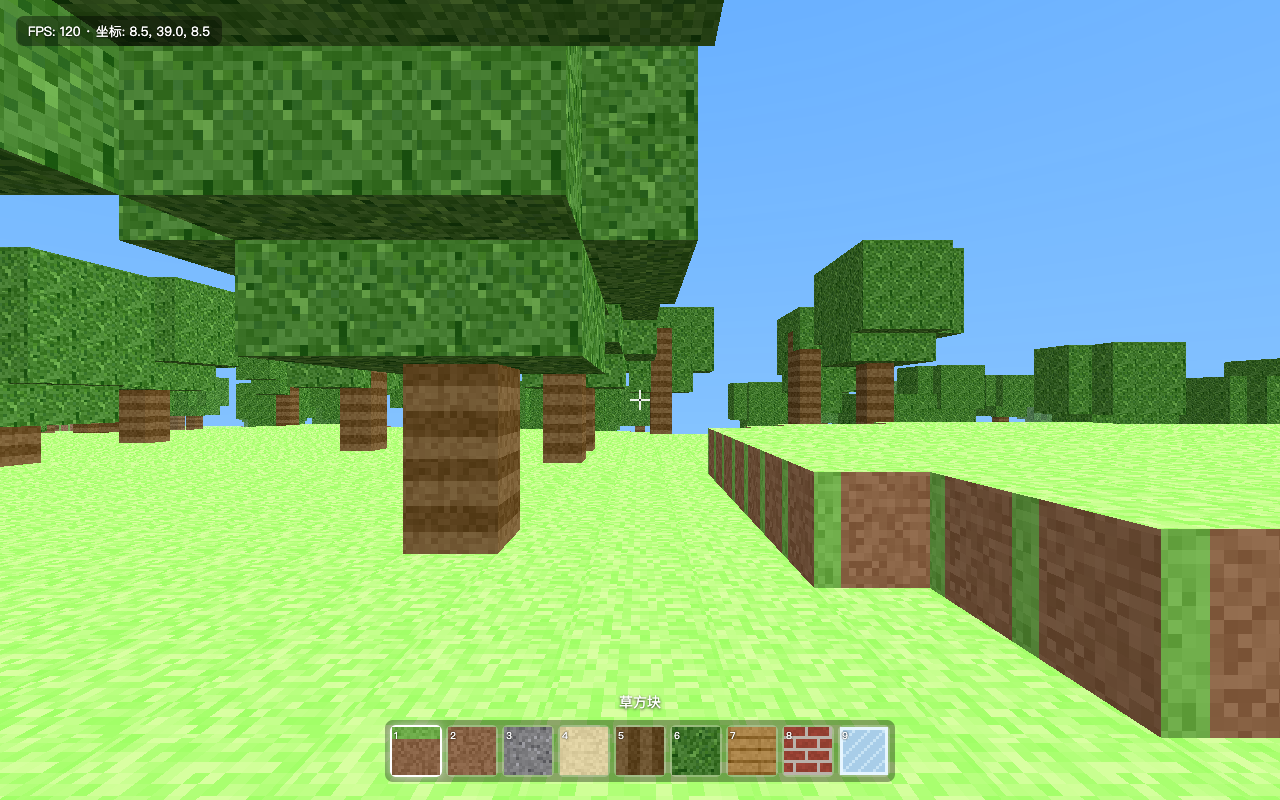
Screenshot taken by the agent itself, mid-verification.
A real, unedited run: a dsh agent (DeepSeek-V4-Pro) was asked to verify a Three.js voxel game it had built earlier. With dsh-preview installed it did all of this autonomously:
browser_open http://localhost:8091— page loaded, no console errors during load.browser_console— one 404 (/favicon.ico), correctly triaged as harmless; all 7 local resources returned 200.browser_read— confirmed the start screen copy, control help, and HUD text.browser_interact(click the start button) — overlay closed, HUD appeared, it watched the coordinates fall from 41.0 to 39.0 and FPS settle at 120, and concluded the physics and render loops were alive. No new errors.browser_screenshot— before/after PNGs saved into the workspace for the human.- Reported exactly what it verified — and what it couldn't (GPU rendering fidelity, real pointer-lock feel).
No human relayed a single screenshot.
Install
dsh plugin --profile web add dsh-preview
Works with any Chromium on your machine — Google Chrome and Microsoft Edge are picked up automatically; otherwise run npx playwright install chromium once and set browserChannels to [chromium].
Requires Node ^22.19 || >=24 (same as dsh itself).
Tools
| Tool | What it does |
|---|---|
browser_open |
Open an http(s) URL or a local file/directory (served automatically over 127.0.0.1). Returns a pageId and any console errors raised during load. |
browser_console |
Console messages + failed network requests captured since load. |
browser_read |
Deterministic no-vision reading: rendered text, outer html, or styles (bounding box + key computed styles of a selector). |
browser_interact |
Click / type / press / scroll-to on a selector; reports console errors the interaction caused. |
browser_screenshot |
Viewport, full-page, or single-element PNG saved into the workspace. |
browser_close |
Close a page when verification is done. |
browser_read is the heart of the design: a text-only model verifies layout facts (box sizes, colors, display values, rendered copy) deterministically, instead of hallucinating over pixels. Screenshots are for the human in the loop.
The bundled skill — the actual product
frontend-verify teaches the loop: open → console → read → interact → screenshot → fix → re-verify, report what passed verbatim, and name what could not be verified rather than implying full coverage. That last rule is why the demo above ends with the agent volunteering that it could not judge GPU rendering or pointer-lock feel.
Disable it with registerSkill: false if you run your own playbook — but then you have bought browser tools, of which this ecosystem has many.
Configuration
All tunables are plugin config — set them in your profile's cordis.patch.yml:
- id: preview
  name: dsh-preview
  config:
    headless: true
    browserChannels: [chrome, msedge, chromium]
    viewportWidth: 1280
    viewportHeight: 800
    navigationTimeoutMs: 15000
    actionTimeoutMs: 5000
    screenshotDir: .dsh-preview
    maxReadChars: 20000
    maxConsoleMessages: 100
    allowedHosts: []          # extra hostnames browser_open may visit
    registerSkill: true
Security model
localhost/127.0.0.1/::1are always allowed — that is what frontend verification needs.- Any other host is refused by default. Grant specific hosts via
allowedHosts; the error message tells the model to ask you rather than work around it. - Local paths are served read-only from their own directory on an ephemeral 127.0.0.1 port, with path containment.
- The plugin never types credentials and the skill forbids screenshotting pages with secrets.
Known limitations
- Headless rendering differs from a real desktop browser: pointer lock, some GPU codepaths, and OS dialogs may behave differently. The bundled skill instructs the agent to say so when it matters.
- No vision description yet: screenshots are for humans; machine verification goes through
browser_read/browser_console. Automatic screenshot→text description through your existing dsh model routes is on the roadmap. - One shared browser process per dsh process; pages are cheap, but parallel agents share it.
Development
git clone https://github.com/Viger1/dsh-preview.git && cd dsh-preview
corepack pnpm install
corepack pnpm run build
dsh plugin --profile web add /absolute/path/to/dsh-preview   # link the local checkout
corepack pnpm run watch + a config touch gives a fast edit-reload loop.
Family
| Plugin | What it gives your agent |
|---|---|
| dsh-preview (this repo) | 👁 Eyes — verify what it builds: open, read, screenshot, self-check |
| dsh-pilot | ✋ Hands — operate any page by accessibility refs, with a network-layer origin fence |
| dsh-review | 🔍 Judgement — find defects, then try to refute each one before reporting it |
| dsh-design | 🎨 Taste — constrain the choices, then measure whether the result kept them |
Each installs independently and they coexist (distinct tool prefixes, shared engineering discipline).
License
安装
装一次目录插件,之后本站所有插件都能让 DeepSeek Harness 自动找、自动装:
dsh plugin add dshbase-catalog然后对 agent 说「帮我装 dsh-preview」,它会在目录里找到并自动安装。文档:dshbase-catalog · 已验证场景包。
该插件是 GitHub 源码(未发 npm)——直接从仓库装:
Web profile:
dsh plugin --profile web add github:Viger1/dsh-previewHeadless(CLI)profile:
dsh plugin --profile headless add github:Viger1/dsh-preview实测报告
验证通过:从 GitHub 源码完成 L1 安装 + L2 加载 + L3 运行(dsh 0.1.0-rc.6)。
分享徽章
把这枚徽章粘进 README——它会链回本页,实测状态变化时自动更新:

[](https://dshbase.com/zh/plugins/dsh-preview/)<a href="https://dshbase.com/zh/plugins/dsh-preview/"><img src="https://dshbase.com/badges/dsh-preview.svg" alt="dshbase 实测可装"></a>