
插件目录 / Knowledge / dsh-provider-model-configurator
dsh-provider-model-configurator
已验证 · 实测可装 LiangYin233
功能简介
DSH高级模型配置器:一键应用pi-ai预设模型的上下文、输出上限、推理挡位
已归档 — 不再维护,谨慎使用
该插件已归档、不再维护——除非你愿意自己维护,否则慎用。
「已验证」表示我们的自动化 CI 在干净 profile 里实际执行了 dsh plugin add 并启动成功——仅此而已。功能描述与版本兼容性均为作者声明。这不是安全审计,也不代表对第三方代码的背书。
README
dsh-provider-model-configurator
一个 DeepSeek Harness (DSH) 插件:在独立设置页「模型 Pro / Model Pro」中集中查看、新建、编辑、复制与删除已配置提供商下的模型条目——上下文窗口、最大输出、输入模态、推理档位与推理兼容开关。还可以从内置的 llm-pi-ai 模型列表读取您所需要配置的模型的上下文参数、最大Token,无需自行填写、手动查询。
界面预览
| 模型 Pro 设置页 | 复制来源选择器 |
|---|---|
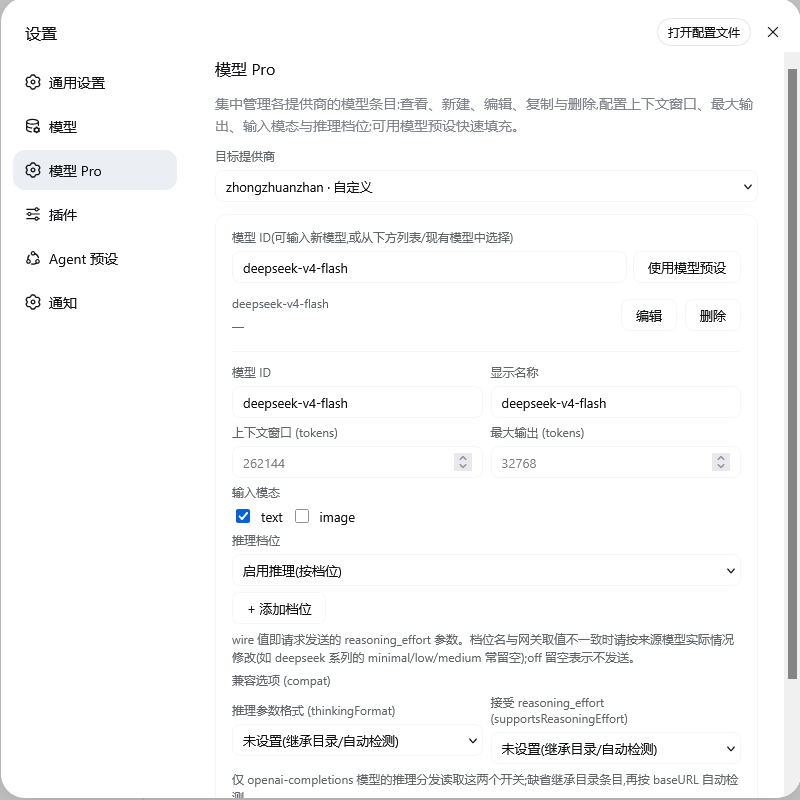 |
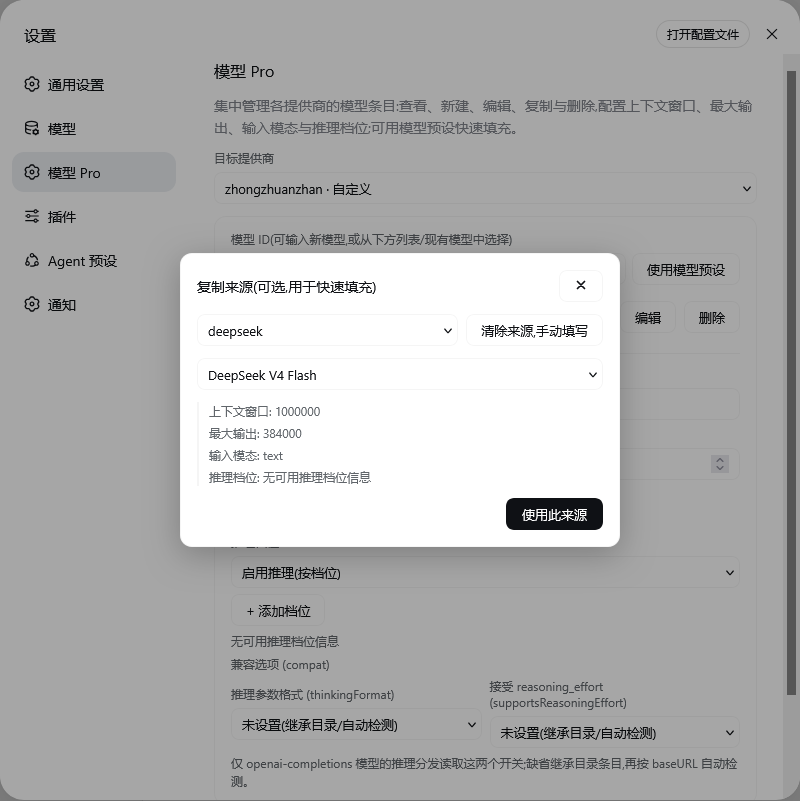 |
安装
# 从 GitHub 安装
dsh plugin --profile web add github:LiangYin233/dsh-provider-model-configurator#v0.3.9

# 或从 GitHub tarball 安装
dsh plugin --profile web add https://github.com/LiangYin233/dsh-provider-model-configurator/archive/refs/tags/v0.3.9.tar.gz

# 或从本地打包安装
npm pack
dsh plugin --profile web add ./dsh-provider-model-configurator-0.3.9.tgz
安装后重启 Web 服务器并刷新页面,打开设置 → 左侧导航「模型 Pro」(Models 页之后)。
功能
- 选择目标提供商,列出其显式模型条目与配置摘要,可编辑 / 删除;
- 新建:输入模型 ID,手动填写显示名、上下文窗口、最大输出、输入模态(text/image)、推理档位(档位 → wire 值,
off留空 = 不发送);推理档位与输入模态均支持「未设置(继承目录)」,避免把未配置的字段写成显式默认值; - 复制填充:「使用模型预设」打开来源选择器,从预设目录或其他提供商挑一个模型快速填充表单;
- 兼容开关 (compat):编辑
thinkingFormat(openai / deepseek / openrouter / together / zai / qwen / string-thinking / ant-ling)与supportsReasoningEffort(true / false / 未设置),供 openai-completions 推理分发读取;
目录快照行为:在尚未显式配置模型列表的目录提供商上新建/应用模型时,插件会把内置目录的当前模型列表整体写入为该提供商的显式条目(目录中已有的 ID 原地更新,新 ID 追加),之后再编辑均基于这份显式列表;目录后续更新不会自动合并进已快照的列表。目录提供商若删到零个显式条目,则回退为内置目录(未快照)状态。
仓库结构
├── package.json        bundle 清单(dsh.bundle.patch / dsh.client / exports)
├── cordis.patch.yml    bundle patch:挂载 dsh-provider-model-configurator
├── dsh.plugin.json     插件元数据(id / version / main)
├── docs/               界面截图(README 预览用)
├── lib/                构建产物(随包发布,由 build.mjs 生成)
│   ├── index.js        ← src/host/index.js
│   ├── contract.js     ← src/host/contract.js
│   └── client.js       ← src/client/static.tsx
├── shared/             构建产物:src/shared/thinking.js(共享常量;lib/contract.js
│                       运行时按 ../shared/thinking.js 解析到包根目录)
├── src/
│   ├── host/           Host 半区源码(index.js 静态 / dynamic.js 动态插件)
│   ├── client/         Client 半区源码(page.tsx / model.ts / page.css / locales/)
│   └── shared/         thinking.js — 推理档位 / 推理格式常量的单一来源
├── scripts/
│   └── check-dynamic.mjs  动态半区语法校验 + 常量同步校验(npm run check 执行)
├── build.mjs           esbuild 构建(lib/ 与 dist/dynamic-client-body.js)
└── tsconfig.json
License
MIT
鸣谢
安装
装一次目录插件,之后本站所有插件都能让 DeepSeek Harness 自动找、自动装:
dsh plugin add dshbase-catalog然后对 agent 说「帮我装 dsh-provider-model-configurator」,它会在目录里找到并自动安装。文档:dshbase-catalog · 已验证场景包。
该插件是 GitHub 源码(未发 npm)——直接从仓库装:
Web profile:
dsh plugin --profile web add github:LiangYin233/dsh-provider-model-configuratorHeadless(CLI)profile:
dsh plugin --profile headless add github:LiangYin233/dsh-provider-model-configurator实测报告
验证通过:从 GitHub 源码完成 L1 安装 + L2 加载 + L3 运行(dsh 0.1.0-rc.6)。
使用场景
给 agent 一套记忆、知识库或检索层,让它不再跨会话丢上下文。
适合谁
跑长项目、想让 agent 记住决策、文档和偏好而不用每次重讲的人。
二次开发建议
记忆/检索后端是缝——插新存储、调蒸馏策略,或加引用与审计轨迹。
分享徽章
把这枚徽章粘进 README——它会链回本页,实测状态变化时自动更新:

[](https://dshbase.com/zh/plugins/dsh-provider-model-configurator/)<a href="https://dshbase.com/zh/plugins/dsh-provider-model-configurator/"><img src="https://dshbase.com/badges/dsh-provider-model-configurator.svg" alt="dshbase 实测可装"></a>