
插件目录 / Developer / dsh-session-categories
dsh-session-categories
已验证 · 实测可装 ht719
功能简介
Session categories plugin for DeepSeek Harness
可用 — 实测通过,早期项目
Session categories plugin for DeepSeek Harness 实测能干净安装、正常启动。早期项目,但功能可用。
「已验证」表示我们的自动化 CI 在干净 profile 里实际执行了 dsh plugin add 并启动成功——仅此而已。功能描述与版本兼容性均为作者声明。这不是安全审计,也不代表对第三方代码的背书。
README
dsh-session-categories
English | 中文
Session Categories adds user-managed category trees to the dsh sidebar. Each Workspace keeps its own categories, and each session can belong to at most one category.
The package includes the Host entry, Web client bundle, and Cordis profile patch. No separate Client or Bundle package is required.
What it looks like
The sidebar groups sessions inside clear, collapsible category containers. The screenshot shows the Workspace, category, and session hierarchy in the current plugin layout.
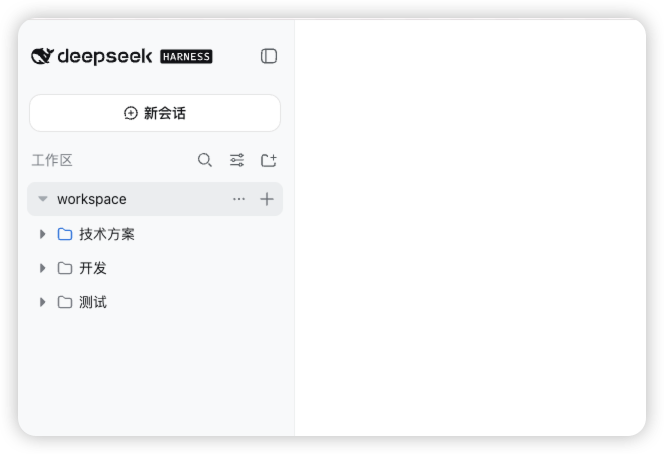
Within a Workspace, you can:
- create a session directly inside a category;
- expand or collapse categories without losing their hierarchy;
- drag a session into another category;
- create a top-level category from the Workspace actions menu;
- create a child category, or rename and delete the current category, from the category actions menu;
- move a session with the folder icon on the Move to category action.
Expanded categories use nested containers with a fixed inset at each depth. Sessions receive one additional inset beyond their category, and drag targets highlight without changing row dimensions. Collapsed Workspace rows show a hierarchy icon when they contain categories or sessions.
Install from GitHub
The dsh command must be available in your shell. Install the prebuilt package directly into an unmodified dsh Web profile:
dsh plugin --profile web add dsh-session-categories
dsh --profile web
If you are running dsh from a source checkout, use its package launcher instead:
pnpm dsh plugin --profile web add dsh-session-categories
pnpm dsh --profile web
The repository includes generated runtime files, so a separate plugin build is not required.
For the unreleased GitHub version, install directly from the repository:
dsh plugin --profile web add github:ht719/dsh-session-categories
Behavior and data
Deleting a category recursively archives its sessions; it never deletes their durable logs. Archive operations are retried with the same operation id and recover after a restart. Mutations reject stale revisions, cross-Workspace session ids, descendant moves, and assignments to unknown categories.
Compatibility
The plugin targets the current dsh prerelease plugin APIs and is intended to work with an unmodified dsh installation. dsh does not promise pre-release compatibility across versions, so update dsh and this plugin together when upgrading.
Source layout
The repository root is the installable prebuilt package. Source packages are retained under packages/workspace/session-categories/, packages/client/ui-session-categories/, and packages/bundle/session-categories/.
The plugin is composed as an ordinary Cordis row. It does not require changes to ui-workspace, ui-slots, api-remotes, or other core dsh packages.
安装
装一次目录插件,之后本站所有插件都能让 DeepSeek Harness 自动找、自动装:
dsh plugin add dshbase-catalog然后对 agent 说「帮我装 dsh-session-categories」,它会在目录里找到并自动安装。文档:dshbase-catalog · 已验证场景包。
该插件是 GitHub 源码(未发 npm)——直接从仓库装:
Web profile:
dsh plugin --profile web add github:ht719/dsh-session-categoriesHeadless(CLI)profile:
dsh plugin --profile headless add github:ht719/dsh-session-categories实测报告
验证通过:从 GitHub 源码完成 L1 安装 + L2 加载 + L3 运行(dsh 0.1.0-rc.6)。
分享徽章
把这枚徽章粘进 README——它会链回本页,实测状态变化时自动更新:

[](https://dshbase.com/zh/plugins/dsh-session-categories/)<a href="https://dshbase.com/zh/plugins/dsh-session-categories/"><img src="https://dshbase.com/badges/dsh-session-categories.svg" alt="dshbase 实测可装"></a>