
插件目录 / Knowledge / dsh-session-kb
dsh-session-kb
已验证 · 实测可装 PolinniZhong
功能简介
会话库:历史会话全文搜索与一键召回。
可用 — 实测通过,早期项目
会话库:历史会话全文搜索与一键召回。 实测能干净安装、正常启动。早期项目,但功能可用。
「已验证」表示我们的自动化 CI 在干净 profile 里实际执行了 dsh plugin add 并启动成功——仅此而已。功能描述与版本兼容性均为作者声明。这不是安全审计,也不代表对第三方代码的背书。
你是作者?可以提供所需账号 / 服务,或提交一份自测报告 (环境 + 安装步骤 + 运行结果),我们审核后点亮徽章。 提交证据或自测报告 ↗
README
dsh-session-workbench — Session Workbench for DeepSeek Harness
Search every past session and recall the ones you need as
@references; manage the conversation-view tab bar (show/hide + reorder). One plugin, three entry points.
What it is
DeepSeek Harness ships with a full-text search engine (SQLite FTS5) and cross-session references (@session mention), but neither has a user-facing interface. This plugin adds the missing discover → browse → insert layer:
- Search — full-text search across all your past sessions (all workspaces), with workspace / time-range / archive filters, and cursor pagination;
- Fragment hits (v1.1) — results are per-session best-hit fragment cards: the matched sentence highlighted with its surrounding context (lazy-loaded), so you see the sentence, not just which session;
- Same-session hits (v1.2) — expanding a fragment card shows a "More hits in this session" fold with the other matches (first 5, then load more), each highlighted — no more hunting for the rest of a session's matches;
- Locate (v1.1, composite anchors in v1.2) — click Locate on a fragment card to open that session, page the window back, and scroll to the exact message with a flash highlight; v1.2 matches the hit sentence plus its preceding text so repeated wording lands on the right occurrence; when unmatched, a non-blocking toast tells you to scroll manually;
- Recall — pick up to 3 sessions and insert them into the input as reference chips in one click; on send, the platform injects read-only snapshots (
## Referenced sessions) and the AI answers with your historical context; - Recent — a minimal recent-sessions list so you can find things fast without searching;
- Archives — search includes archived sessions by default (with an "Archived" badge and all / active-only / archived-only filters) — after DSH archives a session it's visible nowhere else, so search is the only way back; the Recent list excludes archived sessions by default;
- Settings — enable/disable switch + default search scope + privacy statement;
- Conversation views (new in 1.0.0) — manage the session tab bar: show/hide each custom view and reorder them by drag-and-drop, from both the 会话工作台 settings entry (会话视图 partition) and a right-click / double-click panel on the tab bar itself.
Everything runs fully locally with zero network requests; only session metadata and hit snippets are read, and no session is ever modified or deleted (see PRIVACY.md).
The UI is deliberately native-feeling: every color, spacing, radius, font, and interaction (header row, inline search, grouped menu, pill buttons, checkboxes) is measured from DSH's own design system — better-sidebar, the workspace sidebar, and the settings sections — so the plugin looks and behaves like a built-in feature, not a third-party skin.
Why this plugin (differentiation): ecosystem search plugins stop at "which session"; in-session navigation plugins (10+) only jump within the current session. Session KB is the only plugin that closes the loop cross-session search → snippet-level hit → locate the exact message in the old session → @recall.
Screenshots
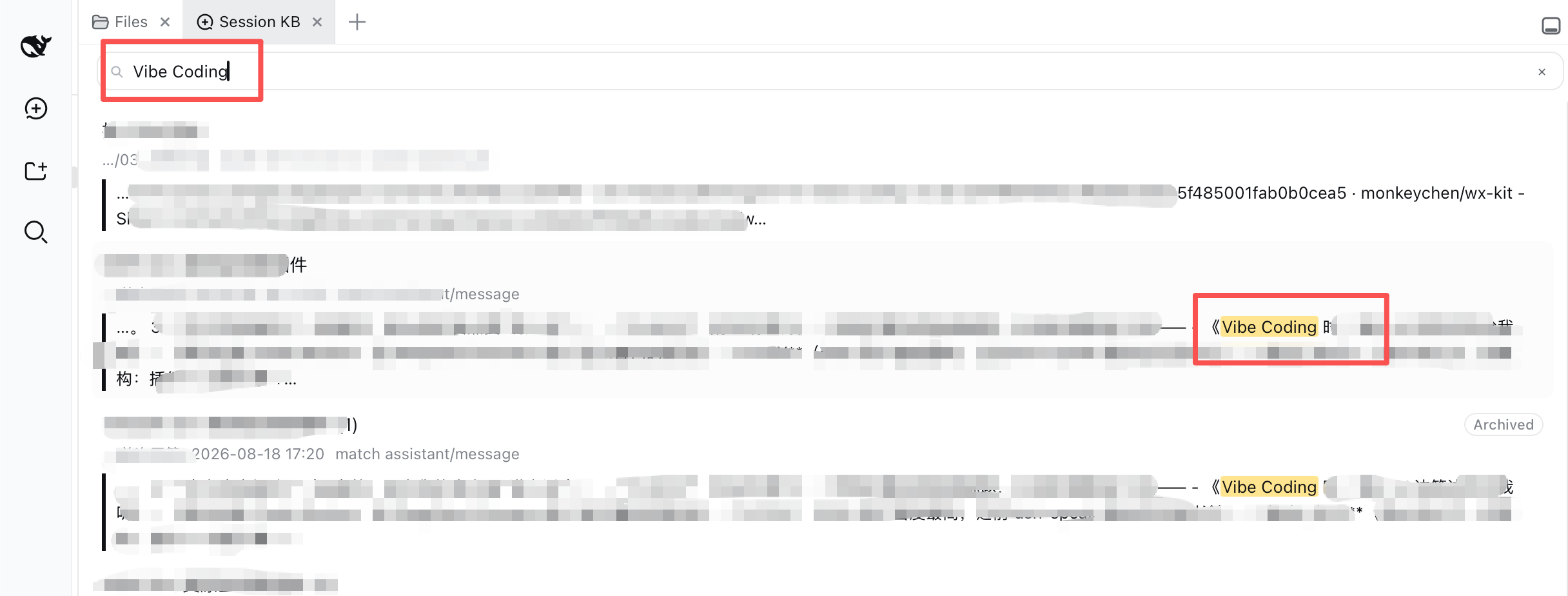
Fragment search (v1.1) — searching "Vibe Coding" returns per-session fragment cards: matched sentence highlighted, context below:
Locate (v1.1) — the session opens and scrolls to the exact hit message with a flash highlight:

Pick & insert — check up to 3 sessions, insert them into the input as reference chips:

Settings — enable/disable card with expandable options and privacy statement:

Videos
Conversation views — reorder in Settings (drag the ⋮⋮ handle):

Conversation views — reorder from the tab-bar panel (right-click / double-click a tab):

High-res
.mp4versions live in docs/videos/.
Requirements
- DeepSeek Harness (
dsh) with a web profile — the plugin is a static bundle (its client is served at runtime; a page refresh picks up client changes, host/profile changes need a restart). - For session-library search, a persistent FTS index must be enabled in the web profile (
openAt: startup), see Install.
Install
dsh plugin --profile web add dsh-session-workbench
Local development can also use a
link:dependency (same pattern as dsh-personal-center).
Enable full-text search (required): the web profile disables the FTS index by default (openAt: never). Override it in <DSH_HOME>/profiles/web/cordis.patch.yml — use a persistent index path and openAt: startup so the index is built once on launch and reused (a :memory: index would rebuild on every search and block the host):
- id: session-query-sqlite
  config:
    path: '/Users/<you>/.dsh/session-query.sqlite'
    openAt: startup
⚠️
pathmust be an absolute path — the platform resolves it withpath.resolveand does not expand~or environment variables. Writing~/.dsh/...silently creates the index inside the DSH dependency tree (lost on upgrade, and a large un-checkpointed WAL makes searches take minutes).
Then restart the DSH app (host-side config and route changes require a restart; client-bundle changes only need a page refresh).
Usage
- Open the Session KB tab in the right sidebar (better-sidebar); the Settings → Session KB section can disable/enable it;
- Without a keyword you see Recent sessions; click the search icon (top-right) to expand the input, type a keyword (literal phrase match, e.g.
MCP config) to switch to search results; - Click the more button (⋯) to filter by workspace / time range / archive (all incl. archived / active only / archived only);
- Click a result to expand the preview (hit context + session meta); click Locate to open that session and scroll to the exact hit message (flash-highlighted); click the path to expand the full path; then check it (up to 3);
- Click Insert references into input →
@sessionchips appear in the input → continue typing your question → send; - The platform injects read-only snapshots into the model context and the AI answers with your history;
- Manage conversation views — open Settings → 会话工作台 → 会话视图 to toggle each view's visibility and drag the ⋮⋮ handle to reorder, or right-click / double-click the session tab bar for the same panel inline.
Model Experience
When the user mentions "before / previous session / how did we do X" — anything needing past context — suggest opening the Session KB tab in the right sidebar, searching, and referencing the matching session(s). Referenced sessions enter your context as ## Referenced sessions read-only snapshots:
- Treat referenced content as a fact source: base answers on its implementation details, and point out conflicts between referenced content and the current question;
- Snapshots have a size limit (64 KB per session by default); for large sessions only part may be retained — ask the user to reference a more focused session when you need earlier details;
- Long sessions may be compacted (early messages replaced by checkpoints) — compacted content is still searchable (the official FTS index includes shadowed content), so "it was compacted" never means "it's lost".
Platform limitations
- At most 3 referenced sessions per message; 64 KB snapshot budget per session (preview shows a hint when a session is large);
- Search is literal phrase matching (FTS limitation) — no synonyms or semantics; quotes,
OR,*are treated as plain characters; - Only user/assistant text and some structured events are indexed — no reasoning, stream chunks, or headers;
- Archive semantics: search includes archived sessions by default; the Recent list excludes them;
- Locate is best-effort: the platform exposes no "open session at seq" API, so Locate pages the window back and text-matches the hit message — repeated text may land on an earlier occurrence, and hits beyond ~500 messages back fall back to a manual-scroll toast.
Development
dsh-session-workbench/
├── package.json          # dsh.bundle.patch + dsh.client.platform=web + exports["./client"]
├── cordis.patch.yml      # plugin row (session-workbench)
├── lib/
│   ├── index.js          # host: loopback routes /session-kb/* (search/context/settings) + isLoopback + archive
│   └── client.js         # client: better-sidebar tab + settings sections (会话库 / 会话视图) + tab-bar view panel (zh/en)
├── docs/
│   ├── DESIGN-SYSTEM.md  # visual/interaction spec (measured values, incl. view drag styles)
│   └── DESIGN.md         # implementation design (host/client/insert-reference/archive/views)
├── PRIVACY.md
└── README.md
See DESIGN.md for implementation; platform notes in PLATFORM-NOTES.md.
Roadmap
- 1.0.1 (current) — DSH 0.1.1-rc.2 compatibility patch; feature baseline unchanged from 1.0.0 合并首发:会话库(search → snippet → locate → recall)+ 会话视图(tab bar show/hide + drag reorder);
- 会话库历史:v1.2(同会话多片段 + 组合锚点)/ v1.1(片段级检索)/ v1.0(搜索召回);
- v2.0 — bookmarks / notes / tags + cost integration + long-session handoff index (FR-HANDOFF);
- v3.0 — backlinks + reference graph + related sessions.
License
MIT
中文
会话工作台(Session Workbench) = 会话库 + 会话视图,一个插件:
- 侧边栏·会话库:全文搜索全部历史会话,把最多 3 个会话以
@引用插入输入框,发送后平台注入只读快照,AI 带着历史上下文回答; - 设置·会话工作台(一个条目,内含两个分区):「会话库」分区(启用开关 + 搜索默认范围 + 隐私说明)+「会话视图」分区(每个视图「显示/隐藏」开关 +
⋮⋮拖拽排序); - 标签条右键/双击面板:快捷管理会话视图(同款开关 + 拖拽排序)。
会话库要点(继承自 dsh-session-kb):
- 搜索用官方本地 SQLite FTS5 索引(
ctx.sessionQuery)——零网络请求,纯本地; - 片段级检索:结果升级为「片段卡片」(命中句高亮 + 前后文),点「定位」打开旧会话、翻到命中位置并滚动到那条消息(高亮 2s);
- 同会话多片段:展开片段卡片查看同会话其余命中(前 5 条 + 加载更多,均带关键词高亮);定位用「命中句 + 前文」组合锚点;
- 召回走官方会话引用机制(
@[label](dsh-session:…)→## Referenced sessions); - 归档:搜索默认包含已归档会话(带「已归档」徽标 + 全部/仅未归档/仅归档筛选);最近列表默认排除归档。
关键词:dsh-plugin · deepseek-harness · session-search · knowledge-base · recall · view-management · conversation-view · 会话 · 检索 · 召回 · 知识库 · 会话视图 · 标签栏 · 视图管理
安装
装一次目录插件,之后本站所有插件都能让 DeepSeek Harness 自动找、自动装:
dsh plugin add dshbase-catalog然后对 agent 说「帮我装 dsh-session-kb」,它会在目录里找到并自动安装。文档:dshbase-catalog · 已验证场景包。
Web profile:
dsh plugin --profile web add dsh-session-kbHeadless(CLI)profile:
dsh plugin --profile headless add dsh-session-kb包信息
npm:dsh-session-kb · 版本 0.3.0 · 实测环境 dsh 0.1.0-rc.6
实测报告
端到端验证通过:dsh 0.1.0-rc.6 上 L1 安装 + L2 加载 + L3 运行问答。
分享徽章
把这枚徽章粘进 README——它会链回本页,实测状态变化时自动更新:

[](https://dshbase.com/zh/plugins/dsh-session-kb/)<a href="https://dshbase.com/zh/plugins/dsh-session-kb/"><img src="https://dshbase.com/badges/dsh-session-kb.svg" alt="dshbase 实测可装"></a>