
插件目录 / UI & Skins / dsh-session-notification
dsh-session-notification
已验证 · 实测可装 dingyi222666
功能简介
会话完成等四状态通知
可用 — 实测通过,社区增长中
会话完成等四状态通知 实测能干净安装、正常启动。社区在增长,是个稳妥选择。
「已验证」表示我们的自动化 CI 在干净 profile 里实际执行了 dsh plugin add 并启动成功——仅此而已。功能描述与版本兼容性均为作者声明。这不是安全审计,也不代表对第三方代码的背书。
README
dsh-session-notification

English | 中文
A notification plugin for the dsh web GUI. When a session finishes, hits an error, asks you a question, or needs your permission, you get a heads-up: a sound plays, and when you step away from the tab a system notification keeps you in the loop.
Screenshots
| The settings panel with the Notifications entry in the sidebar and the section content | The sound picker for each kind (the official dropdown) |
|---|---|
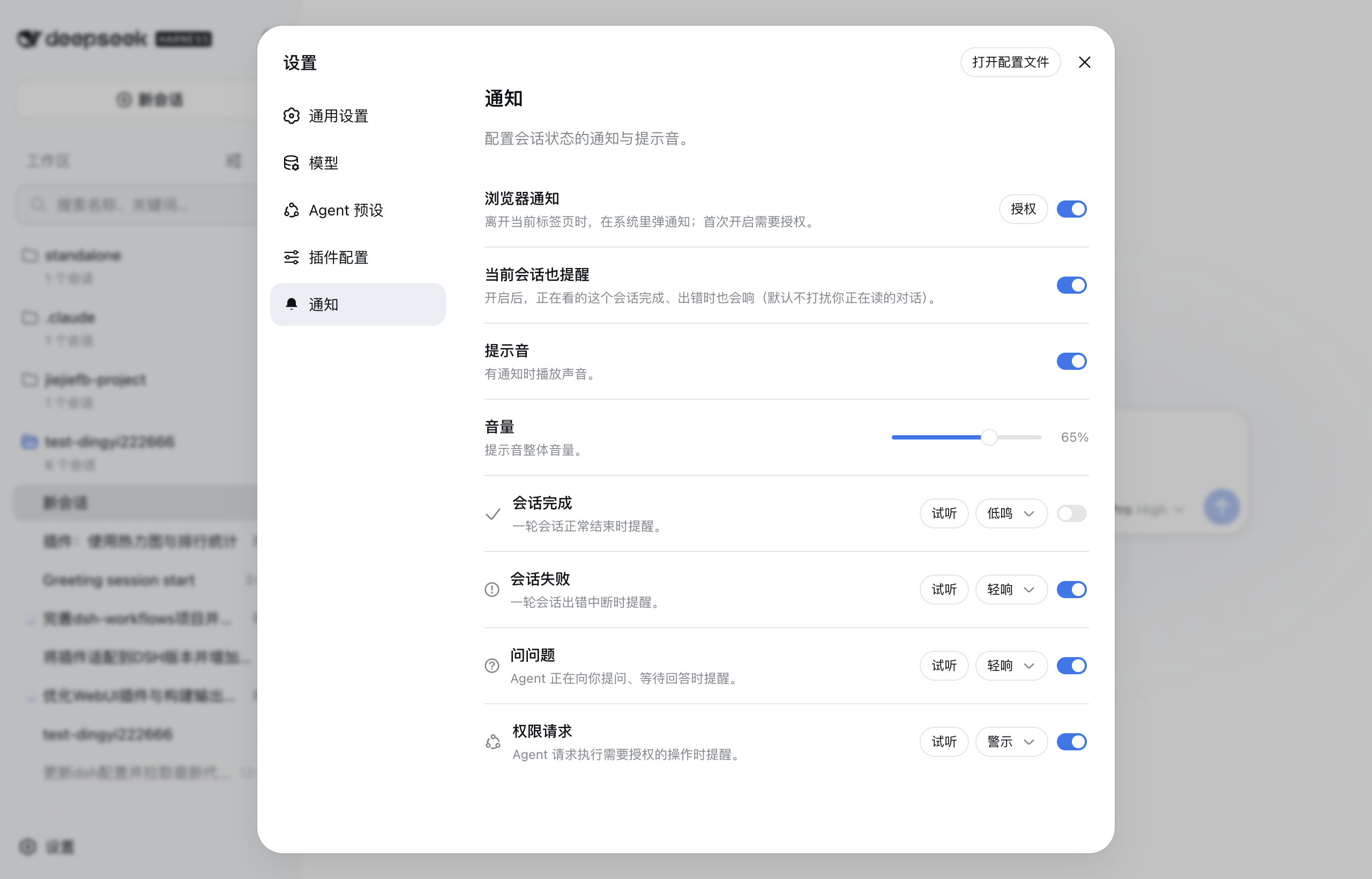 |
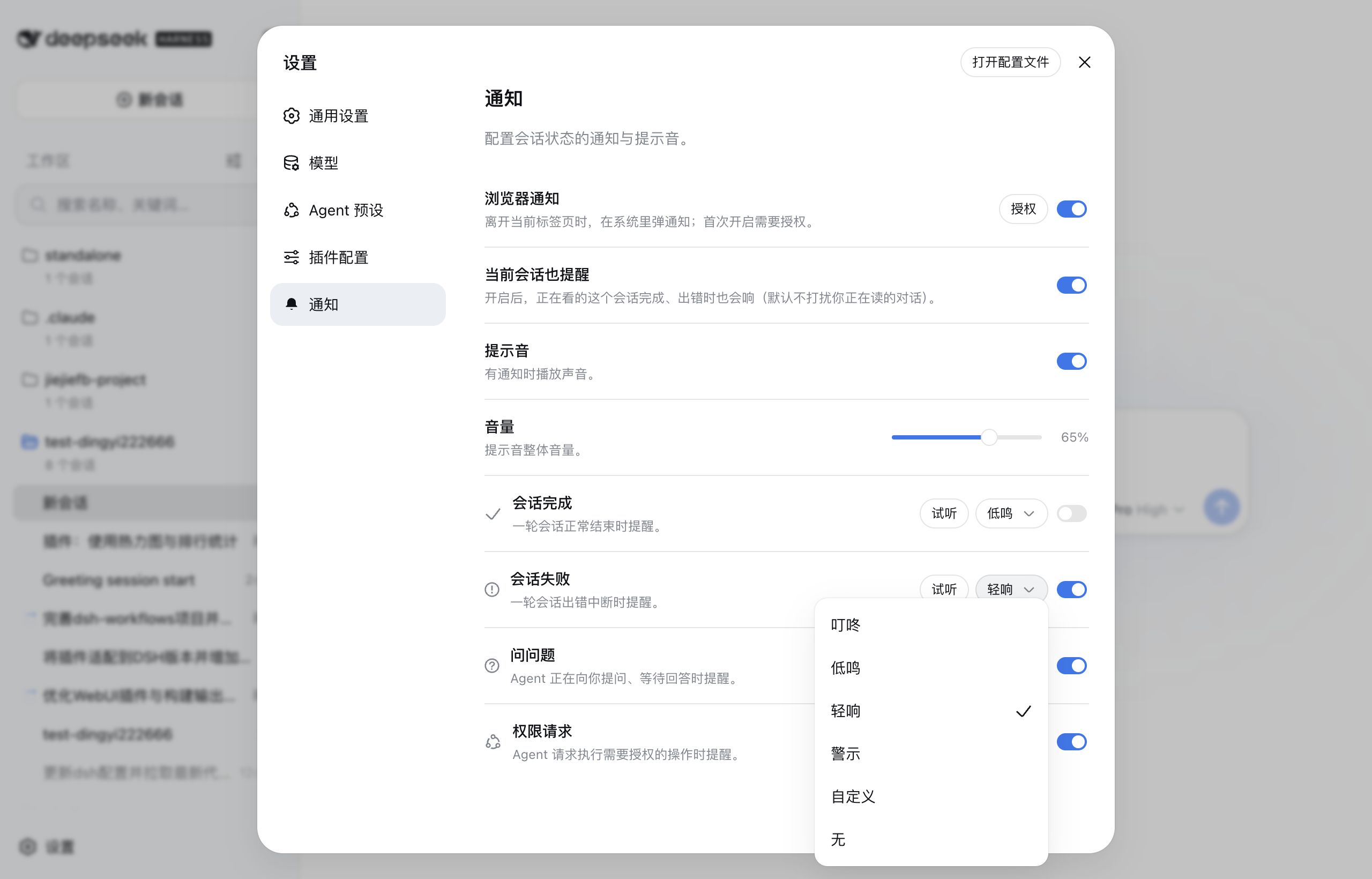 |
Install
# Install from npm (requires dsh >= 0.1.7-rc.2)
dsh plugin --profile web add @dingyi222666/dsh-session-notification
# Restart dsh web for it to take effect
dsh web
Everything lives in this plugin — no harness (host) changes:
- The settings section is registered through the client slot system (
settings.section), exactly like official sections. - Preferences persist in the browser (localStorage) and sync across tabs; nothing requires a host settings namespace or any other host-package change. (dsh 0.1.7 derives plugin config forms from Loader entries, so the node half has no namespace to reserve and stays inert.)
- The settings shell maps only its own section ids to nav icons, so the Notifications nav row shows the shell's default gear.
The four notification kinds
| Kind | When it fires | Default sound |
|---|---|---|
| Session completed | A turn ends normally (turn/end completed) |
chime |
| Session failed | A turn breaks with an error, or the host reports an agent error | fault |
| Question asked | The agent is waiting for your answer (question/requested) |
pop |
| Permission requested | The agent requests an authorized operation (approval/requested) |
alert |
Each kind can be enabled or disabled and reassigned to any of the four built-in sound effects (or muted). The four sounds are synthesized with Web Audio — no audio files are shipped — and the master volume is adjustable with the official-style slider (0–100%). A fixed loudness boost (~+6 dB) with a soft limiter on the playback chain makes every sound noticeably louder without distortion; custom audio feeds the same chain. The shared AudioContext is suspended as soon as playback is over and resumed by the next sound, so an idle notification never keeps the system audio stream (or a macOS sleep assertion) open.
Custom audio
Beyond the four built-in sounds, each kind accepts your own audio file (mp3/ogg/wav, up to 1 MB): pick Custom audio on a kind's row to upload one, and it replaces the built-in for that kind — with a Replace and remove affordance, plus the Custom audio in use tag. Custom files are stored browser-locally (they are device media, not shared preferences).
Browser notifications & the quiet default
Browser (system-level) notifications are off by default; turning the switch on asks for the browser's permission first (a user gesture). Once granted, a notification is shown when the event's session is not the one you are reading, or when the tab is in the background. Notifications carry the page's own icon (the favicon the harness serves). A completed session's notification carries its final reply text (the last assistant message). The Test notification button in the section sends one immediately to verify the channel once permission is granted. The session you are reading stays quiet by default — its own events don't interrupt you; flip the Alert for the current session toggle if you want it to alert too.
Notify for picks the scope (default Main, after subagents): All sessions alerts for every session including subagents; Main only alerts for the main session as soon as it goes idle; Main, after subagents holds that alert until every subagent the main session spawned has finished, so a run that only paused between subagent waves never interrupts you early (failures always alert immediately).
The Notifications settings section
The plugin registers a Notifications section in the settings panel (Settings ⚙ → Notifications):
- Browser notifications master switch (+ permission state and an enable button),
- Alert for the current session toggle (opt in to being alerted while reading that session),
- Notify for picker (All sessions / Main only / Main, after subagents),
- Sound master switch,
- Volume slider (0–100%),
- one row per notification kind: enable switch, custom-audio upload, sound picker (the official dropdown menu), and a Preview button,
- a Test notification button on the browser-notifications row (verifies the OS channel once permission is granted).
Preferences are stored browser-locally (localStorage) under the dsh-session-notification key — no host settings-namespace exposure required — so they persist across sessions and sync across tabs, and never depend on a harness change.
How it works
The browser half watches the sessions list snapshot and each session's conversation snapshot — no polling, no new wire channels:
- A session's
runningedge true→false ends a run; the run is classified failed when a newturn-errornode or a hostagent-errorappeared during it, otherwise completed (a failure that a retry recovered reads as completed). - A pending-interaction edge (
question/approval) raises the question / permission kinds, with the question text or the tool name+reason in the notification body. - Sessions already idle (or already pending) when the plugin loads raise nothing.
Development
yarn run build— builds the browser bundle (lib/client.js) and the Node half (lib/index.js/lib/invariant.js).src/client/notification-service.ts— the engine (classification) and dispatcher (gating);src/client/settings-store.ts— the settings section bridge;src/client/NotificationsSection.tsx— the section UI;src/client/sounds.ts+src/client/custom-audio.ts— the built-in and custom sounds.yarn test— behavior tests;yarn run typecheck— type gate.- dsh 0.1.7-rc.2: the
@deepseek-ai/dsh-*types install from npm as devDependencies (^0.1.7-rc.2, with@deepseek-ai/cordis^4.0.4 and@deepseek-ai/schemastery^3.18.4 matching the vendored framework); no checkout path mappings. - Node-half changes need a
dsh webrestart; browser-bundle changes need a rebuild (yarn run build) — a--devserver hot-reloads them.
Known limitations
- Failure detection reads the conversation snapshot, which the client only maintains for sessions that have been opened; a session that runs without ever being opened notifies as completed even on failure.
- Browser notifications require permission, and sound playback requires the page to have user activation (the browser's autoplay policy) — both are normal for browser apps and resolve as soon as the user interacts with the GUI.
- Custom audio files live in the browser (localStorage), so they do not follow you across browsers or profiles.
- The browser half is event-driven from the sessions list; it does not observe the raw event stream, so a run that starts and finishes between two list snapshots could in principle be missed (the host sends a status flip per edge, so this does not happen in practice).
Model Experience
None. The plugin is a pure client-side observer over the already-logged session state; nothing here reaches a model request.
KV Cache effect
None; this package neither assembles nor sends provider requests.
安装
装一次目录插件,之后本站所有插件都能让 DeepSeek Harness 自动找、自动装:
dsh plugin add dshbase-catalog然后对 agent 说「帮我装 dsh-session-notification」,它会在目录里找到并自动安装。文档:dshbase-catalog · 已验证场景包。
该插件是 GitHub 源码(未发 npm)——直接从仓库装:
Web profile:
dsh plugin --profile web add github:dingyi222666/dsh-session-notificationHeadless(CLI)profile:
dsh plugin --profile headless add github:dingyi222666/dsh-session-notification实测报告
验证通过:从 GitHub 源码完成 L1 安装 + L2 加载 + L3 运行(dsh 0.1.0-rc.6)。
使用场景
改变 dsh 的外观或交互方式——一套主题、皮肤或新面板,重塑工作区。
适合谁
在 web UI 里一待几小时、想让它按自己的习惯好看又好用的人。
二次开发建议
皮肤、面板和主题 token 是扩展点——写新皮肤、加面板,或与上游配色同步 token。
分享徽章
把这枚徽章粘进 README——它会链回本页,实测状态变化时自动更新:

[](https://dshbase.com/zh/plugins/dsh-session-notification/)<a href="https://dshbase.com/zh/plugins/dsh-session-notification/"><img src="https://dshbase.com/badges/dsh-session-notification.svg" alt="dshbase 实测可装"></a>