
插件目录 / UI & Skins / dsh-settings-about
dsh-settings-about
已验证 · 实测可装 sha2kyou
功能简介
dsh Settings → About plugin: runtime version, env, installed plugins (requires @deepseek-ai/[email protected])
可用 — 实测通过,早期项目
dsh Settings → About plugin: runtime version, env, installed plugins (requires @deepseek-ai/[email protected]) 实测能干净安装、正常启动。早期项目,但功能可用。
「已验证」表示我们的自动化 CI 在干净 profile 里实际执行了 dsh plugin add 并启动成功——仅此而已。功能描述与版本兼容性均为作者声明。这不是安全审计,也不代表对第三方代码的背书。
README
dsh-settings-about
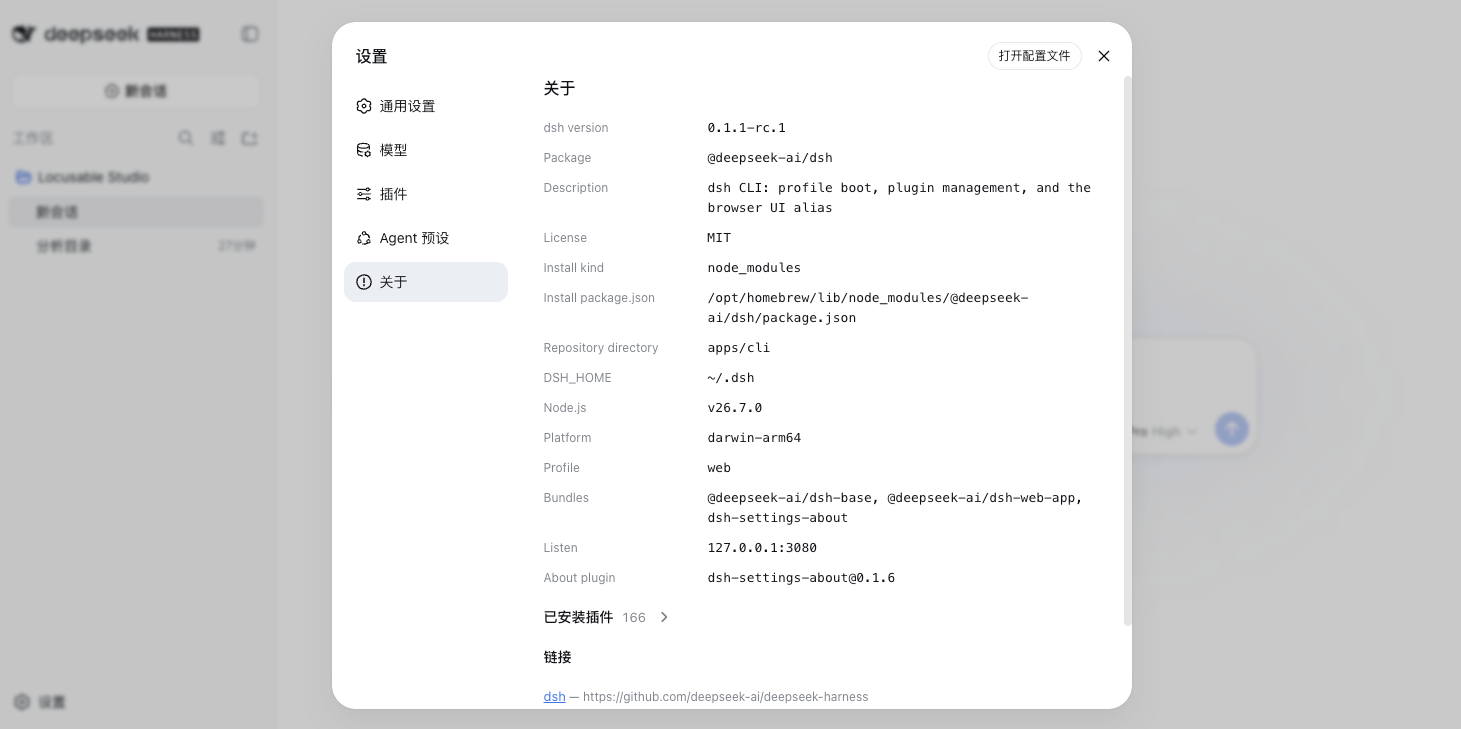
DeepSeek Harness (dsh) plugin that adds Settings → About: verified runtime facts from the currently running dsh process, plus an installed-plugin inventory (id, module, version, enabled, fiber phase).
Version requirements (important)
| Requirement | Constraint |
|---|---|
| dsh | @deepseek-ai/[email protected] only (the 0.1.1-rc.* line with credentials document version 1) |
| Not supported | @deepseek-ai/[email protected].* and older (flat .credentials.yaml without version / refs) |
| Profile | web only (this package ships a browser dsh.client UI) |
| Node.js | Whatever that dsh release requires (typically Node ^22.19 || >=24; verify with your install) |
| pnpm | Required on PATH — dsh plugin forwards to pnpm |
Install / upgrade dsh first:
npm install -g @deepseek-ai/[email protected]
dsh --version   # must print 0.1.1-rc.1
Credentials must use the v1 layout (version: 1 + refs:). If you still have a pre-release flat file, start dsh web once on 0.1.1-rc.1 and let it migrate, or convert manually — do not use a 0.1.0 parser against a v1 file (or the reverse).
Install
dsh plugin --profile web add github:sha2kyou/dsh-settings-about
dsh web
Local checkout:
git clone https://github.com/sha2kyou/dsh-settings-about.git
dsh plugin --profile web add ./dsh-settings-about
Then open Settings → About.
Update (GitHub install):
dsh plugin --profile web update dsh-settings-about
# same effect for this github: spec:
# dsh plugin --profile web add github:sha2kyou/dsh-settings-about
Local checkout: git pull in the clone, then restart dsh web (a link:/path install already points at that directory).
Uninstall:
dsh plugin --profile web remove dsh-settings-about
Optional: About nav icon
Settings sidebar icons are hard-coded in @deepseek-ai/dsh-client-ui-settings-general by section id (unknown ids use the gear). To map about → IconWarningOutline16:
node scripts/patch-about-nav-icon.mjs
# restart dsh web
Re-run after upgrading the global dsh install.
What the page shows
Values are collected from the running process only — missing data is omitted or listed under notes, never invented.
| Item | Source |
|---|---|
| dsh version / license / description / package name | dirname(realpath(process.argv[1]))/../package.json (same as dsh lib/bin.js) |
| Repository link | That package.json repository.url when convertible to http(s) |
| DSH_HOME | @deepseek-ai/dsh-home-paths from the same install |
| Node / platform | process.version / platform / arch |
| Profile / bundles | argv / profile path / $DSH_HOME/profiles/<name>/package.json |
| Listen | Live webServer.host:port |
| Installed plugins | Cordis Loader entries (+ package.json version when resolvable). builtin is derived from profile dependencies only (no Loader provenance). UI can hide builtin: true. |
Layout
| File | Role |
|---|---|
index.js |
Host plugin — GET /dsh-about/info |
collect.js |
Snapshot builder |
client.js |
Browser ModuleLoader bundle — settings.section about |
cordis.patch.yml |
Bundle insert |
scripts/patch-about-nav-icon.mjs |
Optional shell icon patch |
License
安装
装一次目录插件,之后本站所有插件都能让 DeepSeek Harness 自动找、自动装:
dsh plugin add dshbase-catalog然后对 agent 说「帮我装 dsh-settings-about」,它会在目录里找到并自动安装。文档:dshbase-catalog · 已验证场景包。
该插件是 GitHub 源码(未发 npm)——直接从仓库装:
Web profile:
dsh plugin --profile web add github:sha2kyou/dsh-settings-aboutHeadless(CLI)profile:
dsh plugin --profile headless add github:sha2kyou/dsh-settings-about实测报告
验证通过:从 GitHub 源码完成 L1 安装 + L2 加载 + L3 运行(dsh 0.1.0-rc.6)。
分享徽章
把这枚徽章粘进 README——它会链回本页,实测状态变化时自动更新:

[](https://dshbase.com/zh/plugins/dsh-settings-about/)<a href="https://dshbase.com/zh/plugins/dsh-settings-about/"><img src="https://dshbase.com/badges/dsh-settings-about.svg" alt="dshbase 实测可装"></a>