
dsh-sight
已验证 · 实测可装 Fu3rte
功能简介
文本型DSH模型的插件视觉:内置免费/廉价VLM预设+多图像批量分析
可用 — 实测通过,早期项目
文本型DSH模型的插件视觉:内置免费/廉价VLM预设+多图像批量分析 实测能干净安装、正常启动。早期项目,但功能可用。
「已验证」表示我们的自动化 CI 在干净 profile 里实际执行了 dsh plugin add 并启动成功——仅此而已。功能描述与版本兼容性均为作者声明。这不是安全审计,也不代表对第三方代码的背书。
README
dsh-sight
Plug-in vision for text-only DeepSeek Harness (dsh) models — paste an image, get a text description through a built-in VLM backend, no model switching.
Features
- Built-in VLM presets — OpenCode Zen (free, keyless) and Gemini Flash (free tier), plus a custom mode for any OpenAI-compatible endpoint. Pick one in the web settings page, done.
- Multi-image batch — the
visiontool takes up to 10 paths/URLs and describes all of them in ONE request, labeled per image.
How it works
- Prompt-admission override — dsh refuses image pastes for text-only models. dsh-sight wraps
apiProxy.sessions.prompt: the paste is accepted, the bytes land in/tmp/dsh-sight/image{N}/{hash}.png, and the image block becomes a path hint before entering history. Works with any provider — no model variant to switch. visiontool — the model calls it with the hint path (or any local path / http(s) URL); the plugin reads the bytes and answers through the configured OpenAI-compatible VLM backend.- System-prompt section — teaches the model the hint →
visiontool flow. - Web settings page (Settings → Vision) — backend source (preset or custom endpoint), an effective-config preview showing the actual request target, API-key field, and advanced knobs. Saved through the standard settings RPC and applied live, no restart (hot-reload via the
dsh-sight:section of$DSH_HOME/settings.yaml). - Cache cleanup — pasted images are stored under
/tmp/dsh-sight/image{N}/with MD5 dedup and an LRU cap (maxImages, default 200). A boot-time sweep deletesimage*dirs older than 7 days (DSH_SIGHT_MAX_AGE_DAYS), touching only the plugin's own directories; the OS clears/tmpon reboot too. - Security — the API key is
role('secret')and never rides a settings response. Local reads are capped at 25 MiB; URL fetches get a 30s timeout, a 25 MiB cap, and must claim animage/*content type. Remote bodies are downloaded and inlined — the vision API never receives your URLs (no SSRF surface). Only png/jpeg/webp/gif/bmp are accepted.
How to use
- Install & configure —
dsh plugin --profile web add dsh-sight, then open Settings → Vision, pick a preset (or a custom endpoint) and hit Save. - Paste an image — it is auto-saved under a plugin store directory and the image block becomes a hint carrying the exact path, e.g.
[Image #1 auto-saved to /tmp/dsh-sight/image1/xxxx.png]. The store root is OS-dependent (/tmpon Linux,/var/folders/…on macOS,%TEMP%on Windows), but the hint always shows the real full path. - Or call
visiondirectly — thepathsarray takes the hint path above, or any local path / http(s) URL, optionally with aquestion:
{ "paths": ["/tmp/dsh-sight/image1/xxxx.png"], "question": "What does this chart show?" }
- Batch — up to 10 images per call, described in one request.
Demo
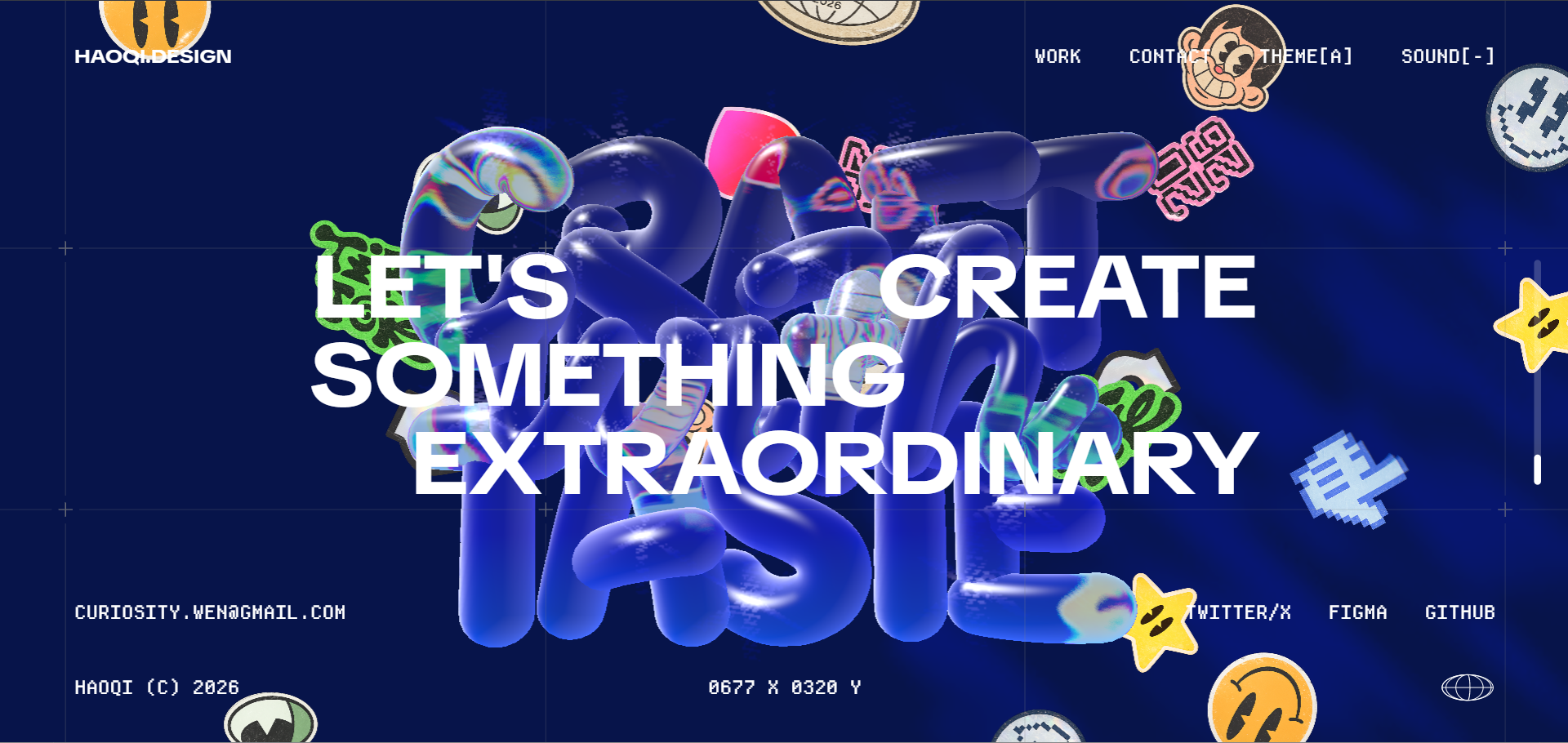
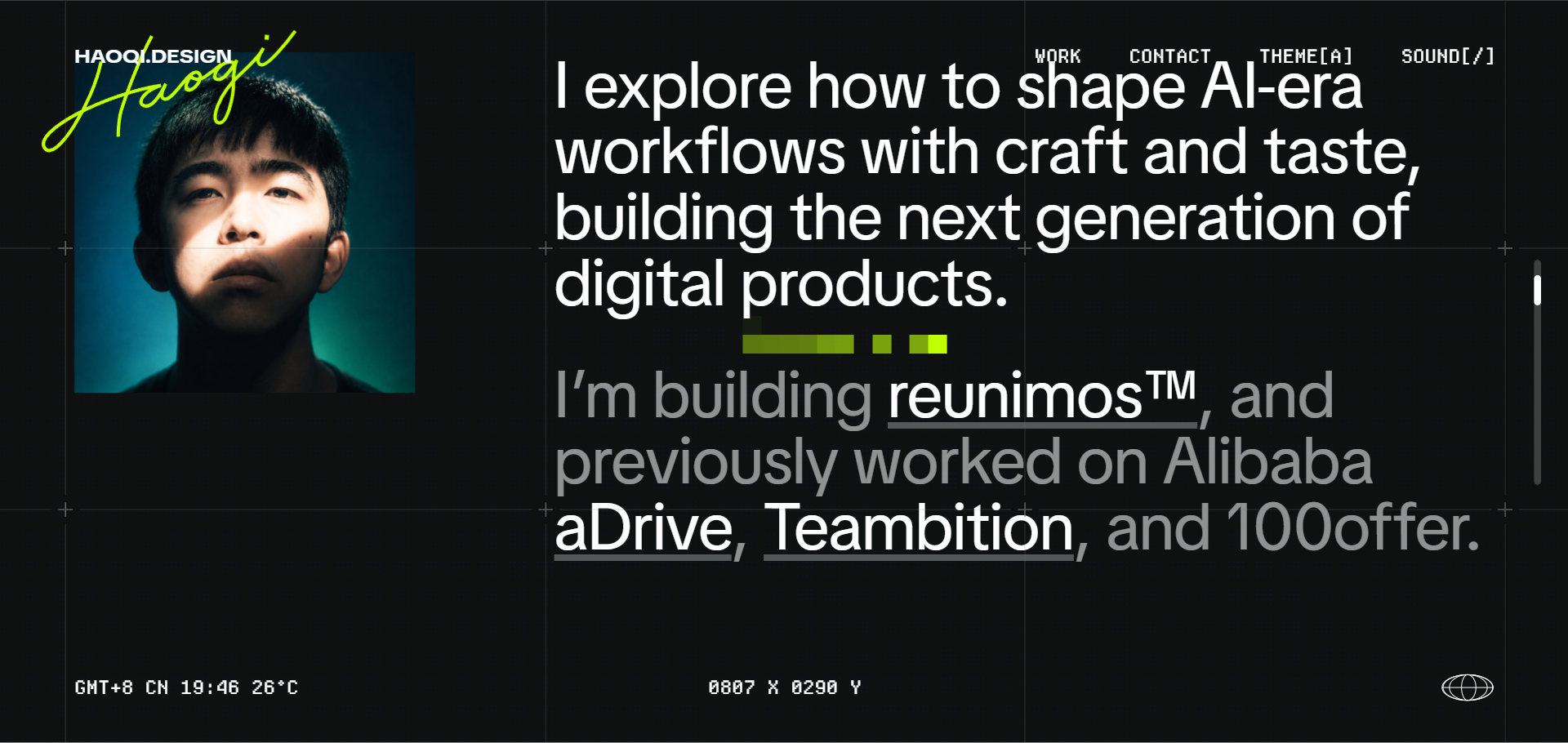
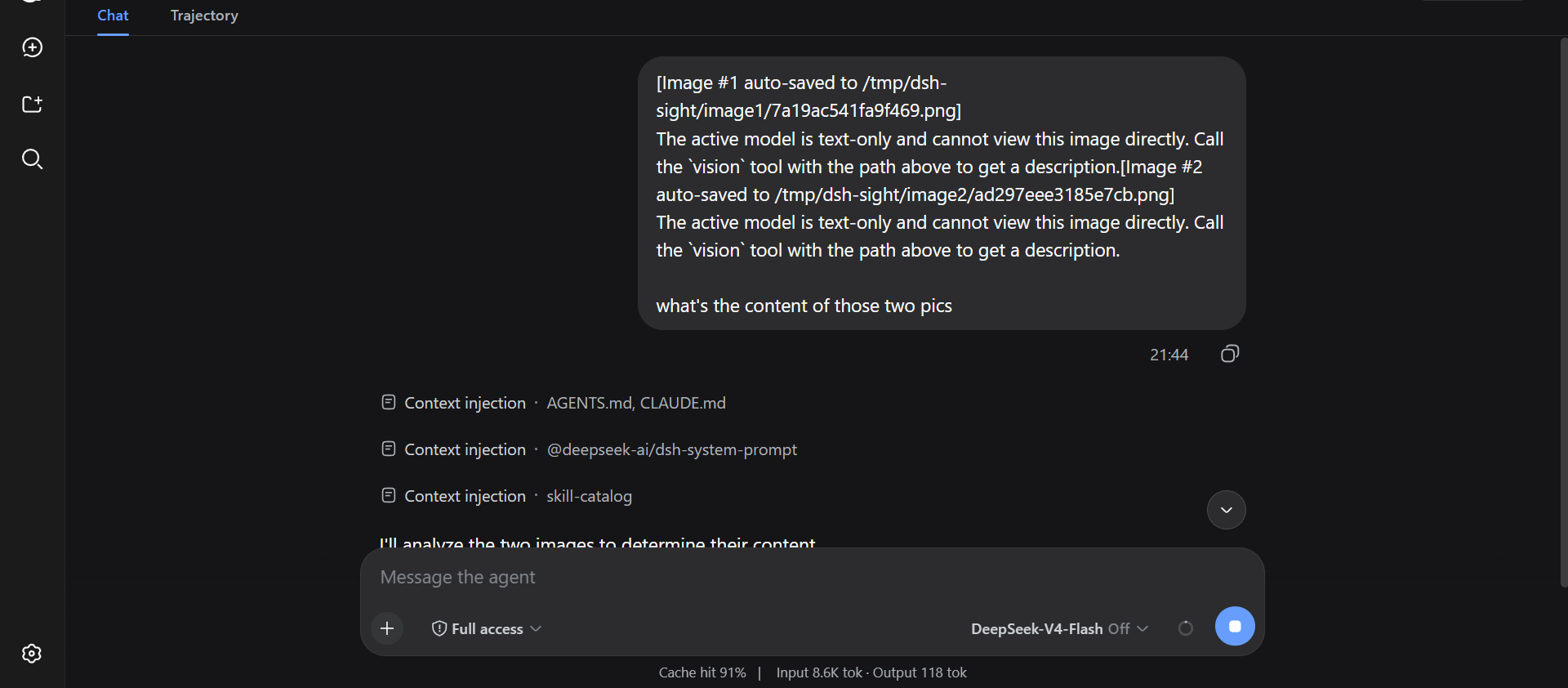
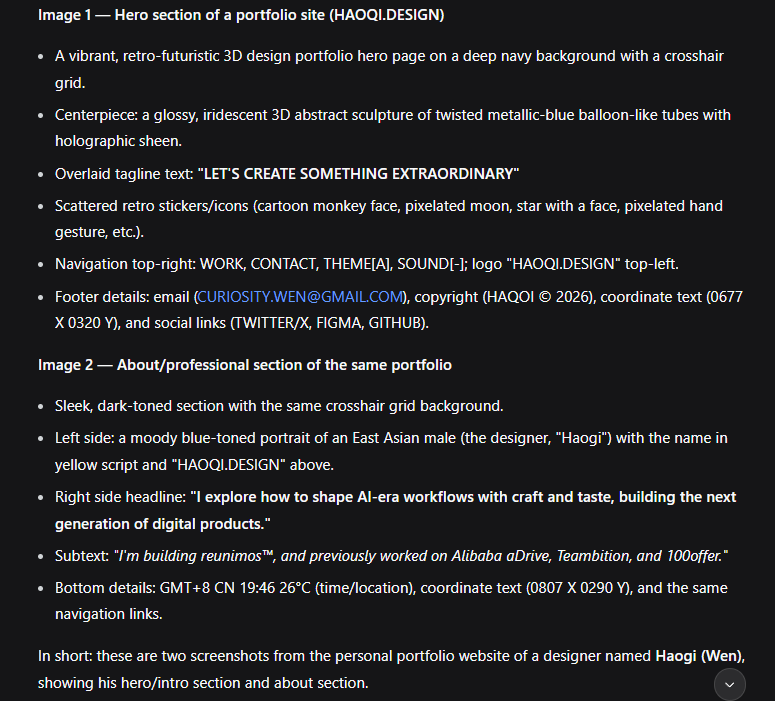
The vision tool's paths array takes up to 10 images per call (local paths or URLs, 25 MiB each). One request, per-image labels:
--- Image 1 ---
<description>
--- Image 2 ---
<description>
Install
Via your AI agent (recommended) — copy this to your agent:
Install dsh-sight for me: https://raw.githubusercontent.com/Fu3rte/dsh-sight/master/install.md
Or manually (npm registry, recommended):
dsh plugin --profile web add dsh-sight
Or from GitHub:
dsh plugin --profile web add github:Fu3rte/dsh-sight
Or clone it yourself:
git clone https://github.com/Fu3rte/dsh-sight.git
cd dsh-sight && pnpm install
dsh plugin --profile web add ./
GitHub downloads slow or unstable (e.g. mainland China)? Use the npm-registry install above. Point pnpm at a mirror and the whole install — package and dependencies — stays off GitHub:
pnpm config set registry https://registry.npmmirror.com
Configure
Open dsh web → Settings → Vision:
- Pick a backend source:
- a preset (
opencode-zen/gemini-flash) — model / base URL fill themselves; or - Custom endpoint — fill in model, Base URL (OpenAI-compatible), and API key yourself.
- a preset (
- Check the effective config card — it shows the model / endpoint / key state the tool will actually use.
- Paste the API key if one is needed, hit Save — applied immediately.
| Preset | Provider | Key env | Price |
|---|---|---|---|
opencode-zen |
OpenCode Zen | (keyless) | free tier |
gemini-flash |
Google AI Studio (OpenAI-compat) | GEMINI_API_KEY |
free tier |
custom |
Any OpenAI-compatible endpoint | your key (or DSH_SIGHT_API_KEY) |
your endpoint |
The keyless preset needs nothing but the save button. For any other OpenAI-compatible endpoint (Aliyun Bailian Qwen, OpenAI, local models, …), pick Custom endpoint and fill in model / Base URL / API key. If a preset's model or Base URL is edited by hand, the page warns that the preset is overridden and offers to switch the row to Custom endpoint with one click.
Headless / no-GUI fallback
Config layers (highest wins):
settings.yamldsh-sight:section (hot-reloads on edit)DSH_SIGHT_*env vars (DSH_SIGHT_PROVIDER,DSH_SIGHT_API_KEY,DSH_SIGHT_MODEL,DSH_SIGHT_BASE_URL,DSH_SIGHT_TIMEOUT_MS,DSH_SIGHT_MAX_TOKENS,DSH_SIGHT_MAX_IMAGES,DSH_SIGHT_CONFIG)~/.config/dsh-sight/config.json(re-read on mtime change)- plugin row config in the profile's
cordis.patch.yml - preset defaults
The API key is role('secret'): it never rides a settings response; the UI renders a write-only field and reports whether one is stored.
Acknowledgements
Inspired by modlens and dsh-eyes.
DeepSeek Harness: official site · GitHub
License: MIT
安装
装一次目录插件,之后本站所有插件都能让 DeepSeek Harness 自动找、自动装:
dsh plugin add dshbase-catalog然后对 agent 说「帮我装 dsh-sight」,它会在目录里找到并自动安装。文档:dshbase-catalog · 已验证场景包。
Web profile:
dsh plugin --profile web add dsh-sightHeadless(CLI)profile:
dsh plugin --profile headless add dsh-sight包信息
npm:dsh-sight · 版本 — · 实测环境 dsh 0.1.0-rc.6
实测报告
端到端验证通过:dsh 0.1.0-rc.6 上 L1 安装 + L2 加载 + L3 运行问答。
使用场景
扩展 agent 的编码能力面——给它一个新工具、工作流或集成,让它接手以前做不了的开发任务。
适合谁
想让 dsh 在真实代码库上像队友一样干活的开发者——能改、能跑、能验证,而不只是回答问题。
二次开发建议
工具/命令面就是缝:暴露更多 SDK 能力、加更聪明的上下文接线,或收紧改代码与验证之间的循环。
分享徽章
把这枚徽章粘进 README——它会链回本页,实测状态变化时自动更新:

[](https://dshbase.com/zh/plugins/dsh-sight/)<a href="https://dshbase.com/zh/plugins/dsh-sight/"><img src="https://dshbase.com/badges/dsh-sight.svg" alt="dshbase 实测可装"></a>