
插件目录 / Developer / dsh-task-notice-board
dsh-task-notice-board
已验证 · 实测可装 SLin-code
功能简介
One installable DeepSeek Harness plugin for managing Workspace → Task → Session collaboration.
可用 — 实测通过,早期项目
One installable DeepSeek Harness plugin for managing Workspace → Task → Session collaboration. 实测能干净安装、正常启动。早期项目,但功能可用。
「已验证」表示我们的自动化 CI 在干净 profile 里实际执行了 dsh plugin add 并启动成功——仅此而已。功能描述与版本兼容性均为作者声明。这不是安全审计,也不代表对第三方代码的背书。
README
DSH Task Notice Board
One installable DeepSeek Harness plugin for managing Workspace → Task → Session collaboration.
This plugin treats a Task as the long-lived collaboration boundary. Sessions assigned to the same Task receive a bounded snapshot of its objective and retained updates on their next model step. Agents can publish durable findings and search older retained updates without copying raw transcripts.
Screenshots
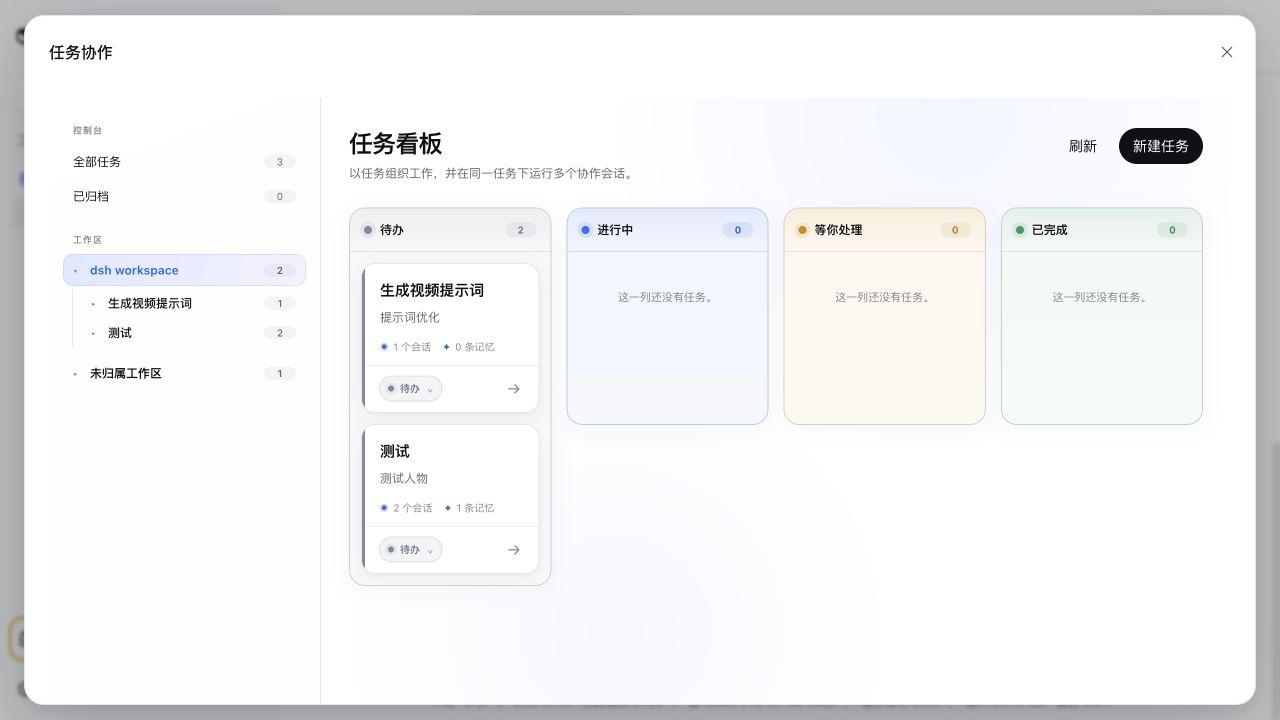
Workspace Task Board
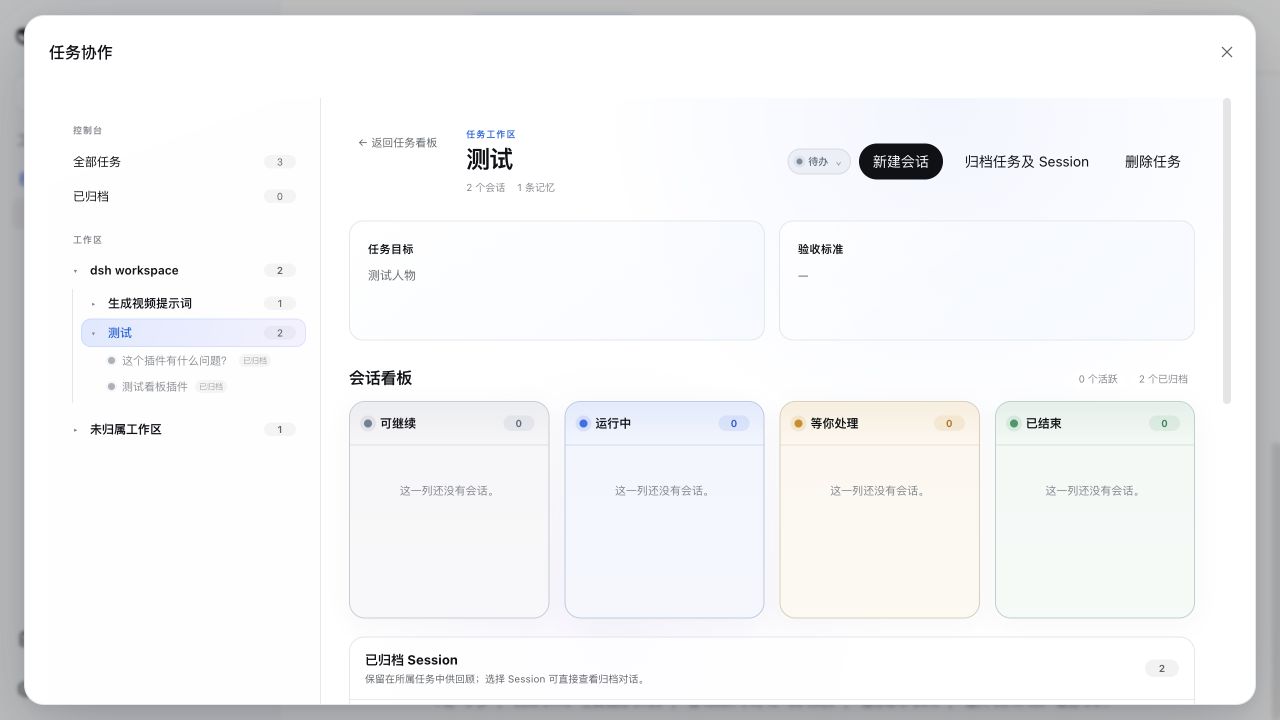
Task workspace and Session Board
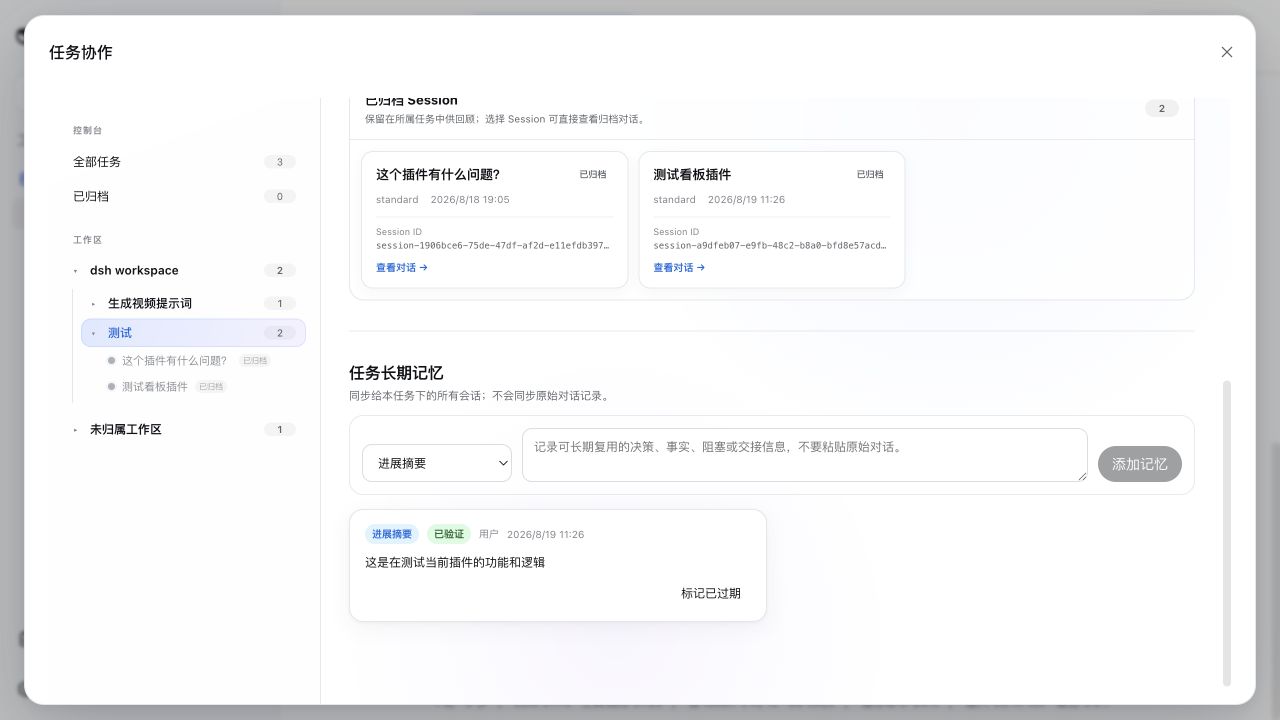
Archived Sessions and Task long-term memory
Current capabilities
- Full-screen control center launched from the DSH sidebar
- Expandable Workspace → Task → Session navigation tree
- Workspace-scoped four-lane Task Board: To do, In progress, Needs you, Done
- Per-Task four-lane Session Board: Ready to continue, Running, Needs you, Ended
- Native DSH approvals, questions, and plan reviews are surfaced directly in the Needs-you lane
- One coherent Task status source: Session links no longer silently move Tasks between lanes; pending Session interactions are the only temporary override
- Human-readable Task cards hide internal storage keys and use compact lane controls
- Create a native DSH Session from a Task, bind it before opening, then return to the native conversation UI
- Every assigned Session shows its owning Task in the native Session header; selecting it reopens the control center directly at that Task
- Strong Session ownership: after the first model step, a Session cannot silently switch Tasks
- Focused Task long-term memory composer: progress summary, key decision, current blocker, and handoff (older finding/evidence records remain readable)
- User-authored memories are verified; Session-authored memories retain source Session and verification state
- Bounded, source-attributed cross-Session context on every next model step
- Idempotent
task_context_publishand boundedtask_context_search - No raw transcript synchronization and no proactive Session wake-up
- Closed Tasks reject new collaborative updates without stopping Sessions
- Archiving commits the Task first so it leaves the active board immediately, then idempotently archives all linked Sessions through DSH
- Archived Sessions remain inside their owning Task with an inline, read-only conversation viewer; partial Session archive failures are shown there with a retry action
- The archived viewer shows human prompts and visible assistant output, while omitting injected context, reasoning, tool arguments, and tool-result contents
- Restoring a Task returns it to To do; DSH Sessions stay archived because the current DSH API has no matching restore operation
- Deleting a Task removes its retained memory and all Session assignments, but never deletes native DSH Sessions or transcripts
Installing the package into the web profile is all it takes. The browser picks up the client bundle through the harness plugin scanner and adds one Task Control Center entry to the sidebar. No DeepSeek Harness source patch or manual UI wiring is required.
Requirements
- DeepSeek Harness
0.1.0-rc.7or newer compatible release - Node.js
^22.19.0or>=24— the plugin ships stage-3 decorators in its
compiled artefacts (Typert@Remotemarkers) that Node parses natively only
in these versions; Node 23 will refuse to load the entries withSyntaxError: Invalid or unexpected token. - pnpm 10+
- The DSH
webprofile, whose storage services back Task persistence
Install from this checkout
Run this from the plugin directory:
pnpm install
pnpm run build
dsh plugin --profile web add .
Then start DeepSeek Harness normally:
dsh web
To remove it:
dsh plugin --profile web remove dsh-task-notice-board
Install from GitHub
After the repository is published:
dsh plugin --profile web add github:SLin-code/dsh-task-notice-board
Git-hosted installation runs the package prepare script. pnpm may first require you to allow the reviewed tsdown build in the profile's pnpm-workspace.yaml; follow the exact key printed by DSH and repeat the install.
Runtime model
The npm package exposes one Cordis plugin entry. Internally that entry composes three implementation seats:
dsh-task-notice-board/taskowns Task records, Task context, and Session assignments.dsh-task-notice-board/task-context-syncprojects bounded Task memory into the next model step.dsh-task-notice-board/tool-task-contextexposes publish and search tools to assigned Sessions.
The browser reuses native DSH Workspace and Session services. Task creation never creates a second workspace model, and opening a Session always returns to the native DSH conversation surface.
Archived conversation history is read from DSH's durable Session log only when the user selects a Session inside its Task. It is not copied into Task long-term memory, and restoring the Task is not required to read it.
License
MIT. The initial implementation is derived from DeepSeek Harness conventions and APIs; see the repository history for changes.
安装
装一次目录插件,之后本站所有插件都能让 DeepSeek Harness 自动找、自动装:
dsh plugin add dshbase-catalog然后对 agent 说「帮我装 dsh-task-notice-board」,它会在目录里找到并自动安装。文档:dshbase-catalog · 已验证场景包。
该插件是 GitHub 源码(未发 npm)——直接从仓库装:
Web profile:
dsh plugin --profile web add github:SLin-code/dsh-task-notice-boardHeadless(CLI)profile:
dsh plugin --profile headless add github:SLin-code/dsh-task-notice-board实测报告
验证通过:从 GitHub 源码完成 L1 安装 + L2 加载 + L3 运行(dsh 0.1.0-rc.6)。
分享徽章
把这枚徽章粘进 README——它会链回本页,实测状态变化时自动更新:

[](https://dshbase.com/zh/plugins/dsh-task-notice-board/)<a href="https://dshbase.com/zh/plugins/dsh-task-notice-board/"><img src="https://dshbase.com/badges/dsh-task-notice-board.svg" alt="dshbase 实测可装"></a>