
插件目录 / UI & Skins / dsh-task-status
dsh-task-status
已验证 · 实测可装 vlln
功能简介
DSH 插件:后台任务状态条,在对话页显示任务进度与实时输出 tail。
可用 — 实测通过,早期项目
DSH 插件:后台任务状态条,在对话页显示任务进度与实时输出 tail。 实测能干净安装、正常启动。早期项目,但功能可用。
「已验证」表示我们的自动化 CI 在干净 profile 里实际执行了 dsh plugin add 并启动成功——仅此而已。功能描述与版本兼容性均为作者声明。这不是安全审计,也不代表对第三方代码的背书。
README
中文 | English
task-status
Background task status bar: task-progress UI above the chat input area — running count + expandable details + live output tail
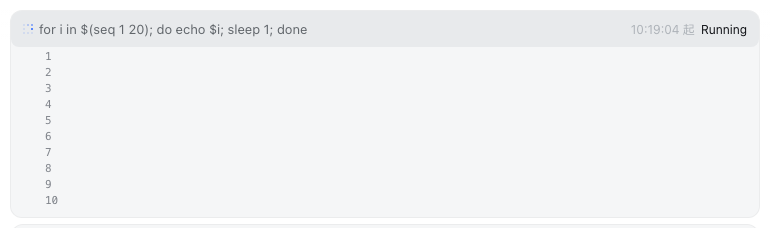
A background-task status bar above the chat input box: running-task count + click-to-expand per-task details + live output tail (auto-polling, 10-line scrolling area). Registered through the official conversation.input.dock slot (same family as queue/todo/goal). Ships as an official bundle plugin (dsh.bundle + dshClient channel), 0 patches.
Preview
Features
UI (chat-page dock slot):
| Feature | Description |
|---|---|
| Status bar | Dock card above the chat input box: ⚙ N background tasks running |
| Expandable details | Click a task row to expand: status / duration / details + output tail |
| Live tail | Polls the output route every 1s while expanded, re-rendering the whole block (the mirror patch guarantees zero contention with the official task_output tool and a consistent view) |
| Scrolling area | Output area capped at 10 lines (160px); overflow becomes a scrollbar (tail keeps the end, scrollable to review) |
| Chat page only | Automatically hidden on non-Chat views (trajectory / taskboard, etc.) |
Routes (Node half):
| Route | Description |
|---|---|
/plugins/dsh-task-status/tasks |
Task list (read-only, filtered by session; owned + unowned union) |
/plugins/dsh-task-status/output |
Task output tail (full:true accumulates the full text; unknown id → 404) |
Output tail contention semantics (official 0809 API constraint): tasks.read is a consumptive, incremental read (one shared cursor per task). This plugin applies a mirror patch to ctx.tasks.read — the official read becomes buffered mirror (increments already read by others, not re-consumed) + direct read of the latest (normal consumption); the plugin's own reads go straight to the underlying rawRead. The official tool and the plugin see the same increment sequence (no duplicates, no loss); only the proactively self-read part can no longer be replayed by the official side alone (official semantics is inherently incremental, so model perception is unaffected).
Installation
Recommended: one-line install from a git source (build artifacts are committed; a git source doesn't trigger a build):
dsh plugin --profile web add "github:vlln/dsh-task-status#main"   # one-line git source (build artifacts committed)
# or npm source: dsh plugin --profile web add @vlln/[email protected]
Or from a local directory (when you have the source): git clone, then cd dsh-task-status && dsh plugin --profile web add ..
After installing, restart web for it to take effect; you can disable/enable it in the "Plugins" panel on the settings page.
Usage
Run a background task and the status bar appears (e.g. the model-side bash tool with run_in_background: true):
⚙ 1 background task running
  ● bash-1  for i in $(seq 1 20)…   started 21:30:15   running
Click a task row to expand → the output tail scrolls live (a scrollbar appears once it exceeds 10 lines). The status bar disappears automatically when the task finishes.
Development
pnpm install
pnpm run build      # tsdown: Node half (lib/index.mjs) + client bundle (lib/client.js)
- Node half:
src/index.mjs(mirror patch +/tasks/outputroutes) - client:
src/client/task-status.tsx(dock-slot status bar)
License
MIT License (example plugin in the DSH ecosystem).
安装
装一次目录插件,之后本站所有插件都能让 DeepSeek Harness 自动找、自动装:
dsh plugin add dshbase-catalog然后对 agent 说「帮我装 dsh-task-status」,它会在目录里找到并自动安装。文档:dshbase-catalog · 已验证场景包。
该插件是 GitHub 源码(未发 npm)——直接从仓库装:
Web profile:
dsh plugin --profile web add github:vlln/dsh-task-statusHeadless(CLI)profile:
dsh plugin --profile headless add github:vlln/dsh-task-status实测报告
验证通过:从 GitHub 源码完成 L1 安装 + L2 加载 + L3 运行(dsh 0.1.0-rc.6)。
使用场景
改变 dsh 的外观或交互方式——一套主题、皮肤或新面板,重塑工作区。
适合谁
在 web UI 里一待几小时、想让它按自己的习惯好看又好用的人。
二次开发建议
皮肤、面板和主题 token 是扩展点——写新皮肤、加面板,或与上游配色同步 token。
分享徽章
把这枚徽章粘进 README——它会链回本页,实测状态变化时自动更新:

[](https://dshbase.com/zh/plugins/dsh-task-status/)<a href="https://dshbase.com/zh/plugins/dsh-task-status/"><img src="https://dshbase.com/badges/dsh-task-status.svg" alt="dshbase 实测可装"></a>