
插件目录 / UI & Skins / dsh-theme-machine
dsh-theme-machine
已验证 · 实测可装 yuqisun
功能简介
A Person-of-Interest surveillance-terminal theme for deepseek-harness — the machine is watching.
可用 — 实测通过,早期项目
A Person-of-Interest surveillance-terminal theme for deepseek-harness — the machine is watching. 实测能干净安装、正常启动。早期项目,但功能可用。
「已验证」表示我们的自动化 CI 在干净 profile 里实际执行了 dsh plugin add 并启动成功——仅此而已。功能描述与版本兼容性均为作者声明。这不是安全审计,也不代表对第三方代码的背书。
README
dsh-theme-machine
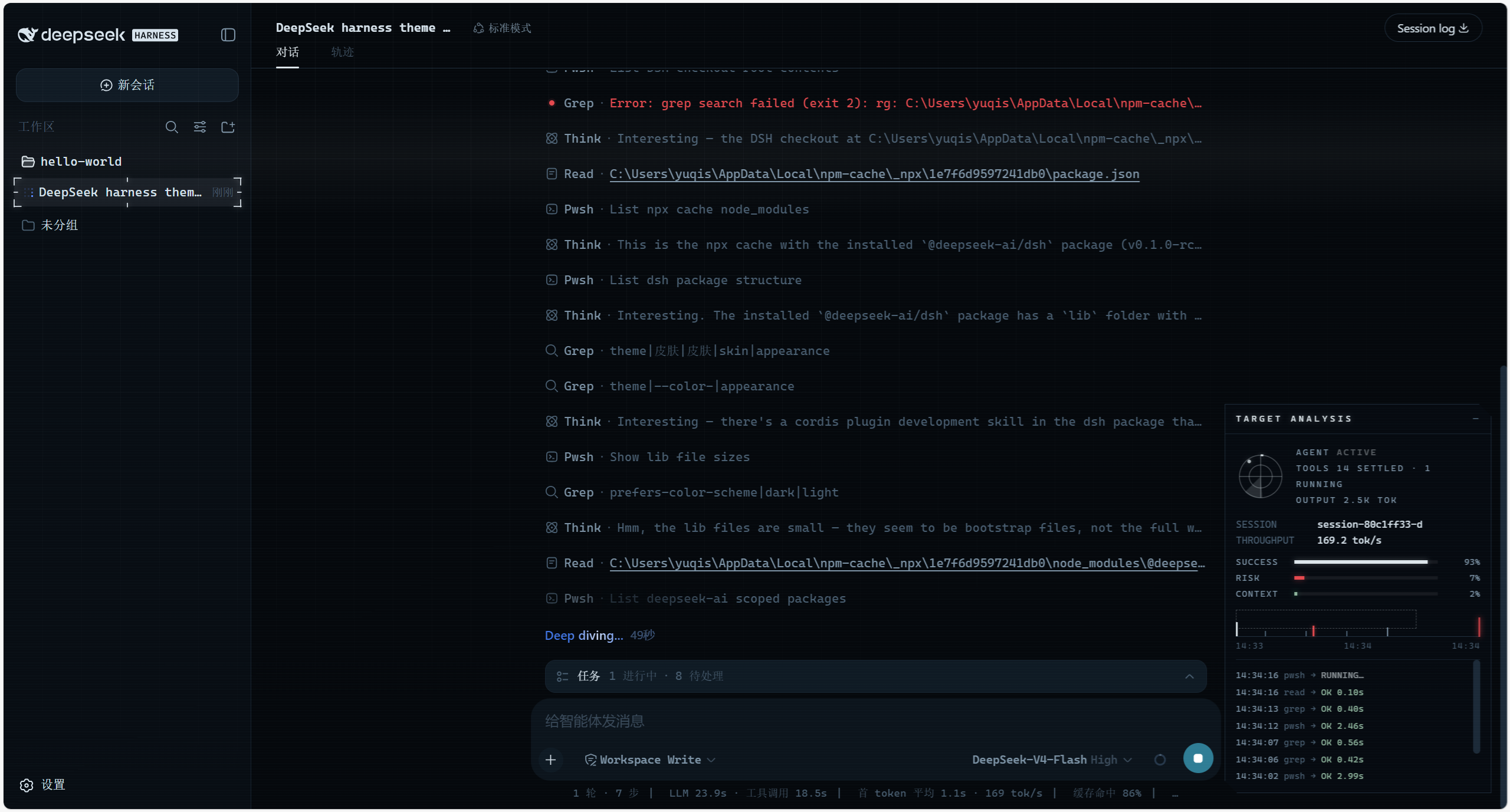
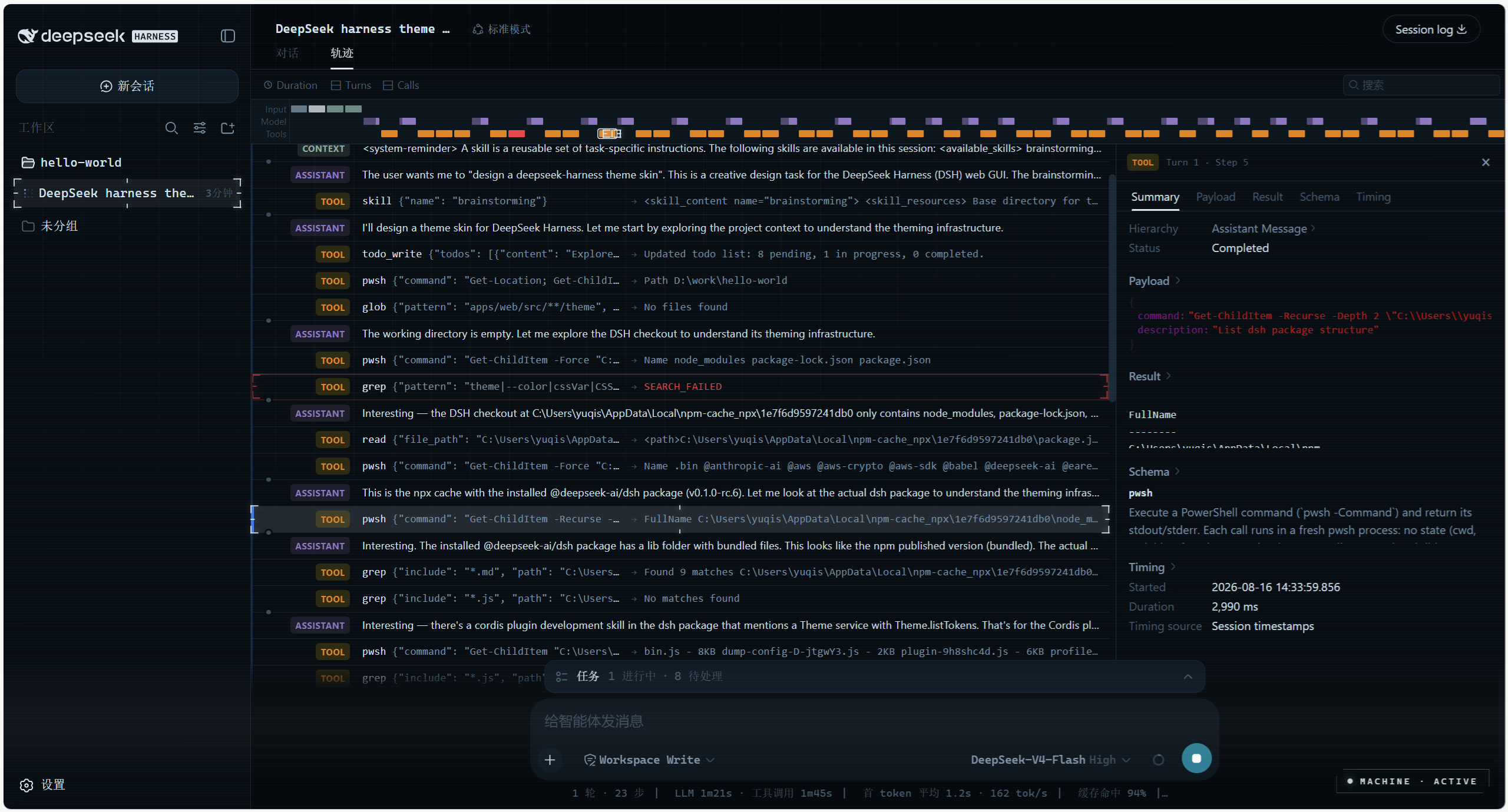
Person of Interest skin for DeepSeek Harness (dsh) — THE MACHINE surveillance-HUD theme for the web UI: deep blue-black surfaces, machine-cyan accents, scanline/grid atmosphere, and a live telemetry panel that makes the UI feel like it's backed by a superintelligence.
Preview
Features
A THE MACHINE dark HUD skin — applied on install, fully restored to the official look on uninstall.
- Token override layer — repaints the whole UI through
ctx.theme.overrideTokens()(~50--dsw-alias-*semantic tokens). Install = applied, uninstall = restored. Works on top of the built-in light/dark preference (the skin is dark-only by design and pins both palettes). - HUD chrome — monospace typography, subtle HUD grid, slow scanline, cyan selection color. Injected as
<style data-plugin>+ two atmosphere<div>s, removed on unload. - Live telemetry panel (
shell.overlayfloating seat, bottom-right):- Radar — sweeps only while the agent is actually running (
ConversationSnapshot.running) - SUCCESS / RISK — real settled tool-call success/error rates (
tool-resultnodes) - CONTEXT — real context-window occupancy from the token-meter
contextPressureprojection (same source as the official composer ring) - THROUGHPUT — decode tok/s folded from assistant timing + provider usage
- EVENT STREAM — the session's real tool calls with durations and error states
- Radar — sweeps only while the agent is actually running (
Collapsed it shrinks to a MACHINE LINK pill that pulses while the agent works.
Install
Requires DeepSeek Harness (dsh CLI). Plugins are managed via dsh plugin; --profile web targets the web profile. Pick one source:
# from npm (recommended)
dsh plugin --profile web add dsh-theme-machine

# from a local checkout
dsh plugin --profile web add link:/path/to/dsh-theme-machine

# from GitHub — pnpm ≥10 will ask you to allowBuilds the prepare script
# (zero-dependency build, see scripts/build.mjs), then re-run the add
dsh plugin --profile web add github:yuqisun/dsh-theme-machine
Then:
- Run the
addcommand above. - Restart
dsh web— the skin applies on load. - Optional — verify the plugin loaded:
dsh web --dump-config | grep dsh-theme-machine
Uninstall
dsh plugin --profile web remove dsh-theme-machine
- Run
removeto drop the plugin dependency. - Restart
dsh web— the stock look is fully restored.
Note: if the Loader row was manually written into
$DSH_HOME/cordis.patch.yml,removewon't rewrite that patch line — delete the matchinginsertentry by hand.
License
MIT
安装
装一次目录插件,之后本站所有插件都能让 DeepSeek Harness 自动找、自动装:
dsh plugin add dshbase-catalog然后对 agent 说「帮我装 dsh-theme-machine」,它会在目录里找到并自动安装。文档:dshbase-catalog · 已验证场景包。
该插件是 GitHub 源码(未发 npm)——直接从仓库装:
Web profile:
dsh plugin --profile web add github:yuqisun/dsh-theme-machineHeadless(CLI)profile:
dsh plugin --profile headless add github:yuqisun/dsh-theme-machine实测报告
验证通过:从 GitHub 源码完成 L1 安装 + L2 加载 + L3 运行(dsh 0.1.0-rc.6)。
分享徽章
把这枚徽章粘进 README——它会链回本页,实测状态变化时自动更新:

[](https://dshbase.com/zh/plugins/dsh-theme-machine/)<a href="https://dshbase.com/zh/plugins/dsh-theme-machine/"><img src="https://dshbase.com/badges/dsh-theme-machine.svg" alt="dshbase 实测可装"></a>