
插件目录 / UI & Skins / dsh-theme-pack
dsh-theme-pack
已验证 · 实测可装 math-lrz
功能简介
16款DSH Web GUI主题皮肤,含Catppuccin等
可用 — 实测通过,早期项目
16款DSH Web GUI主题皮肤,含Catppuccin等 实测能干净安装、正常启动。早期项目,但功能可用。
「已验证」表示我们的自动化 CI 在干净 profile 里实际执行了 dsh plugin add 并启动成功——仅此而已。功能描述与版本兼容性均为作者声明。这不是安全审计,也不代表对第三方代码的背书。
README
dsh-theme-pack
16 套第三方主题皮肤,给 DeepSeek Harness(DSH)Web GUI 换肤。
16 community theme skins for the DeepSeek Harness Web GUI — Catppuccin, Gruvbox, Everforest, Rosé Pine, Solarized, Kanagawa, Tokyo Night, Night Owl, Nord, Dracula, One Dark, with both dark and light variants where the source palette defines them.
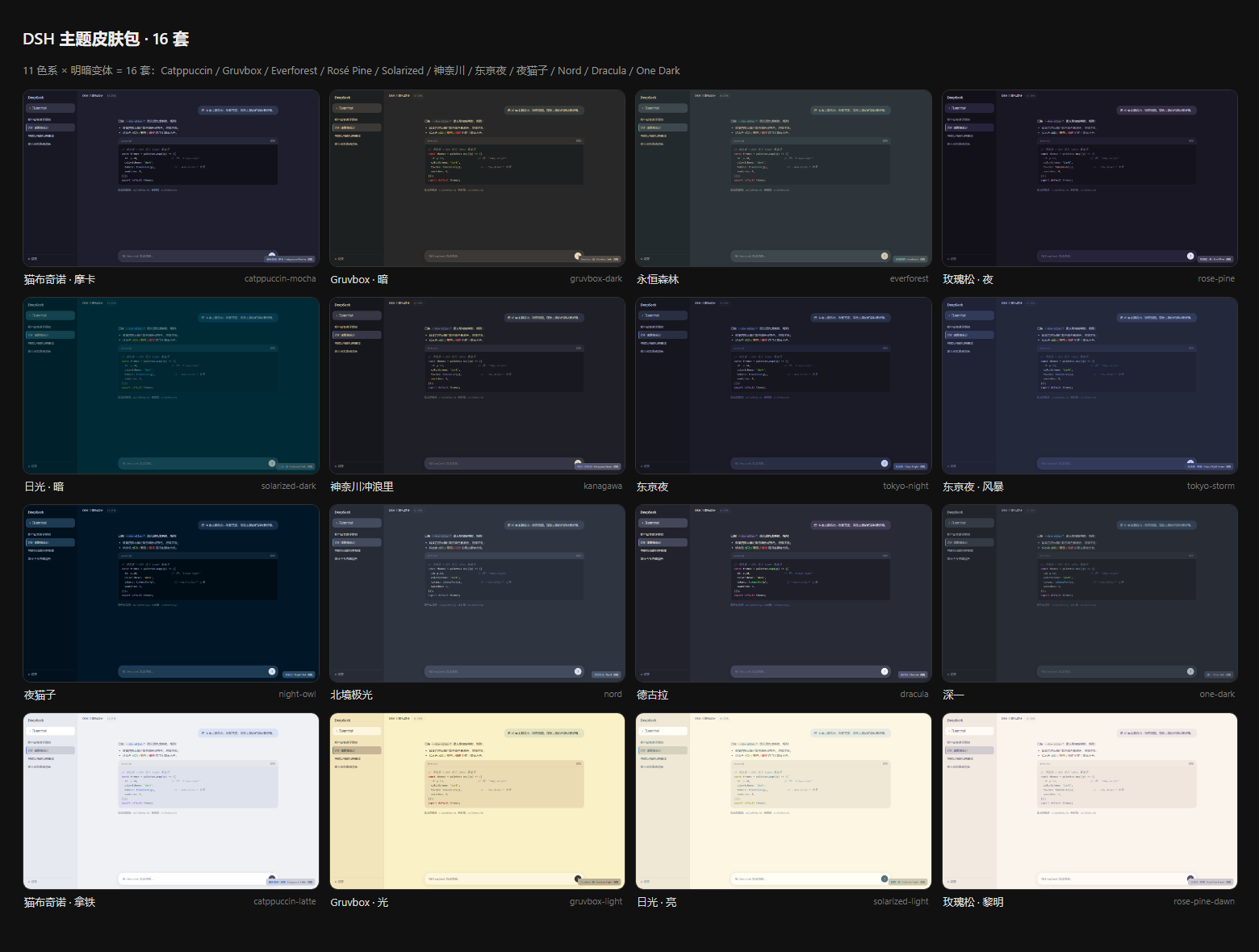
主题清单 · Themes
| # | 主题 | id | 明/暗 |
|---|---|---|---|
| 1 | 猫布奇诺 · 摩卡 Catppuccin Mocha | catppuccin-mocha |
🌙 |
| 2 | 猫布奇诺 · 拿铁 Catppuccin Latte | catppuccin-latte |
☀️ |
| 3 | Gruvbox · 暗 Gruvbox Dark | gruvbox-dark |
🌙 |
| 4 | Gruvbox · 光 Gruvbox Light | gruvbox-light |
☀️ |
| 5 | 永恒森林 Everforest | everforest |
🌙 |
| 6 | 玫瑰松 · 夜 Rosé Pine | rose-pine |
🌙 |
| 7 | 玫瑰松 · 黎明 Rosé Pine Dawn | rose-pine-dawn |
☀️ |
| 8 | 日光 · 暗 Solarized Dark | solarized-dark |
🌙 |
| 9 | 日光 · 亮 Solarized Light | solarized-light |
☀️ |
| 10 | 神奈川冲浪里 Kanagawa Wave | kanagawa |
🌙 |
| 11 | 东京夜 Tokyo Night | tokyo-night |
🌙 |
| 12 | 东京夜 · 风暴 Tokyo Night Storm | tokyo-storm |
🌙 |
| 13 | 夜猫子 Night Owl | night-owl |
🌙 |
| 14 | 北境极光 Nord | nord |
🌙 |
| 15 | 德古拉 Dracula | dracula |
🌙 |
| 16 | 深一 One Dark | one-dark |
🌙 |
每套主题的单张预览图见 previews/ 目录(1440×860,Edge headless 实拍 GUI 模拟页)。
特性
- 零侵入:不重写任何样式表,只覆盖 DSH 主题契约暴露的
--dsw-alias-*/--dsw-specific-*语义 token(每套 80 个);未覆盖的 token 自动回落到内建调色板 - 免构建链:客户端 bundle 是手写的 lazy CJS(
window.__ModuleLoader__.load),直接可装载,不需要 tsdown/vite - 自带选择器:在 设置 → 通用 注入「主题皮肤(16 套)」面板,色点立方点选即换肤,中英文案齐全
- 数据源单一:16 套主题的全部颜色只由
src/palettes.mjs一份调色板文件派生,映射规则集中在src/tokens.mjs
安装
前提:已安装 DSH 并有 web profile(dsh web 可用)。
# 1) 把本仓库装进 web profile(git 依赖,走 pnpm)
dsh plugin --profile web add git+https://github.com/math-lrz/dsh-theme-pack.git
dsh plugin --profile web add dsh-theme-pack   # npm 安装(装完自动挂载,无需手动 insert)
# 2) 编辑 %USERPROFILE%\.dsh\profiles\web\cordis.patch.yml,追加一条 loader 插入:
#    (name 必须是包名而不是 file:/// 路径,否则 client-modules 扫不到客户端 bundle)
- insert:
    - id: dsh-theme-pack
      name: 'dsh-theme-pack'
- 刷新浏览器页面(patch 改动触发热重挂,通常不需要重启
dsh web)。
使用
设置 → 通用 → 外观 下方出现「主题皮肤(16 套)」:16 个色点立方(底 / 主强调 / 成功 / 错误 四色速览),点击立即换肤;内建的 浅色 / 深色 / 跟随系统 继续可用,随时切回。
工作原理
DSH 的主题契约由 @deepseek-ai/dsh-client-ui-theme 定义:
ThemeRuntime.register({ id, colorScheme, tokens })   // 注册第三方主题
            │  tokens: { '--dsw-alias-*': '<css color>', ... }
            ▼
ui-layout 的 ThemePresenter 把 tokens 以 inline style 写到 <body>,
并按 colorScheme 设置 body[data-ds-dark-theme] 与 color-scheme
本插件的客户端 bundle 做三件事:
ctx.theme.register(...)× 16(每次注册都挂在ctx.effect上,插件卸载时逆序回收);- 往
settings.general.item插槽注册主题选择器组件(复用内建「外观」行的 store / locale / inject 模式); - 注册
settings.themePack中英文案。
host 半侧(lib/index.mjs)是一个 no-op 插件——它存在的唯一意义是让 cordis Loader 有一条可加载的条目,dsh-client-modules 的扫描器才会把包名解析进客户端 boot 图,浏览器再经 /plugins/dsh-theme-pack/client.js 拿到真正的 bundle。
目录结构
src/palettes.mjs    16 套调色板原色(唯一数据源,改色/加主题只动这里)
src/tokens.mjs      调色板 → 80 个语义 token 的映射器
scripts/build.mjs   生成器:themes.json + client.js + preview/*.html
scripts/smoke.mjs   冒烟测试:模拟 cordis ctx 验证 16 主题注册与插槽注入
lib/themes.json     机读主题定义(id / colorScheme / label / swatches / tokens)
lib/client.js       生成的客户端 bundle(勿手改)
lib/index.mjs       host 半侧 no-op 入口
preview/            每套主题的 GUI 预览页(截图源)
previews/           渲染好的 PNG 预览图
开发
node scripts/build.mjs     # 改完 palettes.mjs 后重新生成全部产物
node scripts/smoke.mjs     # 冒烟测试(16 主题 × 80 token、插槽、词典)

# 重新出预览图(需要本机 Edge):
& "C:\Program Files (x86)\Microsoft\Edge\Application\msedge.exe" --headless=new --disable-gpu `
  --hide-scrollbars --window-size=1440,860 --screenshot=previews\<id>.png `
  "file:///<本仓库绝对路径>/preview/<id>.html"
加一套新主题:在 src/palettes.mjs 里追加一个调色板对象(id / scheme / bg / fg / blue / 状态色 / syn 语法高亮),跑 build.mjs 即可——token 映射、选择器、文案、预览页全部自动派生。
已知限制
- 主题选择不持久化(上游限制):
ui-theme.preference的内建设置 schema 只认light / dark / system,第三方主题 id 只在进程内有效(见 dsh-client-ui-theme README「Known Limitations」)。刷新页面后回到内建外观,需重新点选。 - 远程(非本机)浏览器同样可选但不持久。
- 遮罩类 token(
--dsw-alias-bg-mask-*)刻意沿用内建默认值,未纳入皮肤映射。
License
MIT © 2026 math-lrz
各主题调色板的版权归原主题作者(Catppuccin、Gruvbox、Everforest、Rosé Pine、Solarized、Kanagawa、Tokyo Night、Night Owl、Nord、Dracula、One Dark 等开源配色的维护者);本仓库仅做 token 映射与打包。
English
dsh-theme-pack ships 16 community color themes for the DeepSeek Harness Web GUI as one zero-build client plugin. Each theme is a set of 80 semantic-token overrides (--dsw-alias-* / --dsw-specific-*) registered through ThemeRuntime.register({ id, colorScheme, tokens }); anything not overridden falls back to the built-in palette, so skins never fight the base stylesheets.
- Install:
dsh plugin --profile web add git+https://github.com/math-lrz/dsh-theme-pack.git, then add one loader insert (id: dsh-theme-pack, name: 'dsh-theme-pack') to your profile'scordis.patch.ymland refresh the browser. - Use: Settings → General → "Theme skins (16)" — click a swatch cube to switch instantly.
- Extend: add one palette object to
src/palettes.mjs, runnode scripts/build.mjs; token mapping, picker entry, locales and preview pages are derived automatically. - Known limitation: third-party theme selection is process-local and not persisted (upstream settings schema only accepts
light/dark/system).
MIT licensed. Palette credit goes to the original theme authors.
安装
装一次目录插件,之后本站所有插件都能让 DeepSeek Harness 自动找、自动装:
dsh plugin add dshbase-catalog然后对 agent 说「帮我装 dsh-theme-pack」,它会在目录里找到并自动安装。文档:dshbase-catalog · 已验证场景包。
Web profile:
dsh plugin --profile web add dsh-theme-packHeadless(CLI)profile:
dsh plugin --profile headless add dsh-theme-pack包信息
npm:dsh-theme-pack · 版本 — · 实测环境 dsh 0.1.0-rc.6
实测报告
端到端验证通过:dsh 0.1.0-rc.6 上 L1 安装 + L2 加载 + L3 运行问答。
使用场景
改变 dsh 的外观或交互方式——一套主题、皮肤或新面板,重塑工作区。
适合谁
在 web UI 里一待几小时、想让它按自己的习惯好看又好用的人。
二次开发建议
皮肤、面板和主题 token 是扩展点——写新皮肤、加面板,或与上游配色同步 token。
分享徽章
把这枚徽章粘进 README——它会链回本页,实测状态变化时自动更新:

[](https://dshbase.com/zh/plugins/dsh-theme-pack/)<a href="https://dshbase.com/zh/plugins/dsh-theme-pack/"><img src="https://dshbase.com/badges/dsh-theme-pack.svg" alt="dshbase 实测可装"></a>