
插件目录 / UI & Skins / dsh-thinking-status-customizer
dsh-thinking-status-customizer
已验证 · 实测可装 Dbi-Eshuh
功能简介
自定义DSH Web思考状态CSS
可用 — 实测通过,早期项目
自定义DSH Web思考状态CSS 实测能干净安装、正常启动。早期项目,但功能可用。
「已验证」表示我们的自动化 CI 在干净 profile 里实际执行了 dsh plugin add 并启动成功——仅此而已。功能描述与版本兼容性均为作者声明。这不是安全审计,也不代表对第三方代码的背书。
README
DSH Thinking Status Customizer
A CSS-only DSH Web plugin that replaces the visible running status with custom flowing text, a GIF/APNG/WebP animation, or a combined image-and-text display without modifying DSH source or rewriting the status DOM.
Preview
Dark theme

Light theme

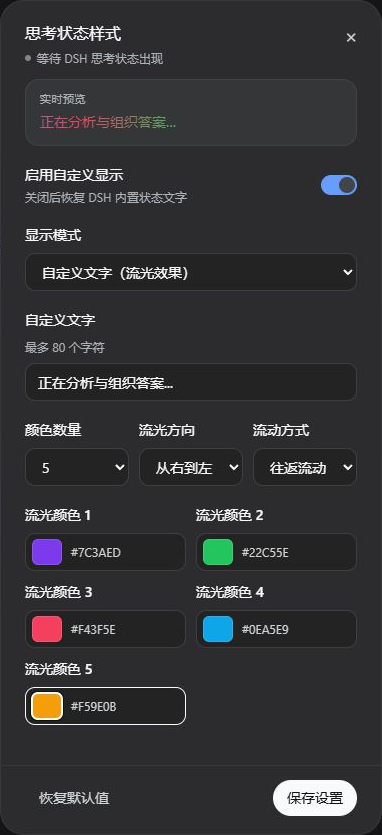
Settings panel
Install
Install the tagged release into a Web profile, inspect the resolved configuration, then restart DSH Web:
dsh plugin --profile web add github:Dbi-Eshuh/dsh-thinking-status-customizer#v0.2.2
dsh --profile web --dump-config
Open the floating Thinking status button after restart. Click the same button again, use the close button, or press Escape to close the panel. The plugin follows the active DSH language setting and updates its English or Chinese interface immediately without discarding unsaved form values; user-authored custom text is preserved verbatim. The dialog can enable or disable the visual replacement and switch among custom text with a flow effect, an animated image, and a left-image/right-text combination. Text modes support two to five custom colors, four flow directions, and continuous or back-and-forth movement. Image modes include a roughly 12-second dance GIF with a transparent background and also accept an HTTPS/Data URL or a local GIF, APNG, or WebP up to 20 MB. Local files above 2 MB remain uncompressed and use a temporary object URL, so they work only in the current tab and must be selected again after a reload.
The settings panel inherits DSH Web's light or dark theme tokens and previews text, color count, colors, flow direction, movement pattern, animation, and size edits before they are saved.
Remove the plugin and restart DSH Web to restore the built-in presentation:
dsh plugin --profile web remove dsh-thinking-status-customizer
Behavior and privacy
The default mode is the custom text 正在吃饭中... with a flow effect. Settings and Data URL images up to about 3 MB are stored only in browser localStorage under dsh-thinking-status-customizer:v1; larger local images use a temporary object URL and are not persisted. The plugin does not upload settings, status text, images, or model interaction. When an HTTPS image URL is configured, the browser requests that URL directly. Missing, corrupt, or unavailable storage resolves to defaults without stopping the page.
The stylesheet targets only [data-conversation-scroll] [role="status"][aria-live="polite"]. It adds a layout-participating pseudo-element and plugin-owned CSS properties; it does not observe the page, replace textContent, or target other live-status elements. Disabling or unloading the plugin removes its style, controls, attributes, CSS properties, and event listeners.
The original DSH status remains in the accessibility tree. This plugin therefore changes visual copy only; assistive technology continues to receive the built-in status text.
Compatibility
The current release is tested with DSH Web 0.1.0-rc.6. It relies on the semantic selector above because ui-conversation does not expose a running-status text provider in that release. A DSH update that changes the selector can make the visual replacement inactive; the plugin remains loaded and its dialog reports that it is waiting for a matching status.
This package uses only the public DSH bundle, client-module loading declarations, and client locale service. It does not patch ui-conversation or depend on private DSH build helpers.
Develop and verify
npm install
npm run verify
lib/index.js and lib/client.js are committed so GitHub installation does not require an install-time build. npm run verify type-checks, tests, rebuilds, confirms the committed bundles match the source, and previews the package contents.
Model Experience
None. The plugin adds no tool, prompt, model-visible input or output, session event, or model behavior. It changes only browser-local presentation of an existing running status.
安装
装一次目录插件,之后本站所有插件都能让 DeepSeek Harness 自动找、自动装:
dsh plugin add dshbase-catalog然后对 agent 说「帮我装 dsh-thinking-status-customizer」,它会在目录里找到并自动安装。文档:dshbase-catalog · 已验证场景包。
该插件是 GitHub 源码(未发 npm)——直接从仓库装:
Web profile:
dsh plugin --profile web add github:Dbi-Eshuh/dsh-thinking-status-customizerHeadless(CLI)profile:
dsh plugin --profile headless add github:Dbi-Eshuh/dsh-thinking-status-customizer实测报告
验证通过:从 GitHub 源码完成 L1 安装 + L2 加载 + L3 运行(dsh 0.1.0-rc.6)。
使用场景
改变 dsh 的外观或交互方式——一套主题、皮肤或新面板,重塑工作区。
适合谁
在 web UI 里一待几小时、想让它按自己的习惯好看又好用的人。
二次开发建议
皮肤、面板和主题 token 是扩展点——写新皮肤、加面板,或与上游配色同步 token。
分享徽章
把这枚徽章粘进 README——它会链回本页,实测状态变化时自动更新:

[](https://dshbase.com/zh/plugins/dsh-thinking-status-customizer/)<a href="https://dshbase.com/zh/plugins/dsh-thinking-status-customizer/"><img src="https://dshbase.com/badges/dsh-thinking-status-customizer.svg" alt="dshbase 实测可装"></a>