
插件目录 / UI & Skins / dsh-turn-navigator
dsh-turn-navigator
已验证 · 实测可装 vibeinging
功能简介
私有 DSH Web 轮次导航插件。
可用 — 实测通过,早期项目
私有 DSH Web 轮次导航插件。 实测能干净安装、正常启动。早期项目,但功能可用。
「已验证」表示我们的自动化 CI 在干净 profile 里实际执行了 dsh plugin add 并启动成功——仅此而已。功能描述与版本兼容性均为作者声明。这不是安全审计,也不代表对第三方代码的背书。
README
@deepseek-ai/dsh-turn-navigator
English | 中文
A compact turn navigator for long DSH Web conversations. It follows the conversation scroll, previews a user turn on hover, and jumps to that turn on click. It stays hidden until the conversation contains at least three user turns.
Preview
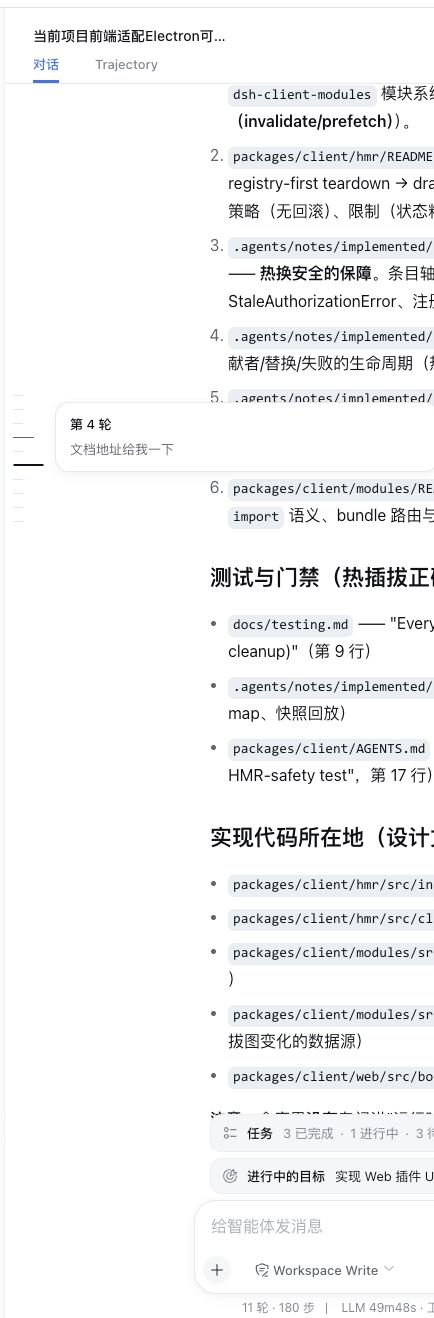
It supports keyboard focus, light and dark themes, and reduced-motion preferences. When needed, it loads only enough older history to decide whether the navigator should appear without moving the reader's current position.
Installation
The plugin is private and not published. Its private repository is dsh-external/dsh-turn-navigator, but the repository remains empty until the first reviewed push. Use the local installation path until a reviewed commit is available, then start Web:
dsh plugin --profile web add -w "/path/to/dsh-turn-navigator"
dsh web
After the first reviewed commit is pushed, install that exact private revision with:
dsh plugin --profile web add -w github:dsh-external/dsh-turn-navigator#<reviewed-commit>
The checked-in lib/ output installs without rebuilding. A compatible DSH Web version is required. To remove the plugin:
dsh plugin --profile web remove -w @deepseek-ai/dsh-turn-navigator
Required DSH Web slot
This plugin registers into conversation.chat.navigator; it does not own or render that slot. A compatible DSH Web build must ship the same contract in both the host runtime and the official private client SDK declarations. A plugin-local type augmentation is not a substitute: it could make TypeScript pass while a host that does not render the slot silently shows no navigator.
Add the slot in the owning @deepseek-ai/dsh-client-ui-conversation package at these points:
- In the slot contract, declare a session-scoped single slot whose owner supplies anchored older-history loading, and include it in the chat view's
PropsRenderSlotsunion:
export interface TurnNavigatorOwnerProps {
  loadOlder: () => void
}

interface SlotMap {
  'conversation.chat.navigator': {
    kind: 'single'
    scope: 'session'
    owner: TurnNavigatorOwnerProps
  }
}
- In the chat view registration, claim the child slot with the same kind and scope:
children: {
  'conversation.chat.navigator': { kind: 'single', scope: 'session' },
}
- In the chat view component, render the slot beside the transcript scroll container and pass the callback that preserves the current reading row while older history is prepended:
{renderSlot('conversation.chat.navigator', { loadOlder: loadOlderAnchored })}
- Cover declaration and disposal, render dispatch, and anchored older-history loading in the host package tests, then publish a matching private SDK version for
@deepseek-ai/dsh-client-ui-conversationand its aligned client peers. A source-only host change does not unblock an external plugin that develops only against official registry packages.
Development and verification
The project .npmrc selects the private @deepseek-ai/* scope; pnpm 11 reads its ${NPM_TOKEN} authentication mapping from the trusted user-level ~/.npmrc. The SDK packages are pinned to the reviewed 0.0.1-rc.2 set. Set NPM_TOKEN, install without lifecycle scripts, then run the checks:
pnpm install --ignore-scripts
pnpm run check
Do not link a DSH source checkout into this directory. Use pnpm run watch beside dsh web --dev for live browser changes. See compat/ for the isolated assembled Web fixture.
Model Experience
None. The plugin only renders existing conversation data in the browser.
KV Cache effect
None.
Known Limitations and Deferred Work
- The private
0.0.1-rc.2SDK does not yet declare the requiredconversation.chat.navigatorslot, so the full development check remains blocked until a matching official SDK release. Do not add a local type shim; the installation target must provide the real slot. - Only loaded history receives markers; earlier turns appear after older history is loaded.
- Previews show text only.
安装
装一次目录插件,之后本站所有插件都能让 DeepSeek Harness 自动找、自动装:
dsh plugin add dshbase-catalog然后对 agent 说「帮我装 dsh-turn-navigator」,它会在目录里找到并自动安装。文档:dshbase-catalog · 已验证场景包。
该插件是 GitHub 源码(未发 npm)——直接从仓库装:
Web profile:
dsh plugin --profile web add github:vibeinging/dsh-turn-navigatorHeadless(CLI)profile:
dsh plugin --profile headless add github:vibeinging/dsh-turn-navigatordsh plugin --profile web add https://dshbase.com/builds/deepseek-ai-dsh-turn-navigator-0.0.1.tgz实测报告
验证通过:从 GitHub 源码完成 L1 安装 + L2 加载 + L3 运行(dsh 0.1.0-rc.6)。
使用场景
改变 dsh 的外观或交互方式——一套主题、皮肤或新面板,重塑工作区。
适合谁
在 web UI 里一待几小时、想让它按自己的习惯好看又好用的人。
二次开发建议
皮肤、面板和主题 token 是扩展点——写新皮肤、加面板,或与上游配色同步 token。
分享徽章
把这枚徽章粘进 README——它会链回本页,实测状态变化时自动更新:

[](https://dshbase.com/zh/plugins/dsh-turn-navigator/)<a href="https://dshbase.com/zh/plugins/dsh-turn-navigator/"><img src="https://dshbase.com/badges/dsh-turn-navigator.svg" alt="dshbase 实测可装"></a>