
插件目录 / Developer / dsh-uni-editor
dsh-uni-editor
已验证 · 实测可装 creativedswork
功能简介
All Editors, one DSH Editor. Unified Editor runtime for DeepSeek Harness, powered by MCP Apps.
可用 — 实测通过,早期项目
All Editors, one DSH Editor. Unified Editor runtime for DeepSeek Harness, powered by MCP Apps. 实测能干净安装、正常启动。早期项目,但功能可用。
「已验证」表示我们的自动化 CI 在干净 profile 里实际执行了 dsh plugin add 并启动成功——仅此而已。功能描述与版本兼容性均为作者声明。这不是安全审计,也不代表对第三方代码的背书。
README
DSH Uni Editor
English | 简体中文


All Editors, one DSH Editor.
DSH Uni Editor brings existing Editors into DeepSeek Harness Agent Chat. Editors keep their own UI, data model, and domain tools; DSH provides one entry point, the current Session context, and a verifiable handoff between human edits and the Agent.
The runtime is a Cordis plugin bundle powered by stable-spec MCP Apps. One npm package provides the Host plugin, Browser bundle, and dsh.bundle patch needed to activate both.
The Host owns its MCP connections, exposes model-visible tools through Harness, keeps app-only tools out of the model registry, and serves untrusted Views through a different-origin Sandbox Proxy. No agent-loop change or external MCP proxy is required.
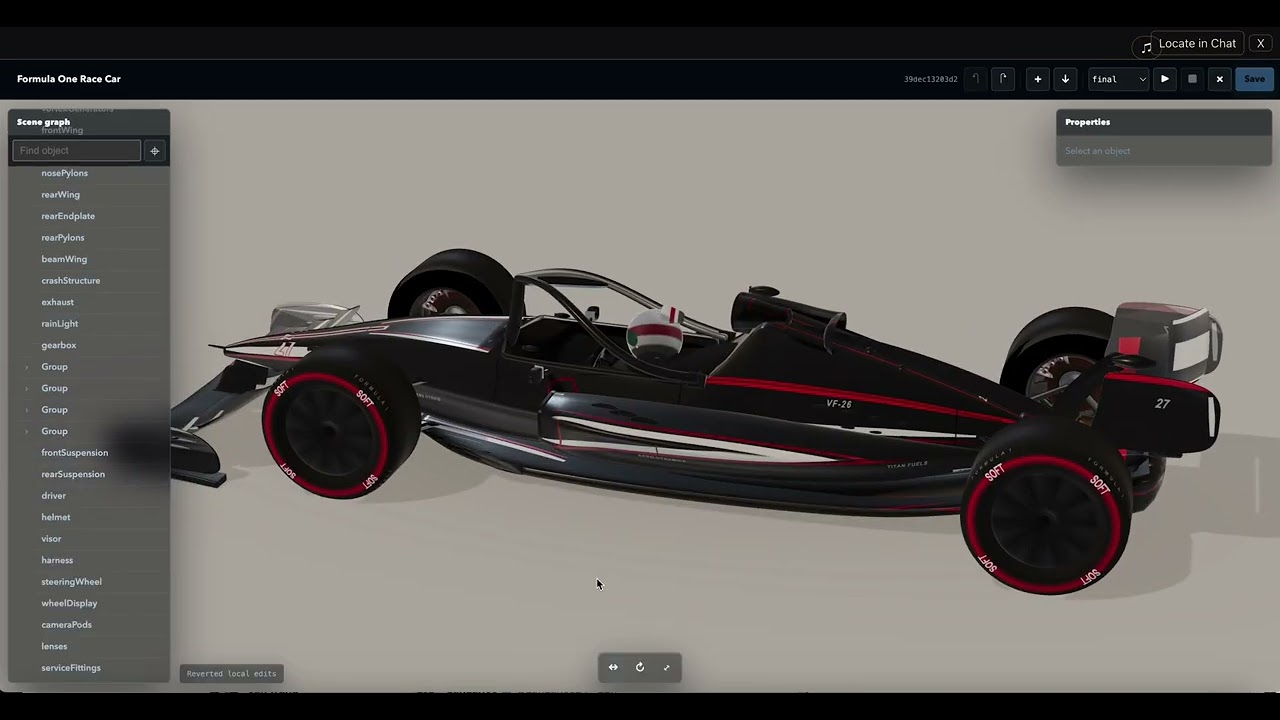
Watch the video demo to see threejs-editor-mcp running directly inside DSH Chat UI. The Editor stays reachable from the Session Header, can move between inline and fullscreen without recreating its iframe, and can return to its originating tool message with Locate in Chat.
Install
Install the package into the Web profile:
dsh plugin --profile web add @creative-dswork/dsh-uni-editor
The bundle is activated automatically. Configure its mcp-apps row in $DSH_HOME/profiles/web/cordis.patch.yml:
- id: mcp-apps
  config:
    servers:
      - serverName: counter
        transport: stdio
        command: node
        args: [/absolute/path/to/server.js]
        cwd: /absolute/path/to/server
        forwardWorkspace: true
    prompts:
      autoInject:
        - serverName: counter
          name: test-review-loop
          arguments:
            threshold: '85'
forwardWorkspace is disabled by default. Enable it only for a trusted local
stdio Server that needs the calling DSH Workspace. transport: streamable-http never receives Workspace metadata and accepts url and
optional headers instead of command, args, cwd, and env.serverName must match [A-Za-z0-9_-]{1,32} and becomes part of the public
tool name.
prompts.autoInject is an explicit trust allowlist. For each listed prompt,
the Host calls MCP prompts/list and prompts/get, then contributes the
returned guidance to the Harness system prompt. This lets the Agent apply an
MCP-provided workflow during ordinary turns without a Slash Command. Only
user-role text and embedded text resources are accepted. The prompt is
removed when its Server disconnects and refreshed afternotifications/prompts/list_changed. Do not allowlist prompts from an
untrusted Server: their content receives system-prompt authority.
Start Harness with:
dsh web
The Web profile must bind to 127.0.0.1; the plugin rejects broader bindings because the Sandbox Proxy currently supports loopback browsers only.
Standalone Counter Demo
The checkout includes a local stdio MCP server with:
show_counter, a model-visible tool linked toui://counter/app;increment_counter, an app-only tool available only to that View;- a bundled View using the official MCP Apps
App.
Run the demo from this checkout with the published Harness CLI. It does not require a neighboring deepseek-harness source directory:
pnpm install
pnpm run build
export DSH_HOME="$PWD/.tmp/demo-home"
pnpm dlx @deepseek-ai/[email protected] plugin --profile web add "$PWD"
pnpm dlx @deepseek-ai/[email protected] web --patch "$PWD/demo/cordis.patch.yml"
Open the printed URL, connect this directory as the workspace, and ask the configured model to show the counter. The settled tool row renders a counter at 0; the + button calls app-only increment_counter through the Host and updates the View to 1.
For the full editor example, install and configure threejs-editor-mcp.
Behavior
- Targets MCP Apps specification
2026-01-26and advertisestext/html;profile=mcp-app. - Supports stdio and Streamable HTTP MCP transports.
- Injects only explicitly allowlisted MCP Prompts, with source provenance, into
the Harness system prompt. - Applies
_meta.ui.visibility; omitted visibility means model and app. - For trusted local stdio Servers with
forwardWorkspace: true, adds the
calling Agent's immutable workspacecwdto model-originatedtools/call
request metadata atai.deepseek.dsh/workspace. It is never added to remote
HTTP or app-originated calls, model-visible tool arguments, or results. - Persists readable text for the model while retaining
structuredContentand result_metain bounded UI-only presentation metadata. - Uses the official
AppBridgeandPostMessageTransportfor View lifecycle and app-originated tool/resource calls. - Keeps a Session-scoped Active App entry in the Header, with support for multiple MCP App instances.
- Opens the active App fullscreen without recreating its iframe or
AppBridge, preserving unsaved View state. - Returns to the originating tool message with
Locate in Chat. - Mediates
ui/download-filefor one embedded JSON resource up to 4 MiB because Sandbox Views cannot download directly. - Enforces CSP by HTTP header on a separate loopback origin and validates
postMessagesource and origin. - Falls back to the ordinary text tool result when a View cannot load.
Tool-list changes are synchronized, while automatic transport reconnection is not yet implemented. The Browser refreshes its catalog every five seconds.
Security Architecture
flowchart LR
  Agent["Harness Agent"] -->|"model-visible tools"| Host["MCP Apps Host<br/>127.0.0.1"]
  Host -->|"stdio or Streamable HTTP"| Server["MCP Server"]

  subgraph Browser["Browser"]
    UI["Harness UI<br/>Host origin"]
    Proxy["Sandbox Proxy<br/>different loopback origin"]
    View["MCP App View<br/>double iframe Sandbox"]
    UI -->|"validated postMessage"| Proxy
    Proxy -->|"CSP + sandbox attributes"| View
  end

  Host -->|"bounded view and resource API"| UI
  View -->|"app-only tools and ui/message"| UI
  UI -->|"authorized bridge calls"| Host
- The Host and Sandbox Proxy use different loopback origins.
- The View runs inside a double iframe with HTTP CSP and explicit sandbox attributes.
postMessagesource and origin are validated before bridge traffic is accepted.- Tool visibility separates model-visible tools from app-only tools.
- Host APIs reject cross-origin writes and enforce finite body and metadata limits.
Development
pnpm install
pnpm run check
pnpm run pack:dry-run
Install a local checkout into a profile:
dsh plugin --profile web add .
dsh --profile web --dump-config
Publishing
prepack runs type checking, the production build, and package tests. The npm tarball contains the Host entry, Browser bundle, declarations, bundle patch, license, and both README languages; development Demo files are excluded.
Publishing is manual through the Publish workflow. The npm environment must provide an NPM_TOKEN with permission for the @creative-dswork scope. The workflow publishes with provenance and creates the matching version tag and GitHub Release only after npm succeeds.
Versions through 0.2.0 were published as @creative-dswork/dsh-mcp-apps. Install @creative-dswork/dsh-uni-editor for current releases.
安装
装一次目录插件,之后本站所有插件都能让 DeepSeek Harness 自动找、自动装:
dsh plugin add dshbase-catalog然后对 agent 说「帮我装 dsh-uni-editor」,它会在目录里找到并自动安装。文档:dshbase-catalog · 已验证场景包。
该插件是 GitHub 源码(未发 npm)——直接从仓库装:
Web profile:
dsh plugin --profile web add github:creativedswork/dsh-uni-editorHeadless(CLI)profile:
dsh plugin --profile headless add github:creativedswork/dsh-uni-editor实测报告
验证通过:从 GitHub 源码完成 L1 安装 + L2 加载 + L3 运行(dsh 0.1.0-rc.6)。
分享徽章
把这枚徽章粘进 README——它会链回本页,实测状态变化时自动更新:

[](https://dshbase.com/zh/plugins/dsh-uni-editor/)<a href="https://dshbase.com/zh/plugins/dsh-uni-editor/"><img src="https://dshbase.com/badges/dsh-uni-editor.svg" alt="dshbase 实测可装"></a>