
插件目录 / Developer / dsh-update-checker
dsh-update-checker
已验证 · 实测可装 duntansen
功能简介
DSH web plugin: check DeepSeek Harness updates from Settings (dsh --version vs npm latest/next) | DSH Web 插件:在设置页自检 DeepSeek Harness 是否有新版本(本地版本 vs npm 最新版)
可用 — 实测通过,早期项目
DSH web plugin: check DeepSeek Harness updates from Settings (dsh --version vs npm latest/next) | DSH Web 插件:在设置页自检 DeepSeek Harness 是否有新版本(本地版本 vs npm 最新版) 实测能干净安装、正常启动。早期项目,但功能可用。
「已验证」表示我们的自动化 CI 在干净 profile 里实际执行了 dsh plugin add 并启动成功——仅此而已。功能描述与版本兼容性均为作者声明。这不是安全审计,也不代表对第三方代码的背书。
README
dsh-update-checker
A DeepSeek Harness (DSH) web plugin that checks whether your local Harness is up to date — right from Settings.
English: Check DeepSeek Harness updates from Settings (local
dsh --versionvs npmlatest/next).中文: 在设置页一键自检 DeepSeek Harness 是否有新版本(本地
dsh --versionvs npm 最新版)。
Features
- Update check: reads the local version via
dsh --version, compares it with the npm registrylatest/nextdist-tags of@deepseek-ai/dsh - One-click update: when a new version is found, click a button to run
npx -y @deepseek-ai/dsh@latestand watch the live install progress in the page - Version timeline: shows the most recent 8 published versions with release dates, highlighting your current version
- Auto-check & notifications: re-checks every 6 hours while the Settings page is open; a browser system notification fires when a new version is detected
- Check history: the last 10 checks are saved to
~/.dsh/dsh-update-checker-history.jsonand shown in the page - Semantic version comparison (handles
rcprerelease segments correctly)
Install
From GitHub:
dsh plugin --profile web add github:duntansen/dsh-update-checker
Then restart dsh web and open the GUI. Open Settings → Update Check to use it.
Usage
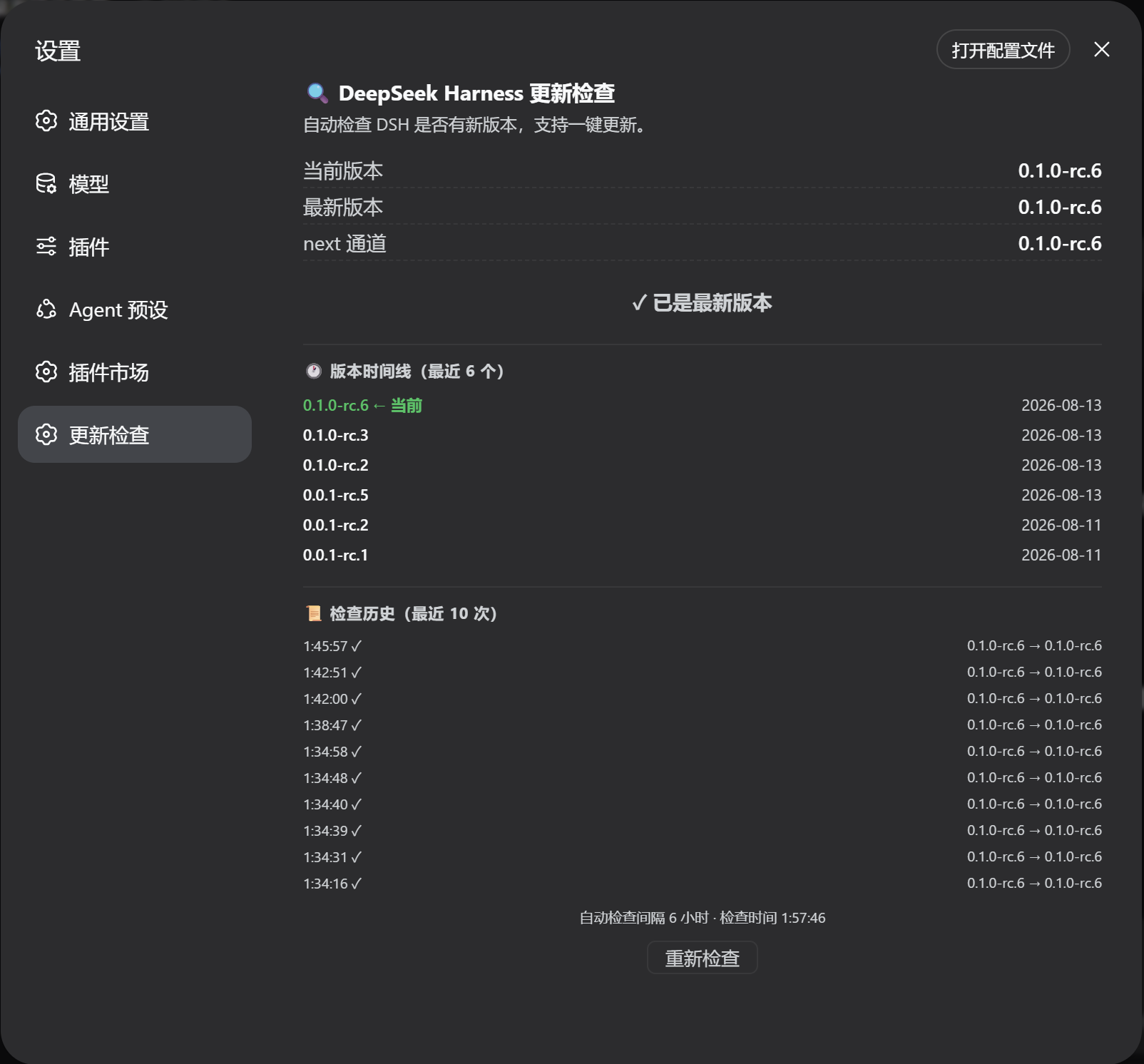
Open Settings → Update Check — a full page with all features:
The page shows:
- Current / latest / next versions and a status badge (
✓ up to date/⬆ update available) - One-click update button (
⬇ Update to x.y.z) when an update is available — shows live terminal output, then prompts to restartdsh webwhen done - Version timeline: the most recent 8 releases with dates, your current version highlighted in green
- Check history: recent check times and version transitions
- Re-check button and the last check time
Auto-check: the plugin checks when the Settings page opens and then every 6 hours while it stays open. When a new version is detected, a browser notification is fired (the first time, the browser asks for notification permission).
How it works
- Host: registers HTTP routes via the
webServerservice:GET /dsh-update-check— local version + npm latest/next + timeline + historyGET /dsh-update-check/status— live update task output (polled)POST /dsh-update-check/update— start the update (same-origin protected, single instance)
- Local version is read with
dsh --version; npm registry data via globalfetch. Commands run cross-platform (Windowscmd.exe/ POSIX/bin/sh). - Client: a
settings.sectionentry (__ModuleLoader__CJS bundle, no build step) that calls the routes above and renders the page.
Project layout
dsh-update-checker/
├── package.json        # dsh bundle patch + web client declaration
├── cordis.patch.yml    # inserts the plugin row into a profile layer stack
├── assets/
│   └── screenshot.png  # README screenshot
└── lib/
    ├── index.js        # host entry: HTTP routes + version comparison
    └── client.js       # client entry: Settings page
License
MIT
安装
装一次目录插件,之后本站所有插件都能让 DeepSeek Harness 自动找、自动装:
dsh plugin add dshbase-catalog然后对 agent 说「帮我装 dsh-update-checker」,它会在目录里找到并自动安装。文档:dshbase-catalog · 已验证场景包。
该插件是 GitHub 源码(未发 npm)——直接从仓库装:
Web profile:
dsh plugin --profile web add github:duntansen/dsh-update-checkerHeadless(CLI)profile:
dsh plugin --profile headless add github:duntansen/dsh-update-checker实测报告
验证通过:从 GitHub 源码完成 L1 安装 + L2 加载 + L3 运行(dsh 0.1.0-rc.6)。
使用场景
扩展 agent 的编码能力面——给它一个新工具、工作流或集成,让它接手以前做不了的开发任务。
适合谁
想让 dsh 在真实代码库上像队友一样干活的开发者——能改、能跑、能验证,而不只是回答问题。
二次开发建议
工具/命令面就是缝:暴露更多 SDK 能力、加更聪明的上下文接线,或收紧改代码与验证之间的循环。
分享徽章
把这枚徽章粘进 README——它会链回本页,实测状态变化时自动更新:

[](https://dshbase.com/zh/plugins/dsh-update-checker-2/)<a href="https://dshbase.com/zh/plugins/dsh-update-checker-2/"><img src="https://dshbase.com/badges/dsh-update-checker-2.svg" alt="dshbase 实测可装"></a>