
插件目录 / Developer / dsh-vsc-integration
dsh-vsc-integration
已验证 · 实测可装 HarcoChen
功能简介
dsh-vsc-integration — DSH 插件(工具)
可用 — 实测通过,早期项目
dsh-vsc-integration — DSH 插件(工具) 实测能干净安装、正常启动。早期项目,但功能可用。
「已验证」表示我们的自动化 CI 在干净 profile 里实际执行了 dsh plugin add 并启动成功——仅此而已。功能描述与版本兼容性均为作者声明。这不是安全审计,也不代表对第三方代码的背书。
README

DeepSeek Harness for VS Code
Your coding agent, with every change in view.
Bring DeepSeek Harness (DSH) into VS Code: work with your code, review native diffs, and follow each task with built-in Trace and usage insights.
English | 简体中文



Install for VS Code · Open VSX · Download VSIX · Changelog
An independent community project. Issues welcome.
For JetBrains IDEs (IDEA, PyCharm, etc.), please see dsh-intellij-integration.

Why DSH?
- See what changed. Review tool edits in VS Code's native side-by-side diff, even outside a Git repository.
- Decide before execution. Approval cards show commands and target files, with proposed diffs for supported file writes.
- Start with context. Bring files, selections, Git diffs, or paused debugger state into a task without copying everything by hand.
- Pick up where you left off. Resume persistent sessions and follow tools, subagents, Todos, and token usage in the Activity panel.
Quick start
Requires VS Code 1.106.0 or later and a configured DSH model provider with credentials.
- Install the extension from the Marketplace or Open VSX links above, or search for
harcochen.dsh-vsc-integrationin Extensions. - Open chat. Open and trust your project folder, then run
DSH: Open Chatfrom the Command Palette. The extension automatically starts or connects to a Runtime; by default, it attempts a managed Runtime download when no usable environment is available. - Set up your provider. Run
DSH: Configure API Keyfor DeepSeek credentials. For other providers, useDSH: Open dsh Web UI in Browser. Select or register a DSH Workspace, then choose a model. - Give it a task. Type
@to reference a file, or right-click a selection for DSH actions. Follow the task, respond to approval requests, and open diffs from tool cards to review the result.
A DSH Workspace groups sessions in Harness and can be associated with a project path. When using the same Runtime, you can continue sessions created in the Web UI.
Try it on real work
| Your task | A place to start |
|---|---|
| Understand unfamiliar code | Select code and use the DSH explain action: “Walk through the execution flow and edge cases.” |
| Review a change | Use the DSH review action on a Git diff in Source Control: “Check these changes for regressions and point to the relevant lines.” |
| Investigate a breakpoint | While paused, run DSH: Explain Current Debug State to attach context including the call stack and local variables. |
| Continue earlier work | Switch to a previous session and use the conversation outline to revisit the discussion. |
Features
Native diff for every edit, no Git required
After a write/edit tool call, open the target file to see VS Code's native side-by-side diff. The before-image is reconstructed by replaying hunks backwards from the Session log, so it also works in non-Git repositories and Git-ignored files.
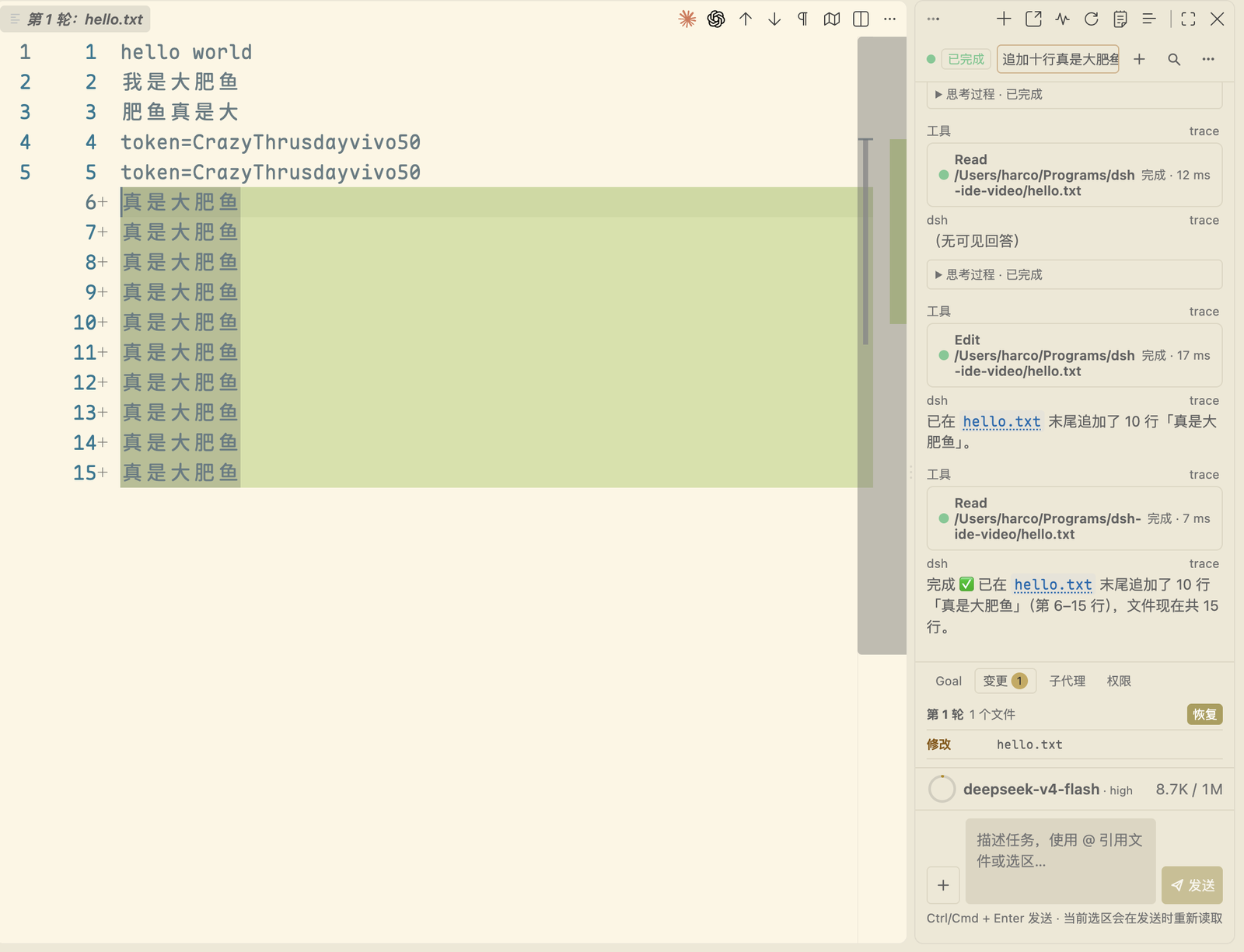
Preview before approval
The approval card shows the actual command line, working directory, and target files that will be written. For supported file-writing tools, open a native diff of the proposed change before approving it.
A write whose target file still has unsaved editor changes is not released: approval is refused, the card names the files and stays pending, and you can save or revert them and approve again.
Slash commands enumerated live from the Runtime
The slash menu dynamically fetches commands registered by the Runtime for the current session (/plan, /compact, /goal, etc.) and merges them with the extension's own IDE commands.

Editor and Git context
- Right-click the current file, selection, or Git diff to explain, fix, review, or generate documentation.
- Right-click
Ask about resourcein Explorer to ask about a file or folder. - The
@menu autocompletes project files and previous Sessions. DSH: Capture AppShot(macOS only) captures a window screenshot and inserts it into the conversation as a draft.
Sessions, Trace, and Activity at a glance
The sidebar provides a native conversation-outline TreeView. Trace, token usage, Todo lists, and subagents are gathered in the Activity panel. The UI supports VS Code's dark and light themes.
DSH: Open Chat in Editor Tab mirrors the same conversation in an editor tab, so the chat can sit next to the file you are editing. Both surfaces show one session and one stream — switching between them does not restart or fork anything.

Autonomous debugging (off by default)
With dsh.autonomousDebugging enabled, the extension exposes a loopback MCP endpoint inside
this window and the agent can drive the VS Code debugger: debug_start launches a launch
configuration that already exists in the workspace, debug_breakpoint adds, removes and lists
breakpoints, debug_control continues, steps and waits for the next pause, and debug_context
reads the paused stack, variables and source. Variables whose names look like secrets are
replaced with [redacted by dsh-ide] before they leave the window. The endpoint binds127.0.0.1 only, checks the Host header and a per-launch token, and never lets the model
invent a launch configuration. It applies to a Runtime this window starts; switching the setting
needs a Runtime restart, which the extension offers when you change it.
Credentials and balance
The bottom bar shows your current balance, including peak and off-peak pricing. Low balances are highlighted clearly.

FAQ
Do I need to install DSH manually? Usually no. The extension looks for a usable local environment and attempts to download a managed Runtime when needed. The first download requires network access; dsh.installWhenMissing controls automatic installation.
How is Jev integrated? Internal builds carry the IDE-neutral dsh-jev-integration Runtime package and mount it only into a Runtime started by this extension; existing or externally managed Runtimes are not modified. Jev is disabled by default. dsh.jev.enabled is the master switch; individual switches enable loop guard, result shaping, completion evidence checks, tool pruning, skill routing, decision tools and local deterministic safety checks. The endpoint and model are configurable, while numeric thresholds use built-in defaults. Configure the API key with DSH: Configure Jev API Key; it is encrypted in VS Code SecretStorage, with TYPESAFE_API_KEY and $HOME/.dsh/.env available as fallbacks. Enabled features may send their required samples to TypeSafe System One. Changes require a Runtime restart. This build exposes the shared Runtime subset of upstream dsh-jev, not its full agent-loop, dashboard, browser, or mobile bundle.
Can I connect to an existing Runtime? Yes. Set dsh.serverUrl to your running dsh web address and set dsh.serverToken to its launch token when the token is not already in the URL. This extension accepts valid SemVer versions at or above dsh 0.1.5-rc.1, including newer prereleases and stable versions. The default download and approved upgrade target is 0.1.7-rc.2; a compatible local installation is reused without downgrading. The extension reads session history through the public Remote page/follow APIs. Session log storage and migration are owned by the Runtime.
The Remote source audit targets upstream tag dsh-v0.1.7-rc.2 (477b4f420553e8a52c2fbccc464d7561b239c443); see the RPC adaptation report. The carrier handles multipart binary unary responses and client-to-host stream frames. The IDE exposes Account management, Schedule Activity Dock, and default Workspace initialization against the updated RC.2 contracts. Remote Workspace Files, Jobs, plugin-manager, permission-preset, and terminal surfaces remain candidates and are not exposed in the IDE.
The default dsh.command: "auto" probes dsh --version on PATH, then in the npm global prefix. A compatible local CLI is used directly. An incompatible CLI gets an upgrade prompt before any plugin download: it shows the current version, target and installation path. Approval upgrades a verified older npm global installation to dsh.runtimeVersion, then probes that same CLI again. Declining or closing the prompt uses pinned pnpm, then npx, then the managed CNB Runtime; missing CLIs also use this fallback. Upgrade failure offers fallback or cancellation. Unknown versions and older installations outside the active npm prefix get manual guidance. Diagnostics never prompt or install. Explicit local paths follow the same upgrade flow; explicit pnpm/npx keeps package-manager startup. If you previously saved dsh.command: "pnpm", reset it or select auto to enable local-first discovery.
Default app arguments are web --no-open; pnpm/npx gets its required prefix automatically when no argument override is saved. Existing package-manager argument overrides are preserved, and auto mode strips their package prefix when selecting a local CLI. Shared Runtime discovery still runs before choosing a new launcher, so fallback reuses a healthy Runtime instead of starting a second one.
If a standalone Runtime asset is unavailable from the configured download source, use a compatible local CLI, the pinned pnpm/npx fallback, or an existing instance. After compilation, node scripts/verify-runtime-discovery.mjs checks selection and actual startup arguments in an isolated POSIX CLI environment without downloads or model requests.
Does DSH support multi-root workspaces? DSH supports multiple independent Workspaces, but each Session has one working directory (cwd). A VS Code multi-root workspace is therefore represented by the first workspace folder for Runtime startup; use separate DSH Workspaces or Sessions when roots need different working directories.
Does DSH automatically identify secrets or personal information? No. Context is based on files, selections, and attachments that you explicitly choose; DSH reports size/truncation but does not send workspace content to an additional secret/PII classifier.
What if startup fails? Run DSH: Diagnose Environment, then DSH: Show dsh Runtime Logs from the Command Palette. Include your extension version, OS, and redacted error details when opening an issue.
Does it support Chinese? Yes. Commands, chat, Activity, and Trace follow VS Code's display language, with English and Simplified Chinese available.
Architecture and runtime
The extension connects to the Runtime through RC Remote RPC, using HTTP calls and a multiplexed WebSocket for live session updates.
Multiple VS Code windows discover each other through Runtime advertisements, then fall back to port 3080 and any configured dsh.serverPort. Every candidate is health-checked before use: authentication and a successful session/list call establish a usable connection, and advertised versions below the minimum are excluded. External services remain externally owned and are not stopped on disconnect. If authentication credentials are missing, set dsh.serverUrl to the full launch URL, including its token.
Advertisements are discovery metadata only. No advertisement grants or denies permission to start, so a missing, stale, or unreadable one can never block startup — the worst case is one failed health probe followed by this window launching its own Runtime.
Each window publishes exactly one file, <ownerId>.json, under dsh-runtime-advertisements-<user> in the OS temporary directory, carrying its endpoint, launch URL, version, PIDs, and composition hash. A window writes only its own file and never reclaims another's; legacy dsh-runtime.lock files are still read as hints, never written or removed. Readers take the sixteen most recent entries, so an abandoned file cannot crowd out live ones.
Advertisement lifecycle:
- Only a ready endpoint is published. A launch that fails before producing a URL leaves nothing behind.
- Startup briefly coordinates through a loopback mutex — at most 250 ms waiting and 500 ms held — and rechecks for a shared Runtime before spawning. Losing that race never blocks a launch; it just means this window starts its own Runtime.
- Explicit stop, dispose, and failed launches withdraw the advertisement.
- An unexpected launcher exit drops ownership but keeps the advertisement while its endpoint still answers, because package-manager wrappers routinely exit while the Runtime they started keeps serving. Only an explicitly refused loopback connection withdraws it; a timeout or an ambiguous host keeps the record.
- Startup is pinned to
--host 127.0.0.1and, withoutdsh.serverPort, to an OS-assigned port. A pinned port that loses a bind race retries once on an OS-assigned port. - Shutdown stops owned process trees before withdrawing the advertisement. POSIX uses separate process groups; Windows uses scoped
taskkill /Twhile the root identity is known.
After npm run compile, run node scripts/verify-runtime-discovery.mjs and node scripts/verify-runtime-shutdown.mjs to check launcher/port selection, advertisements, upgrade confirmation, and shutdown using isolated temporary directories, child processes, and loopback listeners.
graph TD
    A[VS Code Extension Host] <-->|RC Remote RPC| B[Standalone Harness Runtime]
    A <-->|Typed Full-State Bridge| C[React Webview UI]
    B <-->|CNB Distribution| D[Managed Local Engine]
    A <-->|Process Lock| E[Multi-Window Shared Runtime]
Configuration
Search dsh in VS Code settings for the full list.
| Setting | Default | What it does |
|---|---|---|
dsh.serverUrl |
"" |
URL of an already running dsh web Runtime; when set, the extension connects directly. Include ?token=... or set dsh.serverToken. |
dsh.serverToken |
"" |
Launch token for dsh.serverUrl; use it when the address and token are configured separately. |
dsh.autoStart |
true |
Automatically start or connect to dsh web when the extension activates. |
dsh.installWhenMissing |
true |
Automatically download and manage a standalone Runtime when no usable npm/dsh environment is available. |
dsh.runtimeVersion |
0.1.7-rc.2 |
Approved CLI upgrade and plugin download target; accepts any valid SemVer at or above RC.1. |
dsh.npmRegistry |
https://registry.npmmirror.com |
Registry mirror used as a download fallback. |
dsh.npxTimeoutMs |
120000 |
Timeout while waiting for package-manager download and startup. |
dsh.enableCompaction |
true |
Enable the official /compact command when the extension starts its own Runtime. |
dsh.jev.enabled |
false |
Enable Jev; guarded-tool arguments and data used by enabled features may be sent to TypeSafe System One. Configure the API key with DSH: Configure Jev API Key; restart the Runtime to apply. |
dsh.jev.baseUrl |
https://api.typesafe.ai/v1/systemone |
Jev endpoint; use HTTPS for remote endpoints. |
dsh.jev.model |
jev-latest |
Jev model name. |
dsh.jev.loopGuard.enabled |
false |
Enable semantic loop detection after tool execution; trajectory samples may be sent to Jev. |
dsh.jev.resultShaper.enabled |
false |
Enable classification and shaping of repetitive large tool results; samples may be sent to Jev. |
dsh.jev.doneGate.enabled |
false |
Ask Jev to check completion claims against tool evidence. |
dsh.jev.toolPruner.enabled |
false |
Ask Jev to rank visible tools; DSH permissions are unchanged. |
dsh.jev.skillRouter.enabled |
false |
Ask Jev to select relevant skills and add bounded advice. |
dsh.jev.decisionTools.enabled |
false |
Expose Jev ask/rank/check tools; submitted state may be sent to Jev. |
dsh.jev.deterministicSafetyGuard.enabled |
true |
Run destructive-command and credential checks locally. |
dsh.autonomousDebugging |
false |
Let the agent drive this window's debugger through a loopback MCP endpoint. Applies to a Runtime this window starts; needs a Runtime restart. |
dsh.maxContextBytes |
120000 |
Maximum UTF-8 bytes of <ide_context> included per prompt. |
dsh.persistSession |
true |
Reuse the previous Session ID for the current workspace when possible. |
dsh.agentStatusLabels |
fat-whale messages | Random text shown during each streaming turn; customizable. |
dsh.agentStatusLabel |
"" |
Pins a single fixed status line when set. |
dsh.enableEffortKnob |
true |
Use the runner sprite animation as the reasoning-effort slider button. |
Other ways to install
From GitHub Releases — download the .vsix from Releases and run Extensions: Install from VSIX.... Pre-release builds go to Open VSX flagged as pre-release and to GitHub Releases; on Open VSX only users who switched that extension to its pre-release version receive them, and they never reach the VS Code Marketplace, which does not accept SemVer pre-release version numbers. From 0.8.0 on, stable releases use even minor versions (0.8.x) and pre-release builds use the next odd minor (0.9.x), so a stable release never supersedes a newer pre-release.
Build from source:
git submodule update --init --recursive
npm install
npm run check
npm run package
Then install the generated .vsix via Extensions: Install from VSIX....
Extension API
Other VS Code extensions can hook into the API DSH exports.
Conversation navigation API — register custom nodes
const registration = api.registerConversationNavigation([
    { seq: 42, label: "Review the PPO implementation", detail: "Training config" },
]);
context.subscriptions.push(registration);
Agent status label API — customize streaming status text
const dsh = vscode.extensions.getExtension<import("dsh-vsc-integration").DshExtensionApi>(
    "harcochen.dsh-vsc-integration",
);
const api = await dsh?.activate();
context.subscriptions.push(
    api?.registerAgentStatusPresentation({ label: "🐋 Diving" }),
);
Development and testing
npm install
npm run check      # TypeScript check (host + webview)
npm test           # Release gate: webview check + compile + test suite
npm run compile    # Build to dist/
npm run package    # Compile + vsce package
npm run release    # Test + version bump + CHANGELOG archive + tag
The checked-in Remote smoke runner uses historical 0.1.5-rc.2 V3 fixtures. It does not verify the 0.1.7-rc.1 multipart, uplink, or archive changes or the 0.1.7-rc.2 business RPC changes; see the current RPC adaptation report for that audit boundary.
To run the historical Remote integration smoke against a compatible installed launcher:
npm run compile
node scripts/verify-remote-runtime.mjs --launcher /absolute/path/to/dsh
This smoke run uses a temporary DSH home/workspace and a loopback model stub. It does not use your sessions or external model credentials. The runner requires Node.js >=22.15.0 with node:zlib Zstandard support (zstdCompressSync; Node 23 users need >=23.8.0).
To verify the managed Runtime release logic:
node scripts/verify-managed-runtime.mjs              # remote contract only
node scripts/verify-managed-runtime.mjs --full       # install and smoke-test
More information
Acknowledgments
Thanks to dsh-reasoning-effort for the chibi runner sprite reference. The conversation outline takes inspiration from the dsh-milestone project.
License
安装
装一次目录插件,之后本站所有插件都能让 DeepSeek Harness 自动找、自动装:
dsh plugin add dshbase-catalog然后对 agent 说「帮我装 dsh-vsc-integration」,它会在目录里找到并自动安装。文档:dshbase-catalog · 已验证场景包。
该插件是 GitHub 源码(未发 npm)——直接从仓库装:
Web profile:
dsh plugin --profile web add github:HarcoChen/dsh-vsc-integrationHeadless(CLI)profile:
dsh plugin --profile headless add github:HarcoChen/dsh-vsc-integration实测报告
验证通过:从 GitHub 源码完成 L1 安装 + L2 加载 + L3 运行(dsh 0.1.0-rc.6)。
使用场景
扩展 agent 的编码能力面——给它一个新工具、工作流或集成,让它接手以前做不了的开发任务。
适合谁
想让 dsh 在真实代码库上像队友一样干活的开发者——能改、能跑、能验证,而不只是回答问题。
二次开发建议
工具/命令面就是缝:暴露更多 SDK 能力、加更聪明的上下文接线,或收紧改代码与验证之间的循环。
分享徽章
把这枚徽章粘进 README——它会链回本页,实测状态变化时自动更新:

[](https://dshbase.com/zh/plugins/dsh-vsc-integration/)<a href="https://dshbase.com/zh/plugins/dsh-vsc-integration/"><img src="https://dshbase.com/badges/dsh-vsc-integration.svg" alt="dshbase 实测可装"></a>