
插件目录 / Developer / dsh-web-icon-indicator
dsh-web-icon-indicator
已验证 · 实测可装 waknow
功能简介
DSH browser tab favicon reflecting session state: idle / running / asking / done. · DSH 标签页 favicon 实时反映会话状态:待机 / 运行中 / 提问 / 完成
可用 — 实测通过,早期项目
DSH browser tab favicon reflecting session state: idle / running / asking / done. · DSH 标签页 favicon 实时反映会话状态:待机 / 运行中 / 提问 / 完成 实测能干净安装、正常启动。早期项目,但功能可用。
「已验证」表示我们的自动化 CI 在干净 profile 里实际执行了 dsh plugin add 并启动成功——仅此而已。功能描述与版本兼容性均为作者声明。这不是安全审计,也不代表对第三方代码的背书。
README
dsh-web-icon-indicator

Browser tab favicon reflects the current DSH session state — idle / running / asking / done — so you can see at a glance whether a session needs your attention, even when the tab is in the background.
✨ What it does
- Live session state on the tab favicon — the browser-tab icon mirrors
idle/running/asking/done(aggregate priority:asking>running>done>idle), so background tabs tell you at a glance what your agents are doing — includingask_user_questionprompts and approval / sandbox-escalation waits, which pin the icon toasking. - One SVG, recolored & animated in the browser — ships a single whale template (
icons/base.svg); every state, color and frame is rendered client-side as adata:image/svg+xmlURI. No per-color icon files. - Six built-in effects —
static,blink,breath,rainbow,heartbeat,bounce— all driven by JavaScript, since favicons don't play SVG CSS animations. - Fully configurable, applied live — every state's color, effect and cycle speed, plus the asking/done hold timings, apply to the running tab within ~1 s — no reload, no restart.
- Built-in settings UI, zero YAML — a Favicon indicator card in the DSH settings page edits the whole config with live color-swatch previews and persists it to
settings.yamlfor you (path below). - Background-tab & restart-proof — animated states keep a wall-clock fallback while
requestAnimationFrameis paused in hidden tabs, and the status poll self-heals across host restarts.

🛠 Configuration UI — how to get there
| # | Step |
|---|---|
| 1 | Open the DSH Web GUI and go to Settings / 设置. |
| 2 | In the Plugins / 插件 tab, open Plugin config / 插件配置. |
| 3 | Find the Favicon indicator / 标签页图标指示器 card. |
| 4 | Expand a state row (idle / running / asking / done) to edit Effect / 特效, Colors / 颜色 (each swatch is a native color picker) and Cycle (ms) / 周期(毫秒) (shown only for animated states — static states have no cycle); use Asking hold / 提问驻留 and Done hold / 完成驻留 for the two timings. |
Changes are saved through the settings transport into the profile's settings.yaml and applied to the running tab within ~1 s — no reload, no restart. See Configure for the full key reference.
🎬 Default configuration, visualized
The four default states, exactly as they appear in the browser tab (the asking whale really blinks):
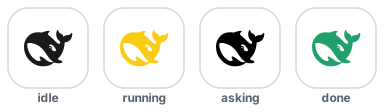
| State | Default color | Default effect |
|---|---|---|
idle |
#1a1a1a — deep whale |
static |
running |
#FACC15 — yellow |
static |
asking |
#E5484D ⇄ #FACC15 — red/yellow |
blink (400 ms) |
done |
#22A06B — green |
static, stays doneHoldMs, then back to idle |
✨ All effects, animated
Every preview below is the real whale path, animated the same way the plugin renders it (the previews are self-contained animated SVGs — they play right in your browser):
| Effect | What it does | Preview |
|---|---|---|
static |
A single colored frame, no motion — uses colors[0] |
 |
blink |
Toggles colors[0] ⇄ colors[1] (a darker second color is derived if missing) over speed |
 |
breath |
Pulsates smoothly between colors[0] and colors[1] (derived if missing) over speed |
 |
rainbow |
Uses colors[0] as the starting hue, then cycles the color wheel over speed |
 |
heartbeat |
Scale pulses with a sharp lub-dub beat over speed — color is colors[0] |
 |
bounce |
The whale hops up and down over speed — color is colors[0] |
 |
Want to tweak colors and watch the tab favicon change live? Open the self-contained demo (demo/dynamic-color.html) — pick a state + effect, edit colors, and the favicon updates in real time (no build, no dependencies).
Install
This is a standard DSH bundle plugin. Install it into the web profile (the GUI/TUI profiles pick it up automatically through the cordis patch layer).
From npm (recommended):
dsh plugin --profile web add dsh-web-icon-indicator@latest
From the Git source:
dsh plugin --profile web add github:waknow/dsh-web-icon-indicator
Or from a local directory / tarball:
dsh plugin --profile web add <path-or-tarball>
Or drop the directory into ~/.dsh/profiles/web/node_modules/<name>/ and ship a cordis.patch.yml that matches the one shipped here.
Configure
All keys are optional; defaults shown.
| Key | Default | Meaning |
|---|---|---|
iconsDir |
<package>/icons/ |
Directory holding the single base.svg |
statusPath |
/dsh-web-icon-status.json |
JSON status endpoint |
iconPathPrefix |
/dsh-web-icon-indicator |
URL prefix base.svg is served under |
askingHoldMs |
3500 |
Minimum visibility of the asking state |
doneHoldMs |
5000 |
Time the done state stays before falling back to idle |
states |
see below | Per-state visual config |
Each entry in states is one object per state: { effect, colors[], speed? }:
config:
  states:
    idle:    { effect: static,    colors: ['#1a1a1a'] }
    running: { effect: static,    colors: ['#FACC15'] }
    asking:  { effect: blink,     colors: ['#E5484D', '#FACC15'], speed: 400 }
    done:    { effect: static,    colors: ['#22A06B'] }
effect— one ofstatic | blink | breath | rainbow | heartbeat | bounce.colors— an array of hex colors.colors[0]is the primary. Multi-color effects read more entries:blinkusescolors[0]⇄colors[1],breathbreathescolors[0]⇄colors[1](each derives a darker second color if omitted),rainbowuses onlycolors[0]as the starting hue.speed— optional per-state cycle length in ms (also theblinktoggle interval). Default1200.
Entries are shallow-merged over the defaults, so you can override only a few states. Example:
- id: dsh-web-icon-indicator
  name: 'dsh-web-icon-indicator'
  config:
    states:
      running: { effect: breath,    colors: ['#FF9900', '#FFD9A0'], speed: 900 }
      asking:  { effect: rainbow,   colors: ['#FF0000'] }
      done:    { effect: heartbeat, colors: ['#2ECC71'] }
Settings page & settings.yaml (DSH ≥ rc7)
The plugin registers the whole config surface above with the DSH settings
service under the web-icon-indicator namespace (a schemastery schema inlib/index.js):
- Web GUI: open 设置 → 插件 → 插件配置 — a Favicon indicator card
edits the same keys (asking/done hold, and per-state effect / colors /
cycle), staged and saved through the settings transport. Each state is a
collapsible row showing a color dot and a one-line summary (blink · #E5484D ⇄ #FACC15 · 400ms); expanding a row reveals its three fields, and
the colors field previews parsed swatches live. - Persistence: values land in the profile's
settings.yaml(default~/.dsh/settings.yaml) as aweb-icon-indicator:section. The composition
entry stays thebaselayer; resolution order is schema defaults →
composition entry → settings document user layer. - No server restart, no tab reload for settings-card saves:
askingHoldMs/doneHoldMsapply live host-side, and per-state visual config (effect /
colors / cycle) is synced into the running tab through the status poll within
~1 s. Only code-level default changes inlib/index.jsneed a tab reload (or
a DSH web rebuild). - The browser half is a hand-written
lib/client.js(ModuleLoader factory
format — no build step, no runtime deps beyond the shell'sreact). The DSH
client scanner picks a newdsh.clientdeclaration up on the next profile
start. - Deployments without a settings service are unaffected: the plugin falls back
to reading the composition entry exactly as before.
How it works
- Host plugin with a small browser half: registers routes on the existing
webServer— the status JSON endpoint, a static/dsh-web-icon-indicator/base.svg(the whale template), and onetapIndexthat injects a small browser script into every servedindex.html. The config surface is registered with the DSH settings service (web-icon-indicatornamespace) for validation, persistence, and the settings-page card (see above). - Status is aggregated across live
agents.list()with priorityasking > running > done > idle. The aggregation runs areconcile()step on every request to detect running → idle transitions, becauseagent/status's idle delivery is not guaranteed at turn end. ask_user_questiontool calls (viatools/pre-execute/tools/result) flip the session intoaskingwith a configurable minimum-hold so the icon stays visible even when the user answers immediately.- Permission / sandbox-interception waits are also surfaced as
asking: when the agent hits a sandbox denial and escalates (sandbox_permissions+justification), or any other tool asks for approval, the approval service appends anapproval/askedsession event and blocks the agent until you decide. The plugin watchessession/event(with an authoritative fold over the live session log as a fallback) and pins the session into theaskingstate for that whole wait, clearing it onapproval/decided. - The browser script polls
/dsh-web-icon-status.jsononce a second, fetchesbase.svgonce, and then on everyrequestAnimationFrametick rebuilds the favicon as adata:image/svg+xml,…URI — replacing the__COLOR__placeholder with the state's configured color and applying the state's configured effect. The status response also echoes the current per-state visual config, so a settings save reaches the running tab on the next poll (~1 s) without a reload. Browsers don't play favicon SVG CSS animations, so all motion is JS-driven. Because browsers pauserequestAnimationFramein hidden tabs, the poll also repaints a wall-clock frame for animated states, so background tabs keep animating (coarsely) instead of freezing; full-speed animation resumes when the tab is visible again. The poll also survives host restarts: a transient fetch failure restores the original icon and retries on the next tick (the SPA reconnects in place, so the icon comes back without a manual refresh).
Browser support & known limitations
The favicon is a plain image, so browsers never run the SVG's own CSS/JS animation inside the tab UI — every frame is rendered here in JavaScript. How well a changing favicon is displayed differs by browser:
| Browser | SVG favicon | Live per-state color/effect | Why |
|---|---|---|---|
| Chrome / Edge | ✅ | ✅ smooth | Re-reads <link rel=icon> live; data:-URI SVGs are fine. |
| Firefox | ✅ | ✅ smooth | Renders SVG favicons well (and honors their prefers-color-scheme, unused here). |
| Safari (macOS) | ✅ rendered static | ⚠️ best-effort | Ignores in-SVG CSS; aggressive icon caching. |
| Safari (iOS) | ✅ rendered static | ⚠️ rarely | Unlikely to refresh without revisiting the tab. |
Known limitations (current as of Safari 26.3):
- Favicons have their own cache. Chrome keeps a favicon database, Firefox a
favicons.sqlite, and Safari a system-level icon cache — none of which a normal clear cache touches, and WebKit even caches the "no icon" case. That is why a changed icon can linger for an existing tab. The plugin already mitigates this: it servesbase.svgand the status endpoint withCache-Control: no-store, bundles a freshness query (?t=Date.now()) on its fetches, and replaces the<link rel=icon>node on each state change. - Safari renders SVG favicons but ignores their internal CSS — no
@media, noprefers-color-scheme, no CSS animation. So all recoloring must be baked into each frame's markup (which the plugin does) rather than driven by CSS variables. data:-URI SVG favicons are unreliable in Safari (WebKit bug 236616, still open; reproduced on Safari 17.6). The plugin currently builds each frame as adata:image/svg+xmlURI, so on Safari the tab icon may not render at all — the biggest known gap.- Dynamic JS updates in Safari are hit-or-miss; they may require a reload, and Safari "locks onto" the first icon it sees. There is no guaranteed, spec-supported way to swap a favicon live in Safari today.
- Pinned-tab icon (
<link rel="mask-icon">) uses its own cache, separate from the regular favicon, and is a single-colour silhouette tinted by thecolorattribute — macOS + pinned-tab only, read at page load, not live.
Full mechanics with sources (WebKit bugs, Stack Overflow, browser-engineering blogs) and a recommended path toward smoother Safari colour changes live in docs/safari-favicon-research.md.
Caveats
- Favicon SVG CSS animations do not run inside the browser's tab UI — all effects are produced in JavaScript by rebuilding the data-URI each frame. This is a deliberate, zero-dependency design. (The animated previews in this README are demo assets for illustration only — the favicon itself is JS-animated.)
- Favicon behavior differs by browser, and Safari is the most limited — see Browser support & known limitations.
- The base template must keep its
__COLOR__placeholder in the#p { fill: … }rule; the browser replaces that token to color each frame. - The plugin runs in the host plane; it must be mounted into a profile's composition, not a session-scoped agent preset.
- File reads go through the
fsservice with the configurediconsDirascwd. Make sure that path is readable under your deployment's sandbox policy.
License
MIT
安装
装一次目录插件,之后本站所有插件都能让 DeepSeek Harness 自动找、自动装:
dsh plugin add dshbase-catalog然后对 agent 说「帮我装 dsh-web-icon-indicator」,它会在目录里找到并自动安装。文档:dshbase-catalog · 已验证场景包。
该插件是 GitHub 源码(未发 npm)——直接从仓库装:
Web profile:
dsh plugin --profile web add github:waknow/dsh-web-icon-indicatorHeadless(CLI)profile:
dsh plugin --profile headless add github:waknow/dsh-web-icon-indicator实测报告
验证通过:从 GitHub 源码完成 L1 安装 + L2 加载 + L3 运行(dsh 0.1.0-rc.6)。
分享徽章
把这枚徽章粘进 README——它会链回本页,实测状态变化时自动更新:

[](https://dshbase.com/zh/plugins/dsh-web-icon-indicator/)<a href="https://dshbase.com/zh/plugins/dsh-web-icon-indicator/"><img src="https://dshbase.com/badges/dsh-web-icon-indicator.svg" alt="dshbase 实测可装"></a>