
插件目录 / Desktop / dsh-webUI-pets
dsh-webUI-pets
已验证 · 实测可装 pineapple880066
功能简介
Codex-style desktop pets for the DeepSeek Harness Web UI / 类似 Codex 的 DeepSeek Harness Web UI 桌宠
可用 — 实测通过,早期项目
Codex-style desktop pets for the DeepSeek Harness Web UI / 类似 Codex 的 DeepSeek Harness Web UI 桌宠 实测能干净安装、正常启动。早期项目,但功能可用。
「已验证」表示我们的自动化 CI 在干净 profile 里实际执行了 dsh plugin add 并启动成功——仅此而已。功能描述与版本兼容性均为作者声明。这不是安全审计,也不代表对第三方代码的背书。
README
DSH WebUI Pets — Codex-style desktop pets for DeepSeek Harness Web UI
DSH WebUI Pets —— 类似 Codex 的 DeepSeek Harness Web UI 桌宠
English version / 英文版
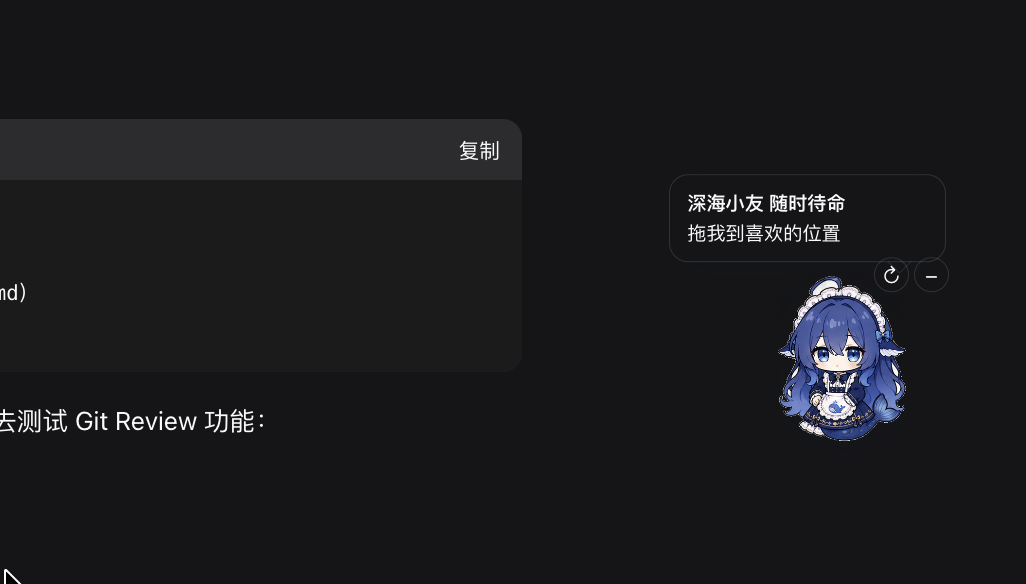
Overview
DSH WebUI Pets is a collection of Codex-like draggable desktop companions for the DeepSeek Harness Web UI. It currently includes seven pets: Doki, Crimson Flower, Blue Ribbon, Deep Sea, Black Rose Maid, Frost Crown, and Mint Gamer. The package is tagged dsh-plugin and renders inside the Web UI instead of opening a native desktop window.
桌宠总览 / Desktop pets overview:

The plugin lives at packages/client/ui-desktop-pet. It registers into the shell.overlay slot and provides draggable, minimizable pets with 12-frame sprite sheets. Use the ↻ control to cycle pets; the selection and position are persisted in browser local storage.
Pet artwork specification
New pets should use a transparent RGBA PNG sprite sheet sized 1448 × 1086 pixels. The sheet is a 4 × 3 grid of 362 × 362 pixel frames, numbered left to right and top to bottom. Use a lowercase kebab-case filename ending in -sprite.png, keep all poses inside their own cells, and keep the character scale and feet baseline consistent.
The complete English and Chinese preparation guide, frame order, naming rules, runtime mapping, and integration checklist are in docs/pet-artwork-spec.md.
Install and enable / 安装与启用
Install the package into the Web profile with the current DSH plugin flow; it is no longer necessary to copy source files into dsh or rebuild the whole dsh checkout:
dsh plugin --profile web add link:/absolute/path/to/dsh-webUI-pets/packages/client/ui-desktop-pet
After installation, open 设置 / Settings → 插件 / Plugins → 插件配置 / Plugin configuration, then use 桌宠 / Desktop pets → 启用桌宠 / Enable desktop pets. The switch is persisted by DSH settings and takes effect without rebuilding dsh. A restart of the Web profile may still be needed after the first installation so the newly installed client bundle is loaded.
The package declares dsh.client and dsh.bundle.patch; the patch adds it to the Web profile composition, while the settings card controls whether the overlay is mounted.
Assets and license
The seven transparent sprite sheets were generated from user-provided character references. Confirm derivative-work and redistribution rights before redistributing the character assets. The plugin source is MIT licensed.
中文翻译
DSH WebUI Pets 是一组面向 DeepSeek Harness Web UI 的、类似 Codex 的可拖拽桌宠。目前包含七个桌宠:Doki、赤花小友、蓝缎小友、深海小友、黑蔷薇女仆、霜冠小友和薄荷电玩小友。仓库已加入 dsh-plugin 话题,桌宠运行在 Web UI 内,不会打开原生桌面窗口。
上方截图是桌宠在 Web UI 中的实际效果;下方总览图展示当前七个桌宠:
插件位于 packages/client/ui-desktop-pet,注册到 shell.overlay 槽位,支持拖拽、缩小和 12 帧组图动画。点击 ↻ 可以循环切换桌宠,选择和位置会保存到浏览器本地存储。
安装与启用
现在按 DSH 的插件流程安装,不需要再把源码复制进 dsh,也不需要重新构建整个 dsh:
dsh plugin --profile web add link:/absolute/path/to/dsh-webUI-pets/packages/client/ui-desktop-pet
安装后打开 设置 / Settings → 插件 / Plugins → 插件配置 / Plugin configuration,在 桌宠 / Desktop pets 卡片中切换 启用桌宠 / Enable desktop pets。开关会写入 DSH 设置并热生效,不需要重新构建 dsh;第一次安装后可能需要重启一次 Web profile,让新客户端 bundle 被加载。
包内已经声明 dsh.client 和 dsh.bundle.patch:patch 负责把插件加入 Web profile,设置卡片负责控制桌宠是否显示。
桌宠图片制作规范
新增桌宠请使用透明背景的 RGBA PNG 组图,尺寸为 1448 × 1086 像素,按 4 列 × 3 行排列,每帧 362 × 362 像素。文件名使用小写 kebab-case,并以 -sprite.png 结尾;每个姿势必须留在自己的单元格内,角色比例和脚部基线要保持一致。
完整的中英文图片制作说明、帧顺序、命名规则、运行时映射和接入检查清单见 docs/pet-artwork-spec.md。
素材与许可证
七套透明组图根据用户提供的角色参考图生成。重新分发角色素材前,请确认相应的二创和分发授权;插件源代码采用 MIT 许可证。
安装
装一次目录插件,之后本站所有插件都能让 DeepSeek Harness 自动找、自动装:
dsh plugin add dshbase-catalog然后对 agent 说「帮我装 dsh-webUI-pets」,它会在目录里找到并自动安装。文档:dshbase-catalog · 已验证场景包。
该插件是 GitHub 源码(未发 npm)——直接从仓库装:
Web profile:
dsh plugin --profile web add github:pineapple880066/dsh-webUI-petsHeadless(CLI)profile:
dsh plugin --profile headless add github:pineapple880066/dsh-webUI-pets实测报告
验证通过:从 GitHub 源码完成 L1 安装 + L2 加载 + L3 运行(dsh 0.1.0-rc.6)。
使用场景
把 dsh 跑成原生桌面应用——独立窗口、托盘图标、快捷键——而不是浏览器标签。
适合谁
想要已安装应用的感觉和系统集成(托盘、全局热键、开机自启)的人。
二次开发建议
原生壳是缝——加全局快捷键、通知、单实例锁或按 OS 定制的行为。
分享徽章
把这枚徽章粘进 README——它会链回本页,实测状态变化时自动更新:

[](https://dshbase.com/zh/plugins/dsh-webUI-pets/)<a href="https://dshbase.com/zh/plugins/dsh-webUI-pets/"><img src="https://dshbase.com/badges/dsh-webUI-pets.svg" alt="dshbase 实测可装"></a>