
hello-dsh
已验证 · 实测可装 pingfanfan
功能简介
从零开始,看懂 DeepSeek Harness 的「万物皆可插件」— 零基础插件开发教程(含 22 个中文技能实例)| Zero-to-plugin tutorial for DeepSeek Harness
可用 — 实测通过,社区增长中
从零开始,看懂 DeepSeek Harness 的「万物皆可插件」— 零基础插件开发教程(含 22 个中文技能实例)| Zero-to-plugin tutorial for DeepSeek Harness 实测能干净安装、正常启动。社区在增长,是个稳妥选择。
「已验证」表示我们的自动化 CI 在干净 profile 里实际执行了 dsh plugin add 并启动成功——仅此而已。功能描述与版本兼容性均为作者声明。这不是安全审计,也不代表对第三方代码的背书。
README




DSH introduces itself as "Everything is a Plugin."
That is not marketing. Open Settings → Plugins → Plugin list and look at the count:
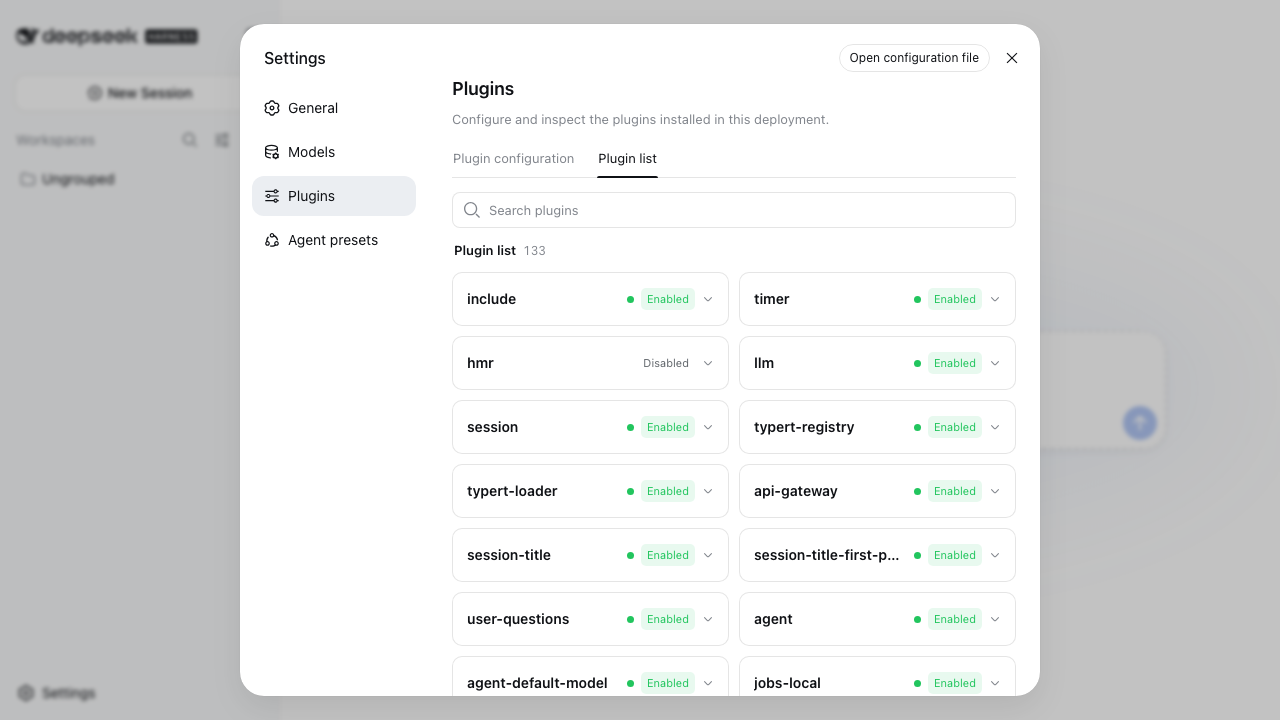
133 of them. llm (the model adapter), session (conversation history), webserver (the page you are looking at), ui-sidebar (the sidebar on the left), and agent-loop — the agent loop itself is a plugin.
This repo walks you from "open a terminal" to building your own plugin and watching its lifecycle.
Start here
🌏 The tutorial is currently written in Chinese. An English version is in progress.
The code, commands, and screenshots are language-neutral, so the walkthrough is still
followable — and the skills inexamples/skills/work regardless of
what language you read.⚠️ Launch the web UI with
--patch, or skills silently do nothing. See
the gotcha below.
It assumes you have nothing: no Node.js, no command-line experience. Every section ends with a checkpoint — you don't move on until you see the expected result.
| Steps | What | Time |
|---|---|---|
| 1–2 | Open a terminal, install Node.js | 7 min |
| 3–5 | Launch DSH, configure the API key, pick a workspace | 10 min |
| 6 | See all 133 plugins for yourself | 3 min |
| 7–8 | Build your first plugin, watch its lifecycle | 10 min |
| 9–10 | What's next, theory (optional) | 13 min |
Steps 1–8 take about 30 minutes and leave you with a working setup.
Two routes to extend DSH
| Route | What you write | Effort | Good for |
|---|---|---|---|
| Markdown (skill) | One text file | 5 minutes | Changing how the model judges, formats, and works |
| TypeScript (code plugin) | A code module | 30+ minutes | New tools, external services, UI changes |
Rule of thumb: if you can explain it in plain language, take the Markdown route.
The tutorial walks through both.
Ready-made examples
Once you're through the tutorial, examples/skills/ has 22 Chinese-language skills ready to use.
Let an AI install them (easiest)
Hand this link to Codex, Claude Code, or DSH itself:
https://github.com/pingfanfan/hello-dsh/blob/main/INSTALL-FOR-AGENTS.md
install this
It checks Node, DSH, and the API key first, then copies files.
Or run one command
git clone https://github.com/pingfanfan/hello-dsh.git
cd hello-dsh && ./install.sh
Preview first: ./install.sh --dry-run
Remove: ./install.sh --uninstall
The skills
| Skill | Use it when |
|---|---|
hello-dsh |
Start here: verify the plugin system, lifecycle, theory |
dsh-onboarding |
First run of DSH, or stuck on startup, workspace, permissions |
dsh-skill-dev |
Full rules for writing skills (Markdown route) |
dsh-first-plugin |
Building your first code plugin (tested walkthrough) |
dsh-plugin-dev |
Full rules for writing plugins (TypeScript route) |
dsh-troubleshoot |
Won't start, config not applying, UNKNOWN_TOOL, missing skills |
plan-before-code |
A task spanning several files, with unknowns |
code-review-cn |
Reviewing a change, PR, or diff |
debug-systematically |
A bug, a failing test, "it worked yesterday" |
explain-codebase |
Getting oriented in an unfamiliar project |
refactor-safely |
Refactoring, splitting functions, removing duplication |
test-first |
Writing tests, implementing a feature, fixing a bug |
api-design |
Designing an interface, adding a public method |
error-handling |
Designing error handling, throw vs return |
perf-optimize |
Optimizing performance, finding what's slow |
security-review-cn |
Security review, attack surface, credential handling |
commit-message |
Writing commit messages, splitting changes |
pr-description |
Writing a PR description, preparing review |
write-tech-cn |
Writing Chinese docs, READMEs, technical posts |
write-docs-cn |
Writing or organizing project docs, API references |
web-research |
Researching online, verifying facts, evaluating options |
ask-good-questions |
Asking a technical question, reporting a bug |
Once installed, say "hello dsh" to DSH and it walks you through, one layer at a time.
One gotcha
⚠️ The DSH web UI ships with skills disabled (the CLI profile has them on). Verified on 0.1.0-rc.6.
To use skills in the web UI:
npx @deepseek-ai/dsh web --patch ./enable-skills-in-web.yml
That file is in this repo's root.
What this tutorial found
Writing this meant running DSH end to end on two clean Macs. These behaviors are documented in the tutorial because each one silently blocks a beginner:
| Finding | Why it matters |
|---|---|
The web profile ships with tool-skill and skill-filesystem disabled; headless has them on |
Same skill works in the CLI, silently does nothing in the web UI, with no error |
| The web UI requires a workspace before the send button activates | The CLI has no such requirement, so it's easy to miss when testing |
| A stale DSH process holding port 3080 makes the page load normally | New instance exits with EADDRINUSE; the browser silently talks to the old one and no config change appears to take effect |
--patch inserts rather than overrides, so patched plugins mount twice |
Harmless, but the plugin list shows 7 skill plugins instead of 5 |
| A camelCase frontmatter key drops the entire skill, warning only | Documented fail-closed behavior, but hard to diagnose without knowing it |
All verified on 0.1.0-rc.6.
Companion tool
dsh-doctor — config health checks that catch silent failures:
npx dsh-doctor
Read-only. Every rule maps to a real failure documented in DeepSeek's own docs or postmortems.
How these skills are written
Following DSH's own .agents/skills/ — 11 skills DeepSeek wrote for internal use. What they have in common:
- Guidance, not a checklist (their words: "This skill is guidance, not a complete checklist")
- Name the sources of truth, and say "read them, don't restate them"
- Layer it: blocking requirements / manual checks / what not to do
- A dedicated "what not to do" section — it prevents more than the positive instructions do
Contributing
See CONTRIBUTING.md. Two requirements: Chinese, and you actually use it.
License
MIT
Unofficial community project. Not affiliated with DeepSeek.
安装
装一次目录插件,之后本站所有插件都能让 DeepSeek Harness 自动找、自动装:
dsh plugin add dshbase-catalog然后对 agent 说「帮我装 hello-dsh」,它会在目录里找到并自动安装。文档:dshbase-catalog · 已验证场景包。
该插件是 GitHub 源码(未发 npm)——直接从仓库装:
Web profile:
dsh plugin --profile web add github:pingfanfan/hello-dshHeadless(CLI)profile:
dsh plugin --profile headless add github:pingfanfan/hello-dsh实测报告
验证通过:从 GitHub 源码完成 L1 安装 + L2 加载 + L3 运行(dsh 0.1.0-rc.6)。
使用场景
扩展 agent 的编码能力面——给它一个新工具、工作流或集成,让它接手以前做不了的开发任务。
适合谁
想让 dsh 在真实代码库上像队友一样干活的开发者——能改、能跑、能验证,而不只是回答问题。
二次开发建议
工具/命令面就是缝:暴露更多 SDK 能力、加更聪明的上下文接线,或收紧改代码与验证之间的循环。
- 危险命令 (high)
分享徽章
把这枚徽章粘进 README——它会链回本页,实测状态变化时自动更新:

[](https://dshbase.com/zh/plugins/hello-dsh/)<a href="https://dshbase.com/zh/plugins/hello-dsh/"><img src="https://dshbase.com/badges/hello-dsh.svg" alt="dshbase 实测可装"></a>