
phi
已验证 · 实测可装 pulseaiclub
功能简介
来自pi的编码代理,支持子代理、哈希行编辑和权限门。
推荐 — 实测可用且热门
来自pi的编码代理,支持子代理、哈希行编辑和权限门。 实测能干净安装、正常启动。521+ stars,社区认可度高,是低风险选择。
「已验证」表示我们的自动化 CI 在干净 profile 里实际执行了 dsh plugin add 并启动成功——仅此而已。功能描述与版本兼容性均为作者声明。这不是安全审计,也不代表对第三方代码的背书。
README




A lean, high-performance terminal coding agent harness in Go — a sibling to Pi.
Docs: pulseaiclub.github.io
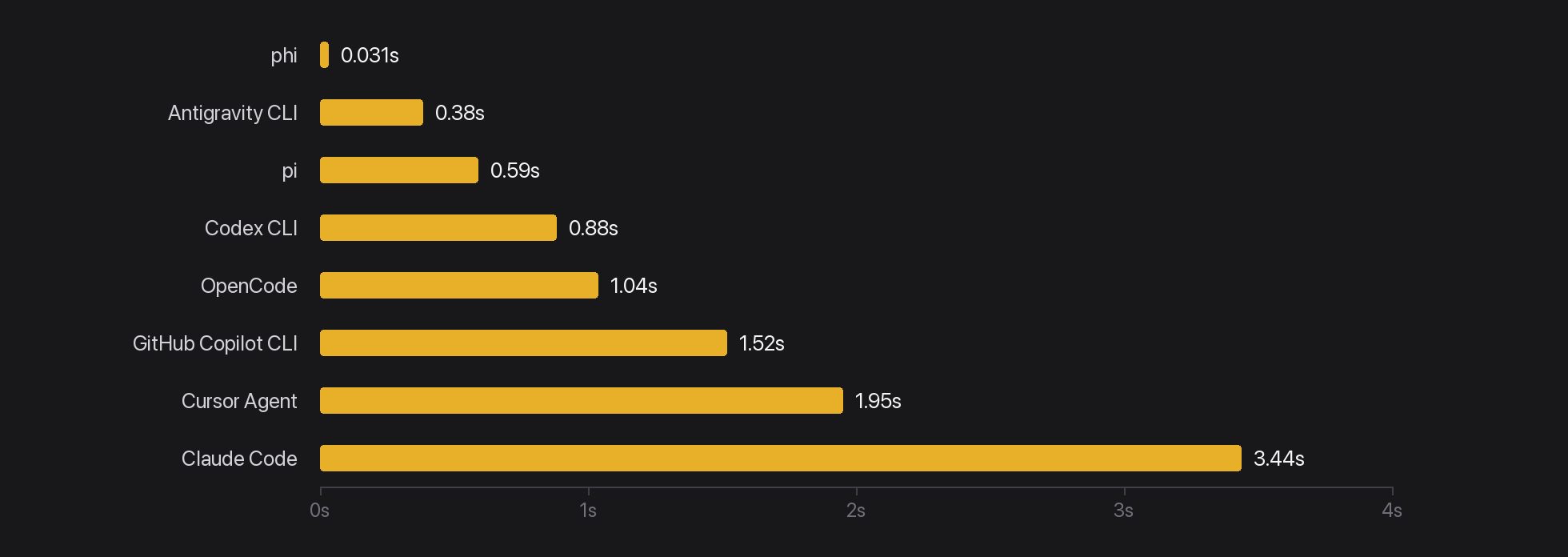
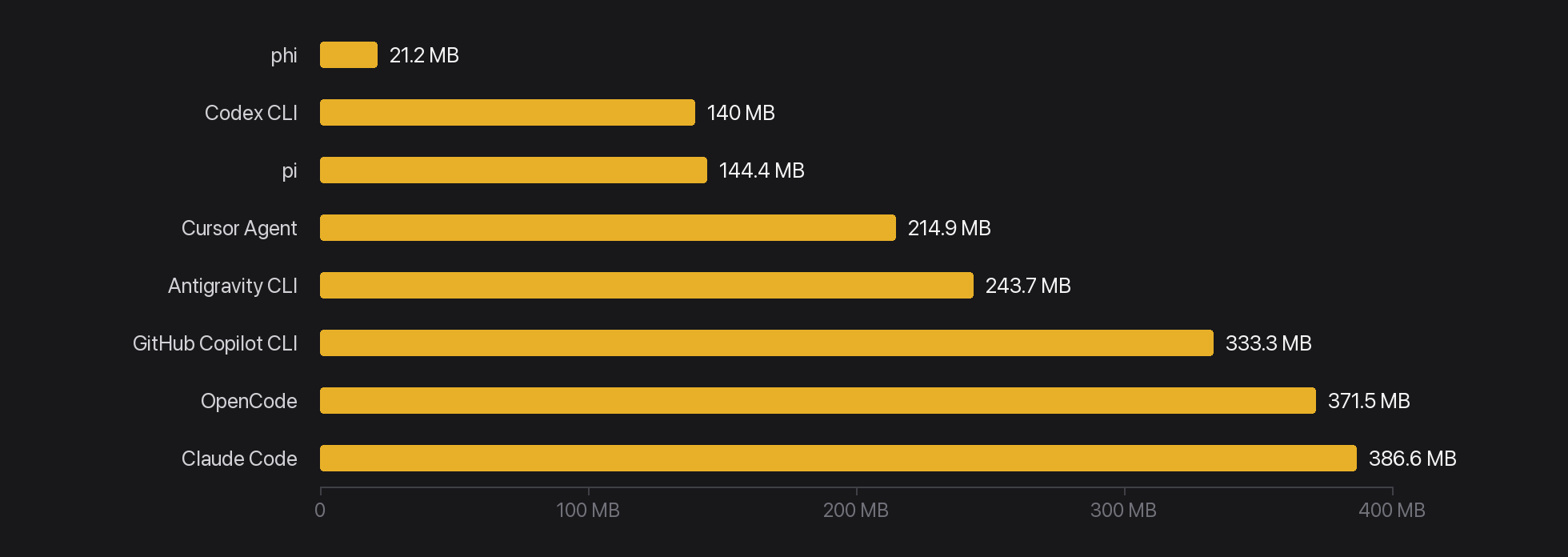
- Fast and small — ~15 MB release binary, ~21 MB idle RSS, ~31 ms to first frame; no Node / Electron / Python runtime
- Sub-agents — spawn isolated jobs and watch the full run unfold in the TUI / job logs, without stuffing every turn into the parent context
- Hashline edits — edit by whole-file
@file path#TAGplus lineLINE#HASHanchors (same idea as oh-my-pi): the model points at anchors instead of rewriting whole files; stale tags/hashes are rejected so over-edits and silent corruption stop here - Permission gate — Gate / Ask before destructive tools fire; safety is not optional when an agent can touch your tree
- MCP without context death — configure as many MCP servers as you want; their tool schemas never enter the model prompt. The system prompt lists server names only (like the Skills catalog); the agent uses three meta-tools (
mcp_list/mcp_inspect/mcp_call) to discover and call on demand. Same Gate / Ask / Hooks path as built-in tools. See MCP - Extensions (Go or Rust) — native binaries speak the PXB binary protocol over stdin/stdout; official author SDKs for Go (
ext/go) and Rust (ext/rust): LLM tools, slash commands, event intercepts, confirm dialogs — no reflection; JSON at the SDK edges viaserde_json. See Extensions - In-TUI diff review —
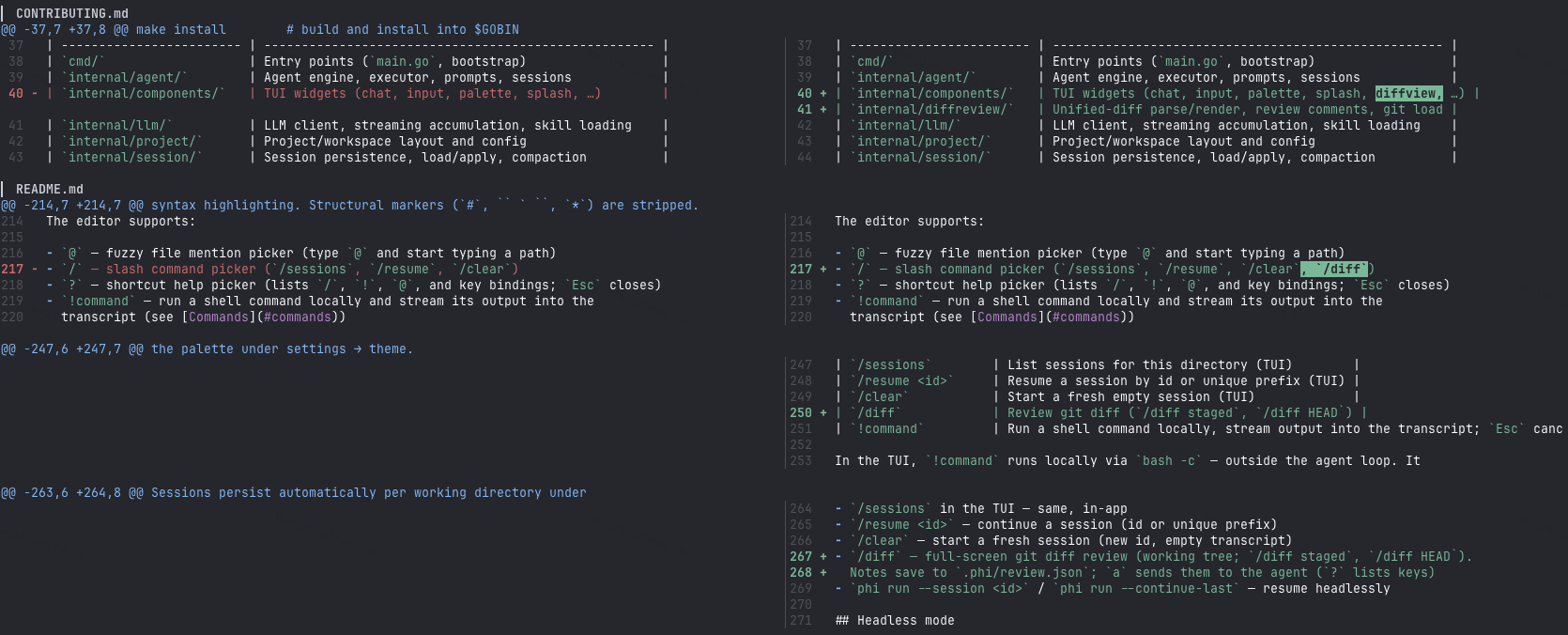
/diffopens a full-screen git review (working tree / staged / HEAD): syntax-highlighted hunks, line notes, thenasends notes to the agent. See Diff review - Any model — OpenAI-compatible, Anthropic, or Gemini via an explicit
apifield; built-in presets fill endpoint, context window, and capabilities for known model names (GPT, DeepSeek, Gemini, Kimi, GLM). See Supported models
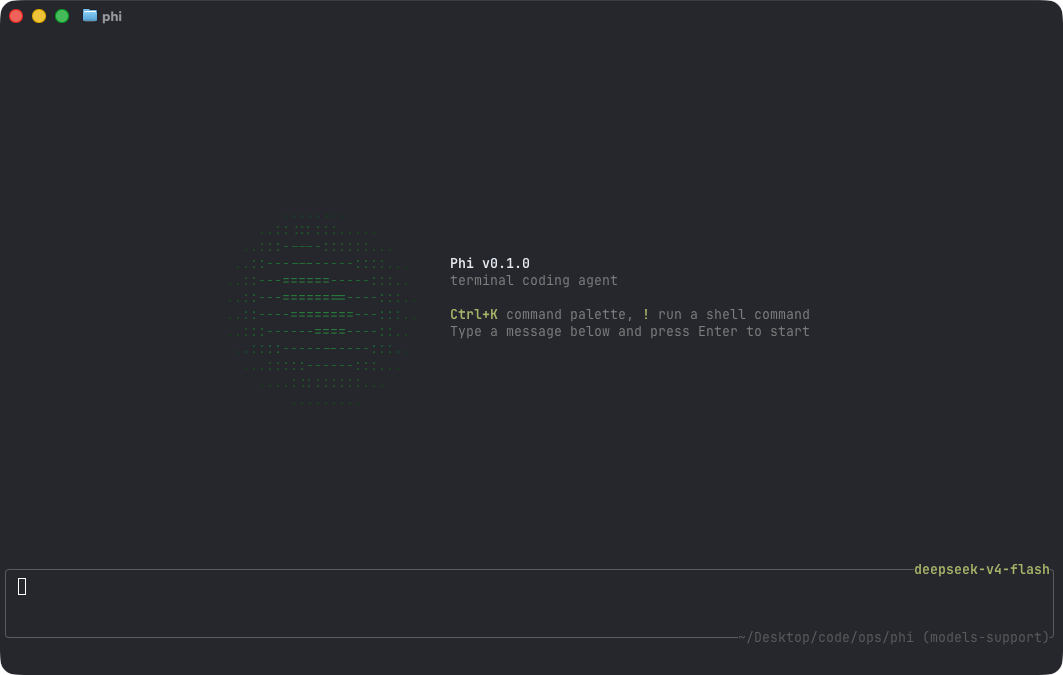
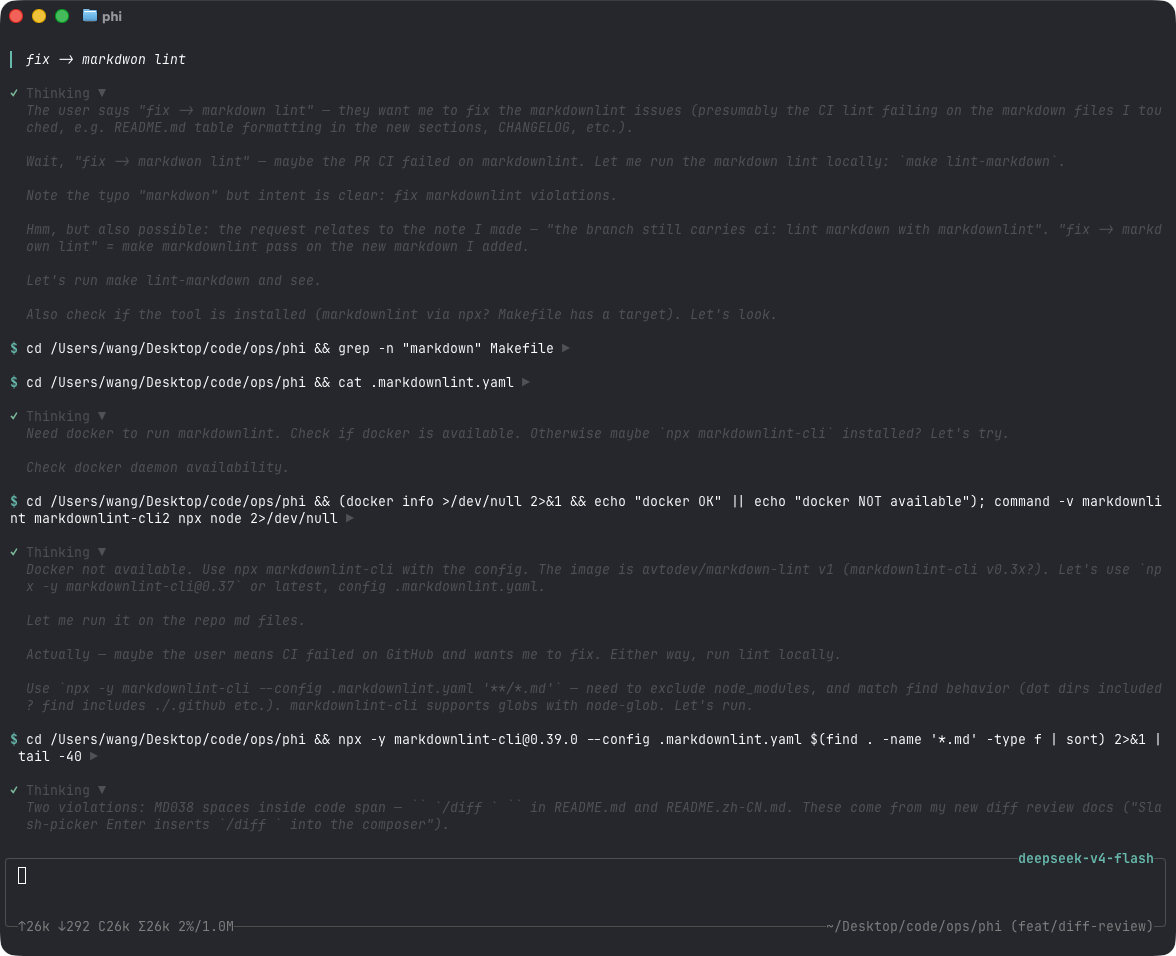
- Docs
- Quick start
- Footprint
- Configuration
- Interactive mode
- Diff review
- Code viewer
- Commands
- Sessions
- Headless mode
- Skills
- Permissions
- Extensions
- MCP
- Tools
- Project layout
Quick start
Install the latest release (macOS / Linux):
curl -fsSL https://raw.githubusercontent.com/pulseaiclub/phi/main/scripts/install.sh | bash
Windows (PowerShell 5.1+):
irm https://raw.githubusercontent.com/pulseaiclub/phi/main/scripts/install.ps1 | iex
First launch needs a model. Open the config editor (creates ~/.phi layout
and writes ~/.phi/config.yaml):
phi config
Or set env vars for a one-off run:
export PHI_MODEL=gpt-4o
export PHI_API_KEY=sk-...
Then start the TUI:
phi
Or build from source (Go 1.26.3+, see go.mod):
make build          # produces ./phi
make install        # build and install into $GOBIN
On first start, phi automatically creates ~/.phi/{bin,skills,hooks,session}. Search
tools (fd, rg) download into ~/.phi/bin in the background when missing.
The TUI gives the model four core tools — read, write, edit, andbash — plus grep, find, and ls. The model uses these to
fulfill your requests. External HTTP fetch is available via MCP when configured.
Footprint
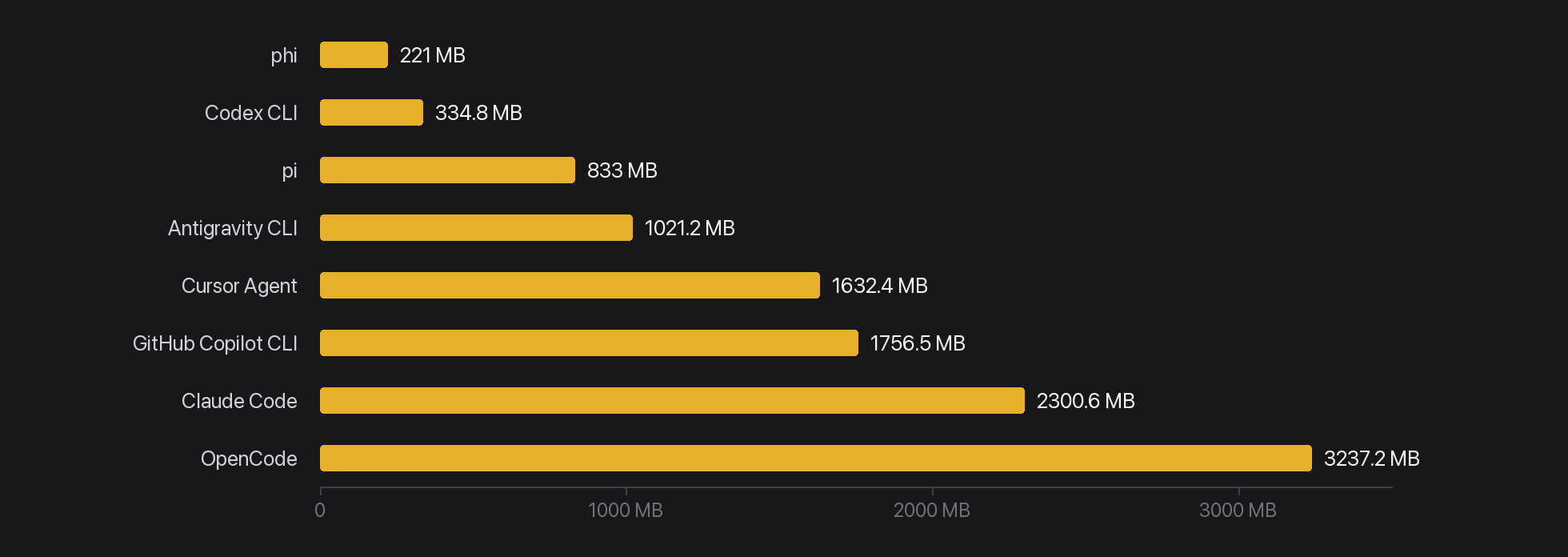
Lean is not enough — phi is built to feel instant and stay cheap under load.
phi numbers are a stripped release build (CGO_ENABLED=0, -ldflags="-s -w")
on macOS arm64. Other harnesses use published Linux PSS / interactive PTY
figures.
Time to first frame
Idle RAM · 1 session
Idle RAM · 10 sessions
| Metric | phi |
|---|---|
| Release binary | ~15 MB |
| Idle RSS (1 session) | ~21 MB |
| 10 idle sessions (total RSS) | ~221 MB |
| Time to first frame | ~31 ms (26–49 ms) |
Cold go build (empty GOCACHE) |
~5.5 s |
| Warm rebuild | ~0.7 s |
| Go source (excl. tests) | ~22k LOC / 107 files |
| Go packages | 32 |
| Direct module deps | 6 (15 modules total) |
| Linked runtimes | system libs only (no Node / Electron / Python) |
Configuration
phi reads ~/.phi/config.yaml (standard YAML). Environment variables
override it for one-off runs. phi config opens a full-screen terminal editor
for the same file — nothing is written until you save, and the previous file is
kept as config.yaml.bak.
phi config keys
  ↑↓ ←→      move / cycle a value        a   add a model
  ⏎          edit or open a picker       d   delete the focused row
  esc        close, or quit              f   fetch model ids from the provider
  ^s         save                        s   save        q  quit
An empty field means "not set", i.e. the value the loader would fill in; the
placeholder shows that value.
# ~/.phi/config.yaml
models:
  - name: gpt-4o
    api: OpenAI             # OpenAI | OpenAIResponses | Anthropic | Gemini (empty → OpenAI-compatible)
    api_key: sk-...         # or set PHI_API_KEY
    base_url: https://api.openai.com/v1   # default; PHI_BASE_URL overrides
    context_window: 128000  # optional
    default: true           # the model used at startup; first entry wins if absent
  - name: claude-sonnet-4-20250514
    api: Anthropic          # required — no name/URL guessing
    api_key: sk-ant-...
    base_url: https://api.anthropic.com
    context_window: 200000
  - name: deepseek-flash    # built-in preset: base_url / context / thinking filled in
    api_key: sk-...
  - name: gemini-2.5-flash  # built-in preset (api: Gemini)
    api_key: ...
    think_level: high       # optional: off | minimal | low | medium | high | …

skill_path: ~/.phi/skills # where SKILL.md files are loaded from

agents:
  enabled: true           # default; set false to disable agent_* sub-agent tools
  models:                 # optional per-role defaults; omit → inherit parent model
    explore: cheap-model
    review: strong-model
    worker: coding-model

permissions:
  mode: interactive       # interactive | readonly | autopilot | headless-strict
  bash:
    default: ask          # ask | allow | deny
    allow:
      - "go test ./..."
    deny:
      - "rm -rf *"
Built-in presets and thinking wire formats: doc/models.md.
Environment overrides:
| Variable | Overrides |
|---|---|
PHI_API_KEY |
models[].api_key (default model) |
PHI_MODEL |
models[].name (default model) |
PHI_BASE_URL |
models[].base_url (default model) |
PHI_SKILL_PATH |
skill_path |
PHI_THINK_LEVEL |
models[].think_level (default model; off disables) |
PHI_OPTIMIZER |
Master on/off switch for optimizer features (0, false, off, no to disable) |
TYPESAFE_API_KEY |
TypeSafe API key required for optimizer features |
Security: When PHI_OPTIMIZER is enabled, command history and context are sent to an external TypeSafe service for judging and ranking. Avoid using the optimizer in environments where shell history may contain sensitive information (API keys, tokens, credentials).
Provider routing uses the explicit api field (OpenAI / Anthropic /Gemini). See Supported models.
Workspace layout
~/.phi/
├── config.yaml   # global configuration
├── bin/          # downloaded search tools (fd, ripgrep)
├── skills/       # SKILL.md skill directories
├── extensions/   # PXB binaries + phi.yaml
├── jobs/         # sub-agent job artifacts (meta, logs, result.md)
└── session/      # persisted sessions, one dir per working directory
    └── <encoded-cwd>/
Interactive mode
phi (or phi tui) starts the TUI: a chat transcript on top, an editor at
the bottom, and a footer with the current activity. When a newer release is
available, the footer shows a hint like 0.2.0 available · phi update.
Assistant output is rendered as Markdown (CommonMark/GFM): headings, emphasis,
strikethrough, links, blockquotes, lists, task checkboxes, and tables are
styled with the active theme; fenced code blocks get a muted language caption and per-language
syntax highlighting. Structural markers (#, `, *) are stripped.
The editor supports:
@— fuzzy file mention picker (type@and start typing a path)/— slash command picker (/sessions,/branch,/clear,/diff,/code)?— shortcut help picker (lists/,!,@, and key bindings;Esccloses)!command— run a shell command locally and stream its output into the
transcript (see Commands)Ctrl+K— command palette: settings → model / theme / permissions / agents (incl. per-role models), skills, hooks
Keyboard shortcuts
| Key | Action |
|---|---|
Ctrl+C |
Quit phi |
Esc |
Cancel the running agent / close pickers |
Ctrl+K |
Toggle the command palette |
Ctrl+A |
Jump to the start of the line |
Ctrl+E |
Jump to the end of the line |
Ctrl+U |
Clear the composer input, images, and skills |
Ctrl+Shift+C |
Copy the selected transcript text |
Themes: Dark (default), Darcula, Pink, and Terminal, switchable from
the palette under settings → theme.
Diff review
/diff is a full-screen git review inside the TUI — read the change, leave
line notes, then hand them to the agent without leaving the terminal.
| Command | What opens |
|---|---|
/diff |
Working tree (git diff) |
/diff staged |
Staged changes |
/diff HEAD |
Last commit (git show) |
Slash-picker Enter inserts /diff plus a trailing space into the composer; submit to open. Inside the overlay:s side-by-side, i add/edit a note, x delete, a send notes to the agent,? help, q / Esc close. Notes live in the overlay's memory only — switching
diffs drops them and nothing is written to disk.
Code viewer
/code <path>[:line] opens a full-screen source viewer: syntax highlighting, a
CJK-aware caret (j/k, h/l, gg/G), and v to select lines then a
to hand them to the chat input as a path:12-18 reference the model reads.
The pane reads files itself and answers to the same deny list as the tool
gate, so sensitive paths (~/.ssh, .env, …), binaries and files over 8 MiB
are refused with a toast.
Esc closes. The status row shows the path, caret and line count while
reading, and the selection size while v is active.
Branch switching
/branch opens the branch picker for the working directory. Two columns: the
branch name, and its most recent commit. A ● marks the branch HEAD is on. Rows
are ordered where you are, where you came from (git reflog), the other local
branches, then remote-tracking branches.
Enter runs git switch on the selected row — off the UI goroutine, so a slow
checkout does not freeze the composer. Picking a remote row checks out the local
branch that tracks it, the same thing git switch feat does for origin/feat.
/branch <name> skips the picker: it switches to that branch, or creates it
from HEAD when no branch carries the name yet. Naming is the whole "new branch"
flow — three characters typed beat a form.
Uncommitted work is never touched: git refuses rather than lose it, and its
reason is toasted verbatim. Switching is blocked while a reply or command is
running, and while a merge, rebase, cherry-pick, revert, or bisect is
unfinished.
Commands
| Command | Description |
|---|---|
phi / phi tui |
Start the interactive TUI |
phi run -p "…" |
Run one agent loop headlessly (see below) |
phi update |
Download and install the latest GitHub release |
phi update --check |
Query the latest release without installing |
phi sessions list |
List persisted sessions for this directory |
/sessions |
List sessions for this directory (TUI) |
/branch |
Switch the working branch — see Branch switching |
/clear |
Start a fresh empty session (TUI) |
/diff |
Full-screen git review — see Diff review |
/code |
Full-screen source viewer — see Code viewer |
!command |
Run a shell command locally, stream output into the transcript; Esc cancels it |
In the TUI, !command runs locally via bash -c — outside the agent loop. It
doesn't count toward agent busy state, and the running command can be cancelled
with Esc without touching an in-flight agent turn.
Sessions
Sessions persist automatically per working directory under~/.phi/session/<encoded-cwd>/ as JSONL trajectories.
phi sessions list— list session id, mtime, and preview for the current
directory/sessionsin the TUI — same, in-app/clear— start a fresh session (new id, empty transcript)phi run --session <id>/phi run --continue-last— resume headlessly
Headless mode
phi run -p "fix the failing test in internal/tools"
Runs one agent loop without a TUI. Human logs go to stderr; with --jsonl,
machine-readable events go to stdout, one JSON object per line.
Flags:
| Flag | Description |
|---|---|
-p, --prompt STRING |
Prompt to run (required) |
--jsonl |
Emit JSONL events to stdout |
--yolo |
Skip all permission checks for this run (benchmarks / CI only) |
--max-rounds N |
Cap tool rounds (default 64) |
--timeout DURATION |
Limit the agent run wall-clock time (e.g. 10m; disabled by default) |
--session ID |
Resume a persisted session by id or unique prefix |
--continue-last |
Resume the newest persisted session for this directory |
--session-dir DIR |
Override the session storage directory |
--tools LIST |
Enable only these comma-separated built-in tools |
--tools accepts built-in names such as read,ls,grep. MCP and agent tools
still append when configured; the flag only scopes the built-in toolset.
Exit codes: 0 success · 1 runtime/LLM error · 2 max rounds reached ·3 config/usage error.
In the interactive TUI, exhausting the tool-round budget prompts Continue /
Stop. Headless phi run has no confirmation UI, so it exits with code 2.
In headless mode, permission ask decisions are denied (there is no approval
UI), so readonly-style safety applies without extra flags. For benchmarks
that need arbitrary shell (pytest, npm test, …), pass --yolo to skip the
permission gate for that run only.
Skills
Skills are directories containing a SKILL.md file with YAML frontmatter and
a Markdown body. They are loaded from ~/.phi/skills/ (or skill_path /PHI_SKILL_PATH) and injected into the agent's context, letting you give the
model reusable procedures:
---
name: My Skill
 description: What this skill does
license: MIT
compatibility: claude, openai
---
Instructions the agent should follow when this skill is relevant.
In the TUI, add skills from the palette (skills → list), then submit the
message with the selected skills applied.
Permissions
Tool execution is gated by a permission policy, so the agent can run read-only
by default and ask before anything destructive. Configure it underpermissions: in ~/.phi/config.yaml.
Modes:
| Mode | Behavior |
|---|---|
interactive |
Default. ask decisions prompt in the TUI. |
readonly |
Deny writes / bash; read tools still work. |
autopilot |
Fold ask → allow, run unattended. |
headless-strict |
Fold ask → deny (used by phi run). |
Per-tool rules: bash.default / bash.allow / bash.deny (exact command
prefix matching). Global keys:workspace_only_writes (default true), ask_timeout_sec, anddangerously_allow_all (default false).
In the TUI, an approval dialog replaces the editor with options to approve,
deny with feedback, or allow all for the session / for every session. The
palette's settings → permissions entry toggles session-wide bypass.
Extensions
Extensions are native binaries speaking the PXB binary protocol over
stdin/stdout (author SDKs: Go github.com/pulseaiclub/phi/ext/go/phi and Rustext/rust, phi-ext). They
subscribe to tool/session events, register LLM tools, and add slash commands.
go get github.com/pulseaiclub/phi/ext/[email protected]
package main

import (
	"github.com/pulseaiclub/phi/ext/go"
	"github.com/pulseaiclub/phi/ext/go/phi"
)

func main() {
	m := phi.New("hello", "0.1.0")
	m.OnToolCall(func(ev ext.ToolCallEvent) *ext.ToolCallResult {
		// return &ext.ToolCallResult{Block: true, Reason: "..."}
		return nil
	})
	_ = m.Run()
}
Install under ~/.phi/extensions/<name>/ with a phi.yaml pointing at the
binary. In the TUI: Ctrl+K → extensions. Disable withPHI_EXTENSIONS=off. Full guide: doc/extensions.md.
Codec throughput on Apple Silicon (release, single-threaded):
| Implementation | Hello encode+decode | Frame write+read (in-memory) | Allocs |
|---|---|---|---|
Rust PXB (phi-ext) |
~0.12 µs | ~0.06 µs | — |
Go PXB (ext/go/pxb) |
~0.11 µs | ~0.05 µs | 3 / op |
| Go JSON lines | ~1.2 µs | — | 15 / op |
The ~10× gap over JSON lines is the protocol (fixed header + tagged fields), not
the language — Rust and Go are within noise on the same codec work. Real
extension latency is dominated by process spawn and pipe RTT anyway. Re-probe:cargo run --release --example bench in ext/rust.
MCP
Configure 100 MCP servers. Pay ~0 schema tokens until you call one.
Most MCP hosts dump every tools/list schema into the model context before
you ask a question — browser stacks alone can burn 50k+ tokens. phi does not.
Instead the agent gets three meta-tools, and the system prompt lists configured server names (no schemas):
| Tool | Role |
|---|---|
mcp_list |
List tool names on one server (compact text) |
mcp_inspect |
Fetch a slim parameter summary for one tool |
mcp_call |
Run server + tool + args |
Flow: pick a server from the prompt → mcp_list(server=…) → mcp_inspect → mcp_call. Subprocesses start lazily on first use.
Calls still go through PreHooks → Gate / Ask → Run → PostHooks.
phi mcp add browsermcp -- npx @browsermcp/mcp@latest
phi mcp doctor
# In the TUI, the model can use configured servers without guessing MCP exists
Config: ~/.phi/mcp.json (project <cwd>/.phi/mcp.json overrides by name).
Disable with PHI_MCP=off. Stdio and HTTP in v1.
Full guide: doc/mcp.md.
Sub-agents
Sub-agent tools (agent_spawn, agent_wait, …) are on by default. To
keep a session lean, disable them in ~/.phi/config.yaml:
agents:
  enabled: false
Or toggle for the current session via the palette: settings → agents.
When disabled, those tools are not registered and the model cannot spawn jobs.
Per-role model defaults (optional) under agents.models pick which configured
model name each role uses when spawned. Omitted roles inherit the parent
session model. Switch for the current session only via
settings → agents → models → explore|review|worker (same session-only semantics
as settings → model; does not write config.yaml).
Sub-agents themselves use a role (explore default | review | worker):
| Role | Tools | Use for |
|---|---|---|
explore |
no write/edit; bash except hard denies | Multi-hop recon / map structure |
review |
same as explore | Diffs / checks; report only |
worker |
full tools except nesting; bash except hard denies | Scoped, self-contained edits |
Default stays explore (no edits). Prefer worker when the task is to implement a scoped change in an isolated context.
Tools
Built-in tools the model can call (see internal/tools/):
| Tool | Purpose |
|---|---|
bash |
Run a shell command in the working directory |
read |
Read a file |
write |
Write a file (gated by permissions) |
edit |
Targeted edit of a file |
grep |
Regex search across files |
find |
File patterns (fd) |
ls |
Directory listing |
agent_spawn |
Start an isolated sub-agent job (async) |
agent_wait |
Wait for a job; returns short summary only |
agent_cancel |
Cancel a running job |
Sub-agent transcripts live under ~/.phi/jobs/<id>/ and are not injected
into the parent context — only the wait/task summary is.
Fast search tools (fd, ripgrep) are downloaded on first startup into~/.phi/bin when missing.
See Project layout for the source tree map.
See CONTRIBUTING.md for development setup, code style, and
commit conventions.
安装
装一次目录插件,之后本站所有插件都能让 DeepSeek Harness 自动找、自动装:
dsh plugin add dshbase-catalog然后对 agent 说「帮我装 phi」,它会在目录里找到并自动安装。文档:dshbase-catalog · 已验证场景包。
该插件是 GitHub 源码(未发 npm)——直接从仓库装:
Web profile:
dsh plugin --profile web add github:pulseaiclub/phiHeadless(CLI)profile:
dsh plugin --profile headless add github:pulseaiclub/phi实测报告
验证通过:从 GitHub 源码完成 L1 安装 + L2 加载 + L3 运行(dsh 0.1.0-rc.6)。
使用场景
扩展 agent 的编码能力面——给它一个新工具、工作流或集成,让它接手以前做不了的开发任务。
适合谁
想让 dsh 在真实代码库上像队友一样干活的开发者——能改、能跑、能验证,而不只是回答问题。
二次开发建议
工具/命令面就是缝:暴露更多 SDK 能力、加更聪明的上下文接线,或收紧改代码与验证之间的循环。
- 危险命令 (high)
分享徽章
把这枚徽章粘进 README——它会链回本页,实测状态变化时自动更新:

[](https://dshbase.com/zh/plugins/phi/)<a href="https://dshbase.com/zh/plugins/phi/"><img src="https://dshbase.com/badges/phi.svg" alt="dshbase 实测可装"></a>