
插件目录 / Productivity / @stmol/dsh-prompt-lib
@stmol/dsh-prompt-lib
已验证 · 实测可装 Stmol
功能简介
在 DSH 里保存自己的提示词库,并在聊天输入框一键开关:Settings → Prompts 页面用于增删改提示词;输入框工具行的 Prompts 按钮按会话勾选,勾中的提示词注入该会话的每一步模型调用,并被它启动的 subagent 继承。You keep your own prompts inside DSH and switch them on pe
可用 — 实测通过,早期项目
在 DSH 里保存自己的提示词库,并在聊天输入框一键开关:Settings → Prompts 页面用于增删改提示词;输入框工具行的 Prompts 按钮按会话勾选,勾中的提示词注入该会话的每一步模型调用,并被它启动的 subagent 继承。You keep your own prompts inside DSH and switch them on pe 实测能干净安装、正常启动。早期项目,但功能可用。
「已验证」表示我们的自动化 CI 在干净 profile 里实际执行了 dsh plugin add 并启动成功——仅此而已。功能描述与版本兼容性均为作者声明。这不是安全审计,也不代表对第三方代码的背书。
README
@stmol/dsh-prompt-lib
🥷 Keep your own prompts inside DeepSeek Harness, and switch them on for a chat in one click.
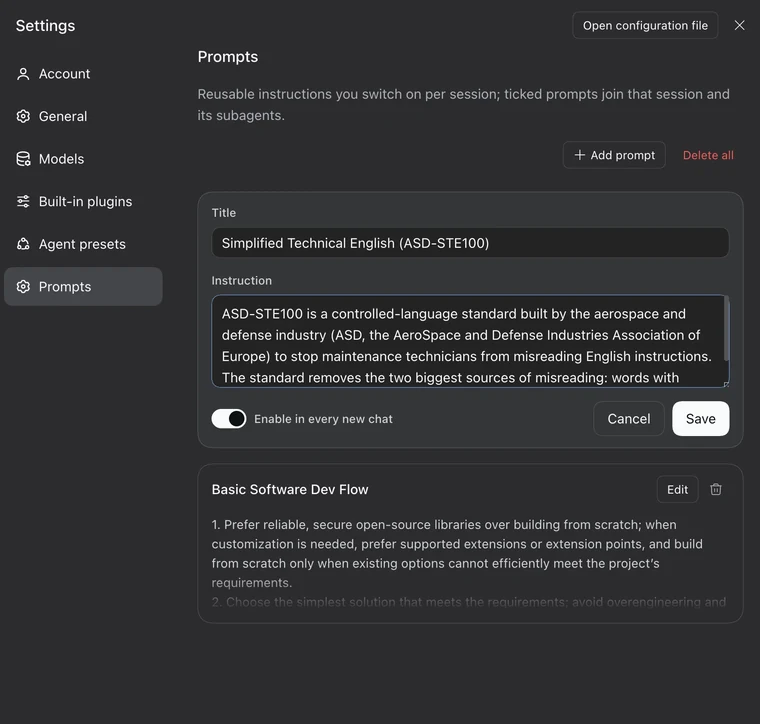
- Settings → Prompts: write, edit and delete your prompts.
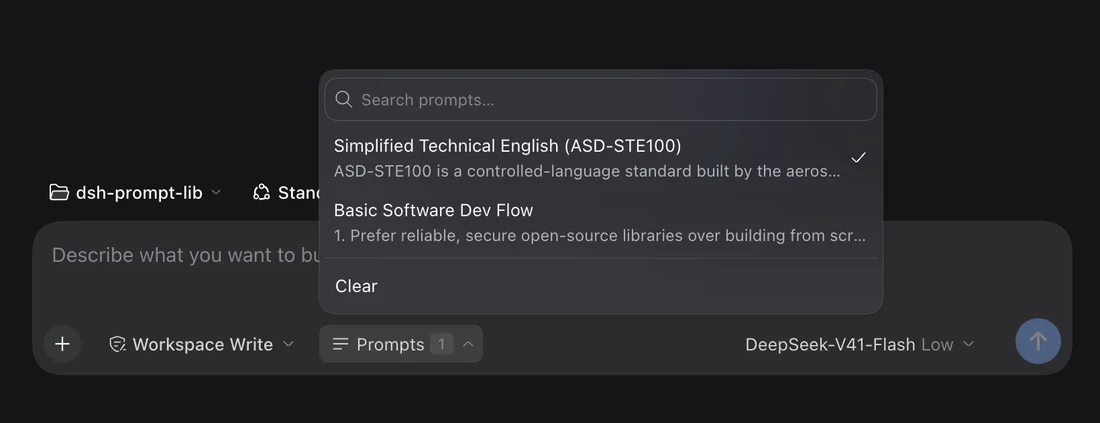
- Chat composer: tick the ones you want for this session. The button shows how many are on.
A prompt that is ticked applies to every model step of that session, and to the subagents it starts.
Install
Published on npm as @stmol/dsh-prompt-lib.
Any bundle source works: the npm package, the repository, a tarball, or a local folder.
- GUI: Settings → Plugins → Add plugin, then
@stmol/dsh-prompt-lib. - CLI:
dsh plugin add @stmol/dsh-prompt-lib.
Restart DSH after the first install; later edits reach the running app through HMR. There are no automatic updates: remove the plugin and add it again.
Install from a local checkout
dsh plugin add link:/path/to/dsh-prompt-lib
A linked checkout keeps its own node_modules, so the plugin's one dependency has to be installed there too:
cd /path/to/dsh-prompt-lib && npm install
Without it the plugin fails to load and nothing appears in Settings.
Usage
- Open Settings → Prompts. It is its own page, after Agent presets. Write a title and an instruction, then save.
- The title is a label for you. The list, the search field and the composer picker use it to keep prompts findable. It is never sent to the model, only the instruction text is.
- The instruction is stored in the plugin's config, so it survives restarts and is there in every session.
- Enable in every new chat marks the prompt as a default. It is off unless you turn it on.
- In a chat, open the Prompts control in the composer tool row, right of the permissions dropdown. Tick what you want. The button shows the count.
- The ticks apply from the next model step. No restart and no new session needed. Tick again, or press Clear, to take them out.
Prompts are matched by an id generated behind the scenes, not by title, so renaming a prompt keeps every session pointed at it.
Defaults for new chats
A prompt can be set to start enabled. Every session that has never been ticked by hand opens with those defaults already on, and the picker shows them ticked, so the count on a fresh chat matches what that chat will use.
The first hand edit to a session, whether that is ticking, unticking or Clear, becomes that session's own choice and takes over from then on. Unticking the last default prompt records "none here" instead of falling back to the defaults you just removed.
Subagents
A session that has ticks of its own uses exactly those, and an empty list counts as a choice. A session with no choice at all takes the choice of the nearest ancestor session, so a subagent inherits from the chat that started it. Only a whole line with no choice anywhere falls back to the defaults for new chats.
Good to know
- The settings file must be writable. The Prompts page says so up front and disables its controls. In the composer, a write the host refuses shows the reason under the list, so an edit is never dropped silently.
- The composer control hides itself until the settings remote is mounted and has answered its first read, rather than show a count that is about to change.
- There are size limits. The editor caps one instruction at 8000 characters. The host applies that same cap, uses at most 100 prompts and reads at most 500 library entries when it renders. Anything past those limits contributes nothing to the model. Settings still shows, edits and keeps every entry.
- Selections accumulate. The plugin keeps one entry per session that has ever been ticked in, and never prunes them. An entry whose prompts were all deleted still means "inject nothing", so removing it would quietly bring back the defaults for that session.
安装
装一次目录插件,之后本站所有插件都能让 DeepSeek Harness 自动找、自动装:
dsh plugin add dshbase-catalog然后对 agent 说「帮我装 @stmol/dsh-prompt-lib」,它会在目录里找到并自动安装。文档:dshbase-catalog · 已验证场景包。
Web profile:
dsh plugin --profile web add @stmol/dsh-prompt-libHeadless(CLI)profile:
dsh plugin --profile headless add @stmol/dsh-prompt-lib包信息
npm:@stmol/dsh-prompt-lib · 版本 1.0.1 · 实测环境 dsh 0.1.0-rc.6
实测报告
端到端验证通过:dsh 0.1.0-rc.6 上 L1 安装 + L2 加载 + L3 运行问答。
分享徽章
把这枚徽章粘进 README——它会链回本页,实测状态变化时自动更新:

[](https://dshbase.com/zh/plugins/stmol-dsh-prompt-lib/)<a href="https://dshbase.com/zh/plugins/stmol-dsh-prompt-lib/"><img src="https://dshbase.com/badges/stmol-dsh-prompt-lib.svg" alt="dshbase 实测可装"></a>