
Plugin directory / Desktop / DSH-Launcher
DSH-Launcher
Verified · install-tested on dsh MarcoG-h
What it does
Offline one-click deployment of DeepSeek Harness 🐋 desktop launcher & third-party plugin manager
Works — verified, early-stage project
Offline one-click deployment of DeepSeek Harness 🐋 desktop launcher & third-party plugin manager It installs cleanly and boots without issues in our testing. It's early-stage but functional.
“Verified” means our automated CI actually ran dsh plugin add in a clean profile and it booted — nothing more. Feature descriptions and version compatibility are the author’s claims. This is not a security audit and not an endorsement of third-party code.
README
DSH Launcher V3 — 鲸罗棋布




无需安装 Node.js、无需源码,一键部署便携运行环境; DSH Web 直接内嵌在客户端窗口里。
从「启动器」升级为「多实例管理中枢」 —— 一套客户端并行运行多套独立的 DSH 环境, 每个环境自由搭配不同的插件组合;配合推荐整合包一键装机与带分类筛选的插件市场, 把插件生态的灵活性变成普通用户也能随手使用的能力。
特别感谢社区作者 @baihejiangnan的倾力相助
 主界面 |
 多实例管理 |
V3版本 新功能亮点
| 亮点 | 说明 |
|---|---|
| 多实例并行 | 支持多开DSH,每一套DSH实例可自由配置不同插件组合 |
| 内置整合包 | 为新手提供多套已优化的插件组合,上手即用 |
| 插件市场更新 | 分类快速找到想要的插件,内置三种插件源 |
| 本地插件管理 | 系统全新升级,适配多实例,避免重复下载插件 |
| 一键部署 | 内置独立环境 , 无需准备 , 全程一键,离线可用 |
| 客户端界面 | DSH Web 直接内嵌在原生窗口,多开更丝滑 |
| 优雅桌面体验 | 系统托盘三态状态灯 + 悬浮球 + 开屏动画 |
内核零改动:DSH Launcher 直接运行官方 dsh,完整保留「一切皆插件」架构与全部官方能力。
数据目录(DSH_HOME)与 CLI 完全兼容:默认共享已有目录,已有会话 / API Key 直接生效;
也可为实例创建全新独立目录,会话、插件、凭据与其余实例彻底隔离。
下载安装
GitHub Releases(推荐)
| 文件 | 说明 | 大小 |
|---|---|---|
| 安装版 exe | NSIS 安装到系统,自动创建桌面 / 开始菜单快捷方式 | ~100 MB |
更多版本见 Releases 页面。
📺 快速上手视频教程:BiliBili
安装版数据目录在
%APPDATA%\dsh-launcher;DSH 会话数据默认沿用~\.dsh(DSH_HOME)。
想强制指定 DSH 配置目录?启动前设置环境变量DSH_HOME即可(与 dsh CLI 行为一致)。
首次使用:
- 双击安装,安装完成后启动 DSH Launcher,显示开屏动画。
- 进入「设置 → 快速离线部署」点击**「快速离线部署」**,自动安装便携 Node + pnpm + dsh 运行环境,部署完成自动切换为内置模式并回填路径。
- 回到「控制台」点击**「启动」**,就绪后自动进入 DSH 界面,即可开始使用。
- 如尚未配置 API Key,在 DSH 界面填写即可。
升级部署:
- 覆盖安装新版安装包即可,数据不会丢失;安装器会自动结束运行中的旧进程。
- 「更新内置 dsh」只升级内置配套插件,不会覆盖
~\.dsh里的第三方插件与cordis.patch.yml手动条目。
V3新功能介绍
多实例体系
一套客户端并行运行多个互不干扰的 DSH 实例,每个实例拥有独立配置与端口
可以给「写代码」「日常聊天」「跑测试」各建一个实例,切换实例 = 切换整套插件环境
新建实例模式:(原理详见:DSH_HOME 隔离)
  「共享」——沿用现有数据目录(共享会话记录,预设,设置选项等等)

  「独立」——创建全新数据目录(会话、插件、等其他实例彻底隔离)
每个实例可单独从客户端控制,独立开启
对于使用「共享」模式的实例,不能同时在一个会话工作
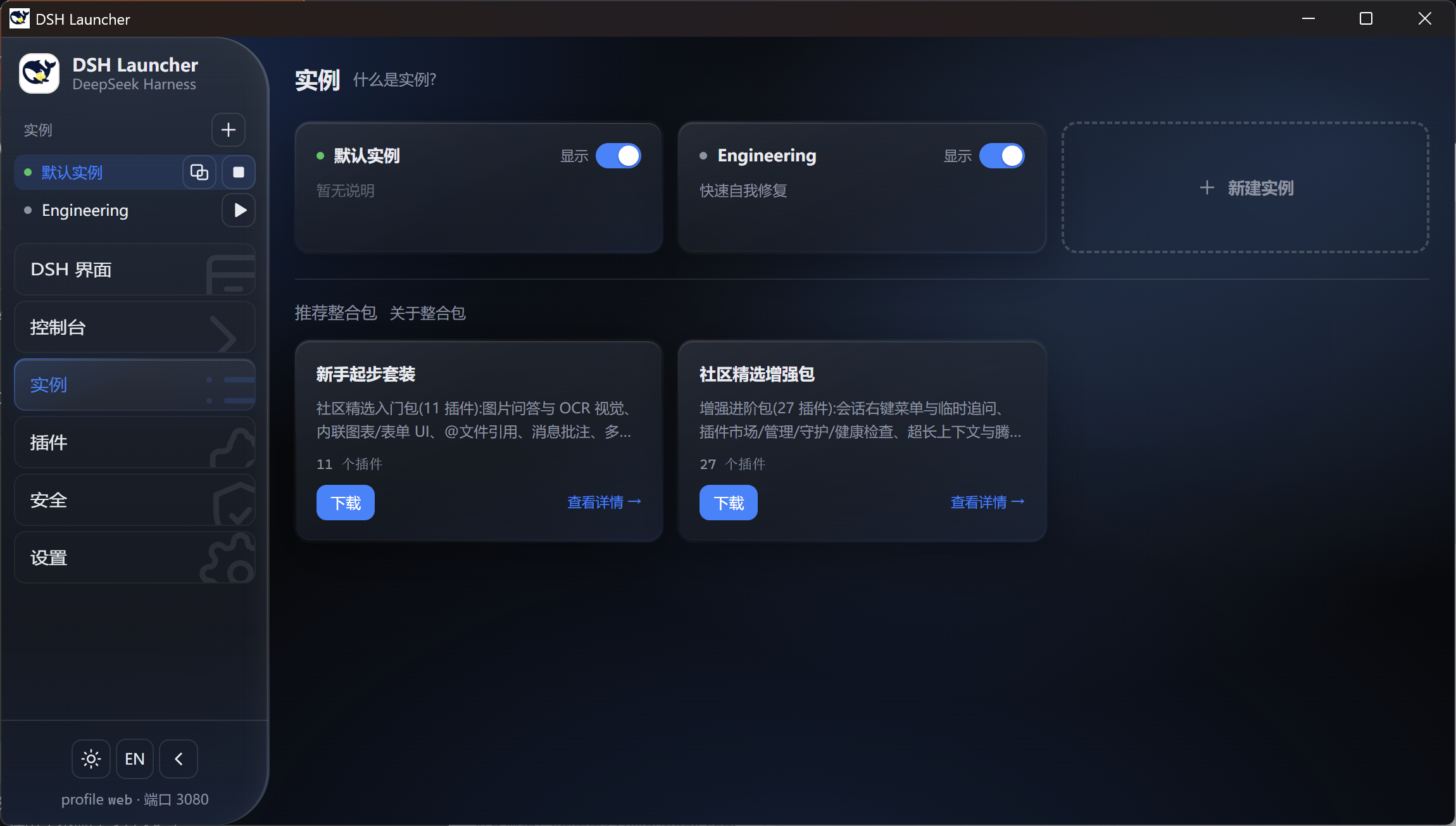
推荐整合包
- 不用自己挑选插件 —— 内置两个精选整合包,一键下载、自动建实例、自动装齐
- 下载过程显示进度条,整合包内插件均独立下载,相互隔离
- 对于第三方插件,常有插件之间的兼容性问题,整合包加入补丁修复兼容问题(详见:插件包)
新版插件市场
分类标签:按分类标签快速找到感兴趣的功能,卡片上直接显示命中分类,点击即可反向筛选
集成插件下载源:Github,Deepseek1024,dshfind 提供多元化下载渠道(插件中文简介)
插件详情内嵌预览,一键安装并归档到本地插件库

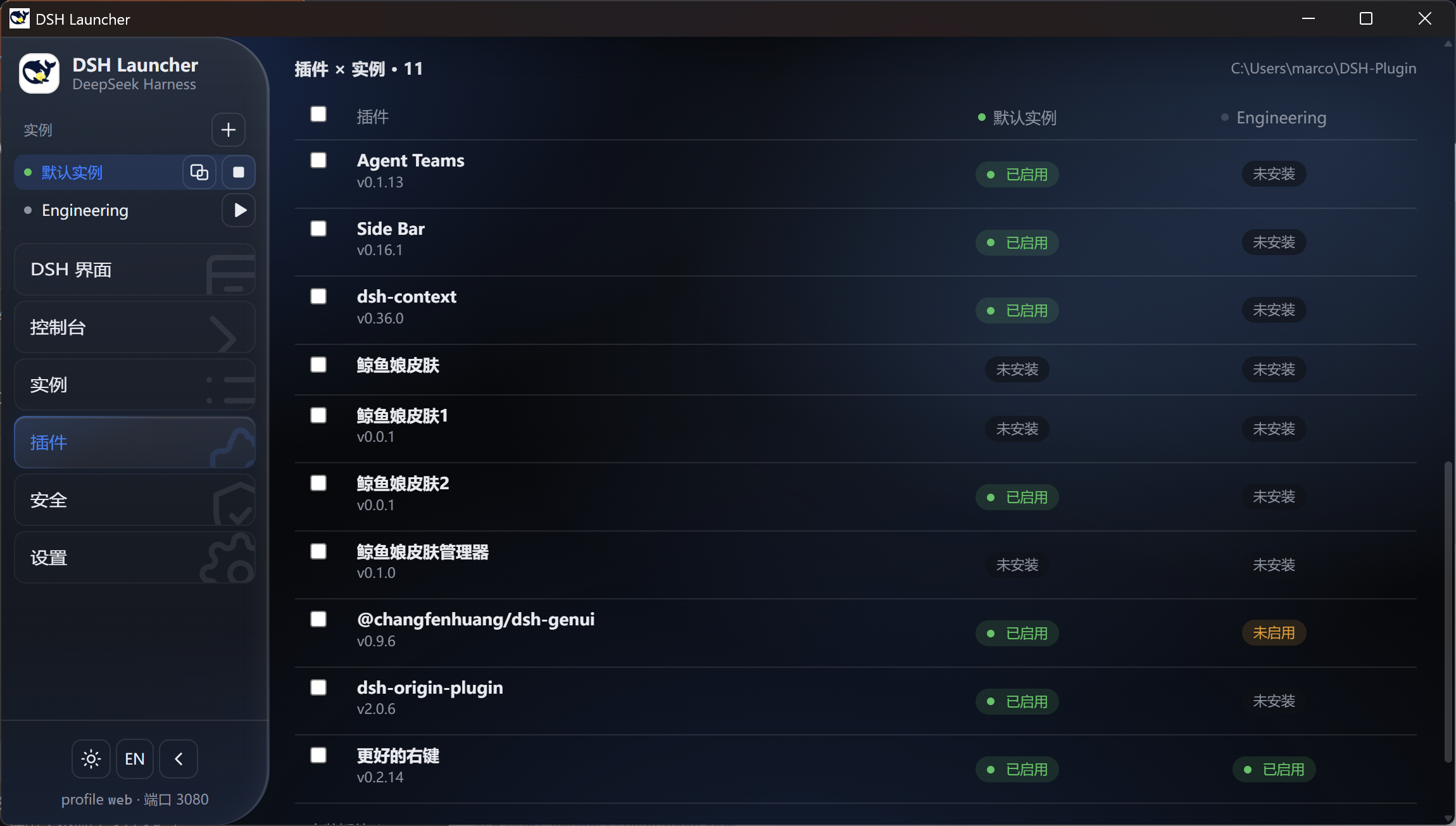
新版本地插件管理
- 采用矩阵式管理:清晰看见每个插件在每个实例的启用情况,一键管理
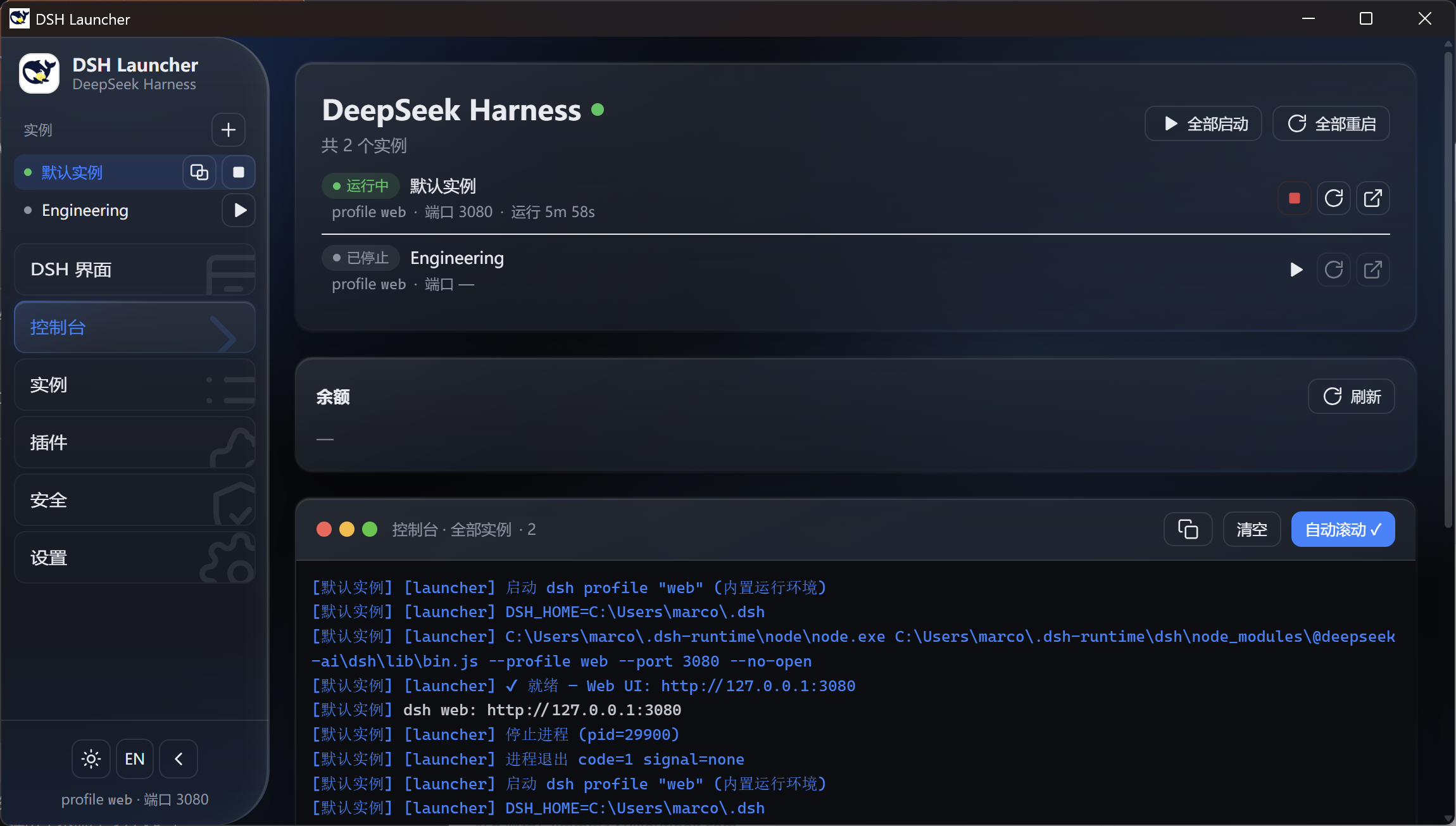
其余功能
- 余额小部件
- 控制台 启动/重启/关闭
- 系统托盘常驻 + 托盘三态状态灯、全屏沉浸 + 悬浮球、开屏动画、关闭至托盘
- 悬浮球,开屏动画
如果您有任何想要的新功能,欢迎来找我交流!QQ交流群:957159489

系统要求
- Windows 10/11(x64)
- 内置版无需预装 Node.js 或任何其他运行时
- 4GB+ 内存(推荐)
从源码构建
pnpm install        # 首次需要下载 Electron,网络慢时可在 .npmrc 配置 electron_mirror
pnpm dev            # 开发模式(HMR)
pnpm build          # 构建 main / preload / renderer 到 out/
pnpm dist           # electron-vite build + electron-builder --win → release/
网络受限时:Electron 镜像
$env:ELECTRON_MIRROR='https://npmmirror.com/mirrors/electron/'。
架构
┌──────────────────────────────────────────────────┐
│  Electron 壳(main process)                       │
│  · 单实例锁 / 窗口 / 托盘 / 悬浮球 / 快捷方式维护   │
│  · 多实例 harness 生命周期(启动/停止/重启/超时保护) │
│  · 整合包装机 / 插件市场(分类筛选) / 余额          │
└──────────────┬───────────────────────────────────┘
               │  spawn node dsh/lib/bin.js <profile>
               │  (DSH_HOME=<共享或独立数据目录>)
               ▼
       内置 node.exe + @deepseek-ai/dsh
       输出 "dsh web: http://127.0.0.1:<port>"
               │  就绪探测(HTTP 200)后加载
               ▼
       WebContentsView 内嵌 DSH UI(单窗口,仅本机回环)
贡献
- @MarcoG-h — 项目发起者与维护者
- @baihejiangnan — 推荐整合包贡献者与维护者
License
MIT。基于 deepseek-ai/deepseek-harness(MIT)。
Install
Install the catalog once, then DeepSeek Harness can find and install any plugin from this site automatically:
dsh plugin add dshbase-catalogThen say "install DSH-Launcher for me" — your agent finds it in the directory and installs it. Docs: dshbase-catalog · verified packs.
This plugin is GitHub source (not published to npm) — install it straight from the repo:
Web profile:
dsh plugin --profile web add github:MarcoG-h/DSH-LauncherHeadless (CLI) profile:
dsh plugin --profile headless add github:MarcoG-h/DSH-LauncherTest report
Verified: L1 install + L2 load + L3 runtime from GitHub source on dsh 0.1.0-rc.6.
When to use it
Run dsh as a native desktop app — its own window, tray icon, and shortcuts — instead of a browser tab.
Who it's for
Users who want an installed-app feel and system integration (tray, global hotkeys, auto-launch) on their OS.
For developers — extending it
The native shell is the seam — add global shortcuts, notifications, single-instance locking, or OS-specific behaviors.
Share this badge
Drop this badge into your README — it links back here and updates automatically when our test status changes:

[](https://dshbase.com/plugins/DSH-Launcher-2/)<a href="https://dshbase.com/plugins/DSH-Launcher-2/"><img src="https://dshbase.com/badges/DSH-Launcher-2.svg" alt="dshbase install-tested"></a>