
Plugin directory / Browser / DSHBox
DSHBox
Verified · install-tested on dsh Nexus-Aethra
What it does
Manage DeepSeek Harness locally: run multiple DSH versions in isolated containers, open the UI in an embedded WebView, import plugins/skills with one click, share extension bundles, and let a queued task system handle installs with live logs. Zero-dependency installer.
Works — verified, growing community
Manage DeepSeek Harness locally: run multiple DSH versions in isolated containers, open the UI in an embedded WebView, import plugins/skills with one click, share extension bundles, and let a queued task system handle installs with live logs. Zero-dependency installer. It installs cleanly and boots without issues in our testing. It has a growing community — a solid choice.
“Verified” means our automated CI actually ran dsh plugin add in a clean profile and it booted — nothing more. Feature descriptions and version compatibility are the author’s claims. This is not a security audit and not an endorsement of third-party code.
README
DSH Box
English · 简体中文
Managed DeepSeek Harness desktop runtime — run, isolate, and extend multiple DeepSeek Harness environments on your own machine, no browser tab required.
DSH Box is a lightweight desktop shell built with Tauri 2 that installs, launches, and manages independent DSH Containers — each with its own DSH version, profile, plugins, skills, workspace, and logs — and renders them in an embedded WebView.
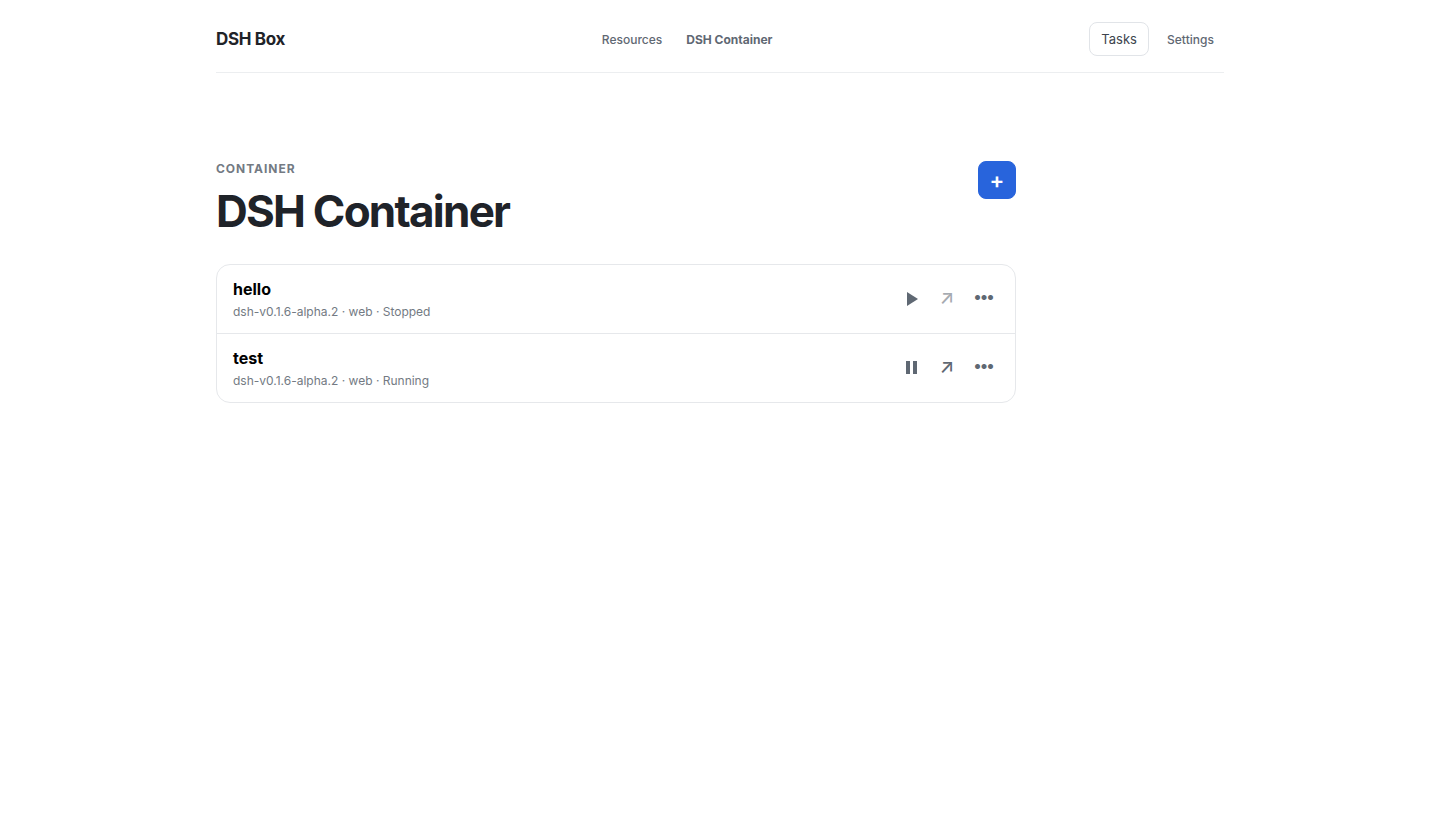
Highlights
- Isolated containers — one DSH version, profile, workspace and host process each.
- Embedded WebView — the DSH UI opens in a native window; no ports, no URLs to paste.
- Ready in seconds — a pulled Harness version arrives with its client artifacts built;
runis a copy (~10s). - Plugin dependency graph — what loads, in what order, why: depth bands, halves apart, fold a depth away.
- Resources: extract, inject, edit — conversations, keys and plugin state as named copies; any YAML block editable by key path.
- An agent surface —
dshbox apply -fconfigures resources from one document; every verb answers--json. - Zero-dependency install — bundled Node, npm, pnpm and Git (Windows), in a clean room.
- Version manager — install any Harness tag and pin a version per container.
- Boxfiles —
FROM+ADDdescribes a template; build once, run many. - Portable templates — every payload is materialised into the template, so containers depend on nothing mutable.
- Bundles — group plugins and skills, then export quick (URLs kept) or full (one archive).
- Tasks you can watch — queued, logged with timings, cancellable, with history.
- A slow daemon never freezes the window — commands run off the main thread and every RPC is bounded.
- RPC + events — one
POST /rpcand one SSE stream serve the UI, the CLI and agents alike. - Network-friendly — GitHub mirror, npm registry mirror, automatic proxy detection.
- Tray and background service —
dshboxdkeeps working with the window closed. - Lightweight — Tauri, not Electron.
- Bilingual UI — English and 简体中文.
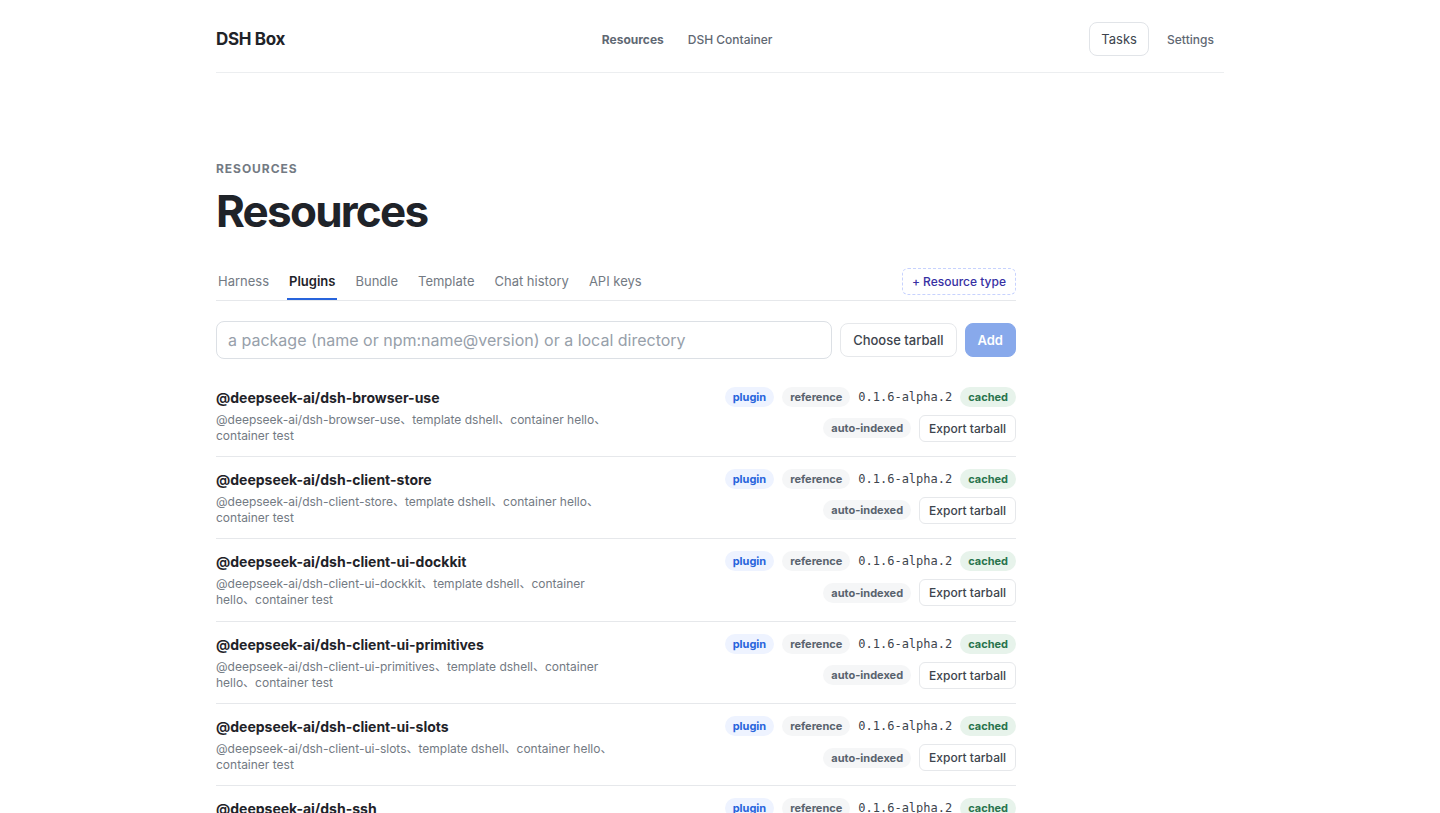
Install
Download the installer for your platform from the Releases page of this repository:
| Platform | Artifact | Notes |
|---|---|---|
| Windows (x64) | dshbox_<version>_x64_<locale>.msi |
MSI installer with bundled runtime and sidecar |
| Linux (x64) | dshbox-<version>-amd64.deb |
Debian/Ubuntu package |
| macOS (arm64) | dshbox-<version>-arm64.dmg |
Apple Silicon |
Grab the latest version from the Releases page — artifact names follow the
<product>-<version>-<arch>convention. Every tagged release carries all three platforms, built by the release workflow.
No runtime prerequisites on Windows — the bundled Node/npm/pnpm/Git runtime travels inside the installer. Linux needs a system Git (apt install git or your distro equivalent); its configuration is isolated per-runtime-directory, so your host ~/.gitconfig is never read by DSH Box builds.
Quick start
- Launch DSH Box and pick a writable runtime directory when prompted (all DSH data lives there).
- Open Resources → DSH Versions → Load versions, then install the DSH tag you want.
- Open Resources → Templates, then pull an official DSH template or build a reusable template from a Boxfile.
- Open Container → create a Container from that template (name and profile).
- The first create prepares the Container in its final directory (offline dependency install, local plugins, frontend build). Press Start — DSH Box launches that prepared copy and opens the DSH UI in the embedded WebView.
- Use Resources to import plugins/skills, assemble bundles, or create Boxfiles for reusable plugin-enabled templates.
Tray
The app minimizes to the system tray on close. Use the tray menu to open the window or start/stop/restart the dshboxd background service.
Architecture
DSH Box separates a Tauri desktop shell, a framework-free Rust workspace, a background daemon (dshboxd), and a small React frontend. The split exists so all business logic — plugin fetching, container lifecycle, template resolution, background tasks — is testable without a UI, and so a CLI or external agent can drive the same flows the UI does.
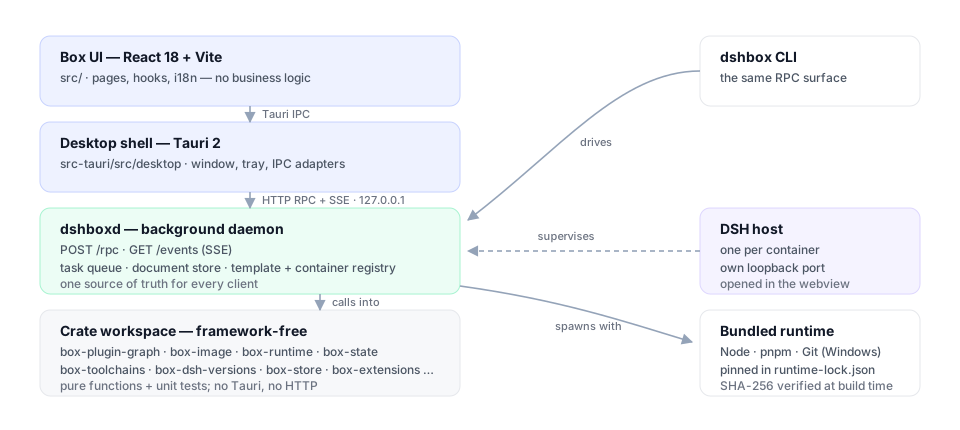
Layered components
| Layer | What lives here | Why |
|---|---|---|
Frontend (React 18 + Vite, src/) |
Pages, components, useTaskQueue/useContainers/useResources/useSettings hooks. No business logic — pages fire RPC requests and react to daemon SSE events. |
Keeps the Box UI thin and lets any client (UI/CLI/agent) share the same code path. |
Desktop shell (Tauri 2, src-tauri/src/) |
Browser window, tray, Tauri IPC adapters. Listens on 127.0.0.1 to the daemon's loopback HTTP server. All real work is delegated to dshboxd over HTTP RPC. |
One source of truth for state changes — UI and CLI cannot drift. |
Daemon (src-tauri/crates/dshboxd) |
Long-lived background service. Owns the queue, the data store, the template index, container registry, and the SSE event bus. Single HTTP entry point (POST /rpc) plus GET /events?token=…. |
Background work (installs, rebuilds, uninstalls) survives the desktop window closing. |
Crate workspace (src-tauri/crates/) |
Framework-free Rust crates: box-foundation, box-runtime, box-scheduler, box-state, box-toolchains, box-dsh-versions, box-containers, box-extensions, box-image, box-template-core, box-data-scheduler, box-logger, box-dsh-context, box-server-core, box-api, box-client. |
Pure functions + unit tests; only the top-level dshbox binary and dshboxd link Tauri/HTTP. |
The dependency direction is one-way: foundation / runtime / scheduler / state → functional crates → Tauri/desktop adapters. Feature crates do not depend on Tauri or one another's mutable state.
Daemon — dual-mode RPC + SSE event stream
Every UI / CLI action lands on POST /rpc with a JSON body of {"method": "...", "params": {...}, "token": "..."}. The daemon's dispatch table decides for each handler whether to synchronously return JSON (List templates, Read settings, …) or asynchronously enqueue a worker (Install, Build, Start container, Rebuild, Uninstall, …). Async handlers return a TaskRecord immediately; the client subscribes to GET /events?token=… for task_stage / task_log / task_finished / resource_added|updated|removed events. The daemon threads one connection per request, so a long task never blocks the liveness probe.
This means the same HTTP surface serves every consumer — the desktop app's Tauri IPC handlers, the CLI (dshbox rpc …), and external agents calling curl -d '…' http://127.0.0.1:7923/rpc. There is no "client fallback" or local-state divergence: the daemon's resource map and task queue are the only sources of truth.
A task's log file is the UI's only window into it: the daemon writes it, the desktop streams the lines into the panel, and a step the user waits minutes for says what it is doing and how long it took.
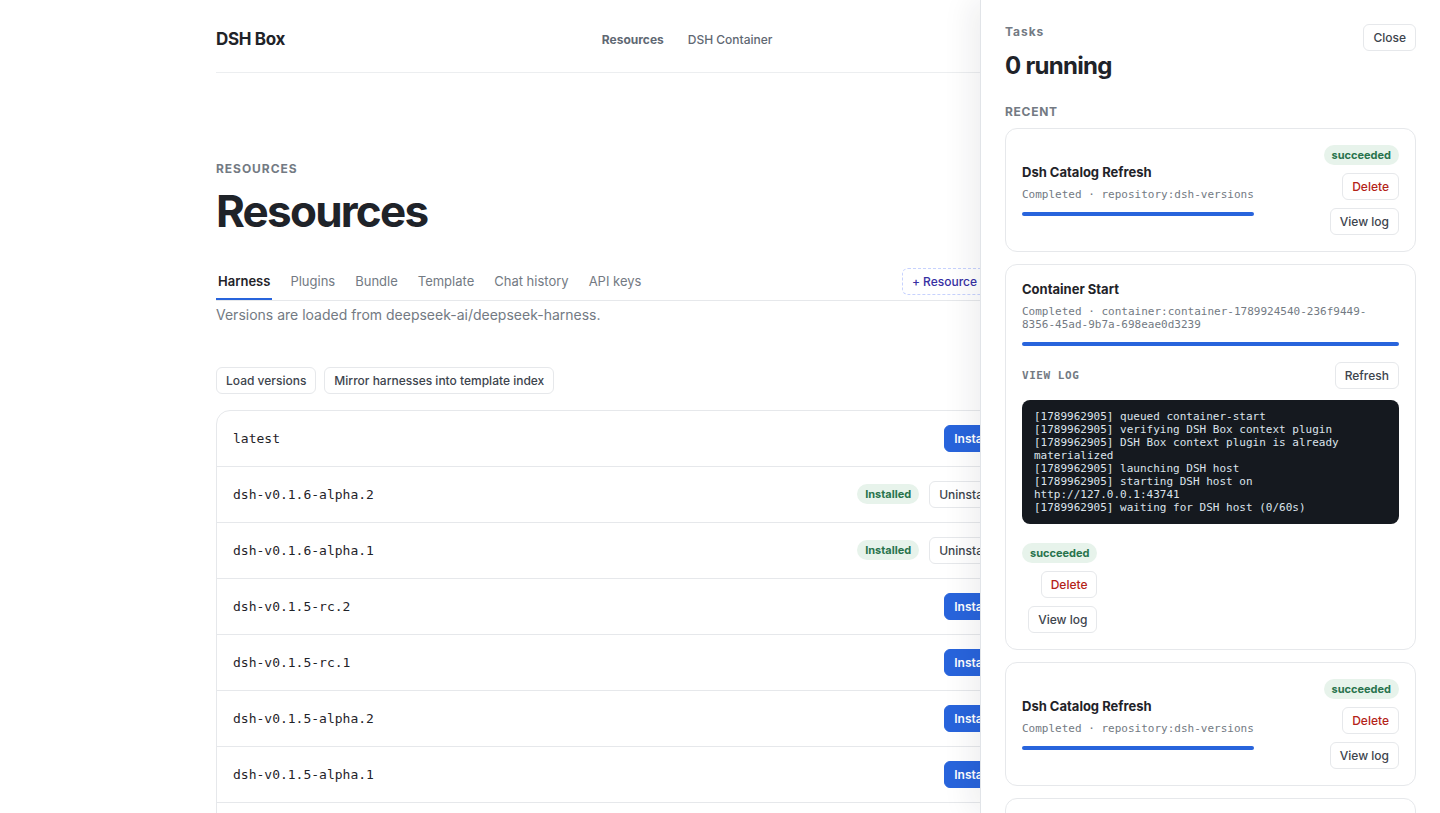
Boxfile and the built-template pipeline
A boxfile (.dsh) is the declarative script that describes a Container you want to instantiate. dshbox build resolves it into a sealed template recipe: physical Harness source without node_modules, plus the profile, local plugin artifacts, skills, and data needed by its ADD directives — including the client artifacts the prepared base already built. dshbox run <template> copies it to the final Container directory and links its dependencies offline; later starts do none of those steps.
The full grammar is in docs/template-system.md; the canonical reference example (every source shape) is in examples/boxfile-plugin-chains.dsh. Here is the minimal form:
FROM github.com/deepseek-ai/deepseek-harness:latest
PROFILE web
NAME my-team

ADD plugin github.com/owner/cordis-plugin-foo:1.2.3
ADD plugin npm:@linxin666/dsh-web-ui-all
ADD plugin ./plugins/secret
ADD skill team-conventions
| Directive | Required | Notes |
|---|---|---|
FROM <ref> |
yes (exactly once) | GitHub short form (`github.com/owner/repo[:tag |
PROFILE <name> |
yes (exactly once) | Target DSH profile (web, headless, …). |
NAME <image-name> |
no | Defaults to the script file's stem. |
VERSION <image-version> |
no | Defaults to latest. |
LABEL key=value |
repeatable | Free-form metadata attached to the built template. |
DEF <name> @<path> |
repeatable | Defines a path alias usable as @<name> in subsequent ADD lines. |
ADD plugin|skill|data <src> [@<dest>] |
one or more | Resource you want baked into every Container made from this template. |
CP <src> [@<dest>] |
alias for ADD plugin |
Kept for backward compatibility. |
<src> accepts four shapes:
- GitHub short form —
github.com/owner/repo[:tag|@ref]. The GitHub branch resolves throughpnpm packand the same fetching/import pipeline as npm; a tagged release becomes aref_onParsedSource::Github. - Tarball —
https://…/pkg.tgz,./relative.tgz,/abs/path.tgz. Anything fetched and unpacked as a tarball. - Local directory —
./plugins/foo//abs/path/foo. Imported directly (no archive round-trip) — useful for plugins in progress. - Bare name —
name[@version]or@scope/name[@version]for plugins already in the Repository. - Explicit prefixes —
git:…(clones via libgit2, no guessing) andnpm:…(registry spec forwarded to pnpm).
The :latest tag and the explicit latest keyword are interchangeable; both pin the harness repository's main branch.
How each ADD is stored matters:
ADD plugin— the source is imported into the shared Repository as an immutable localartifact.tgz, recorded by the sealed recipe, then added only while preparing a Container at its final path. No running Container has an absolute repository path or runs a plugin dependency install.ADD skillandADD data— snapshotted into the data store (<runtime>/data/<digest>/), materialised in the built template, and copied into the Container profile.- The bundled
dsh-box-contextplugin (@deepseek-ai/dsh-box-context) is copied automatically — you do not need toADDit.
dshbox build writes a digest-addressed sealed template. dshbox run <name> then:
- Resolves the template's
FROMchain (max depth 4), - Creates
<runtime>/instances/<id>/{profile,workspace,state,logs}, - Copies the template's materialised plugins/skills/data into the profile,
- Allocates a loopback port immediately before host spawn,
- Launches bundled
pnpm dsh webfrom the Container's Harness copy and waits for readiness, - Writes
paths.dshboxHome+paths.dshboxCliinto the snapshot so the in-container agent can find the CLI.
Where the work happens is deliberate:
| Step | What it does | Cost |
|---|---|---|
dshbox pull template |
clones the Harness commit, installs its dependencies and builds the client artifacts (native addon, host/client libraries, web frontend) into a prepared base, recording the revision and platform they were built for | once per Harness version, per platform |
dshbox build |
copies that base — artifacts included — and installs the profile's plugins into a sealed template | once per template |
dshbox run |
copies the sealed tree, links dependencies from the pnpm store, materialises Box's context plugin, starts the host | ~10s per container |
A base that predates this is repaired in place the first time a template is built from it, and a template carrying no artifacts for this commit and platform (an old one, or one imported from another OS) is rebuilt at container creation instead — the task log says which path was taken. The full storage, transaction, and migration contract is in docs/specs/prepared-template-runtime.md. This is a schema break: legacy shared runtimes/<version>/source layouts are not used by new builds.
Plugin dependency graph
plugin_dependency_graph answers "what loads, in what order, and why" for a sealed template, a container directory, or a running host. The daemon walks the package tree, scans each package's sources, and returns nodes, links, layer depths, load order, shared services, and diagnostics. The Dependency graph button on a template (Resources → Template) and on a container's detail view renders it.
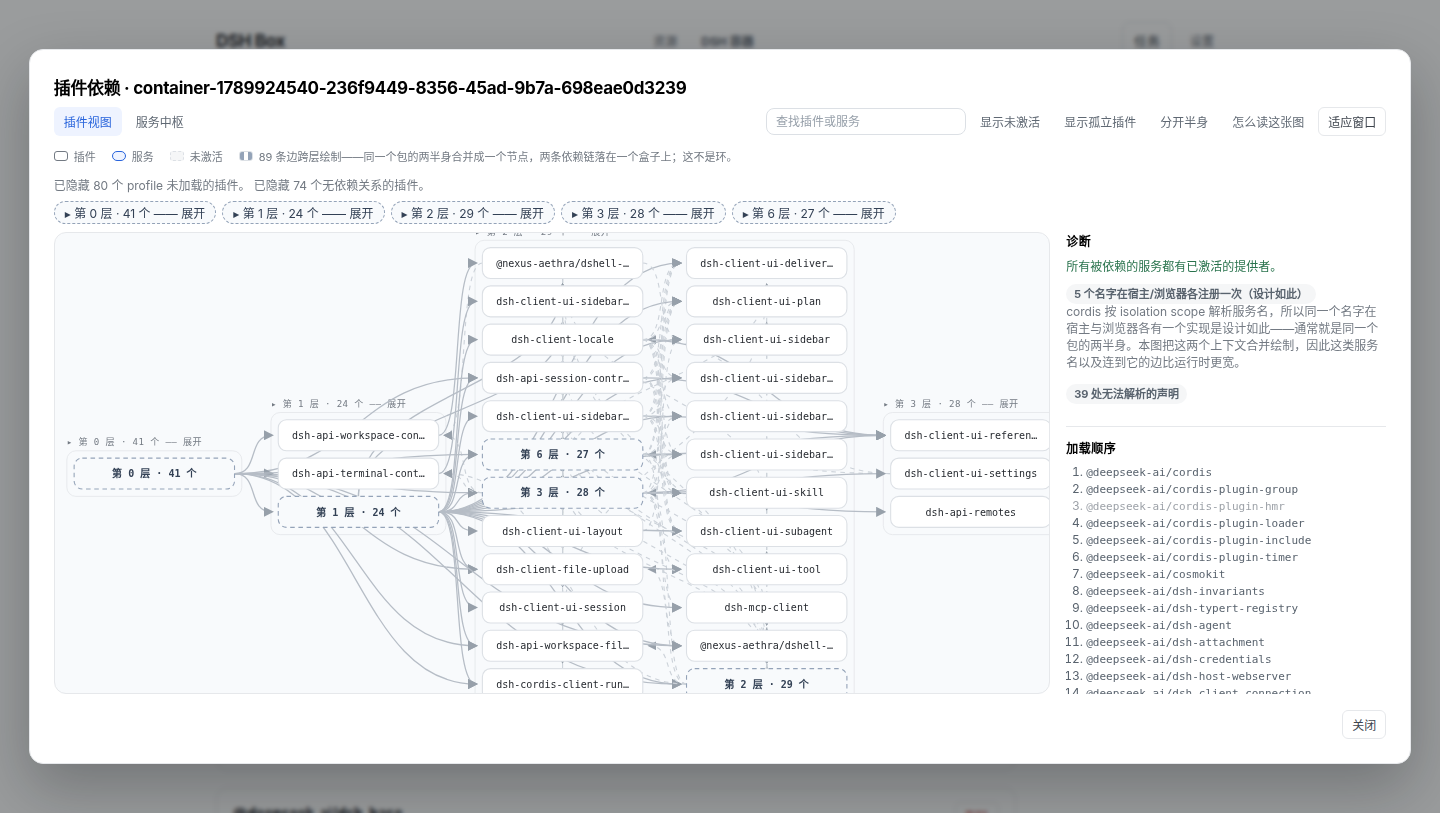
The drawing above is the real thing; the figure below names what it is made of — bands, halves, the dashed cross-context edge, and the pending member of a cycle.
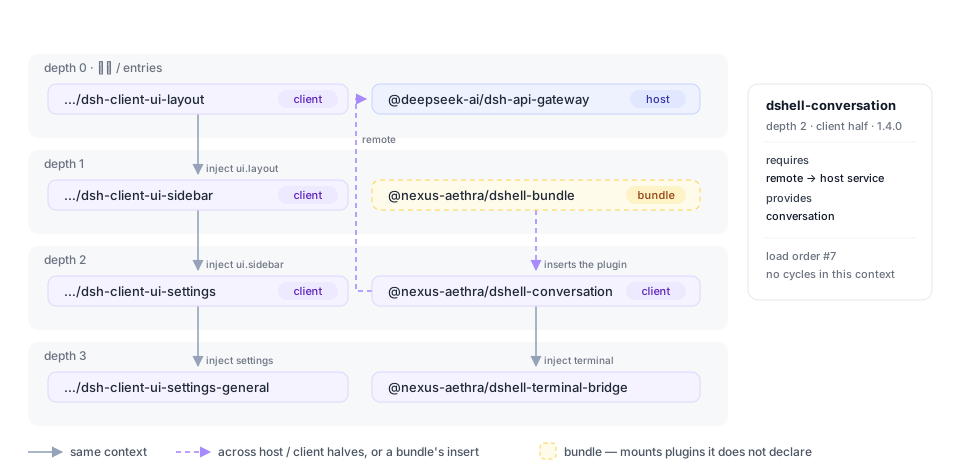
What it computes:
- A node per mounted plugin, not per package. A package that ships both a host and a browser half (
dsh.client+exports["./client"]) becomes two nodes, soinject/provideresolve inside one context. A name provided once per context is a shared service, not a conflict — which also means a cycle is either inside one context or it is real. - Only registered declarations count. An
injectis read where a plugin registers it: anObject.assign(target, { inject })carrier, or a factory's returned{ inject, apply }. A plain object property is not a plugin declaration; treating one as such invented 26 requirements on a real profile. - The launcher is a provider too.
apps/clibuilds the root context and hands services to the plugins it mounts, so it is scanned and drawn asdsh (launcher)— without it, every plugin that injectsprofileContextreads as waiting on nobody. - Depth bands, load order, and folding. A node's depth is one more than the deepest dependency it injects (0 = has nothing to wait for), and within a band nodes are ordered by how many plugins depend on them. A depth too big for one band is folded on open — a 175-node container reads as 31 boxes — and a band's label or its summary box folds and unfolds it: the layer's edges re-point at the summary, the rest of the diagram reflows, and the folded depth stays as a chip above the canvas. A cycle does not hide the order: the nodes still inside it are marked pending.
- A cycle is a graph fact; a crossing is a drawing fact. Red dashed means "on a cycle, this cannot load", decided on the half-preserving links and inside one context. An edge the drawing merely cannot lay out forwards — the default view merges a package's two halves into one box, so
host A → Bsits besidebrowser B → A— is a quiet grey dash with a legend line saying so. Splitting the halves leaves zero crossings, which is the check that the layering is right. - What a working container contradicts is a bug in the scanner. An incomplete static view must not claim a service is missing, a provider is inactive, or two registrations in different contexts conflict; the launcher, the halves of a package, and the isolation scopes each took one of those false alarms out.
- Bundles are followed. A bundle's
cordis.patch.ymlinsertrows are read, so the plugins a bundle mounts appear as the nodes they are — including the ones a BoxfileADDs, which is what makes a template preview show its own plugins before any container exists. - Diagnostics name their file. Anything the scanner cannot resolve is reported with the package and the file it came from, in a collapsible panel, instead of being dropped without a trace.
- Published packages are read where their code is. The client entry from the manifest's
dsh.client/exportssubpath — as a prefix list, because a package shipslib/client.jsandlib/client/—lib/when there is nosrc/, and never a build output directory.
The scan is text-based on purpose — a small scanner over comment-blanked sources, not a TypeScript AST: the graph has to describe a container's node_modules without loading DSH, and a wrong node must be cheap to spot and correct.
Container resources
A container persists state that is not code: conversations under profile/sessions/<workspace>/session-<id>/, provider keys in profile/.credentials.yaml, and whatever a plugin writes under its own directory. Box models each of those as a kind — a location, whether it holds secrets, and how deep its independent entries sit — and two verbs move it.
A kind is one or more parts, and a part is either a whole path or one key path inside a YAML document. The second shape exists because DSH splits some state across files: a provider key is a ref in .credentials.yaml, while the route that names the environment variable holding it lives in settings.yaml under llm-pi-ai.providers.<route>.apiKeyEnv — the rest of which belongs to other plugins. So the credentials kind carries both, extracted into one payload and merged back deeply, and a key arrives with the provider that uses it.
- Extract copies a kind (or one entry, so a single conversation can travel) into
<runtime>/resources/<id>/payload/, digests it, and records it in the shared document store.--out file.tar.gzalso packs it for another machine. - Inject writes it back from the store, straight from another container, or from a tarball.
Refuseis the default and checks every clash before writing anything;Mergereplaces only what the payload carries and deep-merges YAML maps;Overwritereplaces the value first. A file a secret kind writes is tightened to0600on the way in and out, and a running container is refused unless--restartasks for stop → inject → start. - A copy has a name. It is the user's, the selected entry's, or the source container's; taking a copy again adds
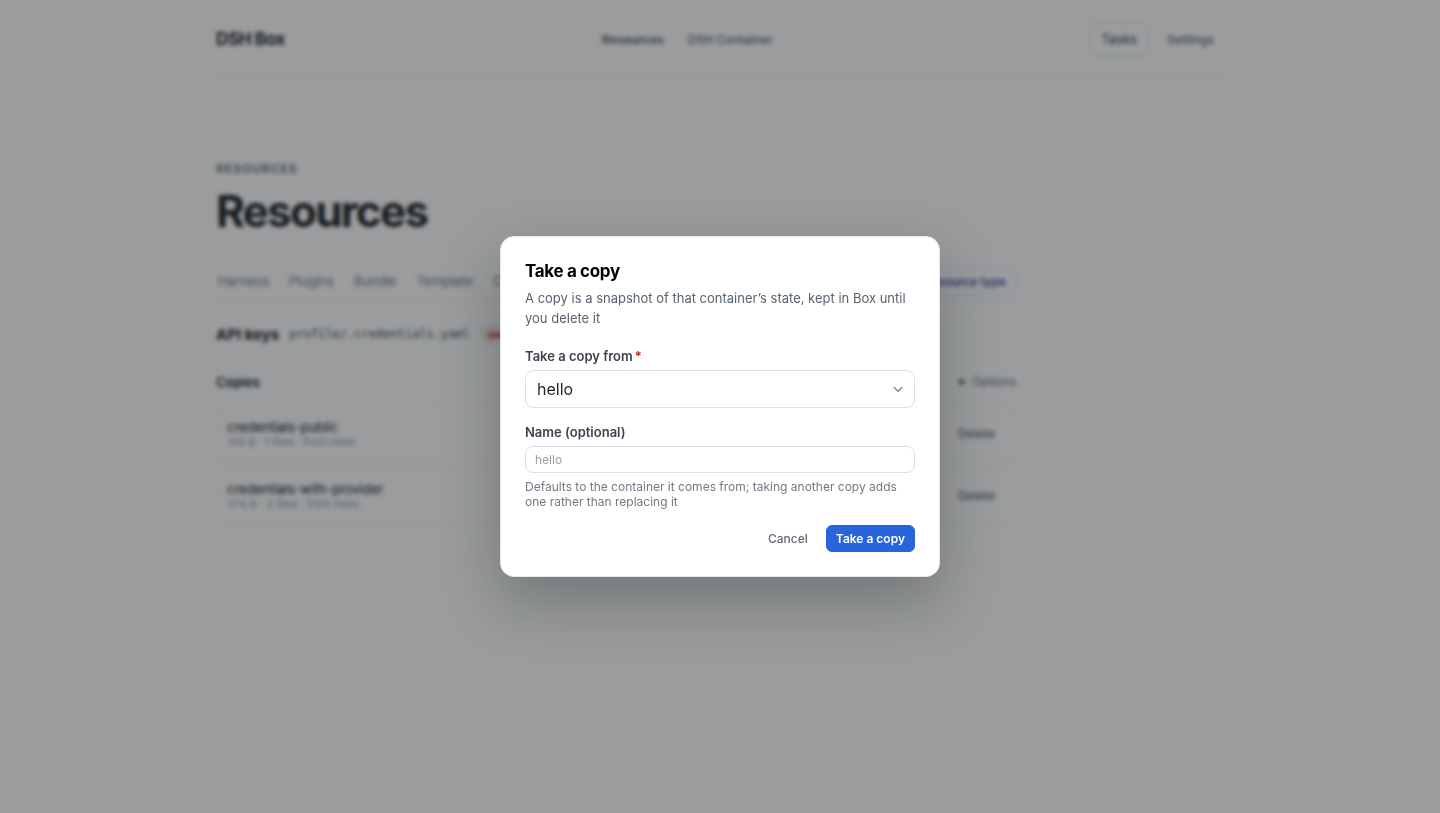
<name>-2rather than replacing the one already there, because taking a copy is an explicit act — the same kind from two containers must not land on one row.
Kinds come from three places: Box ships sessions and credentials; a plugin package can declare its own in dshbox.resources; and when a plugin declares nothing, Box reads the join(root, 'a', 'b') chains in its shipped code and offers those paths as candidates — never as trusted paths. That is what the Resources panel shows: pick a plugin, see whether it persists anything, where, and how much.
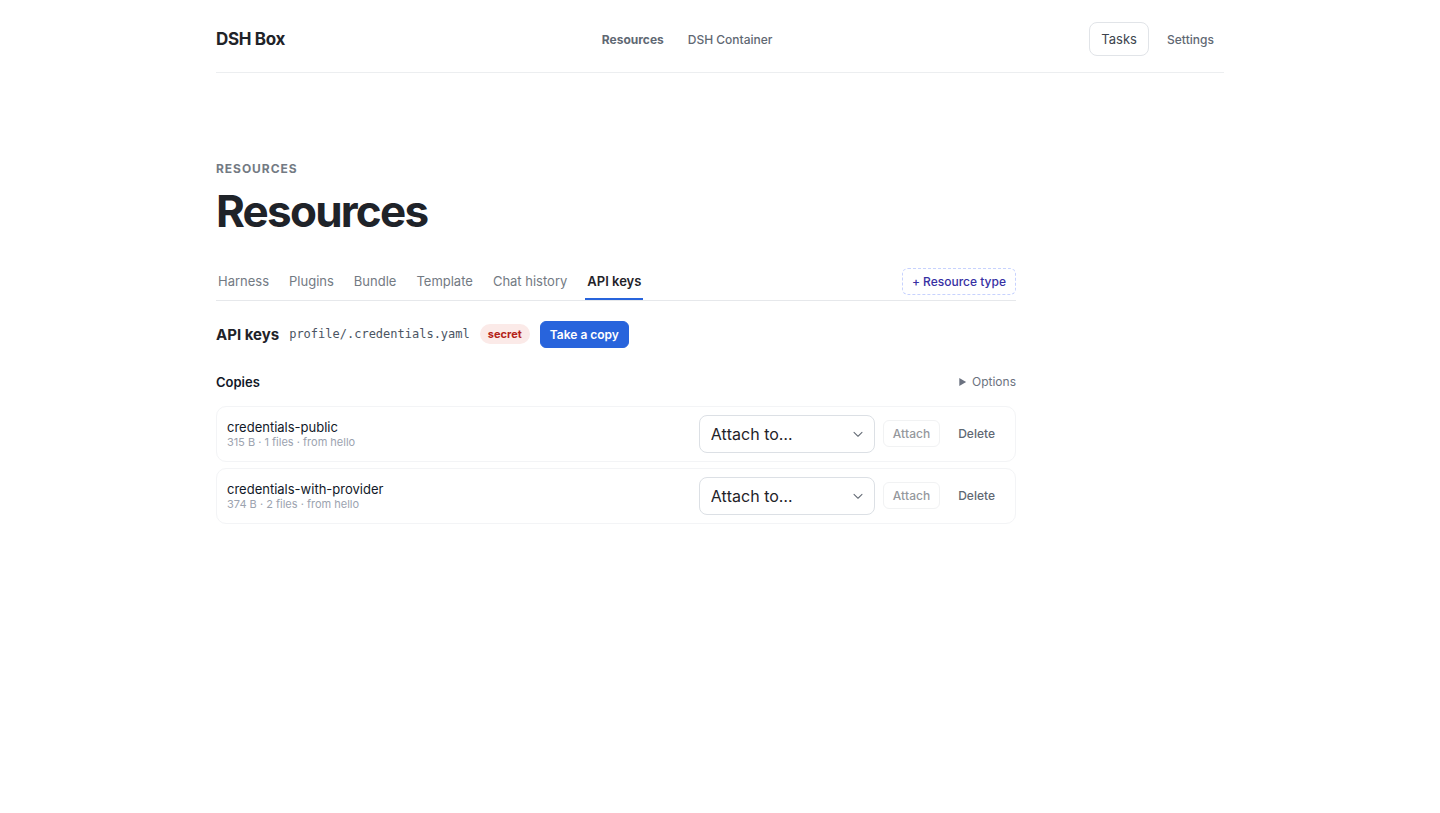
In the UI, a resource type is a tab in the Resources navigation. Chat history and API keys ship as tabs, and + Resource type adds one more: pick a container, then either a kind Box detected there, a plugin to scan (every package installed in the profile is offered, filtered as you type), or a path you pick in a tree of the container's storage area. Taking a copy is one button that opens a card — which container the state comes out of, and what to call the copy:
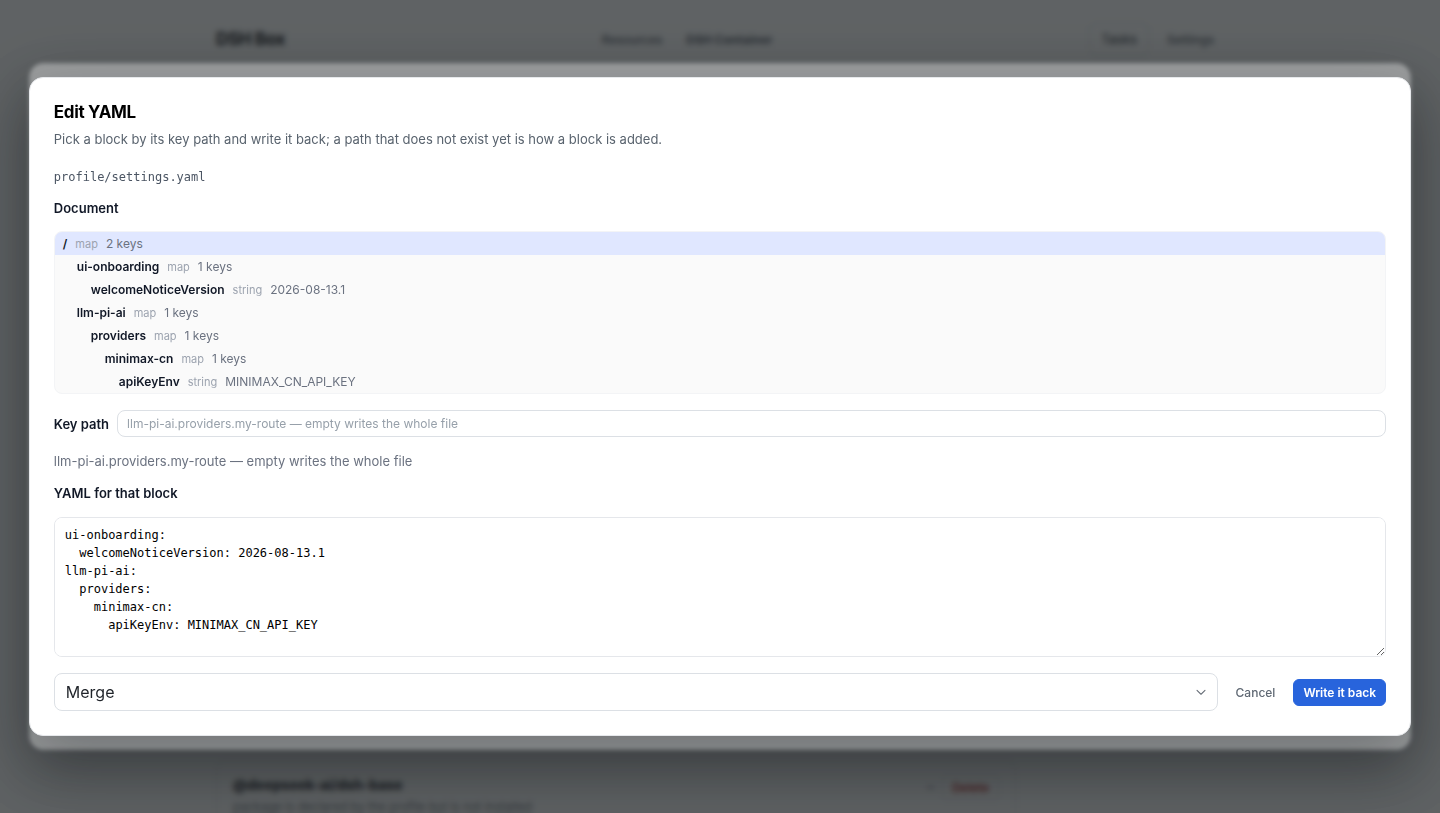
Any YAML block of a container file can be edited by its key path, in the same model: the document is a tree, picking a node loads that block, and a path that does not exist yet is how a block is added. Writing goes through the same merge-or-replace policy an injected copy uses.
dshbox container resource list <id> [--plugin @scope/name]      # kinds, locations, sizes
dshbox container resource types [--json]                        # resource types (UI tabs)
dshbox container resource extract <id> credentials --name prod
dshbox container resource stored                                # what the Box store holds
dshbox container resource inject <id> credentials-prod --merge --restart
dshbox container resource inject <id> --from <other-container> --kind sessions
dshbox container resource read <id> profile/settings.yaml --section llm-pi-ai
dshbox container resource write <id> profile/settings.yaml --section llm-pi-ai.providers.acme \
  --text 'apiKeyEnv: ACME_API_KEY' --merge
Driving it from an agent
The CLI is the agent surface and the UI is the human one, so the verbs an agent needs are non-interactive and machine-readable.
dshbox apply -f <file> takes one document and makes the resource layer match it:
container: test                 # default container for the entries below
types:                          # resource types to register (the UI's tabs)
  - label: ACME state
    kind: path
    path: profile/plugins/acme/state
copies:                         # state to extract into the store
  - name: before-upgrade
    kind: credentials
    from: test
Applying is idempotent — a type is keyed by kind + container + path, and a copy whose name is already in the store reports exists — --dry-run changes nothing, --json reports per entry, and an unknown key is an error rather than a silent no-op. Reading is machine-readable too:
dshbox apply -f resources.yaml --dry-run
dshbox apply -f resources.yaml --json
dshbox container resource list <id> --json
dshbox container resource read <id> profile/settings.yaml --json
dshbox help, dshbox container resource help, and dshbox apply help describe every verb without needing the UI.
Persistence and reference counts
Long-lived indexes are stored as documents instead of scattered files: the task queue goes through box_foundation::collection::DocumentStore — SQLite, via the box-store crate, at <runtime>/state/dshbox.db — so the daemon and the desktop app share one queue without either owning a file. Legacy task JSON is imported on first open and archived as *.pre-sqlite, and schema changes are forward-only migrations gated by PRAGMA user_version. Content-addressed directories (templates/<hash>/, data/<digest>/, runtimes/) stay on disk, and config.json stays machine-local in ~/.dsh-box/ — it never enters the store.
Containers, templates, plugins and skills are referenced by id, and deletion is soft-delete → fast queue → permanent delete, so an entity still in use is never garbage-collected. Full design in docs/specs/data-scheduler.md.
Logging
tracing + tracing-subscriber ship structured logs to <runtime>/logs/<component>.log (daily rolled) and mirror to stderr. Filter with RUST_LOG, e.g. RUST_LOG=info,dshboxd=debug,box_template_core=debug.
Technology
| Layer | Stack |
|---|---|
| Desktop shell | Tauri 2, Rust (Cargo workspace under src-tauri/) |
| UI | React 18, TypeScript, Vite |
| Background service | dshboxd sidecar (single HTTP entry: POST /rpc + GET /events) |
| Bundled runtime | Node / npm / pnpm / Git-Windows-only (per-platform archive, SHA-256-pinned in runtime-lock.json) |
| Targets | Windows x64 (MSI), Linux x64 (deb, rpm), macOS arm64 (dmg) — all built by the release workflow |
Building from source
Prerequisites: Node.js 22.13+ with pnpm (the pinned packageManager needs node:sqlite), the Tauri 2 prerequisites for your platform, and 7-Zip (needed once by runtime:prepare to unpack the Windows PortableGit archive — install from 7-zip.org or apt install p7zip-full, and make sure 7z is on PATH). 7-Zip is a build-time-only tool; it never ships in the installer.
pnpm install
pnpm runtime:prepare    # fetch + verify + extract the bundled Node/pnpm/Git runtime
pnpm server:prepare     # build the dshboxd sidecar
pnpm tauri dev          # run in development
runtime:prepare verifies every archive against the SHA-256 pins in runtime-lock.json before extraction and aborts on mismatch. If 7-Zip is missing the Git step is skipped with a warning (Node/pnpm still prepare); re-run after installing it.
Release bundles (per platform):
pnpm bundle:windows     # Windows MSI installer
pnpm bundle:linux       # Linux .deb
pnpm bundle:macos       # macOS .dmg
Run the test suite:
cd src-tauri && cargo test --workspace
Releasing
The version lives in three files and they must agree — package.json, src-tauri/tauri.conf.json, and src-tauri/Cargo.toml. Bump all three, record what changed in CHANGELOG.md, then tag:
git tag v0.1.8 && git push origin v0.1.8
.github/workflows/release.yml takes it from there: it builds the Linux .deb + .rpm, the Windows MSI, and the macOS arm64 .dmg through the same bundle:* scripts a developer runs locally, and attaches all of them to the GitHub Release for that tag. The tag is compared against the three version fields first, so a mismatched tag fails instead of publishing mislabelled installers; if a release for the tag already exists, the artifacts are re-uploaded over it. Running the workflow manually (workflow_dispatch) builds everything without publishing, which is the way to test a pipeline change.
Installers are unsigned: macOS needs the usual Gatekeeper bypass on first launch and Windows shows a SmartScreen prompt. Signing and notarization identities can be added to the workflow when certificates are available.
Repository layout
src/                       React/TypeScript management UI
src-tauri/                 Rust workspace + Tauri shell
  crates/                  focused, framework-free crates
    box-foundation         config, paths, document collections
    box-store              SQLite document store + legacy import
    box-runtime            absolute-path process exec
    box-scheduler          persisted task queue + locks
    box-state              ResourceStateManager (read model)
    box-toolchains         bundled Node/pnpm resolver
    box-dsh-versions       DSH GitHub catalogue (harness tag + installs)
    box-containers         Container metadata + active Host registry
    box-extensions         repository plugin/skill scan + transfer
    box-image              .dsh parser, manifest v6, gzip tar I/O
    box-plugin-graph       plugin dependency scan + graph assembly
    box-resources          resource kinds, extraction and injection
    box-template-core      root/common template install/uninstall core
    box-data-scheduler     soft-delete + dual-queue async hard-delete
    box-logger             tracing init + daily-rolled log files
    box-dsh-context        dsh-box-context plugin (paths.dshboxHome/dshboxCli)
    box-server-core        dshboxd helpers + service install
    box-api, box-client    RPC surface + client adapter
  src/desktop/app/         domain modules (containers, extensions, tasks, …)
  tools/runtime-packager   bundled Node/pnpm/Git runtime packager
examples/                  boxfile.dsh + plugin-chains example
docs/                      template-system.md, specs/, design/, notes/,
                           releases/, images/
.github/workflows/         release.yml — a v* tag builds the three installers
The canonical reference for the boxfile grammar is docs/template-system.md; prepared-base/sealed-template design lives in docs/specs/prepared-template-runtime.md; the full RPC + event-stream surface in docs/design/rpc-and-events.md.
License
Proprietary — see repository owner for licensing terms.
© Nexus-Aethra
Install
Install the catalog once, then DeepSeek Harness can find and install any plugin from this site automatically:
dsh plugin add dshbase-catalogThen say "install DSHBox for me" — your agent finds it in the directory and installs it. Docs: dshbase-catalog · verified packs.
This plugin is GitHub source (not published to npm) — install it straight from the repo:
Web profile:
dsh plugin --profile web add github:Nexus-Aethra/DSHBoxHeadless (CLI) profile:
dsh plugin --profile headless add github:Nexus-Aethra/DSHBoxTest report
Verified: L1 install + L2 load + L3 runtime from GitHub source on dsh 0.1.0-rc.6.
When to use it
Let the agent drive a real browser — navigate, click, fill, and read pages — for research or UI testing.
Who it's for
Users who want browser automation done by the agent rather than a separate scraper or test script.
For developers — extending it
Browser actions are the seam — expose more tool calls (form fill, downloads, tab management) to the model.
Share this badge
Drop this badge into your README — it links back here and updates automatically when our test status changes:

[](https://dshbase.com/plugins/DSHBox/)<a href="https://dshbase.com/plugins/DSHBox/"><img src="https://dshbase.com/badges/DSHBox.svg" alt="dshbase install-tested"></a>