
Plugin directory / Desktop / DshCockpit
DshCockpit
Verified · install-tested on dsh Lxiayu
What it does
DshCockpit — DeepSeek Harness desktop cockpit: runtime auto-update, cost control, global quick ask, scheduled tasks, full-text session search, data security. Auto-update / cost center / Quick Ask / scheduled tasks / session search
Works — verified, growing community
DshCockpit — DeepSeek Harness desktop cockpit: runtime auto-update, cost control, global quick ask, scheduled tasks, full-text session search, data security. Auto-update / cost center / Quick Ask / scheduled tasks / session search It installs cleanly and boots without issues in our testing. It has a growing community — a solid choice.
“Verified” means our automated CI actually ran dsh plugin add in a clean profile and it booted — nothing more. Feature descriptions and version compatibility are the author’s claims. This is not a security audit and not an endorsement of third-party code.
README
简体中文 | English

DshCockpit · 鲸鱼娘办公室
你的 AI 团队,今天也可爱营业。
给 DeepSeek Harness 一个有温度的桌面工作空间。
鲸鱼娘在这里工作、巡游、闲聊和休息,你在这里掌握任务与进度。


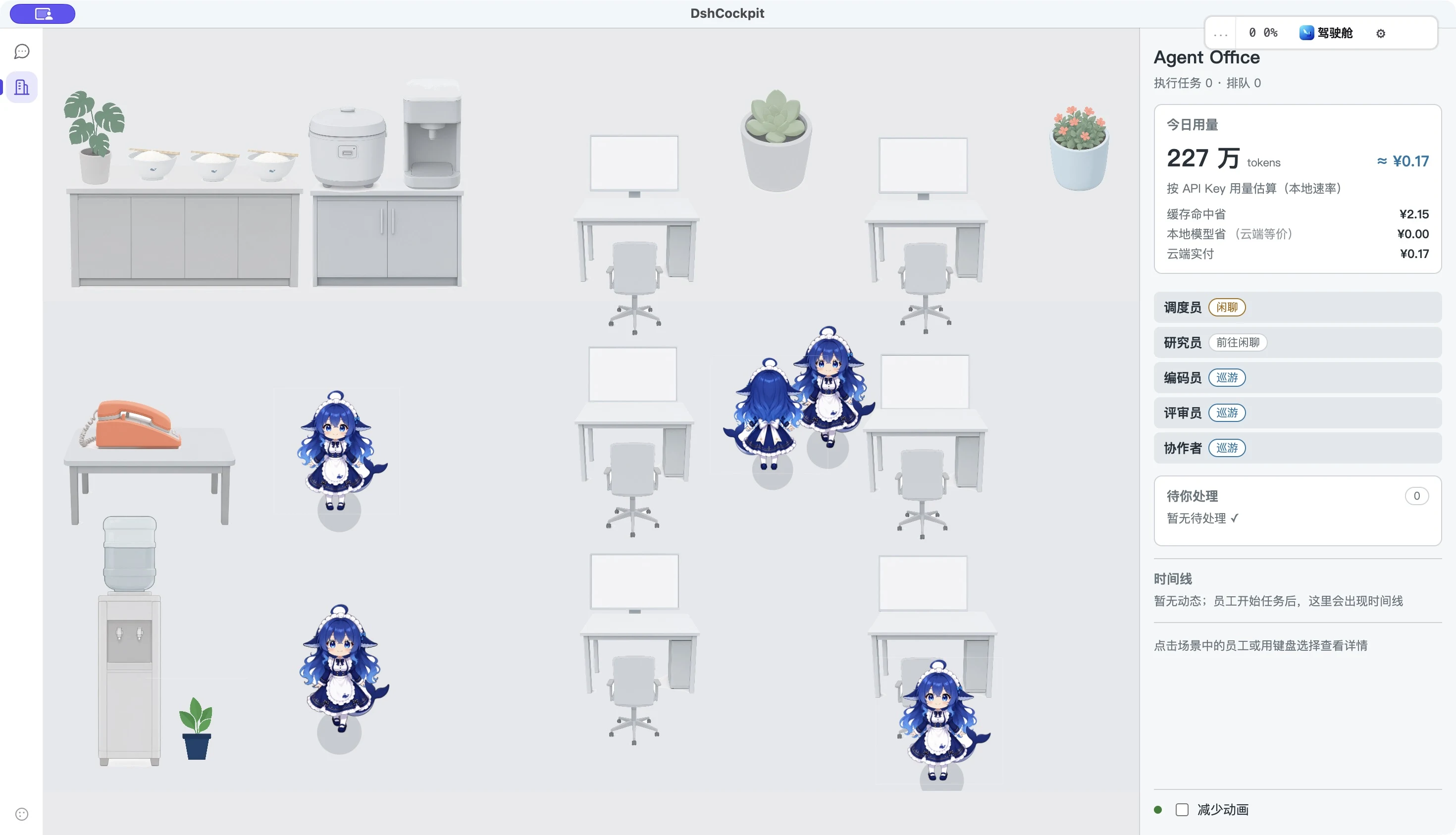
主仓库应用实拍。画面中的用量仅为拍摄时的本机数据,不代表性能或费用承诺。
让 AI 的工作,看得见,也有一点温度
DshCockpit 是 DeepSeek Harness 的开源桌面壳,把原生会话工作台、常驻运行能力和一个鲜活的虚拟办公室放在一起。
进入办公室,你会看到调度员、研究员、编码员、评审员和协作者这些角色。任务进行时,员工状态随运行事实变化;空闲时,鲸鱼娘也会巡游、闲聊、休息,有自己的小小日常。
- 看得到团队:角色、工位、行走和气泡,让 Agent 从一行状态变成办公室里的同事。
- 跟得上进展:员工列表、任务状态、活动时间线和今日工作记录,帮助你了解谁在忙、发生了什么。
- 知道何时介入:待处理区域集中展示需要你回答或审批的事项。
- 掌握用量:办公室侧栏展示今日 Token 和费用估算;详细成本与上下文工具继续由驾驶舱提供。
- 随时回到会话:左侧功能栏可在原生 Harness 工作台与办公室之间切换。
任务事实与角色日常分开管理。 工作、完成、失败等任务状态来自运行时;巡游、闲聊和小憩是办公室的日常表现。角色动画本身不会被当成任务已经完成的证据。
认识你的鲸鱼娘同事




短片展示应用内的巡游和闲聊;上面的角色图与行走动图来自角色素材,不是任务执行录像。办公室为角色提供可观察的状态,Agent 与角色外观在实现上保持分离。
可爱的背后,有靠谱的桌面工具
| 能力 | 帮你做什么 |
|---|---|
| 原生 Harness 工作区 | 保留熟悉的会话与工具工作方式,桌面壳补充外围能力 |
| 内置运行时 | 发布安装包内置所需运行时,无需单独安装 Node.js |
| 更新与回滚 | 更新检查、运行时切换与数据快照,让维护更从容 |
| 成本与上下文 | Token 用量、上下文压力、成本统计和预算提醒 |
| Quick Ask 与定时任务 | 随手交代任务,查看后台运行与完成通知 |
| 会话检索与远程访问 | 检索历史,并按需配置手机访问与消息渠道 |
实际可用能力以所下载版本的发布说明为准。办公室仍在持续打磨,欢迎反馈角色表现和交互细节。
开始你的办公室工作日
- 打开 Releases,选择对应平台的安装包。
- 安装并启动 DshCockpit,配置模型/API Key,选择工作区。
- 在会话工作台交代任务,点击左侧 办公室 图标查看团队状态。
- 从员工详情、时间线和待处理区域了解进度,需要时回到会话继续交流。
| 平台 | 推荐安装包 |
|---|---|
| Windows x64 | .exe 安装程序;也可选择便携 .zip |
| macOS Apple Silicon(M 系列) | .dmg,打开后拖入「应用程序」 |
当前发布构建面向 Windows x64 和 macOS arm64;不要把 arm64 包用于 Intel Mac。macOS 包目前使用 ad-hoc 签名,尚未完成 Apple Developer ID 公证;首次打开可能需要在系统设置中确认来源。
macOS 首次打开
- 下载
.dmg,打开后把 DshCockpit 拖入「应用程序」。 - 如果首次打开提示“已损坏”或“无法验证开发者”,确认安装包来自本项目发布渠道后,打开「终端」执行:
xattr -dr com.apple.quarantine /Applications/DshCockpit.app
- 返回「应用程序」,重新打开 DshCockpit。命令仅移除该应用的下载隔离标记;如果你安装到了其他目录,请替换命令中的路径。
与 v0.2.8 安装说明 一致,普通用户选择 .dmg 即可,macOS .zip 主要供自动更新使用。
微信交流群
分享鲸鱼娘的工作日、交流使用心得,也欢迎来提建议和报告问题。

当前二维码图片标注 2026 年 10 月 3 日前有效。如果已经过期,请通过 GitHub Issues 联系我们更新。
从源码运行
准备 Node.js 22 或更新版本,以及 npm:
git clone https://github.com/Lxiayu/DshCockpit.git
cd DshCockpit
npm install
npm start
本地打包:
npm run build:win  # Windows 安装程序与便携包
npm run build:mac  # macOS Apple Silicon 包
打包脚本和 CI 的具体平台要求见 RELEASE.md 与 .github/workflows/。
参与开发
欢迎贡献 Bug 报告、交互建议、文档、角色动画与代码。反馈办公室问题时,请附上应用版本、操作系统、复现步骤;如有截图或录屏,请先移除不适合公开的任务内容。
src/office/:办公室场景、状态与交互。content/、resources/characters/:内容与角色素材。src/:桌面壳与运行时集成。photo/:README 与宣传素材。
项目架构与设计背景见 DESIGN.md;历史规划文档不等同于当前发布承诺。
开源与素材
核心代码使用 MIT License。Logo、角色、插画与第三方美术不自动继承代码许可,使用时请查看对应资源的授权与来源说明。宣传素材索引见 photo/README.md。
DshCockpit 是社区项目,与 DeepSeek 官方无隶属关系,也未获其背书。
Install
Install the catalog once, then DeepSeek Harness can find and install any plugin from this site automatically:
dsh plugin add dshbase-catalogThen say "install DshCockpit for me" — your agent finds it in the directory and installs it. Docs: dshbase-catalog · verified packs.
This plugin is GitHub source (not published to npm) — install it straight from the repo:
Web profile:
dsh plugin --profile web add github:Lxiayu/DshCockpitHeadless (CLI) profile:
dsh plugin --profile headless add github:Lxiayu/DshCockpitTest report
Verified: L1 install + L2 load + L3 runtime from GitHub source on dsh 0.1.0-rc.6.
When to use it
Run dsh as a native desktop app — its own window, tray icon, and shortcuts — instead of a browser tab.
Who it's for
Users who want an installed-app feel and system integration (tray, global hotkeys, auto-launch) on their OS.
For developers — extending it
The native shell is the seam — add global shortcuts, notifications, single-instance locking, or OS-specific behaviors.
Share this badge
Drop this badge into your README — it links back here and updates automatically when our test status changes:

[](https://dshbase.com/plugins/DshCockpit/)<a href="https://dshbase.com/plugins/DshCockpit/"><img src="https://dshbase.com/badges/DshCockpit.svg" alt="dshbase install-tested"></a>