
Plugin directory / Automation / EasyDSH
EasyDSH
Verified · install-tested on dsh rpvvn
What it does
WPF one-click launcher for DeepSeek Harness
Works — verified, early-stage project
WPF one-click launcher for DeepSeek Harness It installs cleanly and boots without issues in our testing. It's early-stage but functional.
“Verified” means our automated CI actually ran dsh plugin add in a clean profile and it booted — nothing more. Feature descriptions and version compatibility are the author’s claims. This is not a security audit and not an endorsement of third-party code.
README
✨ 功能特性
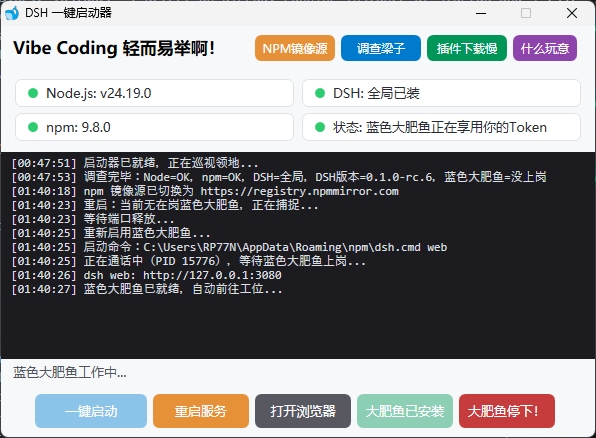
- 🚀 一键启动:自动检测环境并后台启动 DSH Web 服务,服务就绪后自动打开浏览器
- 🔄 一键重启:强制停止当前服务 → 等待端口释放 → 重新启动
- ⏹ 停止服务:全局扫描所有运行中的 DSH 进程(node 进程 + 3080 端口),强制结束
- 📦 一键安装:执行
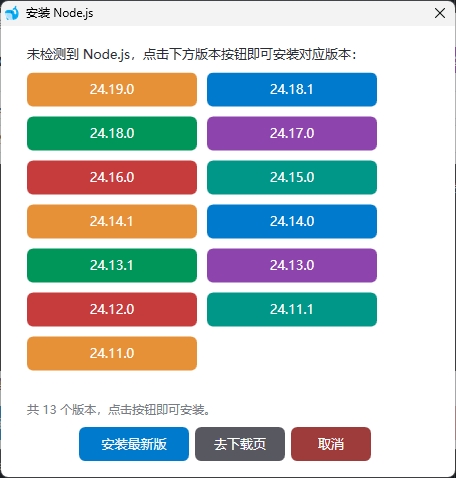
npm install -g @deepseek-ai/dsh全局安装 - 🔍 环境检测:检测环境缺失提供下载,实时展示 Node.js / npm / DSH(全局 / npx 缓存)/ 服务端口状态,彩色圆点卡片
- 🎨 WPF 矢量界面:圆角按钮、彩色状态卡片、悬停高亮
- 📦 单文件绿色版:无需安装、无需配置文件,可放入 U 盘随处运行
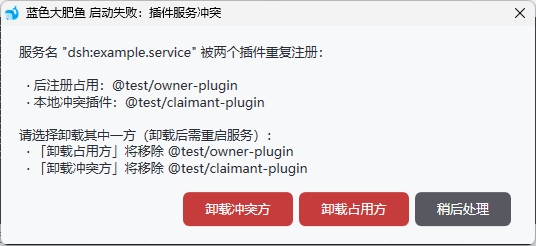
- 🛡 服务冲突诊断:启动失败时自动识别「插件服务名冲突」,弹窗说明谁占用、谁冲突,并可一键卸载其中一方
- 🔌 灵活关闭:关闭窗口时可选择「停止并关闭」或「仅关闭窗口」,让 DSH 服务继续后台运行而不强制停止
- 🚫 单实例运行:启动时自动检测,若已有实例在运行则提示「已经运行,请勿重复运行」并自动退出
- ℹ️ 额外支持:npm国内镜像源切换、下载本地代理切换、DSH版本管理
界面展示
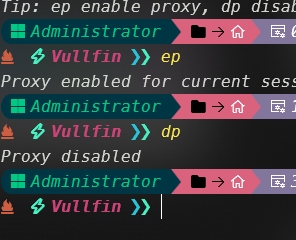
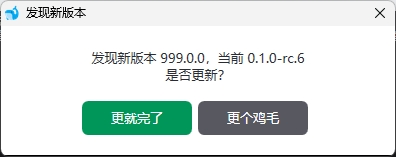
📋 环境依赖
| 依赖 | 说明 |
|---|---|
| Windows 7+ | 需 .NET Framework 4.0+(Windows 10/11 已自带) |
| Node.js | 含 npm,用于运行 / 安装 DSH |
🚀 使用方法
- 从 Release 下载
DSH-Launcher.exe,或按下方说明自行编译 - 双击运行
- 首次使用点「安装 DSH」(或确保 DSH 已通过
npx缓存 / 全局安装) - 点「一键启动」,服务就绪后自动打开浏览器访问
http://127.0.0.1:3080
提示:关闭启动器窗口时,若 DSH 仍在运行会弹窗询问——可选择「停止并关闭」「仅关闭窗口」(服务继续后台运行)或「取消」。
🔨 编译
无需安装 Visual Studio 或任何 SDK,Windows 自带的 .NET Framework 4.0 编译器(csc.exe)即可编译。
方式一:一键编译
build.bat
方式二:手动编译
C:\Windows\Microsoft.NET\Framework64\v4.0.30319\csc.exe ^
  /nologo /codepage:65001 /target:winexe /win32icon:icon.ico ^
  /out:DSH-Launcher.exe ^
  /r:"C:\Windows\Microsoft.NET\Framework64\v4.0.30319\WPF\PresentationCore.dll" ^
  /r:"C:\Windows\Microsoft.NET\Framework64\v4.0.30319\WPF\PresentationFramework.dll" ^
  /r:"C:\Windows\Microsoft.NET\Framework64\v4.0.30319\WPF\WindowsBase.dll" ^
  /r:"C:\Windows\Microsoft.NET\Framework64\v4.0.30319\System.Xaml.dll" ^
  /r:"C:\Windows\Microsoft.NET\Framework64\v4.0.30319\System.Drawing.dll" ^
  /r:"C:\Windows\Microsoft.NET\Framework64\v4.0.30319\System.Management.dll" ^
  DshLauncher.cs
32 位系统请把路径中的
Framework64替换为Framework。
如何发布版本
git tag v1.0.0
git push origin v1.0.0
推送后,工作流会自动编译 DSH-Launcher.exe 并发布到新的 Release。
⚙️ 工作原理
| 动作 | 实现 |
|---|---|
| 启动 | 优先全局 dsh web,否则 npx --yes @deepseek-ai/dsh web |
| 停止 | WMI 扫描命令行含 deepseek-ai 的 node 进程 + netstat 找 3080 端口进程,taskkill /F /T 强制结束 |
| 检测 | node -v / npm -v / `npm config get prefix |
| 端口 | 默认 127.0.0.1:3080 |
| 冲突诊断 | 捕捉 dsh web 输出,正则识别服务名冲突,解析占用方/冲突方包名,弹窗并提供一键卸载 |
📁 目录结构
├── .github/workflows/build.yml   # 自动编译与发布
├── DshLauncher.cs                # 全部源码
├── icon.ico                      # 应用图标
├── build.bat                     # 一键编译脚本
├── UpdateLog.md                  # 更新说明(Release notes)
├── README.md                     # 中文文档(本文档)
├── readmeEN.md                   # 英文文档
├── patches/                      # 附带的 DSH 补丁
└── .gitignore
🔧 常见问题
- 提示「未检测到 Node.js」:请先安装 Node.js。
- 点「停止服务」后浏览器仍能打开:属正常现象,刷新页面后即失效。
- 图标不显示:编译时确保
icon.ico与源码在同一目录。 - 启动失败提示「插件服务冲突」:两个插件注册了同名 Cordis 服务(常见如
pet)。按弹窗提示卸载其中一方即可;对应的 DSH 报错改进补丁见patches/dsh-cordis-service-collision-message.patch。
社区支持 Linux.do
MIT License
Install
Install the catalog once, then DeepSeek Harness can find and install any plugin from this site automatically:
dsh plugin add dshbase-catalogThen say "install EasyDSH for me" — your agent finds it in the directory and installs it. Docs: dshbase-catalog · verified packs.
This plugin is GitHub source (not published to npm) — install it straight from the repo:
Web profile:
dsh plugin --profile web add github:rpvvn/EasyDSHHeadless (CLI) profile:
dsh plugin --profile headless add github:rpvvn/EasyDSHTest report
Verified: L1 install + L2 load + L3 runtime from GitHub source on dsh 0.1.0-rc.6.
When to use it
Automate a repetitive job — scheduling, chaining tasks, or reacting to events — so it runs without you starting it.
Who it's for
Users with recurring work who want it cron-style and hands-off rather than manually triggered.
For developers — extending it
Triggers and task templates are the seams — add event-driven or file-watch triggers, and richer workflow composition.
Share this badge
Drop this badge into your README — it links back here and updates automatically when our test status changes:

[](https://dshbase.com/plugins/EasyDSH/)<a href="https://dshbase.com/plugins/EasyDSH/"><img src="https://dshbase.com/badges/EasyDSH.svg" alt="dshbase install-tested"></a>