
Plugin directory / UI & Skins / awesome-dsh-background-plugin
awesome-dsh-background-plugin
Verified · install-tested on dsh leavestring
What it does
DSH Web background personalization plugin: upload your own image (JPG/PNG/WEBP/GIF, auto-compressed to 1600px on browser) or one-click switch between Aurora, Ember, and Rice Paper presets; real-time WYSIWYG preview, fine-tune image presence, dark overlay, soft focus, fit mode and focus position; auto-saves to DSH settings on upload, restores on restart, works in light/dark themes; sidebar, message bubbles, input box remain unobstructed, overlay menus unaffected; fully local processing, no server upload, can be completely removed by toggling off or one-click reset; built-in bilingual Chinese/English UI
Works — verified, early-stage project
DSH Web background personalization plugin: upload your own image (JPG/PNG/WEBP/GIF, auto-compressed to 1600px on browser) or one-click switch between Aurora, Ember, and Rice Paper presets; real-time WYSIWYG preview, fine-tune image presence, dark overlay, soft focus, fit mode and focus position; auto-saves to DSH settings on upload, restores on restart, works in light/dark themes; sidebar, message bubbles, input box remain unobstructed, overlay menus unaffected; fully local processing, no server upload, can be completely removed by toggling off or one-click reset; built-in bilingual Chinese/English UI It installs cleanly and boots without issues in our testing. It's early-stage but functional.
“Verified” means our automated CI actually ran dsh plugin add in a clean profile and it booted — nothing more. Feature descriptions and version compatibility are the author’s claims. This is not a security audit and not an endorsement of third-party code.
README
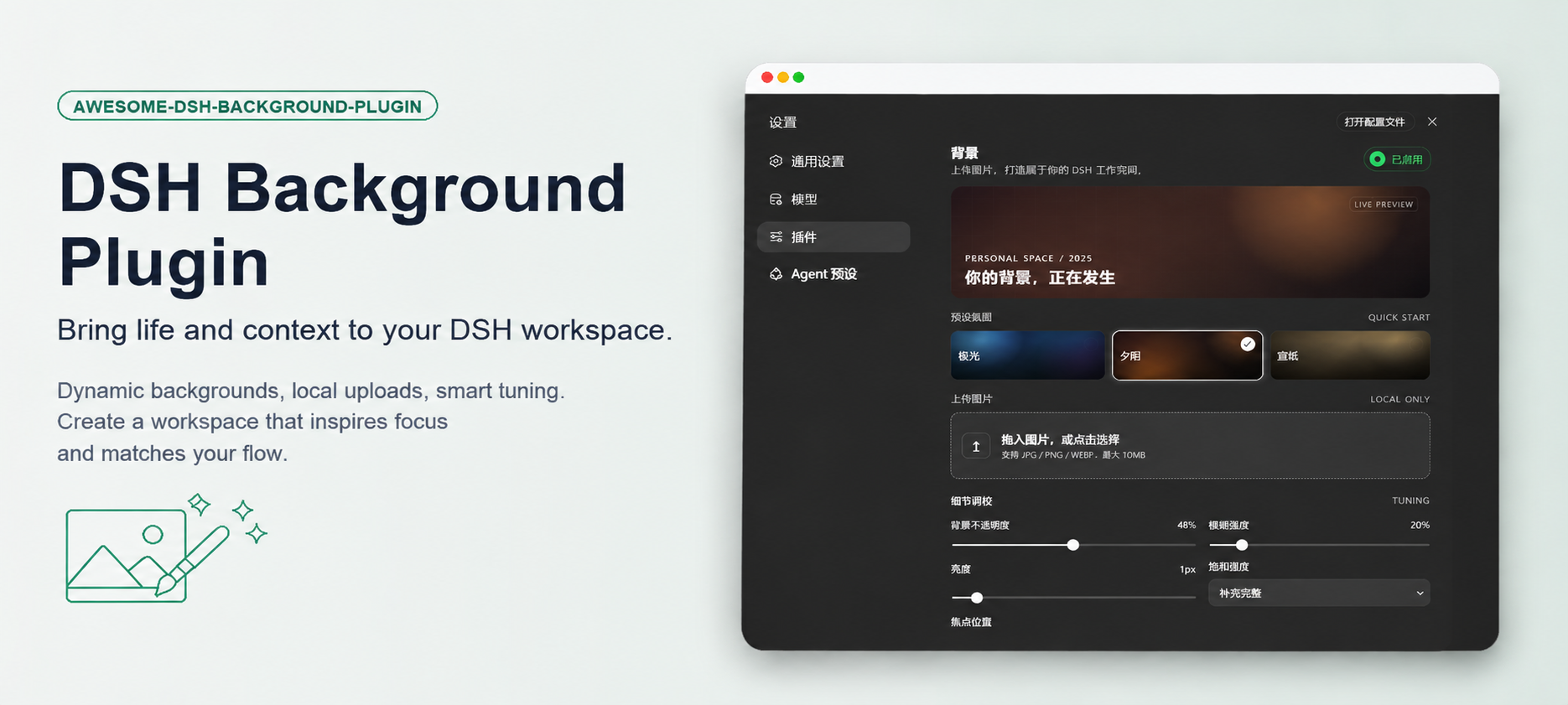
DSH Background
为 DSH Web 提供可上传图片 / 预设氛围的背景设置插件,设置持久化,重启不丢失。
简体中文 | English





为什么需要它?
DSH Web 默认只有一套主题色背景。如果你和我一样,希望自己的工作空间不再千篇一律,可能已经试过:
- 直接改主题文件 / CSS —— 不可行。DSH 是插件化架构,主题走 CSS 变量,任何更新都会覆盖你的修改;
- 用油猴脚本 / 浏览器插件改样式 —— 侵入性强、要写选择器、还要跟着 DSH 版本走,维护成本高;
- 放弃个性化 —— 长时间盯着单调的纯色界面,容易疲劳也缺少归属感。
这个插件通过 DSH 官方的 Cordis 插件机制,把「背景」变成设置页里的一个正式设置项,并解决了实现过程中最棘手的三个坑:
- 设置保存被静默拒绝 —— DSH 的 Host 只允许白名单内的设置命名空间被浏览器读写,否则一点保存就回滚。插件附带了
expose-namespace.mjs一键脚本,把ui-background加入白名单; - 对话区盖住背景 —— DSH 的对话主区、详情面板、布局框架都有不透明背景。插件在背景激活时让这些页面级容器透出背景层,同时保留侧栏、消息气泡、输入框的原有表面;
- 图片上传即丢 —— 大图写设置文档慢、重启就消失。插件在浏览器端把图片压缩到 1600px / WEBP 后再写入设置,上传即自动持久化,重启后原样恢复。
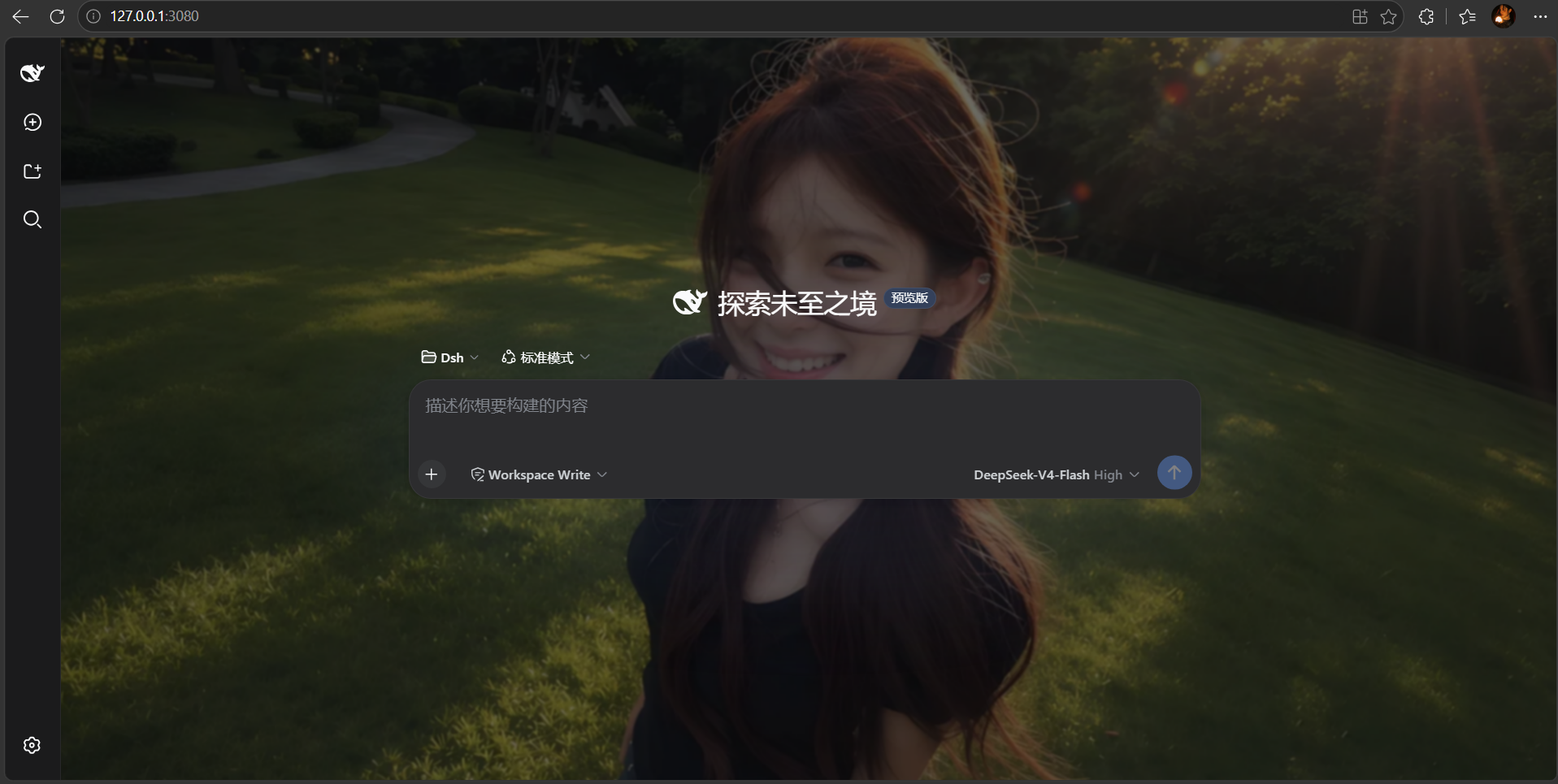
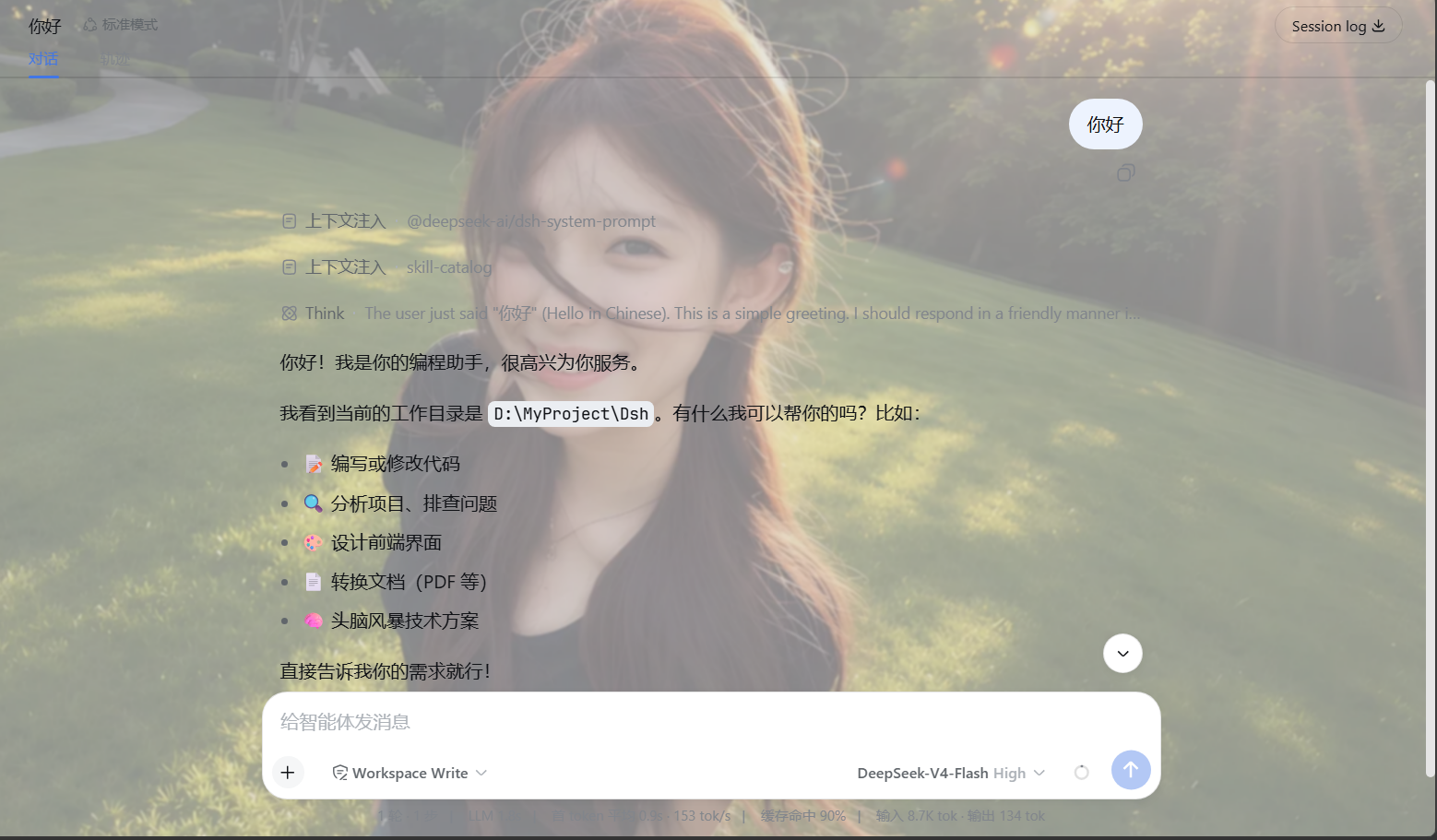
截图
暗色模式 + 自定义图片背景:
浅色模式 + 自定义图片背景:
功能
- 🖼️ 上传你自己的图片:支持 JPG / PNG / WEBP / GIF(GIF 经 Canvas 处理后会转为静态图片),浏览器本地压缩(长边 ≤ 1600px,WEBP 输出,兼顾画质与体积)。上传即自动保存,无需再点保存按钮,重启后自动恢复。
- 🎨 三种预设氛围:极光(aurora)、余烬(ember)、宣纸(paper),一键切换、点击即时生效,不想找图也能快速换个心情。
- 🎚️ 五维细调:图像存在感(透明度)、暗色遮罩(保证前景可读)、柔焦(模糊)、适配方式(铺满 / 完整显示 / 拉伸)、焦点位置(居中 / 顶部 / 底部 / 左侧 / 右侧)。
- 🔄 实时预览:设置面板内所见即所得,拖动滑块即时看到对话区的效果;不满意随时「放弃修改」。
- 🔒 隐私友好:图片在浏览器中压缩后,经本机 DSH 设置接口写入本地设置文档,不会发送给第三方图片服务。
- 🌐 双语界面:中文 / English。
- 🧩 低侵入、可随时移除:背景是浏览器内一个固定图层,不修改、不遮挡任何对话内容;关闭「已启用」开关或点击「恢复默认」即可完全移除,不留痕迹。
- 🌗 主题兼容:浅色 / 深色主题下都正常工作(附带的暗色模式截图就是真实效果)。
安装
⚡ 一键安装(推荐,小白友好)
准备好 Node.js(≥ 18)、pnpm 和 DSH 后,运行一个安装脚本即可自动完成「打包 → 安装 → 白名单」:
# 1. 拿到代码:GitHub 页面点 Code → Download ZIP 解压,或执行:
git clone https://github.com/leavestring/awesome-dsh-background-plugin.git
cd awesome-dsh-background-plugin

# 2. 一键安装(默认装到 web profile):
node scripts/install.mjs

# 3. 完全停止原来的 DSH 进程,再重新启动:
dsh web
然后打开 http://127.0.0.1:3080(Ctrl+F5 强刷,清掉旧缓存),进入 设置 → 通用设置 → 背景 即可使用。
装到其他 profile:
node scripts/install.mjs --profile 你的profile名如果提示
dsh命令找不到(你是用 npx 启动 DSH 的):
- Windows PowerShell:
$env:DSH_CMD = "npx @deepseek-ai/dsh"后重新运行;安装后用npx @deepseek-ai/dsh web启动- macOS / Linux:
export DSH_CMD='npx @deepseek-ai/dsh'后重新运行;安装后用npx @deepseek-ai/dsh web启动安装脚本目前自动识别常见的 npm/npx DSH 安装位置。若白名单步骤提示找不到目标,请参考下方“手动安装”的第 3 步显式传入文件路径。
🤖 让 DSH Agent 帮你安装
如果你现在正通过 DSH Web 与 Agent 对话,可以把下面这段提示词直接发送给 Agent:
请帮我安装 DSH Background 插件。
仓库地址:
https://github.com/leavestring/awesome-dsh-background-plugin.git请按以下要求操作:
- 检查 Node.js、pnpm、DSH 版本,以及当前实际使用的 DSH 安装位置;
- 克隆仓库并进入
awesome-dsh-background-plugin目录;- 将插件打包并安装到
webprofile;- 检查插件是否已加入 Web profile 的 dependencies 和 bundles;
- 检查当前实际使用的
dsh-host-apiproxy是否已暴露ui-background;- 如果尚未暴露,只修改当前 DSH 实际使用的安装副本,不要随意修改其他 npx 缓存;
- 安装过程中不要启动第二个 DSH Web 服务;
- 完成安装并验证结果后,提醒我需要手动重启 DSH;
- 如果关闭当前 DSH 会中断你的会话,请不要替我关闭或重启,而是把正确的重启命令告诉我;
- 如果任何步骤失败,请停止操作并报告具体错误,不要反复执行或尝试破坏性修改。
[!IMPORTANT]
如果执行安装的 Agent 就运行在当前 DSH 中,关闭 DSH 会立即中断 Agent 会话。因此,Agent 安装完成后通常不会替你关闭或重启当前 DSH。
看到 Agent 报告安装成功后,请你回到启动 DSH 的终端,手动停止原来的 DSH,然后重新启动。
如果你平时直接使用 dsh:
dsh web
如果你平时通过 npx 使用 DSH:
npx @deepseek-ai/dsh web
重启完成后,打开 http://127.0.0.1:3080,按 Ctrl+F5 强制刷新,然后进入:
设置 → 通用设置 → 背景
Agent 安装本质上仍然执行本页的安装流程,只是由 Agent 自动检查环境、执行命令并验证结果。请仅在可信的 Agent 环境中安装可信仓库。
🧑🔧 手动安装(想了解每一步在做什么)
第 1 步:打包插件 —— 把源码打包成可安装的 .tgz:
pnpm pack --pack-destination .
第 2 步:安装到 DSH profile —— 装进你的 DSH 配置:
dsh plugin --profile web add ./awesome-dsh-background-plugin-0.1.9.tgz
第 3 步:暴露命名空间(重要,当前 DSH 安装副本通常只需一次)
DSH 的 dsh-host-apiproxy 只允许白名单内的 settings 命名空间被浏览器读写。命名空间不在白名单时,保存会被拒绝(settings-not-exposed),表现就是:点「启用」后一保存又变回「未启用」。DSH 升级、清理 npx 缓存或更换安装方式后,可能需要重新执行这一步。
运行仓库内辅助脚本,把 ui-background 加入白名单(幂等,可重复运行):
node scripts/expose-namespace.mjs
如果脚本找不到 dsh 安装位置,手动传入文件路径:
node scripts/expose-namespace.mjs <path-to>/@deepseek-ai/dsh-host-apiproxy/lib/index.js
手动改法:在上面的文件里,往
WEB_SETTINGS_NAMESPACES数组("ui-theme"之后)加入"ui-background"。
第 4 步:重启并刷新
dsh web
打开 http://127.0.0.1:3080(必要时 Ctrl+F5 强刷),进入 设置 → 通用设置 → 背景。
❓ 常见问题(FAQ)
| 现象 | 解决 |
|---|---|
提示 pnpm not found |
安装 pnpm:npm install -g pnpm(或用 Corepack:corepack enable) |
提示 dsh 命令找不到 |
设置 DSH_CMD 环境变量后重跑(见上方一键安装说明) |
| 点「启用」保存后又变回「未启用」 | 白名单未生效:重跑 node scripts/expose-namespace.mjs,或按手动安装第 3 步手动添加 |
| 页面还是旧样子 / 背景不显示 | Ctrl+F5 强刷(浏览器缓存了旧版本),或重启 dsh web |
| 上传的图片重启后消失 | 确认插件是 0.1.6 及以上(上传即自动保存);旧版本需点「保存背景」 |
使用
- 打开 设置 → 通用设置 → 背景
- 点一个预设,或上传一张图片(上传后立即生效并持久化,无需点保存)
- 拖动「图像存在感 / 暗色遮罩 / 柔焦」滑块实时预览,满意后点 保存背景 持久化参数
- 想移除背景:点 恢复默认,或关闭「已启用」开关后保存
工作原理
- Host 侧插件(
lib/index.js)通过@deepseek-ai/dsh-settings注册ui-background命名空间与 Schemastery schema,让背景设置成为 DSH 设置体系的一部分。 - 浏览器侧插件(
lib/client.js)在settings.general.item插槽注册「背景」设置行,并通过 DSHsettingsScope读写设置,与官方设置项使用同一套持久化机制。 - 背景层是一个
position: fixed; z-index: 0的图层(#dsh-background-layer),始终位于页面最底层。背景激活时:- 把
--dsw-alias-bg-base覆盖为transparent,让对话主区、详情面板、布局框架透出背景; - 侧栏、消息气泡、输入框使用各自的专用变量,保持不透明,保证可读性与功能区分;
- 通过
createPortal渲染到<body>的下拉菜单(如消息「更多」菜单)保持原有定位与层级,点击不受影响。
- 把
- 图片经 Canvas 压缩为 dataURL 后,通过本机 DSH 设置接口写入本地设置文档(默认位于
~/.dsh/settings.yaml),不会发送给第三方图片服务。
目录结构
awesome-dsh-background-plugin/
├── lib/
│   ├── index.js               # Host 插件:注册 ui-background 设置命名空间与 schema
│   └── client.js              # 浏览器端:背景图层、设置行、上传压缩、持久化
├── scripts/
│   ├── install.mjs            # 一键安装脚本(打包 + 安装 + 白名单)
│   └── expose-namespace.mjs   # 辅助脚本:把 ui-background 加入 Host 暴露白名单
├── screenshots/               # 仓库展示截图
├── cordis.patch.yml           # DSH bundle 补丁:注册插件条目
├── package.json               # 插件元数据(dsh.client 注入信息)
├── CHANGELOG.md
└── LICENSE                    # MIT
开发
node --check lib/client.js && node --check lib/index.js   # 语法检查
pnpm pack --pack-destination .                            # 打包
许可证
Install
Install the catalog once, then DeepSeek Harness can find and install any plugin from this site automatically:
dsh plugin add dshbase-catalogThen say "install awesome-dsh-background-plugin for me" — your agent finds it in the directory and installs it. Docs: dshbase-catalog · verified packs.
This plugin is GitHub source (not published to npm) — install it straight from the repo:
Web profile:
dsh plugin --profile web add github:leavestring/awesome-dsh-background-pluginHeadless (CLI) profile:
dsh plugin --profile headless add github:leavestring/awesome-dsh-background-pluginTest report
Verified: L1 install + L2 load + L3 runtime from GitHub source on dsh 0.1.0-rc.6.
When to use it
Change how dsh looks or how you interact with it — a theme, a skin, or a new panel that reshapes the workspace.
Who it's for
Users who spend hours in the web UI and want it to look and feel the way they work.
For developers — extending it
Skins, panels, and theme tokens are the extension points — author a new skin, add a panel, or sync tokens with an upstream palette.
Share this badge
Drop this badge into your README — it links back here and updates automatically when our test status changes:

[](https://dshbase.com/plugins/awesome-dsh-background-plugin/)<a href="https://dshbase.com/plugins/awesome-dsh-background-plugin/"><img src="https://dshbase.com/badges/awesome-dsh-background-plugin.svg" alt="dshbase install-tested"></a>