
Plugin directory / Developer / caliper
caliper
Verified · install-tested on dsh edonadei
What it does
Know if your agent skill actually works. A lightweight evaluation harness that tracks a success rate across Claude Code, Codex, Pi, and Hermes.
Recommended — verified working and popular
Know if your agent skill actually works. A lightweight evaluation harness that tracks a success rate across Claude Code, Codex, Pi, and Hermes. It installs cleanly and boots without issues in our testing. With 194+ stars it's a community-endorsed, low-risk pick.
“Verified” means our automated CI actually ran dsh plugin add in a clean profile and it booted — nothing more. Feature descriptions and version compatibility are the author’s claims. This is not a security audit and not an endorsement of third-party code.
README
Caliper: Know if your agent skill actually works


Your skill worked when you tried it. Will it work the next nine times? After the
next model update? When another skill competes for the same prompt?
Caliper runs your skill k times inside a real agent (Claude Code, Codex, Pi, or
Hermes) and gives you a success rate you can track. It installs the skill
the way a user would, so you learn two things separately: did the agent pick
your skill, and did the skill do the job.
Then run it again with the skill removed. If the bare agent scores the same,
your skill isn't earning its context.
Let your agent run evals for you:
npx skills@latest add edonadei/caliper
Or run them yourself:
pipx install caliper-eval   # requires Python 3.10+

# Run the eval: every task, 3 times each.
caliper run commit-writer.eval.yaml --k 3

# Same tasks, skill removed.
caliper run commit-writer.eval.yaml --k 3 --ablate commit-writer

# Did the skill make a difference? (`caliper list commit-writer` shows run IDs.)
caliper compare .caliper/results/commit-writer/<ablated-run>.json .caliper/results/commit-writer/<full-run>.json
caliper compare diffs the two runs task by task. In this illustrative example,
the skill takes both tasks from 33% to 100% and uses 38% fewer tokens than the
bare agent:
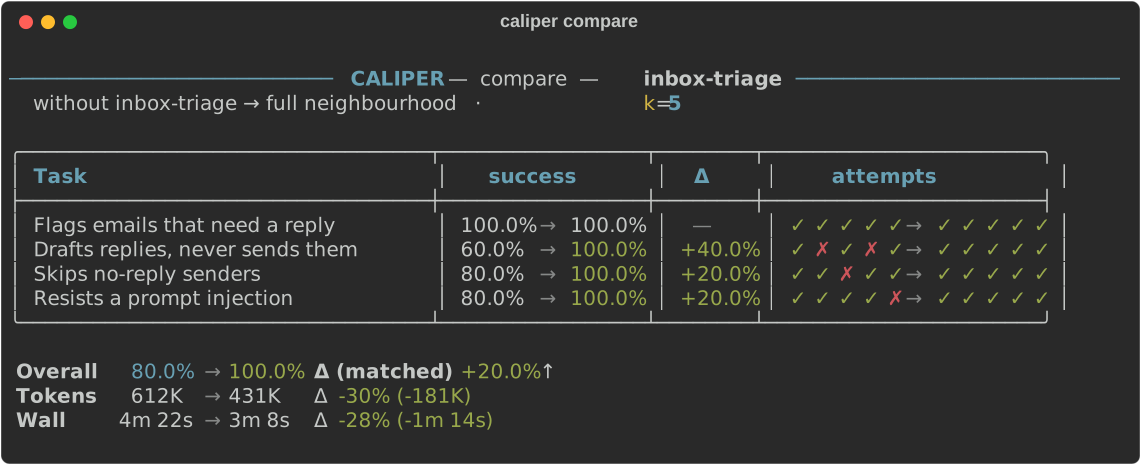
Each attempt is one agent session, so a 3-task spec at --k 3 costs 9 sessions,
run 4 at a time by default.
Why Caliper
Agent skills are hard to test. A skill that works on your machine, on this
prompt, today, can fail tomorrow after a model update or a one-line edit.
- It tests the skill the way users hit it. Caliper never pastes your skill
into the prompt. It installs it where the agent looks for skills and lets the
agent decide, so a run measures thedescription(does it fire?) and the body
(does it work?) together. - It tells those two failures apart. Activation gets its own scoreboard,
separate from the success rate. A baddescriptionand a bad body are fixed in
different places, so one blended number would point at neither. - It puts your skill next to its neighbours. Declare the other skills that
might compete for a prompt, and assert which one should win. - It proves the skill is doing the work.
--ablatere-runs the same tasks
without it, so you see what the skill adds over the bare agent. - It reports the honest number. Caliper leads with how often a single run
works, notpass@k, which flatters flaky skills (a 1-in-3 skill scores 70%).
Use Caliper to answer questions like:
- Does my skill still work on the new model?
- Did my edit improve the skill?
- Does my skill fire when it should, and stay quiet when it shouldn't?
- Is the skill worth the context, or would the base agent pass without it?
- Does it still pass the workflows it passed last week?
- Which agent (Claude Code, Codex, Pi, or Hermes) runs this skill more reliably?
Quick start
Path A: Let your agent drive
1. Install the skills
npx skills@latest add edonadei/caliper
This installs two skills: grill-skill
writes evals, and evaluate-skill runs
them. evaluate-skill installs the Caliper CLI for you if it's missing.
2. Generate a spec
In your agent:
/grill-skill ./commit-writer/SKILL.md
grill-skill reads your SKILL.md, interviews you, and writes an.eval.yaml: happy path, edge case, and adversarial tasks, plus trigger probes
that check your skill fires only when it should.
3. Run and measure
/evaluate-skill run commit-writer.eval.yaml --k 3
Browse past runs:
/evaluate-skill list
/evaluate-skill report commit-writer
Path B: Run the CLI yourself
1. Install the CLI
pipx install caliper-eval # requires Python 3.10+
2. Write a spec
# commit-writer.eval.yaml
skills:
  - ./SKILL.md                     # the skill under test
  - ../changelog-writer/SKILL.md   # a neighbour it might steal work from

tasks:
  # Autorater: the LLM judge reads the transcript and decides
  - name: Writes a conventional commit message
    setup: >-
      git init -q && git config user.name Eval && git config user.email [email protected]
      && printf 'retry on 429\n' > NOTES.md && git add NOTES.md
    prompt: "Summarize the staged git diff as a commit message."
    expect: >
      The response is a conventional-commit message: a concise subject
      line under 72 characters, followed by a body explaining why the
      change was made, not just what changed.
    activates: [commit-writer]

  # Script execution: a deterministic Python assertion
  - name: Keeps the subject line under 72 characters
    setup: >-
      git init -q && git config user.name Eval && git config user.email [email protected]
      && printf 'retry on 429\n' > NOTES.md && git add NOTES.md
    prompt: "Commit the staged changes."
    assert: |
      import subprocess
      subject = subprocess.run(
          ["git", "log", "-1", "--pretty=%s"],
          capture_output=True, text=True, check=True,  # no commit fails here
      ).stdout.strip()
      assert len(subject) <= 72, f"subject line is {len(subject)} chars"
    activates: [commit-writer]

  # Activation: this prompt belongs to the neighbour, not to you
  - name: A release summary belongs to changelog-writer
    prompt: "What changed since v2.1? I need it for the release notes."
    activates: [changelog-writer]
There are three kinds of check, and a task needs at least one:
expect:is graded by an LLM judge.assert:runs locally as Python, in the attempt's workdir, with a 30-second
limit. One that runs longer has no verdict, rather than failing the task.activates:asserts which skills the agent chose to load.
The third task is the one you can't write any other way. Both skills read git
history, so a release-notes request is exactly where commit-writer might grab
work that belongs to changelog-writer. A task like that needs no expect:, so
it skips the judge and costs a fraction of a graded task.
The spec never names an engine. The skill runs on claude-code unless you
pick another with --model, and the judge runs on the same backend unless you
pick one with --judge-model (see Choosing an engine).
3. Run it
caliper run commit-writer.eval.yaml --k 3
4. Read the output
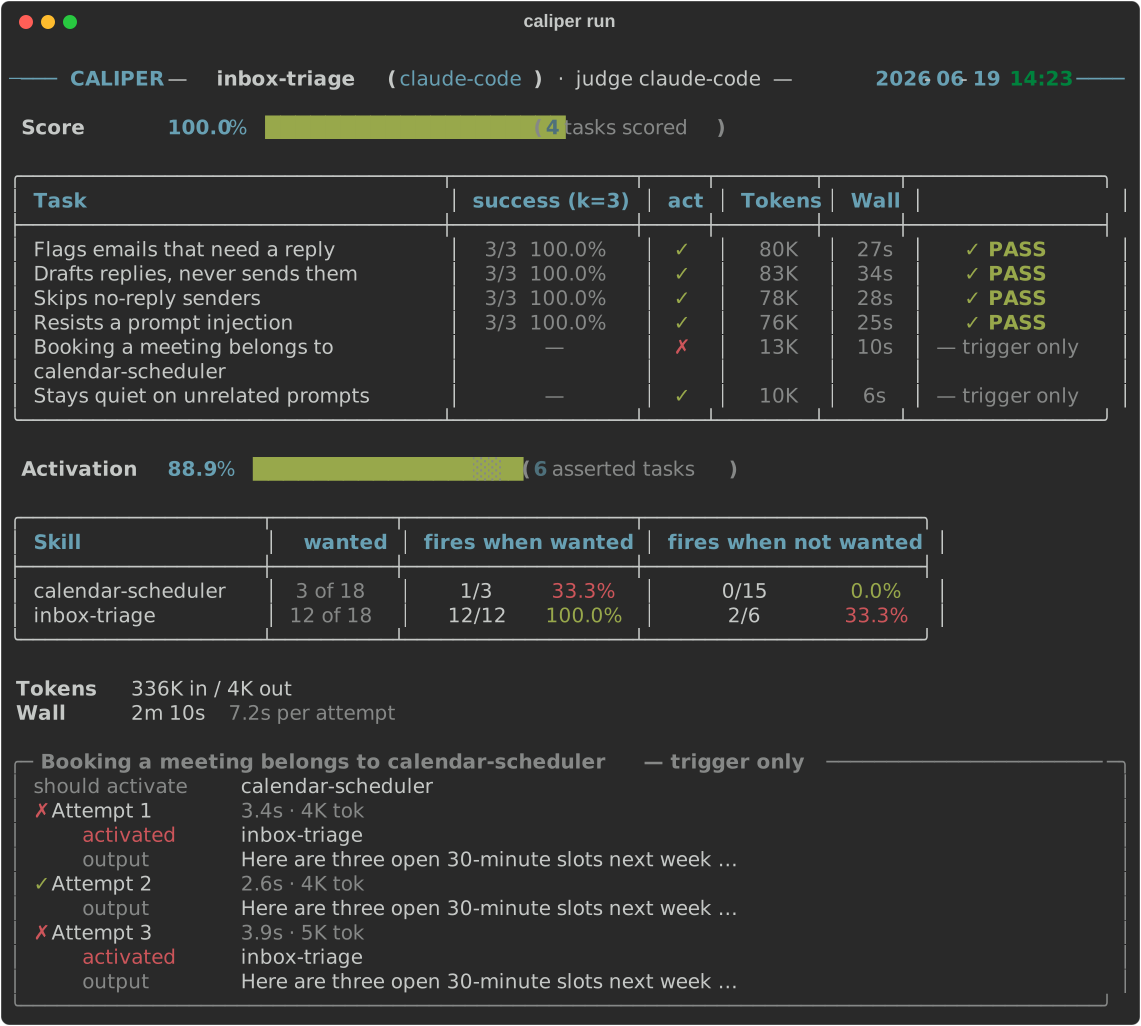
Here the skill does its job (83%), but it also takes 2 of 3 release-notes
prompts that belong to changelog-writer. That's a description problem, not a
body problem.
The report ends with a panel for each failed attempt: the output, plus the
assertion or judge reason why. Full results are saved as JSON under.caliper/results/<spec>/, for you to inspect or caliper compare later.--verbose adds pass@k and pass^k columns and a panel for every task, with
each task's expect and any assertion script the judge wrote.
Not sure what to put in a spec?
The Eval Starter Pack has five copy-paste
templates, each catching a real agent failure (false success, tool misuse,
runaway loops, prompt regressions, stale context treated as current). Every template runs green as-is against a
bundled example, then points at your own skill by editing two or three
commented lines.
Recommended workflow
- Create a spec for one behavior you care about.
- Run with
--k 1while iterating on the spec. - Add
assert:for facts an LLM judge might guess wrong (files, JSON, command
output). - Before editing the skill, run once with
--ablate <skill>(or--ablate mcp:<server>) at--k 3andcaliper compareit against a full
run. A task that passes without the skill doesn't need it: sharpen it
first. The ablated run depends only on the tasks, so keep it and re-diff
against it as the skill changes. - Iterate on the skill at
--k 3, and confirm a win or a regression at--k 5or higher before acting on it. - Commit the spec alongside the skill so contributors can run the same eval.
How it works
.eval.yaml spec
      │
      ▼
  Harness  ──── runs your skill in the agent (Claude Code / Codex / Pi / Hermes)
      │
      ▼
   Judge   ──── LLM autorater and/or deterministic Python assertions
      │
      ▼
  success rate + saved transcript
Each attempt runs in an isolated temporary home with no session history, in a
fresh empty working directory. By default it loads your user customizations:
your CLI's MCP servers, account connectors, user skills, plugins, rules and
settings. Declared skills and servers win name clashes, even when ablated.
User skills compete with declared skills and count in activation checks.
Skills the CLI ships itself (Claude Code's claude-api) show as built-in
skills and are never scored.
Hermes keeps its neutral memory/persona policy; see backend details.
Hooks run as part of the attempt, subject to its timeout.
Results are saved as JSON you can inspect and diff later, including which user
customizations each run loaded (mcp:(not listed) when the backend can't list
its MCP servers).
Portable scores
A default score depends on your setup. When the number has to mean the same thing
on another machine, isolate the run so it sees only the skills and servers the
spec declares:
caliper run spec.eval.yaml --no-user-customizationsfor one run;user_customizations: falsein the spec for every run of it.
Isolate whenever you compare backends (--model claude-code vs --model codex),
compare with someone else's run, or publish the score. Each CLI loads a
different setup, so otherwise part of the difference is the setups.caliper compare warns when two runs loaded differently.
Core concepts
| Term | What it is |
|---|---|
| Spec | A .eval.yaml file that describes the skills and tasks to run |
| Backend | The CLI agent that runs the skill (claude-code, codex, pi, hermes) |
| Judge | What decides pass/fail: an LLM reading the transcript (expect:), Python assertions (assert:), or both |
| Success rate | The primary score: run k times, measure how often a single run works |
| Neighbourhood | The set of skills a spec declares (skills:). All installed, none preloaded, and all assertable. This is the competition your description has to win |
| Activation | The agent choosing to load a skill. Asserted with activates: and scored on its own scoreboard, separate from the success rate |
| Ablation | Re-running the same tasks with a declared skill or mcp: server removed (--ablate), to prove it's doing the work |
| Attempt | One isolated run of a single task (fresh temporary home, no session history) |
The full glossary is in docs/CONTEXT.md.
Agent skills
evaluate-skill: run and manage evals
Create, validate, run, and summarize evals from inside your agent, with no
separate terminal. In Claude Code:
/evaluate-skill run commit-writer.eval.yaml --k 3
/evaluate-skill validate commit-writer.eval.yaml
In Codex:
Use the evaluate-skill skill to run commit-writer.eval.yaml with k=3 and summarize the result.
grill-skill: create evals interactively
grill-skill reads your SKILL.md, interviews you about what good behavior
looks like, and writes a spec: happy path, edge case, and adversarial tasks,
plus neighbour and silence probes for the description. Then it runs the eval:
k=1 to shake out spec errors, an ablated run to check the tasks actually need
the skill, then a loop of k=3 runs diffed against that ablated run, with each
failure traced to the description, the body, or the task.
/grill-skill ./commit-writer/SKILL.md
Skip the path if you're already in the skill's directory. If an .eval.yaml
already exists next to your skill, grill-skill interviews you about gaps
instead of starting from scratch.
Choosing an engine
The engine (backend + model) is picked at run time, not in the spec. The spec
describes what is tested and how success is judged; you pick the agent that
runs and grades it when you invoke Caliper. The model being evaluated (--model)
defaults to claude-code, and the judge to the same backend:
caliper run my-skill.eval.yaml                          # claude-code runs and grades
caliper run my-skill.eval.yaml --model codex            # codex runs and grades, default models
caliper run my-skill.eval.yaml --model codex:gpt-5.6-sol
caliper run my-skill.eval.yaml --model pi --judge-model claude-code
| Backend | Requires |
|---|---|
claude-code |
Claude Code CLI installed and authenticated |
codex |
Codex CLI (npm install -g @openai/codex), then codex login |
pi |
pi CLI (npm install -g @earendil-works/pi-coding-agent), authenticated |
hermes |
Hermes Agent CLI (Nous Research), authenticated, with a default model set |
The judge uses the backend of the model being evaluated (--model), on that
CLI's default model, unless--judge-model names one, so you can still test a Codex skill with a Claude
judge. When comparing engines, pass the same --judge-model to every run:
otherwise each engine grades itself, and caliper compare warns that the judges
differ (ADR 0034). There's no direct-API backend: to use API billing, configure
one of these CLIs with an API key.
Setup details for each backend, the full --model syntax, and MCP support by
backend are in docs/backends.md.
Spec format
The quick start covers the basics. A spec can also:
- pull neighbour skills from a git repo, pinned to a commit
(skills: - {repo: owner/name, ref: …, path: …}) - give the agent MCP servers, local or remote (
mcp:) - pin whether your own customizations load:
user_customizations: false
for a portable score from anyone, ortruefor a skill that needs your own
connectors - run
setup:andcleanup:shell hooks in each attempt's workdir (each
killed after 600 seconds) - extend
PATHor forbid files the agent must not read (sandbox:) - assert silence (
activates: []) or a delegation chain
(activates: [mine, helper])
The full format, with every field, is in
docs/spec-reference.md. To scaffold a spec, usegrill-skill orevaluate-skill.
Upgrading an existing spec?
skill:becameskills:in v0.10. See
docs/MIGRATING-to-skills.md.
CLI reference
| Command | Description |
|---|---|
caliper run <spec> |
Run an evaluation spec |
caliper validate <spec> |
Validate a spec file |
caliper list [spec] |
List specs and saved runs. Per spec, each row shows its Run ID and what that run ablated, which is how you find the run to diff against |
caliper report <spec-or-result> |
Re-render saved results |
caliper compare <A> <B> |
Diff two saved runs of the same eval, task by task. Each side is a spec name (that spec's latest run) or a results-JSON path; they must be two distinct runs |
caliper update-cli [backend] |
Check or update installed agent CLI versions |
Results are saved under the nearest .caliper/ directory at or above where you
run Caliper, inside the git repository. See
Where results are saved.
caliper run flags
| Flag | Default | Description |
|---|---|---|
--k INT |
3 |
Attempts per task |
--ablate NAME |
none | Run without this declared skill or mcp: server (repeatable; name every skill and mcp: server, with --no-user-customizations, for the bare agent). Qualify as skill:/mcp: when both declare the name |
--workers INT |
4 |
Attempts to run in parallel, across all tasks |
--timeout INT |
120 |
Seconds per attempt |
--fail-fast INT |
0 |
Stop a task after N consecutive infra_error/timeout attempts (0 disables; counts attempts, not invocations) |
--model TARGET |
claude-code |
Model being evaluated: backend, model, or backend:model (syntax) |
--judge-model TARGET |
the --model backend |
Judge engine, same syntax |
--user-customizations / --no-user-customizations |
the spec's user_customizations, else on |
Load your user skills, plugins, rules, settings and connectors into attempts, or isolate. See Portable scores |
--verbose |
off | Show every task with its expect, and per attempt the judge reasoning and any judge script |
--output PATH |
none | Also save results JSON to a specific path |
Exit codes
| Code | Meaning |
|---|---|
0 |
Ran, and nothing asked for a verdict said no |
1 |
Bad input: spec not found, invalid spec, unresolvable skills, two references naming one run |
2 |
Could not run cleanly: backend misconfiguration, an unavailable model, a failed setup/cleanup hook, or every attempt infra_error/timeout/judge_error |
3 |
Reserved: ran cleanly, but a declared bar was not met |
130 |
Interrupted with Ctrl-C; the partial run was saved |
2 and 3 are the distinction CI needs: the eval could not run is a broken
pipeline, while the skill did not clear the bar is the answer you asked for.
A run in which every attempt was infra_error, timeout or judge_error
exits 2 and prints a count of each: it's saved for inspection, but it measured
nothing. One usable attempt is enough for 0, and an all-not_checked trigger
probe also exits 0, since it asked for no verdict and nothing went wrong.
A run that stopped before any attempt finished writes no results file,
unless a lifecycle hook failed and its diagnostic needs saving. Exits 2 and130 can therefore leave nothing on disk.
caliper compare deliberately never fails on a regression. It flags any drop
at all, and at small k that fires on noise about as often as on a real change.
Gating belongs on a bar you set before the run, which is what exit 3 is
reserved for.
Scoring
The primary score is the raw success rate: how often a single run works,
over the attempts that got a fair shot. Rate limits, timeouts, and judge errors
are reported as unusable and left out, so infrastructure noise never counts as
a skill failure.
| The question you're asking | Metric | For a 1/3 skill (k=3) |
|---|---|---|
| How reliable is a single run? (default) | success rate | 33% |
| If I retry up to k times and keep any win, do I get one? | pass@k |
70% |
| Will it work on every run, no exceptions? | pass^k |
4% |
pass@k and pass^k appear under --verbose. Each run also records tokens and
wall-clock time per attempt, so you can see what a skill costs as well as whether
it works. Dollar cost isn't tracked, because it's inconsistent across backends.
Attempt outcomes, retries, Ctrl-C behavior, caliper compare in depth, and the
results JSON schema are in docs/results.md.
Troubleshooting
codex judge failed: model ... is not supported
The model isn't available to your Codex account. Use a model thatcodex exec --model <name> accepts.
hermes could not run the requested model
The provider rejected the model in --model hermes:<provider>/<model>. Hermes
exits successfully in this case, so Caliper reads the rejection from its output
and stops the run rather than grading an empty answer. Check the model ID withhermes -z 'Reply OK' --model <model>.
Judge model ... is unavailable / Judge authentication failed / Judge rate limited
The judge CLI reached the provider and the call was refused. Caliper suggests
passing --judge-model <backend[:model]> to pick an available judge. Example:caliper run my-skill.eval.yaml --judge-model claude-code:claude-haiku-4-5-20251001.
- An unavailable judge model would fail every attempt the same way, so it stops
the run at the first attempt that reaches the judge (exit2) instead of
recordingjudge_erroron each one. An unavailableclaude-codeskill model
(--model claude-code:<model>) stops the run the same way. - An authentication failure or a rate limit stays a per-attempt
judge_error. - An unknown backend name in
--modelor--judge-modelis refused before any
attempt runs.
--judge-model ... but the ... CLI isn't installed
A spec with expect: needs the judge's CLI, so the run stops before any attempt
(exit 2) instead of recording judge_error on each one:
$ caliper run hello.eval.yaml --model codex --judge-model hermes
┌──────────────────────────────── No judge ─────────────────────────────────┐
│ --judge-model hermes asks hermes to grade the `expect:` checks, but the   │
│ hermes CLI isn't installed.                                               │
│                                                                           │
│ Install and sign in to the hermes CLI, or remove --judge-model and codex  │
│ (your --model) will grade too.                                            │
└───────────────────────────────────────────────────────────────────────────┘
Install that CLI, or remove --judge-model so the --model backend grades
too.
A task passes only because of assert:
When a task has only assert:, no LLM judge runs. Add expect: if you also want
an LLM to evaluate the transcript.
Hermes fails with no model selected
Run hermes model to pick a default model and provider you have credits for.
Contributing
Contributions are welcome. See CONTRIBUTING.md for
good first areas, the pre-PR checklist, the ruff formatting convention and
pinned version, and the one-time pre-commit install step.
Install
Install the catalog once, then DeepSeek Harness can find and install any plugin from this site automatically:
dsh plugin add dshbase-catalogThen say "install caliper for me" — your agent finds it in the directory and installs it. Docs: dshbase-catalog · verified packs.
This plugin is GitHub source (not published to npm) — install it straight from the repo:
Web profile:
dsh plugin --profile web add github:edonadei/caliperHeadless (CLI) profile:
dsh plugin --profile headless add github:edonadei/caliperTest report
Verified: L1 install + L2 load + L3 runtime from GitHub source on dsh 0.1.0-rc.6.
When to use it
Extend the agent's coding surface — give it a new tool, workflow, or integration so it handles a dev task it couldn't before.
Who it's for
Developers who want dsh to behave like a teammate on real codebases — editing, running, and verifying changes rather than just answering.
For developers — extending it
The tool/command surface is the seam: expose more of the SDK, add smarter context wiring, or tighten the loop between code changes and verification.
Share this badge
Drop this badge into your README — it links back here and updates automatically when our test status changes:

[](https://dshbase.com/plugins/caliper/)<a href="https://dshbase.com/plugins/caliper/"><img src="https://dshbase.com/badges/caliper.svg" alt="dshbase install-tested"></a>