
Plugin directory / Developer / codex-dsh-bridge
codex-dsh-bridge
Verified · install-tested on dsh knottttt
What it does
Codex bridge for dispatching tasks to DeepSeek Harness sessions, with Harness settings integration.
Works — verified, early-stage project
Codex bridge for dispatching tasks to DeepSeek Harness sessions, with Harness settings integration. It installs cleanly and boots without issues in our testing. It's early-stage but functional.
“Verified” means our automated CI actually ran dsh plugin add in a clean profile and it booted — nothing more. Feature descriptions and version compatibility are the author’s claims. This is not a security audit and not an endorsement of third-party code.
README
Codex DeepSeekHarness Bridge
Let Codex dispatch local project tasks to DeepSeek Harness sessions. All code in this repository was generated by Codex.
ENGLISH | 简体中文
Overview
codex-dsh-bridge connects Codex to a locally running DeepSeek Harness WebUI through its HTTP RPC API.
The repository contains both sides of the integration:
- a Codex plugin with MCP tools and a collaboration skill;
- a DeepSeek Harness companion that adds bridge controls to Harness settings.
Beginner one-click install
Requirements:
- Windows PowerShell 5.1 or PowerShell 7;
- Node.js 18 or newer;
- Codex CLI with plugin support;
- DeepSeek Harness with the
dshcommand available.
Download and run the installer:
$installer = Join-Path $env:TEMP "codex-dsh-bridge-install.ps1"
Invoke-WebRequest "https://raw.githubusercontent.com/knottttt/codex-dsh-bridge/main/install.ps1" -OutFile $installer
powershell -ExecutionPolicy Bypass -File $installer
The installer:
- adds or refreshes the Codex marketplace;
- installs the Codex plugin;
- installs the Harness companion into the
webprofile; - prints the required restart steps.
After installation:
- restart the DeepSeek Harness WebUI;
- start a new Codex task;
- open
Settings → Plugins → Plugin configurationin Harness; - confirm that Codex DSH Bridge is enabled.
Manual installation
Run these commands if you prefer to review each action:
codex plugin marketplace add knottttt/codex-dsh-bridge --ref main
codex plugin add codex-dsh-bridge@codex-dsh-bridge
dsh plugin --profile web add github:knottttt/codex-dsh-bridge#main
Restart Harness and start a new Codex task after the commands finish.
Updating
Run the installer again. It refreshes the marketplace, reinstalls the Codex plugin, and updates the Harness package:
powershell -ExecutionPolicy Bypass -File $installer
Uninstalling
Download and run the uninstaller:
$uninstaller = Join-Path $env:TEMP "codex-dsh-bridge-uninstall.ps1"
Invoke-WebRequest "https://raw.githubusercontent.com/knottttt/codex-dsh-bridge/main/uninstall.ps1" -OutFile $uninstaller
powershell -ExecutionPolicy Bypass -File $uninstaller
Saved bridge settings are preserved by default. Pass -RemoveSettings to remove them as well.
Components
| Component | Location | Purpose |
|---|---|---|
| Codex plugin | .codex-plugin/, .mcp.json |
Registers the plugin and its local MCP server |
| MCP bridge | scripts/ |
Connects Codex tools to the DSH HTTP RPC API |
| Collaboration skill | skills/ |
Guides Codex when delegating work to DSH |
| Harness companion | dsh-plugin/ |
Adds bridge controls to Harness settings |
| Marketplace | .agents/plugins/marketplace.json |
Makes the Codex plugin installable from GitHub |
| Installer | install.ps1 |
Installs and updates both sides of the bridge |
Available Codex tools
- inspect the current DSH host;
- list and filter DSH sessions;
- create a session for a project;
- queue or steer a message;
- read clean user and final assistant messages;
- wait for bounded completion;
- cancel or fork a session;
- dispatch a task through one convenience tool.
Harness settings
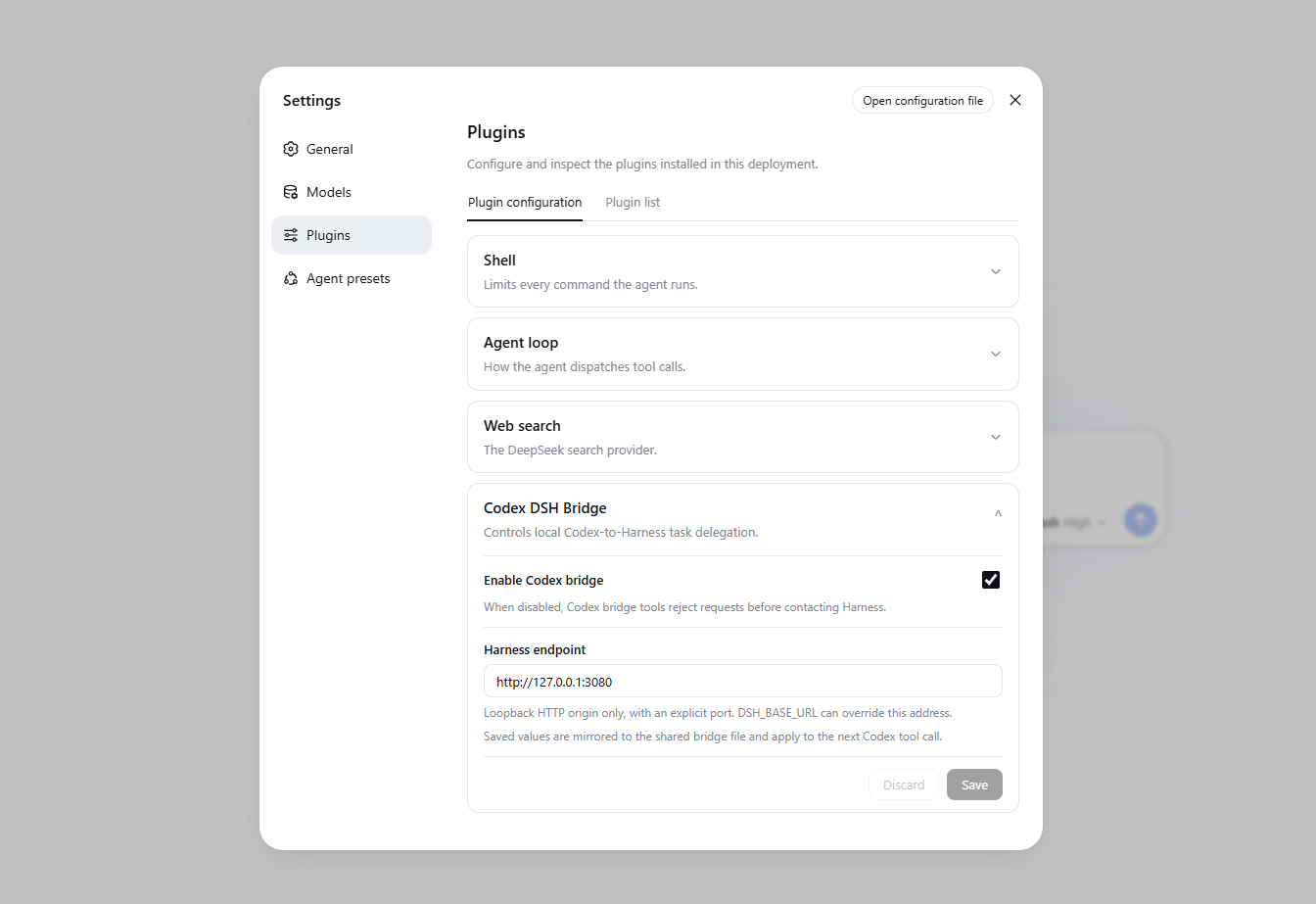
The companion adds a configuration card at:
Settings → Plugins → Plugin configuration → Codex DSH Bridge
The card controls:
- whether the Codex bridge is enabled;
- which local Harness endpoint the bridge uses.
Settings are mirrored to:
%DSH_HOME%\codex-dsh-bridge.json
When DSH_HOME is unset, the fallback location is:
%USERPROFILE%\.dsh\codex-dsh-bridge.json
The MCP process reads this file for every tool call, so endpoint and enabled-state changes apply without restarting Codex. The optional DSH_BASE_URL environment variable overrides the saved endpoint, while the Harness enabled switch still takes priority.
Local-only security boundary
The bridge accepts only loopback HTTP origins with an explicit port:
127.0.0.1localhost::1
HTTPS, LAN addresses, credentials, URL paths, query parameters, and fragments are rejected.
Troubleshooting
Codex tools do not appear
Start a new Codex task. Plugins and MCP tools are loaded when a task starts.
Harness settings card does not appear
Restart the Harness WebUI and verify the installed package:
dsh plugin --profile web list --depth 0
The list should contain codex-dsh-bridge-companion.
A required command is missing
Verify the commands independently:
node --version
codex --version
dsh --version
Install only one side
The installer supports:
.\install.ps1 -SkipDsh
.\install.ps1 -SkipCodex
Development
Run the complete test suite and package check from the repository root:
npm test
npm run pack:check
The suite covers bridge configuration, endpoint validation, Harness settings, revision conflicts, client registration, and distribution metadata.
Install
Install the catalog once, then DeepSeek Harness can find and install any plugin from this site automatically:
dsh plugin add dshbase-catalogThen say "install codex-dsh-bridge for me" — your agent finds it in the directory and installs it. Docs: dshbase-catalog · verified packs.
This plugin is GitHub source (not published to npm) — install it straight from the repo:
Web profile:
dsh plugin --profile web add github:knottttt/codex-dsh-bridgeHeadless (CLI) profile:
dsh plugin --profile headless add github:knottttt/codex-dsh-bridgeTest report
Verified: L1 install + L2 load + L3 runtime from GitHub source on dsh 0.1.0-rc.6.
Share this badge
Drop this badge into your README — it links back here and updates automatically when our test status changes:

[](https://dshbase.com/plugins/codex-dsh-bridge/)<a href="https://dshbase.com/plugins/codex-dsh-bridge/"><img src="https://dshbase.com/badges/codex-dsh-bridge.svg" alt="dshbase install-tested"></a>