
Plugin directory / Developer / deepseek-harness-cli
deepseek-harness-cli
Unverified peiyuwang54
What it does
DeepSeek CLI
Unverified — not yet verified
DeepSeek CLI Not yet verified — install and test it yourself.
“Unverified” means our automated CI has not yet installed this plugin. Feature descriptions and version compatibility are the author’s claims. This is not a security audit and not an endorsement of third-party code.
README
DeepSeek CLI is an open-source coding agent powered by DeepSeek that runs locally in your terminal.
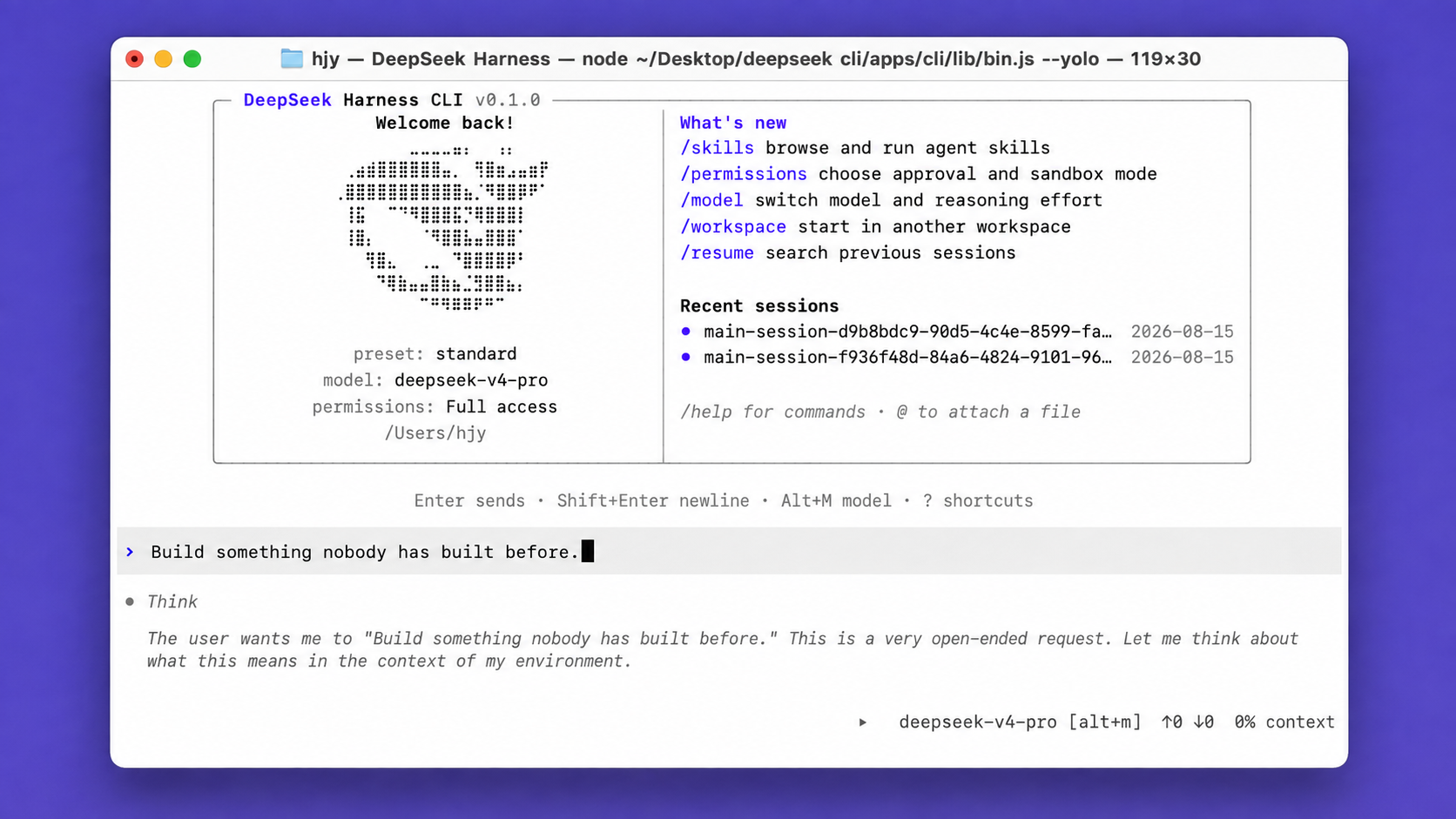
9 interface languages · 6 theme palettes · Agentic coding from plan to execution

Note: This is DeepSeek Harness CLI. We keep iterating in sync with the official DeepSeek Harness, and we look forward to your forks and stars.
Quickstart
Install
macOS or Linux:
curl -fsSL https://raw.githubusercontent.com/peiyuwang54/deepseek-harness-cli/master/apps/cli/install/install.sh | sh
The command starts the Web UI at http://127.0.0.1:3080 by default and opens it in the default browser for a local launch. An SSH launch only prints the host URL because the SSH client or editor owns the local forwarded address. Pass --no-open to run the server without opening a browser. See Web UI guide.
Windows:
powershell -ExecutionPolicy Bypass -c "irm https://raw.githubusercontent.com/peiyuwang54/deepseek-harness-cli/master/apps/cli/install/install.ps1 | iex"
You can also install DeepSeek CLI with the following package managers:
# Install using npm
npm install -g @peiyu_wang/deepseek-harness-cli
# Install using Homebrew
brew install --cask peiyuwang54/dsh/deepseek-harness-cli
Then open a project directory and run deepseek to get started. The shorter dsh alias is also available:
deepseek
# or
dsh
Run a non-interactive task for scripts and CI with deepseek exec:
deepseek exec "run the tests"
deepseek exec --json "review this repository"
deepseek exec resume --last "continue"
On first launch, paste your DeepSeek API key into the masked prompt. The key is stored by the shared credential provider and never added to chat history. Use /credentials to inspect its source, replace it, or remove the saved value.
For automation, set DEEPSEEK_API_KEY before launch ($env:DEEPSEEK_API_KEY="your-key" in PowerShell). An inherited environment value is read-only inside the CLI.
Permission modes
deepseek
deepseek --full-auto
deepseek --yolo
Use /permissions during a session, or pass --sandbox and --ask-for-approval for exact controls. --yolo disables both confinement and approval prompts, so use it only in an isolated environment. See the CLI behavior reference and permission presets.
MCP servers
deepseek mcp add filesystem -- npx -y @modelcontextprotocol/server-filesystem .
deepseek mcp list
Use /mcp in a running session to inspect connected servers. For HTTP OAuth, run deepseek mcp auth <name>. See MCP server management and the MCP client reference for transports, credentials, reloads, and capability details.
Diagnose an installation without starting a profile, or install shell completion for both command names:
deepseek doctor
deepseek doctor --json
deepseek completion zsh > ~/.zsh/completions/_deepseek
doctor also checks shipped profile overlays and presets, the optional Web frontend asset, installation channel, sandbox runner, truecolor, mouse input, clipboard support, and every enabled managed MCP connection. MCP probes start the configured server with a 5000 ms per-request timeout; --mcp-timeout-ms changes it. Optional server failures and host capability checks are warnings; a required MCP server failure, missing runtime asset, or unsupported Node version is blocking.
Inspect and validate a profile's installed plugin bundles without starting it:
deepseek plugin --profile tui list
deepseek plugin --profile tui verify --json
deepseek plugin --profile tui source <package>
deepseek plugin --profile tui disable <package>
deepseek plugin --profile tui enable <package>
deepseek plugin --profile tui install <package>
deepseek plugin --profile tui update
source shows the package directory and declared repository. enable and disable change the active Cordis bundle list and take effect on the next launch; install, update, and remove use pnpm for dependency resolution.
What it includes
- Code reading, editing, shell tools, web search, skills, MCP, and subagents.
- Persistent sessions with resume, plan, goal, queued messages, and automatic context compaction.
- A Codex-style terminal UI with six theme palettes and English, Simplified Chinese, Traditional Chinese, Arabic, French, Russian, Spanish, Japanese, and Korean.
- Plugin-based profiles for terminal, headless automation, and the Web UI.
Run from source
git clone https://github.com/peiyuwang54/deepseek-harness-cli.git
cd deepseek-harness-cli
pnpm install --frozen-lockfile
pnpm run build
pnpm dsh
Source builds require Node.js ^22.19 or >=24 and pnpm 11.7.0.
pnpm run build prepares the repository artifacts. pnpm dsh web uses those built artifacts without rebuilding.
Docs
- CLI commands and profiles
- Terminal UI and slash commands
- Configuration reference
- Architecture
- Development
Report bugs in GitHub Issues.
License
This project is licensed under MIT. Restored TUI code retains its BSD-3-Clause notice; see THIRD_PARTY_NOTICES.md.
Community
- LinuxDo — https://linux.do
Install
Install the catalog once, then DeepSeek Harness can find and install any plugin from this site automatically:
dsh plugin add dshbase-catalogThen say "install deepseek-harness-cli for me" — your agent finds it in the directory and installs it. Docs: dshbase-catalog · verified packs.
This plugin is GitHub source (not published to npm) — install it straight from the repo:
Web profile:
dsh plugin --profile web add github:peiyuwang54/deepseek-harness-cliHeadless (CLI) profile:
dsh plugin --profile headless add github:peiyuwang54/deepseek-harness-cliTest report
Not yet L3-verified — see failure note below if we already ran it.
Note: No failure note yet — queued or not yet run. Browse all pending failures →
When to use it
Extend the agent's coding surface — give it a new tool, workflow, or integration so it handles a dev task it couldn't before.
Who it's for
Developers who want dsh to behave like a teammate on real codebases — editing, running, and verifying changes rather than just answering.
For developers — extending it
The tool/command surface is the seam: expose more of the SDK, add smarter context wiring, or tighten the loop between code changes and verification.
Share this badge
Drop this badge into your README — it links back here and updates automatically when our test status changes:

[](https://dshbase.com/plugins/deepseek-harness-cli-2/)<a href="https://dshbase.com/plugins/deepseek-harness-cli-2/"><img src="https://dshbase.com/badges/deepseek-harness-cli-2.svg" alt="dshbase listed"></a>