
Plugin directory / Developer / deepseek-harness-cli
deepseek-harness-cli
Verified · install-tested on dsh soolaugust
What it does
DeepSeek Harness: Everything is a Plugin.
Works — verified, early-stage project
DeepSeek Harness: Everything is a Plugin. It installs cleanly and boots without issues in our testing. It's early-stage but functional.
“Verified” means our automated CI actually ran dsh plugin add in a clean profile and it booted — nothing more. Feature descriptions and version compatibility are the author’s claims. This is not a security audit and not an endorsement of third-party code.
README
dsh cli — interactive terminal agent
English | 中文
dsh cli is an interactive terminal agent, forked from DeepSeek Harness with a CLI focus: a Claude Code-style coding experience in your terminal — full-screen UI, streaming output, tool cards, session history, and permission controls, with no browser needed.
Under the hood it is DeepSeek Harness's plugin architecture (everything is a plugin), but this repository only cares about and polishes the single dsh cli interaction path.
Features
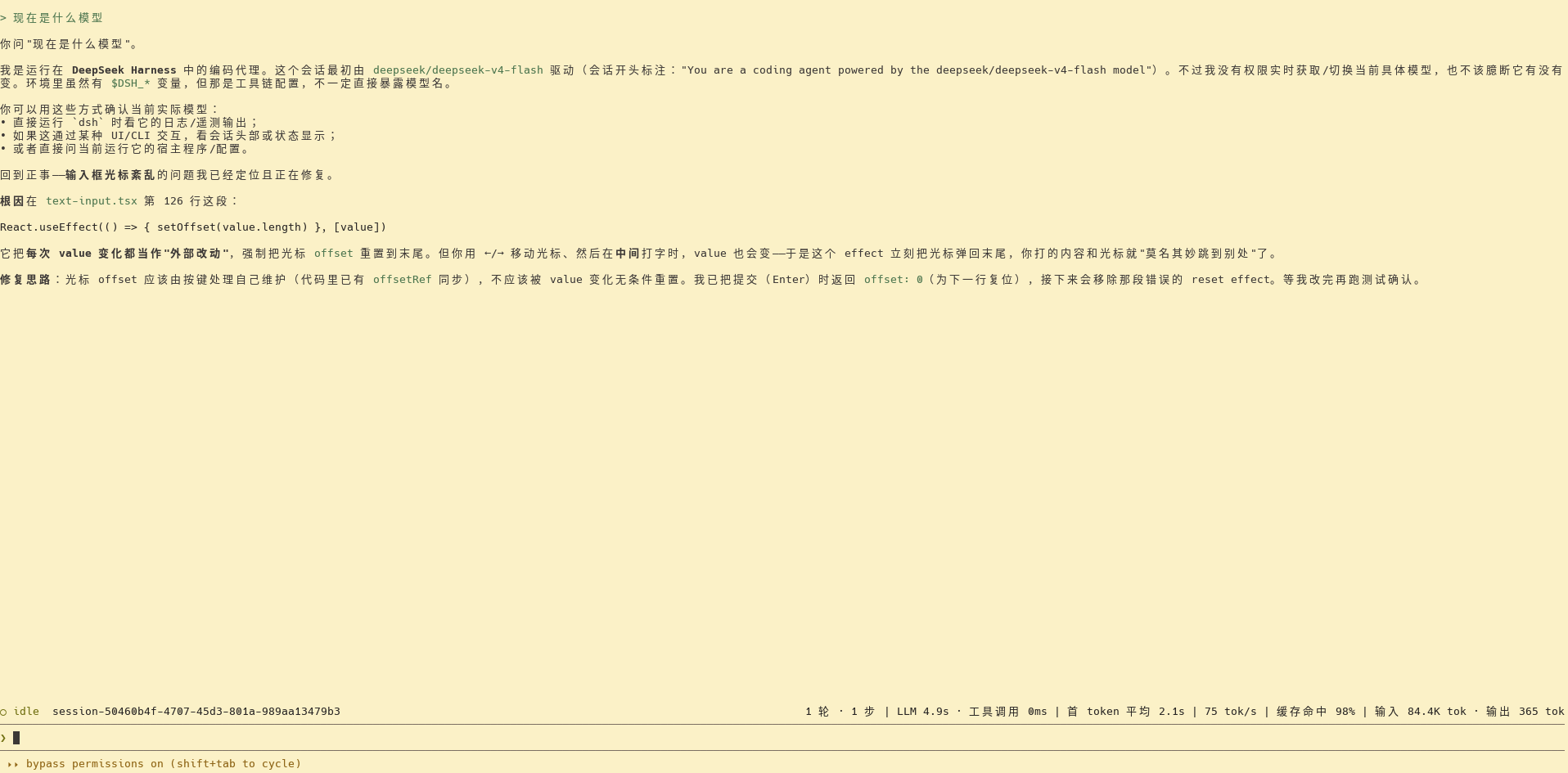
- Claude Code-style interaction: full-screen alternate screen, input bar pinned to the bottom, up/down arrow history navigation (including cross-session persistent history)
- Markdown terminal rendering: bold, italic, code, lists, and headings rendered with terminal styles
- Tool card folding: adjacent tool calls merge into one line, expand with
Ctrl+O - Session stats bar: turns/steps, LLM time, first-token latency, throughput, cache hit rate, input/output tokens
- Permission badge:
Shift+Tabcyclesread-only → workspace-write → danger-full-access, withdanger-full-accessshown as "bypass permissions" - Custom provider: point to any OpenAI-compatible endpoint (e.g. mify), with both model routing and
web_searchconfigurable - Session resume: reopening
dsh clicontinues the last session, switch with/session - Hot-reload development:
pnpm dsh:dev(node --watch) auto-restarts on source changes
Demo
Quick start
Requires Node.js ≥ 22.
# from source
git clone https://github.com/soolaugust/deepseek-harness-cli.git
cd deepseek-harness-cli
pnpm install
pnpm run build
pnpm dsh cli
From npm:
npx @deepseek-ai/dsh cli
The first launch creates/resumes a session; type text and press Enter to send, and model output renders streaming above the input bar.
Usage
| Action | Effect |
|---|---|
Type text + Enter |
Send to the agent |
↑ / ↓ |
History navigation (cross-session persistent) |
Shift+Tab |
Cycle permission preset |
Ctrl+O |
Expand/collapse tool group |
Ctrl+C |
Cancel current turn while running; quit at the prompt |
/exit /help /clear /session /model /permission |
Slash commands |
Full instructions in the CLI guide.
Configuring a custom provider
Point ~/.dsh/settings.yaml at any OpenAI-compatible endpoint (e.g. mify, OpenRouter); both model routing and web_search are configurable. See CLI guide · Using a custom model provider.
Development
pnpm dsh:dev          # auto-restart on source changes (hot-reload development)
pnpm run test         # unit tests
pnpm run typecheck    # type checks
Inherited from DeepSeek Harness
This repository is a fork of DeepSeek Harness focused on its dsh cli interactive terminal capability. The full multi-profile architecture, Web UI, SDK, and more remain in the upstream repository.
License
Install
Install the catalog once, then DeepSeek Harness can find and install any plugin from this site automatically:
dsh plugin add dshbase-catalogThen say "install deepseek-harness-cli for me" — your agent finds it in the directory and installs it. Docs: dshbase-catalog · verified packs.
This plugin is GitHub source (not published to npm) — install it straight from the repo:
Web profile:
dsh plugin --profile web add github:soolaugust/deepseek-harness-cliHeadless (CLI) profile:
dsh plugin --profile headless add github:soolaugust/deepseek-harness-cliTest report
Verified: L1 install + L2 load + L3 runtime from GitHub source on dsh 0.1.0-rc.6.
When to use it
Extend the agent's coding surface — give it a new tool, workflow, or integration so it handles a dev task it couldn't before.
Who it's for
Developers who want dsh to behave like a teammate on real codebases — editing, running, and verifying changes rather than just answering.
For developers — extending it
The tool/command surface is the seam: expose more of the SDK, add smarter context wiring, or tighten the loop between code changes and verification.
Share this badge
Drop this badge into your README — it links back here and updates automatically when our test status changes:

[](https://dshbase.com/plugins/deepseek-harness-cli/)<a href="https://dshbase.com/plugins/deepseek-harness-cli/"><img src="https://dshbase.com/badges/deepseek-harness-cli.svg" alt="dshbase install-tested"></a>