
Plugin directory / Desktop / deepseek-harness-workbench
deepseek-harness-workbench
Verified · install-tested on dsh xuan-ao-1
What it does
Windows desktop distribution of the official DeepSeek Harness
Works — verified, early-stage project
Windows desktop distribution of the official DeepSeek Harness It installs cleanly and boots without issues in our testing. It's early-stage but functional.
“Verified” means our automated CI actually ran dsh plugin add in a clean profile and it booted — nothing more. Feature descriptions and version compatibility are the author’s claims. This is not a security audit and not an endorsement of third-party code.
README
DeepSeek Harness Workbench
DeepSeek Harness 官方架构的 Windows 桌面发行版 —— 把官方
dshAgent Harness 打包成开箱即用的桌面应用。
不是新的 Harness、聊天框架、插件框架或 IDE 框架;它只是官方架构的一个桌面发行状态(Application Carrier)。


✨ 特性
- 开箱即用:单个安装包内置 Node.js 运行时 + 官方
dsh(@deepseek-ai/[email protected])+ 预生成 Profile 模板,无需预先安装 Node/pnpm/DSH,装完即用。 - 无边框沉浸式窗口:Windows 完全自绘标题栏与最小化/最大化/关闭按钮(对齐 Windows 11 / TraeWork 风格),自适应浅色/深色主题。
- 官方原生 UI:直接加载官方
dsh-web-appWeb 界面(Phase 0 loopback),非自研聊天界面。 - 插件生态:完整兼容官方 DeepSeek Harness 插件体系 —— 官方 DSH 插件不改版即可运行。
- 数据隔离可选:安装版用户数据在
~/.dsh(与命令行dsh共享);便携版数据在 exe 旁data/.dsh(绿色携带、零残留)。 - 架构合规:不 fork Core、不建第二套插件 API、所有能力通过官方 Profile + Bundle 组合(详见
docs/)。
🖼 界面预览
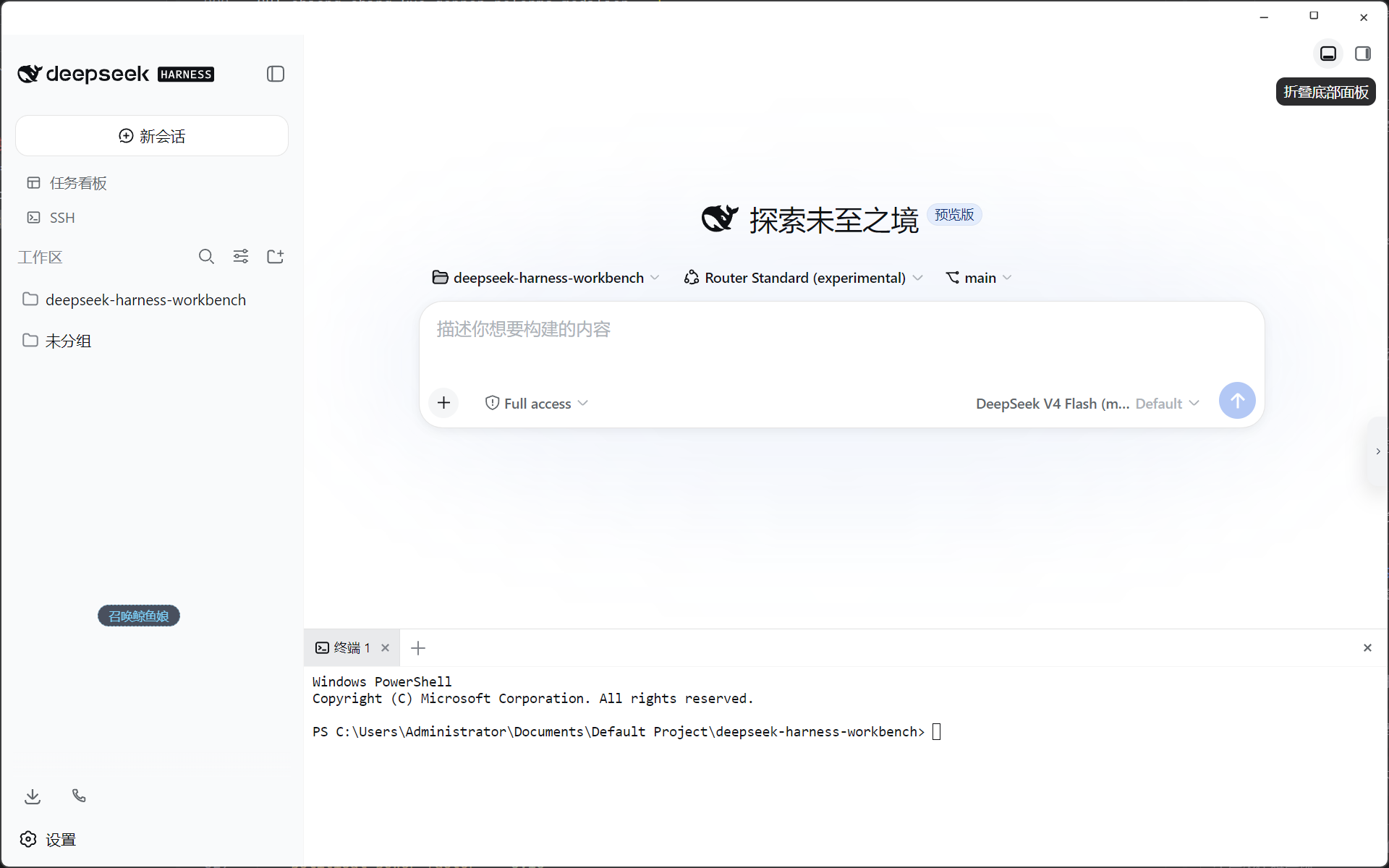

⚖️ 与官方 dsh CLI 的对比
官方 dsh CLI |
DeepSeek Harness Workbench | |
|---|---|---|
| 安装 | 需手动装 Node.js / pnpm / DSH | 单个 exe 装完即用,内置全部运行时 |
| 界面 | 终端命令 + 手动开浏览器 | 独立无边框窗口,原生 Web UI,自动启动 |
| 窗口控制 | 无(浏览器标签页) | 自绘标题栏 + 最小化/最大化/关闭(Win11/TraeWork 风格) |
| 插件生态 | 官方 dsh plugin |
完全兼容,同一套 Profile + Bundle,不改版 |
| 数据 | ~/.dsh |
安装版共用 ~/.dsh;便携版隔离到 exe 旁 |
| 上手成本 | 高(多条命令) | 低(双击运行,配一个 API Key 即可对话) |
它不是对 DSH 的分叉或替代,而是官方架构的桌面发行状态 —— 省掉环境配置,换来原生窗口体验,底层能力完全一致。
📥 下载
从 Releases 页面下载最新版:
| 版本 | 说明 |
|---|---|
| Setup 安装版 | DeepSeek-Harness-Workbench-x.y.z-Setup-x64.exe —— 标准安装,创建桌面/开始菜单快捷方式,支持自定义安装目录 |
| Portable 便携版 | DeepSeek-Harness-Workbench-x.y.z-Portable-x64.exe —— 绿色免安装,解压到任意目录直接运行,数据在 exe 旁,可 U 盘携带 |
首次启动 Portable 版需要解压(约 3-4 分钟),请耐心等待。
校验文件完整性请使用随 Release 附带的SHA256SUMS.txt。
⚡ 一键安装(PowerShell)
不用下载页面,复制下面任意一行到 PowerShell 回车即可:
# 安装 Setup 版(静默安装,自动建快捷方式)
irm https://raw.githubusercontent.com/xuan-ao-1/deepseek-harness-workbench/main/scripts/install.ps1 | iex

# 部署 Portable 版(放到 %USERPROFILE%\DeepSeek Harness Workbench)
irm https://raw.githubusercontent.com/xuan-ao-1/deepseek-harness-workbench/main/scripts/install.ps1 | iex -Args "-Portable"

# 自定义便携版目录
irm https://raw.githubusercontent.com/xuan-ao-1/deepseek-harness-workbench/main/scripts/install.ps1 | iex -Args "-Portable -InstallDir D:\Apps\DeepSeek Harness"
脚本自动完成:查询最新 Release → 下载安装包 → SHA256 完整性校验 → 静默安装/就位 → 启动应用。
🚀 快速开始
- 下载 Setup 或 Portable 版本并运行。
- 启动后首次运行会从内置模板离线创建 Profile(无需网络)。
- 在界面中配置 DeepSeek API Key(
DEEPSEEK_API_KEY或界面设置)。 - 开始对话 —— 可让 Agent 读写工作区文件、执行命令、调用工具。
🛠 本地开发
# 环境要求:Node.js >= 20, pnpm
pnpm install                      # 安装 workspace 依赖

pnpm arch:check                   # 架构守卫扫描(无需依赖,纯 Node)
pnpm -C apps/electron run build   # 编译 Electron 主进程/预加载脚本
pnpm -C apps/electron run dev     # 热重载开发(tsc watch + electronmon 自动重启)

node build/scripts/package.mjs    # 完整打包:prepare-runtime → build → NSIS/Portable + SHA256SUMS
node build/smoke-tests/smoke.mjs  # 冒烟测试(真实启动 Runtime)
产物输出到 release/:
DeepSeek-Harness-Workbench-<version>-Setup-x64.exeDeepSeek-Harness-Workbench-<version>-Portable-x64.exeSHA256SUMS.txt
📚 文档
- ARCHITECTURE — 当前实际架构(三层:Electron 应用 → DSH Profile → 官方 Runtime)
- DECISIONS — 架构决策记录(ADR)
- STATUS — 项目状态与版本矩阵
- RELEASE — 发布政策与门槛
- KNOWN_ISSUES — 已知问题
- ROADMAP — 路线图(M1 → M2 Official Electron Carrier)
- UPSTREAM — 上游 DSH 版本 pin 与阅读结论
🏗 架构
┌──────────────────────────────────────┐
│        Electron Application          │
│  Window / IPC / Process / Update     │
│  Frameless + self-drawn controls     │
└────────────────┬─────────────────────┘
                 ▼
┌──────────────────────────────────────┐
│             DSH Profile              │
│  dsh-base + official bundles         │
│  + workbench-desktop bundle          │
│  + user bundles + cordis.patch.yml   │
└────────────────┬─────────────────────┘
                 ▼
┌──────────────────────────────────────┐
│   Official DeepSeek Harness          │
│  Host/Client Cordis Runtime          │
│  Services / Tools / Agents           │
│  Subagents / Workflow / UI Slots     │
└──────────────────────────────────────┘
📄 License
本项目基于官方 deepseek-ai/deepseek-harness(MIT)构建,发行层亦采用 MIT License。详见 LICENSE。
致谢:基于 deepseek-ai/deepseek-harness 官方开源架构构建。
Install
Install the catalog once, then DeepSeek Harness can find and install any plugin from this site automatically:
dsh plugin add dshbase-catalogThen say "install deepseek-harness-workbench for me" — your agent finds it in the directory and installs it. Docs: dshbase-catalog · verified packs.
This plugin is GitHub source (not published to npm) — install it straight from the repo:
Web profile:
dsh plugin --profile web add github:xuan-ao-1/deepseek-harness-workbenchHeadless (CLI) profile:
dsh plugin --profile headless add github:xuan-ao-1/deepseek-harness-workbenchTest report
Verified: L1 install + L2 load + L3 runtime from GitHub source on dsh 0.1.0-rc.6.
When to use it
Run dsh as a native desktop app — its own window, tray icon, and shortcuts — instead of a browser tab.
Who it's for
Users who want an installed-app feel and system integration (tray, global hotkeys, auto-launch) on their OS.
For developers — extending it
The native shell is the seam — add global shortcuts, notifications, single-instance locking, or OS-specific behaviors.
Share this badge
Drop this badge into your README — it links back here and updates automatically when our test status changes:

[](https://dshbase.com/plugins/deepseek-harness-workbench/)<a href="https://dshbase.com/plugins/deepseek-harness-workbench/"><img src="https://dshbase.com/badges/deepseek-harness-workbench.svg" alt="dshbase install-tested"></a>