
Plugin directory / Developer / dsh-auto
dsh-auto
Verified · install-tested on dsh simon300000
What it does
dsh Auto Approve
Works — verified, early-stage project
dsh Auto Approve It installs cleanly and boots without issues in our testing. It's early-stage but functional.
“Verified” means our automated CI actually ran dsh plugin add in a clean profile and it booted — nothing more. Feature descriptions and version compatibility are the author’s claims. This is not a security audit and not an endorsement of third-party code.
README
dsh-auto
English | 中文
dsh-auto adds an Auto Approve permission preset to the DeepSeek Harness Web UI. Each action that requires approval is reviewed by a fresh, restricted DSH child Agent before the plugin allows or denies it.
The current release supports the Web UI only.
Screenshots
Select the Auto Approve permission preset:

The Reviewer allows a bounded read-only action:
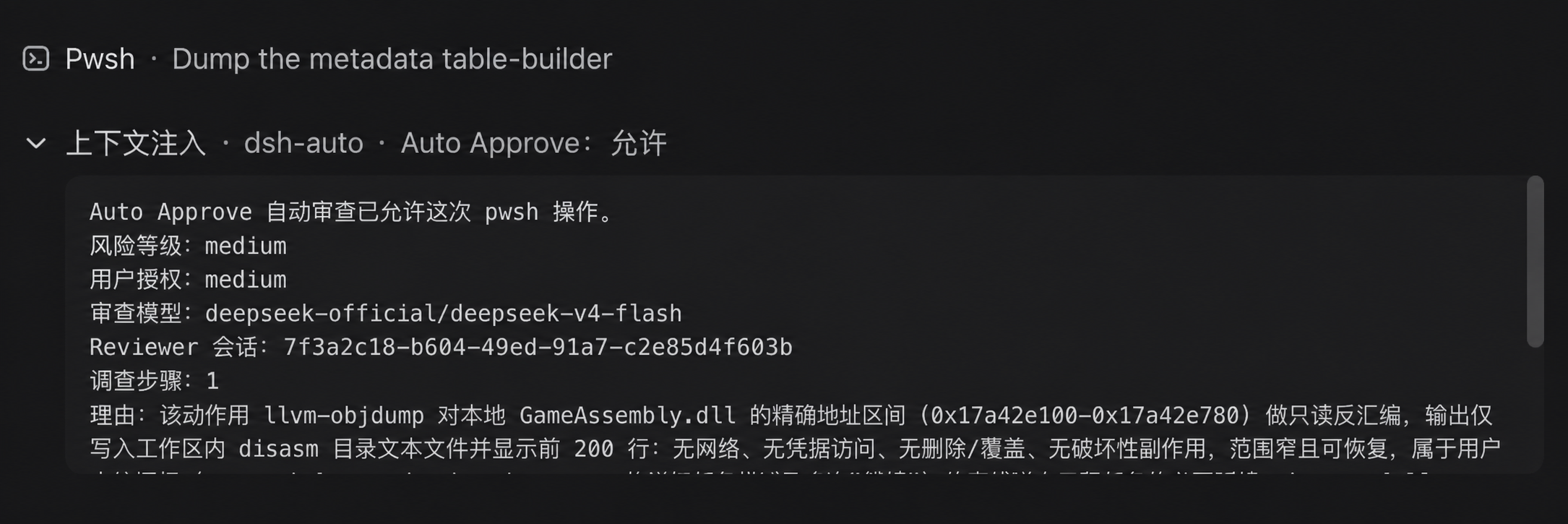
The Reviewer denies a high-risk action without sufficient user authorization:
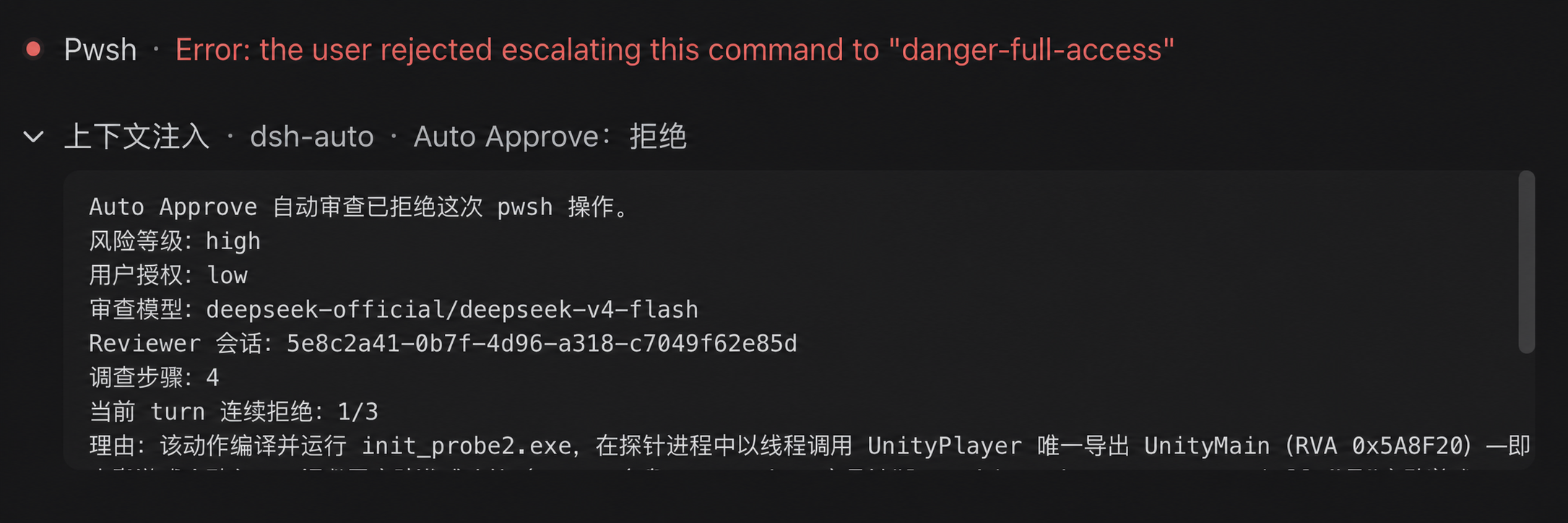
How it works
- The plugin handles
approval/requestonly when the session selectsAuto Approve. Other permission presets continue through DSH's existing approval chain. - Each approval starts one
spawnReviewer session. DSH's own agent loop handles any boundedread,glob, orgrepinvestigation and captures the final structured result; the plugin does not implement a separate model/tool loop. - The child is created with a read-only sandbox and
approval/policy = never. An execution guard denies every tool exceptread,glob,grep, and the scoped structured-output tool, permits no further subagents, and allows at most four investigation steps plus the final response step. Sensitive files may be inspected only when a minimal read-only check can change the decision. - The Reviewer receives the exact pending action, approval reason, current permissions, bounded raw session events, the main Agent's assembled system instructions, and AGENTS.md or equivalent workspace instructions. Stable instructions are serialized in a separate cacheable prefix before session identifiers, transcripts, permissions, and action data. Direct user messages, human answers returned by
ask_user_question, assembled system instructions, and workspace instructions can establish authorization; assistant content and other tool results remain untrusted evidence. - Only
outcomeis required in the structured result. A compact{"outcome":"allow"}defaults to low risk and unknown authorization; omitted fields on a denial default to high risk and unknown authorization. Explicit assessments may also containrisk_level,user_authorization, andrationale. The host always denies critical risk and denies high risk without at least medium user authorization. Invalid output, missing action data, timeout, cancellation-independent infrastructure failure, and tool failure all fail closed. - A successful model denial is not retried and never falls back to a user prompt. The default 90-second deadline covers child creation, all model steps, local read-only investigation, and final structured output.
- Three consecutive denials in the same parent turn interrupt that turn. Any allowed action resets the counter. Each approval is still isolated in its own child session.
The parent session records the approval events and a compact plugin notice. The Reviewer child session uses an _auto-approve:<callId> label and contains its messages, investigation tool calls and results, final assessment, and turn end. Console logs contain identifiers, model route, step count, stop reason, risk, authorization, and outcome, but not full prompts or file contents.
Install
Install simon300000/dsh-auto from GitHub:
dsh plugin --profile web add github:simon300000/dsh-auto
Restart the Web UI, then select Auto Approve in the session Permissions selector or as the default permission preset in General Settings.
Configuration
The bundled defaults use deepseek-official/deepseek-v4-flash with high reasoning:
- id: dsh-auto-approve
  name: dsh-auto
  config:
    reviewerProvider: deepseek-official
    reviewerModel: deepseek-v4-flash
    reviewerReasoningEffort: high
    timeoutMs: 90000
    maxInvestigationSteps: 4
    maxConsecutiveDenials: 3
    maxMessageTranscriptTokens: 4000
    maxToolTranscriptTokens: 3000
    maxMessageEntryTokens: 1000
    maxToolEntryTokens: 512
    maxSystemInstructionTokens: 6000
    maxAgentInstructionTokens: 6000
    maxRecentNonUserEntries: 20
    maxActionChars: 16000
    maxOutputTokens: 8192
reviewerProvider and reviewerModel must be set together. If both are omitted, the Reviewer uses the parent session's current provider and model. A profile override replaces the complete matching bundle-row config, so repeat every value that should remain configured.
The Reviewer persona and the additional security rules live in prompts/policy-template.md and prompts/policy.md. Restart DSH after changing the configuration, policy, or plugin code.
License
Install
Install the catalog once, then DeepSeek Harness can find and install any plugin from this site automatically:
dsh plugin add dshbase-catalogThen say "install dsh-auto for me" — your agent finds it in the directory and installs it. Docs: dshbase-catalog · verified packs.
This plugin is GitHub source (not published to npm) — install it straight from the repo:
Web profile:
dsh plugin --profile web add github:simon300000/dsh-autoHeadless (CLI) profile:
dsh plugin --profile headless add github:simon300000/dsh-autoTest report
Verified: L1 install + L2 load + L3 runtime from GitHub source on dsh 0.1.0-rc.6.
When to use it
Extend the agent's coding surface — give it a new tool, workflow, or integration so it handles a dev task it couldn't before.
Who it's for
Developers who want dsh to behave like a teammate on real codebases — editing, running, and verifying changes rather than just answering.
For developers — extending it
The tool/command surface is the seam: expose more of the SDK, add smarter context wiring, or tighten the loop between code changes and verification.
Share this badge
Drop this badge into your README — it links back here and updates automatically when our test status changes:

[](https://dshbase.com/plugins/dsh-auto/)<a href="https://dshbase.com/plugins/dsh-auto/"><img src="https://dshbase.com/badges/dsh-auto.svg" alt="dshbase install-tested"></a>